
1. Introduction and Overview
This manual provides detailed instructions for the assembly, operation, maintenance, and troubleshooting of your Homall KMG-GD94T 140cm T-Shape Ergonomic Gaming Desk. Please read this manual carefully before assembly and use to ensure proper function and longevity of your product.

Figure 1: Homall KMG-GD94T Gaming Desk in a typical gaming environment.
The Homall KMG-GD94T gaming desk is designed for durability and ergonomic comfort, featuring a robust all-metal frame and a carbon fiber textured desktop. Its T-shape design provides stability, while integrated features like cable management, a headphone hook, and a cup holder enhance the user experience.
2. Assembly Instructions
Assembly of the Homall KMG-GD94T gaming desk typically requires two people. Please ensure all components are present before beginning. Note that assembly tools are not included with the product.
2.1. Package Contents
- Desktop Panel (Carbon Fiber Surface)
- Two T-Shape Metal Legs
- Full-Surface Mouse Pad
- Headphone Hook
- Cup Holder
- Cable Management Box
- Assembly Hardware (screws, bolts, etc.)
2.2. Recommended Tools (Not Included)
- Phillips Head Screwdriver
- Allen Wrench Set (if not provided with hardware)
2.3. Step-by-Step Assembly
- Unpack Components: Carefully remove all parts from the packaging and lay them out on a clean, soft surface to prevent scratches. Verify all components listed in Section 2.1 are present.
- Attach Legs to Desktop: Position the desktop panel upside down. Align the two T-shape metal legs with the pre-drilled holes on the underside of the desktop. Secure them using the provided screws and bolts. Ensure all connections are tight but do not overtighten.
- Install Accessories: Attach the headphone hook, cup holder, and cable management box to their designated locations on the underside or sides of the desktop using the appropriate hardware.
- Flip the Desk: With assistance, carefully flip the assembled desk upright and place it in its desired location.
- Apply Mouse Pad: Lay the full-surface mouse pad evenly over the desktop.

Figure 2: Desk dimensions and structural overview.
3. Operating Instructions
The Homall KMG-GD94T gaming desk is designed for straightforward use as a stable and ergonomic workstation for gaming or general computer use.
3.1. Utilizing Desk Features
- Full-Surface Mouse Pad: The desk comes with a large, anti-slip, waterproof, and scratch-resistant mouse pad that covers the entire desktop, providing a consistent and comfortable surface for your mouse and keyboard.
- Cable Management System: Use the two cable grommets on the desktop and the integrated cable management box underneath to route and organize your cables, keeping your setup tidy and clutter-free.
- Headphone Hook: Hang your gaming headset on the convenient hook located on the side of the desk when not in use, keeping it easily accessible and off the desktop.
- Cup Holder: Place your beverage in the integrated cup holder to prevent spills and keep your drink within reach during gaming sessions.

Figure 3: Key features of the gaming desk.

Figure 4: Full-surface mouse pad with waterproof feature.
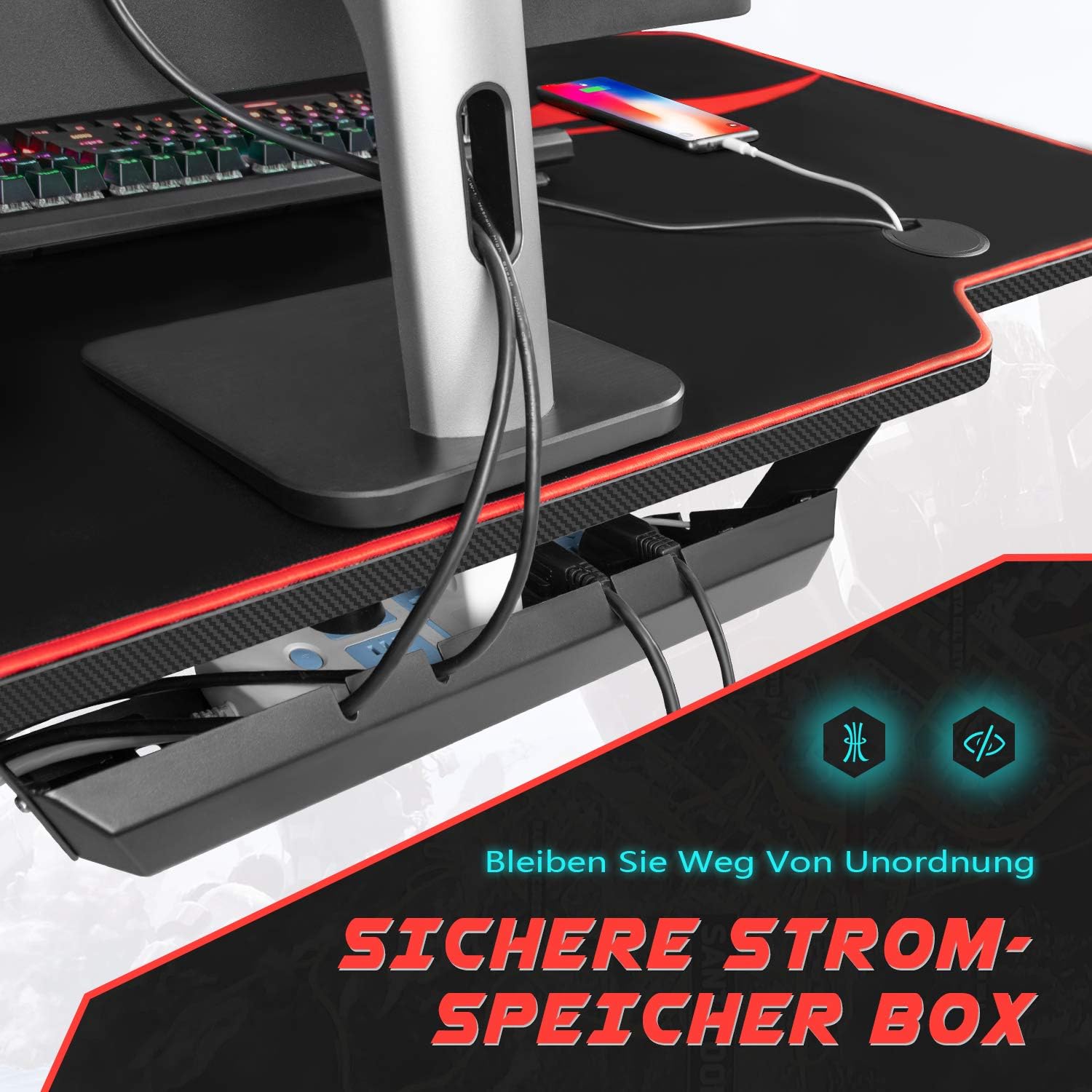
Figure 5: Integrated cable management system.
4. Maintenance
Proper maintenance ensures the longevity and appearance of your Homall gaming desk.
- Cleaning the Desktop: Wipe the carbon fiber surface with a damp cloth. For stubborn stains, use a mild cleaning solution and dry immediately. Avoid abrasive cleaners or harsh chemicals that could damage the finish.
- Cleaning the Frame: The metal frame can be cleaned with a damp cloth. Ensure it is dried thoroughly to prevent rust.
- Mouse Pad Care: The full-surface mouse pad is waterproof. For cleaning, wipe with a damp cloth. Do not machine wash or submerge in water.
- Check Connections: Periodically check all screws and bolts to ensure they remain tight. Retighten if necessary to maintain desk stability.
5. Troubleshooting
If you encounter any issues with your Homall KMG-GD94T gaming desk, refer to the following common troubleshooting tips.
5.1. Desk Instability/Wobbling
- Check Leg Levelers: Ensure the adjustable feet on the bottom of the T-shape legs are properly adjusted to compensate for uneven floor surfaces.
- Tighten Screws: Verify that all assembly screws and bolts are securely tightened. Loose connections can cause instability.
- Even Weight Distribution: Ensure heavy equipment is centrally placed and weight is distributed evenly across the desktop.
5.2. Missing or Damaged Parts
- If you find any parts missing or damaged upon unboxing, please contact Homall customer service immediately with your purchase details and a description of the issue.
5.3. Difficulty Assembling
- Review the assembly instructions carefully. Ensure you have the recommended tools. If issues persist, consider seeking assistance from another person as assembly is recommended for two individuals.
6. Specifications
| Feature | Specification |
|---|---|
| Model Number | KMG-GD94T |
| Dimensions (L x W x H) | 140 cm x 60 cm x 74.5 cm (55.12 x 23.62 x 29.53 inches) |
| Weight | 20.5 Kilograms (45.19 lbs) |
| Maximum Load Capacity | 80 Kilograms (176 lbs) |
| Desktop Material | Carbon Fiber Texture |
| Frame Material | Metal (Alloy Steel) |
| Color | Black |
| Special Features | Ergonomic Design, Cable Management, Headphone Hook, Cup Holder, Full-Surface Mouse Pad |
| Assembly Required | Yes |
| Recommended Assembly Persons | 2 |
| Care Instructions | Wipe with a damp cloth |
7. Warranty and Support
Homall is committed to providing high-quality products and excellent customer service. While specific warranty details are not provided in this manual, we offer responsive and competent after-sales service to address any questions or concerns you may have regarding your product.
For support, inquiries about missing parts, or any product-related questions, please contact Homall customer service through your original point of purchase or visit the official Homall website for contact information.