
1. Product Overview
The Elo 2403LM is a 24-inch medical-grade touchscreen monitor designed for healthcare environments. It combines advanced touchscreen technology with DICOM Part 14 functionality, ensuring accurate and consistent image reproduction for clinical review. Its robust design includes an IP54 rating for protection against dust and liquids, making it suitable for environments requiring frequent cleaning and sanitization. The monitor is equipped with TouchPro PCAP technology, offering a responsive 10-touch experience, even with wet or dry gloves.

Figure 1: Front view of the Elo 2403LM 24-inch medical-grade touchscreen monitor, showcasing its sleek design and display.
This monitor is ideal for various clinical applications, including EMR documentation, image viewing, clinical collaboration, and integration into medical devices. It is pre-calibrated from the factory according to AAPM secondary display guidelines, ensuring compliance with the DICOM 14 GSDF curve for reliable medical image review.
2. Setup and Installation
2.1 Unpacking and Contents
Carefully unpack the monitor and all accessories. Verify that all components listed below are present:
- Elo 2403LM Touchmonitor
- Quick Install Guide
- 3x Tie wraps
- VGA cable
- HDMI cable
- Touch USB cable
- Audio cable
- Power brick (E323104)
- NA & EU Power cables
- EEI Label
- DICOM calibration sheet

Figure 2: Rear view of the monitor, highlighting the various ports and VESA mounting points for flexible installation.
2.2 Connecting the Monitor
- Power Connection: Connect the power brick to the monitor's power input and then plug the appropriate power cable (NA or EU) into an electrical outlet.
- Video Connection:
- For HDMI connection, use the provided HDMI cable to connect the monitor to your computer's HDMI output.
- For VGA connection, use the provided VGA cable to connect the monitor to your computer's VGA output.
- Touch Functionality: Connect the provided Touch USB cable from the monitor's USB upstream port to an available USB port on your computer. This enables the touchscreen features.
- Audio Connection (Optional): If you wish to use the monitor's audio capabilities, connect the audio cable from the monitor's audio input to your computer's audio output.
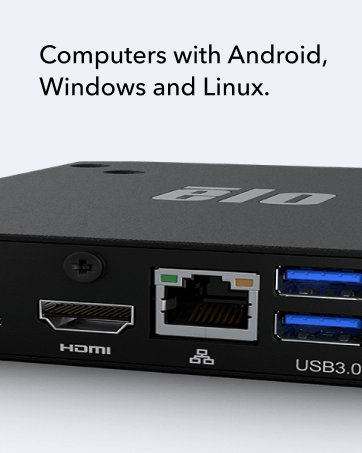
Figure 3: Detailed view of the monitor's connectivity ports, including HDMI, USB, and power input.
2.3 Mounting Options
The Elo 2403LM is designed with VESA hole patterns (100x100mm) for flexible mounting. This allows for easy integration onto various stands, articulating arms, walls, or medical carts. Ensure that any third-party mounting solution used is compatible with VESA 100x100mm standards and can support the monitor's weight (approximately 21.6 pounds).
3. Operation
3.1 Powering On/Off
Press the power button, usually located on the side or bottom bezel of the monitor, to turn the unit on or off. The power indicator light will illuminate when the monitor is active.
3.2 Touchscreen Functionality
The monitor features TouchPro PCAP technology, supporting up to 10 simultaneous touches. This allows for multi-touch gestures similar to those on tablets and smartphones. The touchscreen is designed to operate effectively even when users are wearing wet or dry gloves, which is crucial in medical environments.
- Single Touch: Equivalent to a mouse click.
- Multi-Touch Gestures: Pinch-to-zoom, rotate, and scroll are supported, depending on the operating system and application.
3.3 DICOM Part 14 Compliance
The Elo 2403LM is pre-calibrated to comply with the DICOM 14 GSDF curve, ensuring accurate and uniform grayscale image reproduction. This is essential for reliable clinical review of medical images such as X-rays and scans. No user calibration is typically required for DICOM compliance, as it is factory-set.
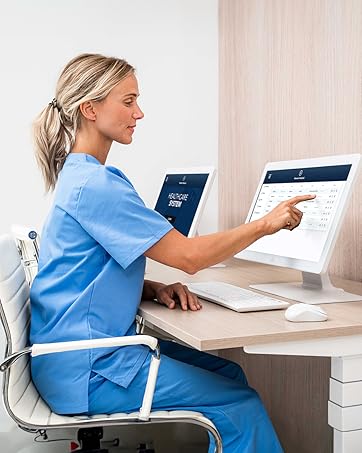
Figure 4: Example of the Elo 2403LM monitor in use within a healthcare environment, demonstrating its application for clinical review.
4. Maintenance and Cleaning
4.1 Cleaning Instructions
The Elo 2403LM monitor features an IP54 rating, meaning it is sealed against limited dust ingress and protected against water spray from any direction. This makes it easy to clean and sanitize, which is critical in medical settings.
- Power Off: Always power off and unplug the monitor before cleaning.
- Cleaning Solution: Use a soft, lint-free cloth lightly dampened with a mild, non-abrasive cleaning solution or a medical-grade disinfectant. Avoid harsh chemicals, ammonia-based cleaners, or abrasive materials.
- Wiping: Gently wipe the screen and bezel. Do not spray cleaning solution directly onto the monitor.
- Drying: Allow the monitor to air dry completely before plugging it back in and powering it on.
Caution: Do not allow liquids to seep into the monitor's openings. Excessive moisture can damage internal components.
4.2 General Care
- Avoid placing heavy objects on the monitor.
- Do not expose the monitor to extreme temperatures or direct sunlight for prolonged periods.
- Ensure proper ventilation around the monitor to prevent overheating.
5. Troubleshooting
| Problem | Possible Cause | Solution |
|---|---|---|
| No image on screen |
|
|
| Touchscreen not responding |
|
|
| Image is distorted or blurry |
|
|
If the problem persists after attempting these solutions, please contact Elo customer support for further assistance.
6. Technical Specifications
| Feature | Detail |
|---|---|
| Model Number | E659395 |
| Screen Size | 24 Inches |
| Resolution | 1920 x 1080 (FHD 1080p) |
| Aspect Ratio | 16:9 |
| Touch Technology | TouchPro PCAP (10-touch) |
| IP Rating | IP54 (sealed against dust and liquids) |
| Medical Compliance | DICOM Part 14 GSDF Curve, IEC 60601 compliant power supply |
| Product Dimensions | 19.69 x 19.69 x 11.02 inches |
| Item Weight | 21.6 pounds |
| VESA Mounting | Standard 100x100mm |
| Total USB Ports | 2 |
| Manufacturer | Elo Touch Solutions, Inc. |

Figure 5: Dimensional drawing of the Elo 2403LM monitor, indicating height, width, and depth.
7. Warranty and Support
7.1 Legal Disclaimer
This product is not an FDA-approved "medical device" or otherwise approved by the FDA and is not ISO-13485 compliant. Depending on the intended use, additional certifications may be required.
7.2 Customer Support
For technical assistance, warranty information, or to download the latest drivers and documentation, please visit the official Elo website or contact their customer support directly.
Elo Official Website: www.elotouch.com
Please have your model number (E659395) and serial number ready when contacting support.


