
1. Introduction
Thank you for choosing the APPS2Car Solid Cup Holder Tablet Mount. This product is designed to securely hold your tablet or smartphone in your vehicle's cup holder, providing convenient access for navigation, entertainment, or communication. This manual provides detailed instructions for proper installation, operation, and maintenance to ensure optimal performance and longevity of your device.
For your safety, always ensure the mount is securely installed and does not obstruct your view or interfere with vehicle controls while driving.
2. Product Overview
The APPS2Car Solid Cup Holder Tablet Mount features a robust design for stability and versatility. It is compatible with a wide range of devices, from 4.7 to 13 inches, including various iPad models, Samsung Galaxy tablets, and smartphones.
Key Features:
- Sturdy Tough Rod Mechanism: Features a 1-inch thick rod for enhanced stability and durability in the cup holder.
- Adjustable Height and Angle: Easy pull-and-push mechanism for height adjustment (Min 10.3", Max 12.5") and a flexible rotating head for portrait or landscape viewing.
- Extra Big Cup Base: Adjustable base diameter (3-4.6") to fit most vehicle cup holders, minimizing shaking.
- Universal Compatibility: Adjustable clamp fits devices from 4.7 to 13 inches, including most tablets and smartphones, even with cases.
- Considerate Details: Includes quick-release strings, anti-slip rubber pads, and a reserved cable slot for charging.
Components:
- Adjustable Cup Holder Base
- Telescopic Rod with Height Adjustment
- Device Clamp with 360° Rotating Head

Image 2.1: The APPS2Car Solid Cup Holder Tablet Mount shown holding both a tablet and a smartphone, illustrating its versatility and design.

Image 2.2: This diagram illustrates the upgraded compatibility of the mount, accommodating devices ranging from 4.7 to 13 inches, including various phone and tablet models, and highlighting its case-friendly design.
3. Setup Instructions
Follow these steps to properly install your APPS2Car Solid Cup Holder Tablet Mount.
3.1 Installing the Cup Holder Base
- Place the adjustable cup holder base into your vehicle's cup holder.
- Twist the knob on the base clockwise to expand the side wings. Continue twisting until the base is firmly secured in the cup holder and does not wobble.
- Ensure the base is stable before proceeding.
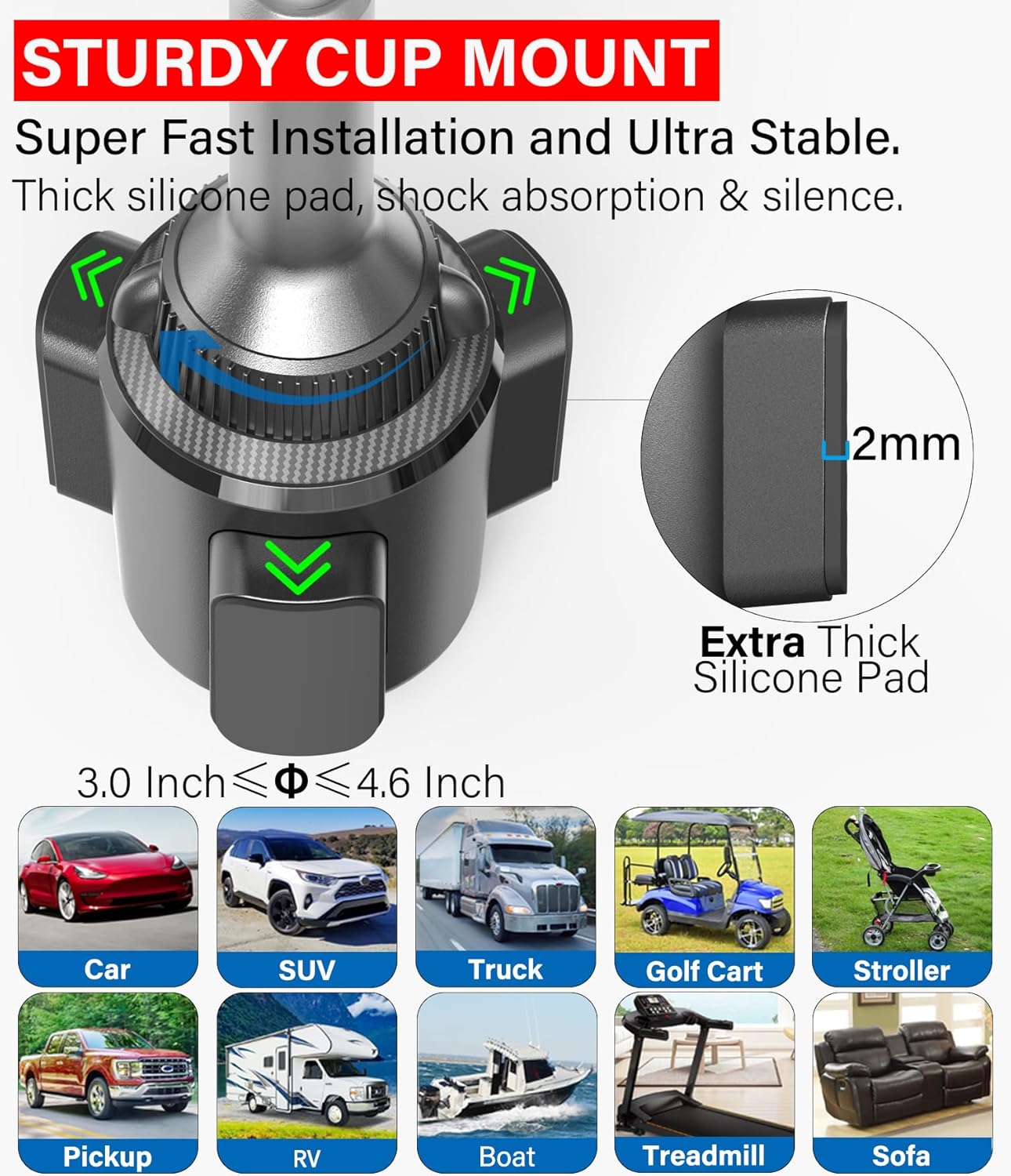
Image 3.1: A detailed view of the sturdy cup mount base, showing its adjustable diameter (3.0 to 4.6 inches) and thick silicone pads for shock absorption and stability.
3.2 Attaching the Device Clamp
- Align the device clamp with the ball joint on top of the telescopic rod.
- Push the clamp onto the ball joint until it snaps into place.
- Tighten the collar around the ball joint to secure the clamp's position and prevent unwanted rotation.
3.3 Inserting Your Device
- Gently pull the quick-release strings on the device clamp to expand the holding arms.
- Place your tablet or smartphone into the clamp, ensuring it is centered and held securely by the anti-slip rubber pads.
- Release the strings to allow the arms to retract and grip your device firmly.

Image 3.2: This image highlights the thoughtful design details of the device clamp, including the quick-release strings for easy device insertion/removal, anti-slip rubber pads for secure grip, and a reserved cable slot for charging.
4. Operating Instructions
Adjust the mount to achieve your desired viewing angle and position.
4.1 Adjusting Height
- To adjust the height of the telescopic rod, simply pull up or push down on the rod. No screws are needed for this adjustment.
- The height can be adjusted between 10.3 inches (minimum) and 12.5 inches (maximum).

Image 4.1: This diagram illustrates the 'Super Fast' adjustable height feature of the mount, showing how to simply pull or push to change the height between a minimum of 10.3 inches and a maximum of 12.5 inches.
4.2 Adjusting Viewing Angle and Orientation
- The device clamp can rotate 360 degrees on the ball joint, allowing you to switch between portrait and landscape modes.
- Loosen the collar around the ball joint slightly to adjust the tilt and swivel angle, then tighten it to secure the desired position.

Image 4.2: This graphic demonstrates the 360-degree rotation capability of the device clamp, allowing for flexible viewing angles in both portrait and landscape orientations.
4.3 Charging Your Device
- Utilize the reserved cable slot at the bottom of the device clamp to connect your charging cable without obstruction.
5. Maintenance
Proper maintenance ensures the longevity and optimal performance of your tablet mount.
- Cleaning: Wipe the mount with a soft, damp cloth to remove dust and grime. Avoid using harsh chemicals or abrasive cleaners, as they may damage the material.
- Inspection: Periodically check all adjustable parts, especially the cup holder base and the ball joint collar, to ensure they remain tight and secure. Re-tighten if necessary.
- Storage: If not in use for an extended period, store the mount in a cool, dry place away from direct sunlight.
6. Troubleshooting
If you encounter any issues with your APPS2Car Solid Cup Holder Tablet Mount, refer to the following common problems and solutions.
| Problem | Possible Cause | Solution |
|---|---|---|
| Mount is wobbly or unstable in the cup holder. | Cup holder base not fully expanded or incompatible cup holder size. | Ensure the cup holder base is twisted clockwise until it is tightly secured. Verify your cup holder diameter is within the 3-4.6 inch range. |
| Device is not held securely in the clamp. | Clamp arms not fully closed or device size is outside the compatible range. | Ensure the quick-release strings are fully released, allowing the arms to grip the device. Confirm your device screen size is between 4.7 and 13 inches. |
| Device clamp rotates or tilts unexpectedly. | Ball joint collar is loose. | Tighten the collar around the ball joint to secure the desired angle and orientation. |
| Mount obstructs gear shift or armrest. | Cup holder location is not ideal for this mount type. | This mount works best in cup holders not immediately adjacent to the gear shift or armrest. Consider alternative APPS2Car mounts (e.g., suction cup or CD slot mount) if this is an issue. |
7. Specifications
- Model Number: IP3-C04
- Item Weight: 14.2 ounces
- Product Dimensions (LxWxH): 8.9 x 3.8 x 3 inches
- Color: Black
- Compatible Devices: Tablets, Smartphones
- Compatible Screen Sizes: 4.7 to 13 inches
- Cup Holder Base Diameter: Adjustable from 3.0 to 4.6 inches
- Adjustable Height Range: 10.3 inches (Min) to 12.5 inches (Max)
- Mounting Type: Cup Holder Mount
8. Warranty and Support
APPS2Car products are manufactured with quality and reliability in mind. For specific warranty information, please refer to the product packaging or the official APPS2Car website. If you require technical assistance or have questions regarding your product, please contact APPS2Car customer support through their official channels.
Contact Information: Please visit the official APPS2Car website for support and contact details.