1. Introduction
The Geek Chef 7-in-1 Air Fryer Oven 24.5QT is a versatile kitchen appliance designed to simplify your cooking experience. This multi-functional unit combines the capabilities of an air fryer, convection oven, toaster, and more, offering a compact solution for various culinary tasks. With its generous 24.5-quart capacity and multiple cooking modes, it is suitable for preparing family-sized meals while promoting healthier cooking habits by reducing fat consumption.

Image 1: The Geek Chef 7-in-1 Air Fryer Oven 24.5QT, showcasing its sleek stainless steel design and compact form factor.
2. Safety Instructions
Please read all instructions carefully before using the appliance. Failure to follow these instructions may result in electric shock, fire, or serious injury.
- Always place the appliance on a stable, level, heat-resistant surface.
- Ensure adequate ventilation around the appliance during operation. Maintain at least 4 inches (10 cm) of space on all sides.
- Do not immerse the appliance, cord, or plug in water or other liquids.
- Keep children and pets away from the appliance during operation.
- Unplug the appliance from the outlet when not in use and before cleaning.
- Do not operate the appliance if the cord or plug is damaged, or if the appliance malfunctions or has been damaged in any way.
- Use only accessories recommended by the manufacturer.
- The exterior surfaces of the appliance may become hot during use. Use oven mitts or gloves when handling hot surfaces or accessories.
- Do not place anything on top of the appliance while it is operating.
- This appliance is for household use only.
3. Product Features
The Geek Chef 7-in-1 Air Fryer Oven is engineered with several features to enhance your cooking experience:
- Family-Sized Capacity: A spacious 24.5QT interior with 3 rack levels allows for cooking large quantities of food, serving up to 10 people. It can air fry up to 5 lbs of food or toast 6 slices of bread simultaneously.
- Healthy & Efficient Cooking: Equipped with 1700W power, it cooks food efficiently, reducing over 85% of fats compared to traditional frying methods. ETL listed for safety.
- Versatile 7-in-1 Functionality: Offers multiple cooking modes including Warm, Broil, Toast, Bake, and Air Fry. Temperature range from Warm to 450°F and a 60-minute timer.
- User-Friendly Design: Features a large glass viewing window and inner oven light for easy monitoring of cooking progress. Brushed Stainless Steel exterior for durability and aesthetic appeal.
- Included Accessories: Comes with 1 Baking Pan, 1 Airfryer Basket, 1 Oven Rack, and 1 Drip Tray to expand your cooking possibilities.

Image 2: The interior of the Geek Chef Air Fryer Oven, demonstrating its multi-level cooking capability with various foods.

Image 3: A visual representation of the various accessories included with the Geek Chef Air Fryer Oven, such as the air fryer basket, baking pan, and oven rack.
4. Setup
Before first use, ensure all packaging materials are removed. Place the air fryer oven on a flat, stable, heat-resistant surface with at least 4 inches of clearance from walls and other appliances. Wash all removable accessories (baking pan, airfryer basket, oven rack, drip tray) with warm, soapy water, rinse thoroughly, and dry completely. Wipe the interior and exterior of the appliance with a damp cloth.
Video 1: An overview of the Geek Chef 7-in-1 Air Fryer Oven, demonstrating its various components and accessories during unboxing and initial setup. This video provides a visual guide to the product's features and how to arrange the internal racks and trays.
5. Operating Instructions
The Geek Chef Air Fryer Oven features intuitive knob controls for easy operation:
- Power: Press the power button to turn the unit on or off.
- Timer: Turn the TIMER knob to set the desired cooking time, up to 60 minutes. The unit will automatically shut off when the timer expires.
- Temperature: Adjust the TEMP knob to select the cooking temperature, ranging from Warm to 450°F.
- Function: Use the FUNCTION knob to choose your desired cooking mode: Warm, Broil, Toast, Bake, or Air Fry.
- Toast Darkness: When using the Toast function, turn the TOAST DARKNESS knob to select your preferred level of browning (Light, Medium, Dark).
- Oven Light: Press the OVEN LIGHT button to illuminate the interior for monitoring food without opening the door.
Always preheat the oven for 5-10 minutes before adding food for optimal results, especially for air frying and baking.
Video 2: A short demonstration of the Geek Chef Air Fryer Oven in operation, showing food being cooked inside the air fryer basket. This video highlights the internal lighting and the cooking process.
6. Maintenance and Cleaning
Regular cleaning ensures the longevity and optimal performance of your Geek Chef Air Fryer Oven.
- Before Cleaning: Always unplug the appliance and allow it to cool completely before cleaning.
- Interior Cleaning: Wipe the interior walls with a damp cloth and mild detergent. For stubborn stains, use a non-abrasive sponge. Avoid harsh chemicals or abrasive cleaners.
- Exterior Cleaning: Wipe the exterior with a soft, damp cloth. Do not use abrasive pads or steel wool, as they can damage the stainless steel finish.
- Accessories: The baking pan, airfryer basket, oven rack, and drip tray are dishwasher-safe or can be hand-washed with warm, soapy water. Ensure they are completely dry before reinserting into the oven.
- Crumb Tray: Regularly remove and empty the drip tray to prevent grease buildup and potential fire hazards.

Image 4: A close-up view of the interior of the Geek Chef Air Fryer Oven, highlighting its easy-to-clean surfaces and removable accessories for convenient maintenance.
7. Troubleshooting
If you encounter any issues with your Geek Chef Air Fryer Oven, please refer to the following common problems and solutions:
- Appliance does not turn on: Ensure the power cord is securely plugged into a working electrical outlet. Check your household circuit breaker.
- Food is not cooking evenly: Ensure food is arranged in a single layer in the air fryer basket or on the rack. Shake or flip food halfway through cooking. Adjust temperature or cooking time as needed.
- White smoke coming from the appliance: This may be caused by grease or food residue on the heating elements or drip tray. Clean the interior and accessories thoroughly.
- Food is not crispy: Ensure not to overcrowd the basket/rack. Use the Air Fry function and ensure proper temperature and time settings.
- Knobs are stiff or difficult to turn: This can sometimes occur. Apply gentle, firm pressure. If the issue persists, contact customer service.
For further assistance, please contact Geek Chef customer service.
8. Specifications
| Feature | Specification |
|---|---|
| Brand | Geek Chef |
| Model Name | 7-in-1 Air Fryer Oven 24.5QT |
| Model Number | 7-in-1 Air Fryer Oven 24.5QT |
| Color | Stainless Steel |
| Product Dimensions | 7.6"D x 10.6"W x 11.22"H |
| Capacity | 24.5 Quarts |
| Special Feature | Automatic Shut-Off |
| Included Components | Baking Pan, Airfryer Basket, Oven Rack, Drip Tray |
| Wattage | 1700 watts |
| Control Type | Knob |
| Material | Stainless Steel |
9. Warranty and Support
Geek Chef is committed to providing excellent customer service and product quality.
- Money-Back Guarantee: Enjoy a 30-day money-back guarantee from the date of purchase.
- Product Warranty: This appliance comes with a 1-year warranty covering manufacturing defects.
- Technical Consultation: Benefit from lifetime technical consultation for any product-related queries or issues.
- Customer Service: Our dedicated customer service team is ready to assist you within 24 hours. For support, please refer to the contact information provided in your product packaging or visit the official Geek Chef website.
- Recipes & App: Download the GeekSmart App to access over 100 video recipes and extend your warranty. Search for #GeekChefRecipes on YouTube for additional cooking ideas.
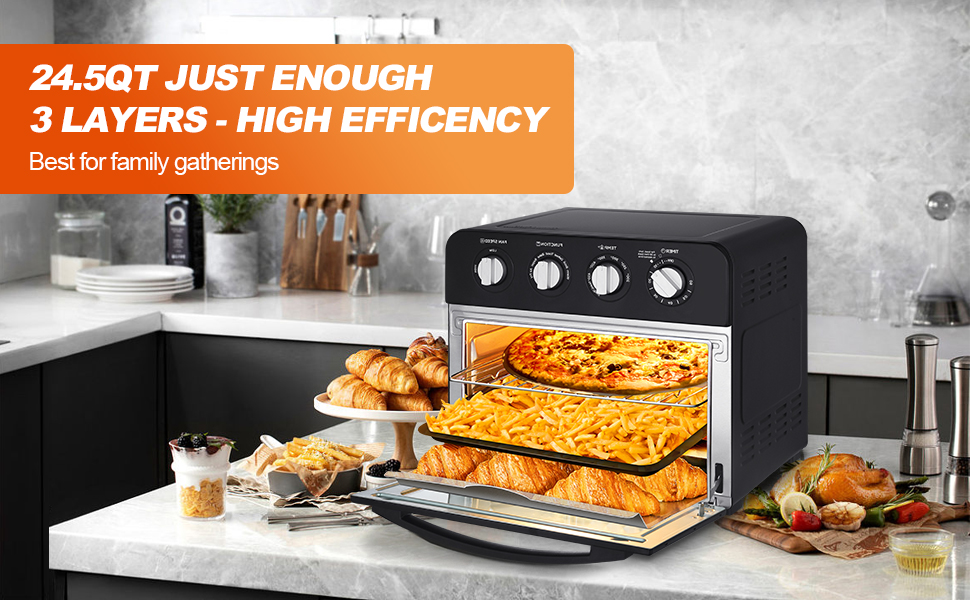
Image 5: The GeekSmart App interface, illustrating how users can access recipes and support for their Geek Chef appliances.


