
Cetis 2510D NOMW
Cetis Standard Desk Phone 2510D NOMW User Manual
Model: 2510D NOMW
Introduction
Welcome to the user manual for your Cetis Standard Desk Phone, model 2510D NOMW. This guide provides essential information for setting up, operating, and maintaining your new telephone. Please read these instructions carefully to ensure proper use and longevity of your device.
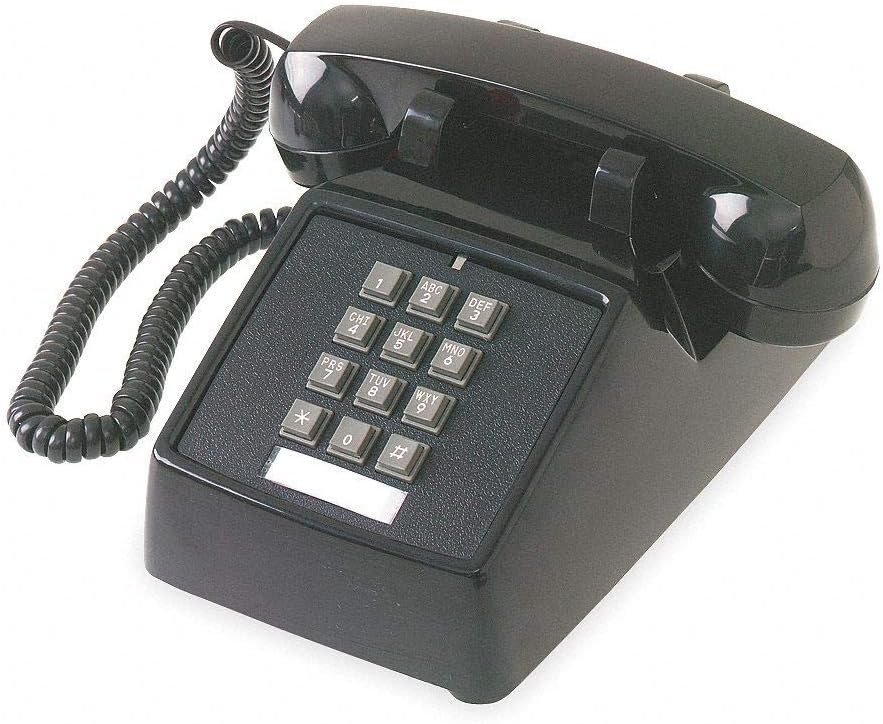
Figure 1: Cetis Standard Desk Phone 2510D NOMW. This image shows the black corded desk phone with its coiled handset cord, numeric keypad, and a blank label area below the keypad.
Important Safety Instructions
- Do not use this product near water, for example, near a bathtub, wash bowl, kitchen sink, or laundry tub, in a wet basement, or near a swimming pool.
- Avoid using the telephone during an electrical storm. There may be a remote risk of electric shock from lightning.
- Do not use the telephone to report a gas leak in the vicinity of the leak.
- Only use the power cord and accessories provided by the manufacturer.
- Protect the power cord from being walked on or pinched, particularly at plugs, convenience receptacles, and the point where they exit from the appliance.
Package Contents
Verify that your package contains the following items:
- Cetis Standard Desk Phone (Base Unit)
- Handset
- Coiled Handset Cord
- Line Cord (RJ11)
- User Manual (this document)
Setup Instructions
- Connect the Handset: Plug one end of the coiled handset cord into the handset and the other end into the jack on the side of the phone base unit, typically marked with a handset icon.
- Connect the Line Cord: Plug one end of the line cord into the wall telephone jack (RJ11) and the other end into the LINE jack on the back or side of the phone base unit.
- Placement: Place the phone on a stable, flat surface. Ensure it is not near heat sources or in direct sunlight.
- Initial Test: Lift the handset. You should hear a dial tone. If not, recheck all connections.
Operating Instructions
Making a Call
- Lift the handset.
- Listen for a dial tone.
- Dial the desired telephone number using the keypad.
- Wait for the call to connect.
- When finished, place the handset back on the cradle.
Answering a Call
- When the phone rings, lift the handset.
- Begin your conversation.
- When finished, place the handset back on the cradle.
Adjusting Ringer Volume
The Cetis 2510D NOMW features a double gong ringer. The ringer volume is typically fixed or adjusted via a mechanical switch on the base unit (if present). Refer to the physical phone for any visible switches.
Adjusting Handset Volume
This model includes ADA compliant volume control for the handset. The volume control is usually a slider or button located on the side of the handset or base unit. Adjust it to a comfortable listening level during a call.
Maintenance
- Cleaning: Wipe the phone with a soft, damp cloth. Do not use harsh chemicals or abrasive cleaners.
- Cord Care: Avoid tangling or stretching the coiled handset cord excessively. Ensure the line cord is not pinched or damaged.
- Storage: If storing the phone for an extended period, disconnect it from the wall jack and store it in a cool, dry place.
Troubleshooting
| Problem | Possible Cause | Solution |
|---|---|---|
| No dial tone | Line cord disconnected or faulty. | Ensure the line cord is securely plugged into both the wall jack and the phone. Test with another phone if available. |
| Cannot hear caller / Caller cannot hear me | Handset cord loose or faulty; Handset volume too low. | Check handset cord connections. Adjust handset volume control. |
| Phone does not ring | Ringer turned off or faulty line. | Check for a ringer on/off switch on the phone base. Verify the phone line is active. |
| Buttons not responding | Stuck buttons or internal fault. | Gently press buttons to ensure they are not stuck. If the issue persists, contact support. |
Specifications
- Model: Cetis 2510D NOMW
- Type: Standard Desk Phone
- Color: Black
- Number of Lines: 1
- Ringer: Double Gong Ringer
- Speakerphone: No
- Mount Type: Desk
- Volume Control: ADA Compliant Handset Volume Control
- Power Source: Line Powered (No Batteries Required)
- Includes: Data Port
Warranty Information
For warranty details and service, please refer to the warranty card included with your product or visit the official Cetis website. Keep your purchase receipt as proof of purchase.
Customer Support
If you require further assistance or encounter issues not covered in this manual, please contact Cetis customer support. Contact information can typically be found on the manufacturer's website or on the product packaging.
For more information, visit the Cetis Official Website.
Ask a question about this manual
Ask about setup, troubleshooting, compatibility, parts, safety, or missing instructions. Manuals+ will review the question and use this page’s manual context to help answer it.