
CHiQ CPC12PAP02
Contents
CHiQ Portable Air Conditioner 12000 BTU
User Manual
Model: CPC12PAP02
Introduction
Thank you for choosing the CHiQ Portable Air Conditioner. This manual provides important information regarding the installation, operation, and maintenance of your new appliance. Please read this manual thoroughly before using the air conditioner and keep it for future reference.
The CHiQ portable air conditioner is designed to provide a comfortable indoor environment with its 4-in-1 modes: Cooling, Fan, Dehumidifier, and Sleep Timer. Its compact design and 360° universal wheels allow for easy movement between rooms.
Safety Information
To ensure safe operation, please observe the following precautions:
- Always use a grounded power outlet with the correct voltage (230 Volts AC).
- Do not operate the unit with a damaged power cord or plug.
- Do not block the air inlets or outlets. Maintain at least 20 cm clearance around the unit.
- Do not insert fingers or objects into the air outlet.
- Keep the unit away from flammable gases or combustible materials.
- Ensure the unit is placed on a stable, level surface to prevent tipping.
- Unplug the unit before cleaning or performing any maintenance.
- Do not attempt to repair or disassemble the unit yourself. Contact qualified service personnel.
- This appliance uses R290 refrigerant, which is flammable. Handle with care and ensure proper ventilation.
Product Overview
Components and Features
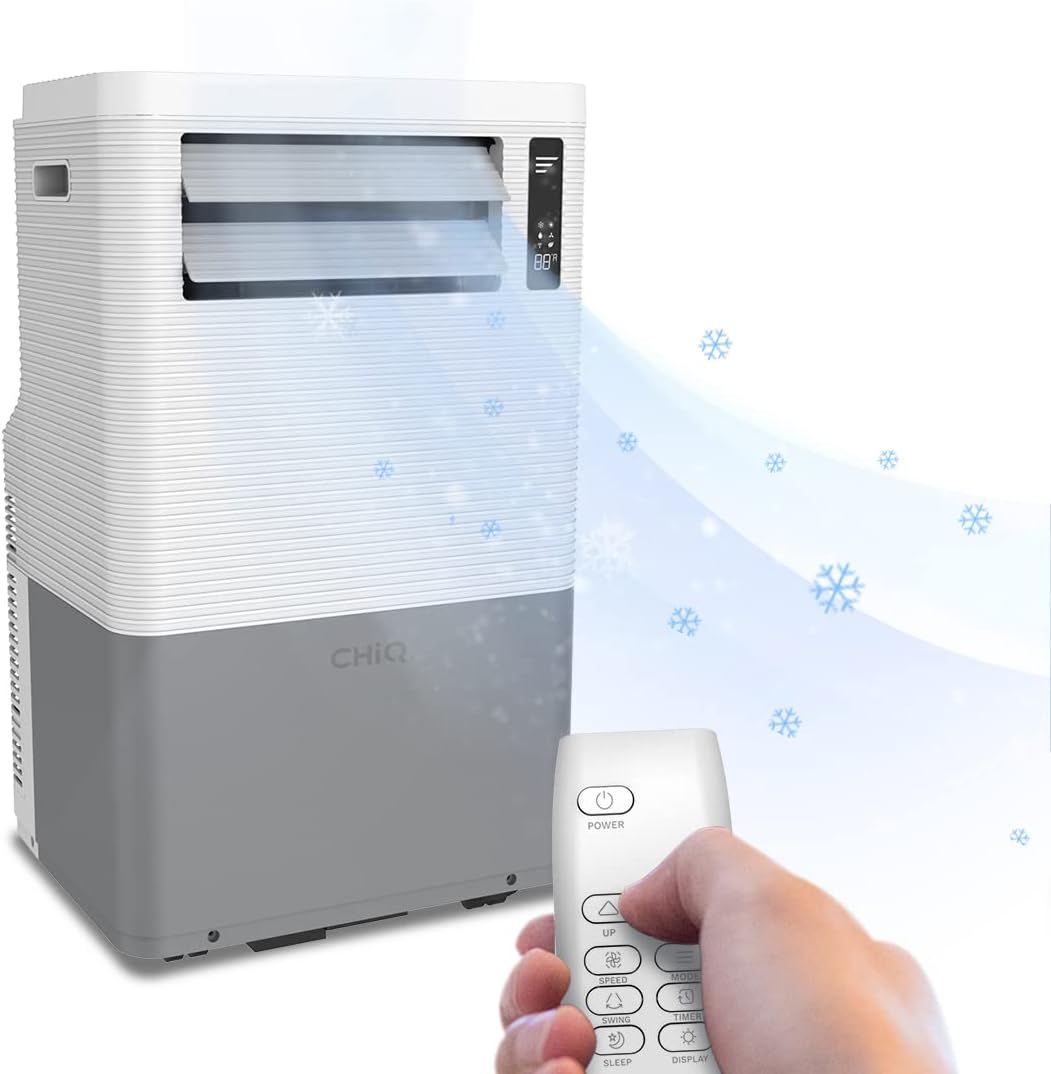
Figure 1: The CHiQ Portable Air Conditioner with its remote control, illustrating the cooling air output.

Figure 2: Dimensions of the portable air conditioner: 455mm width, 374mm depth, and 757mm height. Recommended for areas up to 100m³ or 42m².

Figure 3: Rear view of the unit, showing the air exhaust vent, power cord storage, and the European standard plug.
- Fast Cooling: Super strong air volume of 360m³/h with 5 meters long-distance air supply for rapid room cooling.
- Smart Modes: Features Cooling, Fan, and Dehumidifying modes with three-speed air supply and 16-31℃ temperature setting. Includes Sleep mode and 24-hour On/Off timer.
- Portability: Equipped with 360° rotating universal wheels for easy movement between rooms.
- Noise Reduction: Engineered for effective noise reduction, maintaining stability with its 33KG body.
Control Panel and Remote Control
The unit features an intuitive control panel on the top and comes with a remote control for convenient operation from a distance. Key functions include power on/off, mode selection, temperature adjustment, fan speed control, sleep mode activation, and timer settings.
Figure 4: The main unit's display and the remote control, showing various function buttons for operation.
Setup
Unpacking
Carefully remove the air conditioner and all accessories from the packaging. Check for any damage during transit. Keep the packaging materials for future storage or transport.

Figure 5: The portable air conditioner unit along with its standard accessories, including the exhaust hose, window kit, remote control, and various adapters for installation.
Installation
The product comes with a standard window kit for convenient installation. Follow these steps for proper setup:
- Connect the exhaust hose to the air outlet on the back of the unit.
- Extend the exhaust hose and connect the window kit adapter to the other end.
- Install the window sealing cloth or adjustable window slide kit in your window opening.
- Insert the exhaust hose adapter into the window kit opening, ensuring a tight seal to prevent hot air from re-entering the room.
- Position the unit on a flat, stable surface, ensuring there is at least 20 cm of space around it for proper airflow.
- Plug the power cord into a grounded 230V AC outlet.

Figure 6: The portable air conditioner set up in a room, demonstrating the exhaust hose connected to a window kit for efficient heat expulsion.
Operating Instructions
Basic Operation
- Power On/Off: Press the "Power" button on the control panel or remote control to turn the unit on or off.
- Mode Selection: Press the "Mode" button to cycle through Cooling, Fan, and Dehumidifier modes.
- Temperature Adjustment: In Cooling mode, use the "Up" and "Down" arrows to set the desired temperature between 16°C and 31°C.
- Fan Speed: Press the "Speed" button to select low, medium, or high fan speed.
Operating Modes
- Cooling Mode: The unit cools the room to the set temperature. Ensure the exhaust hose is properly installed.
- Fan Mode: The unit circulates air without cooling. You can adjust the fan speed.
- Dehumidifier Mode: The unit removes moisture from the air. In low-humidity environments, drainage may not be required. For continuous dehumidification, connect a drainage hose (not included) to the continuous drainage port.
- Sleep Mode: Activates a quiet operation mode, gradually increasing the temperature slightly over time to ensure comfortable sleep.
Timer Function
The 24-hour timer allows you to set the unit to automatically turn on or off after a specified period.
- To set Auto-Off: While the unit is running, press the "Timer" button and use the "Up/Down" arrows to set the desired off-time (1-24 hours).
- To set Auto-On: While the unit is off, press the "Timer" button and use the "Up/Down" arrows to set the desired on-time (1-24 hours).
Maintenance
Regular maintenance ensures optimal performance and extends the lifespan of your air conditioner. Always unplug the unit before performing any maintenance.
Cleaning the Air Filter
The air filter should be cleaned every two weeks or more frequently depending on usage and air quality.
- Turn off and unplug the air conditioner.
- Locate the air filter panel (usually on the back or side of the unit).
- Remove the filter.
- Clean the filter with a vacuum cleaner or wash it with warm water and mild detergent.
- Rinse thoroughly and allow the filter to air dry completely before reinserting.
Draining Water
The unit has a self-evaporative system, but in high humidity conditions, water may accumulate in the internal tank. The unit will stop operating and display an error code when the tank is full.
- Turn off and unplug the air conditioner.
- Place a shallow pan or tray under the drainage port (located at the bottom rear of the unit).
- Remove the drain plug to allow water to flow out.
- Once drained, replace the drain plug securely.
- For continuous drainage in Dehumidifier mode, connect a suitable hose (not included) to the continuous drainage port.
Storage
If the unit will not be used for an extended period, follow these steps for proper storage:
- Drain all accumulated water from the unit.
- Run the unit in Fan mode for a few hours to dry the interior.
- Clean the air filter.
- Unplug the power cord and coil it neatly.
- Store the unit in a cool, dry place, preferably in its original packaging.
Troubleshooting
Before contacting customer service, please refer to the following table for common issues and their solutions.
| Problem | Possible Cause | Solution |
|---|---|---|
| Unit does not turn on. | No power supply; Power cord not plugged in; Circuit breaker tripped; Water tank full. | Check power outlet; Ensure plug is fully inserted; Reset circuit breaker; Drain water from the unit. |
| Unit does not cool effectively. | Air filter clogged; Room too large; Doors/windows open; Exhaust hose not properly installed; Temperature setting too high. | Clean air filter; Ensure unit is suitable for room size; Close all doors and windows; Check exhaust hose connection; Lower the set temperature. |
| Unit is noisy. | Unit not on a level surface; Air filter clogged; Internal components vibrating. | Place unit on a flat, stable surface; Clean air filter; Contact customer support if noise persists. |
| Water leaks from the unit. | Drain plug loose or missing; Unit tilted; Continuous drainage hose not properly connected. | Ensure drain plug is secure; Place unit on a level surface; Check continuous drainage hose connection. |
Specifications
| Feature | Detail |
|---|---|
| Brand | CHiQ |
| Model Info | CPC12PAP02 |
| Product Dimensions | 45.49 x 37.39 x 75.69 cm |
| Item Weight | 40 kg |
| Efficiency | A |
| Capacity (Cooling) | 12000 British Thermal Units |
| Noise Level | 65 dB |
| Installation Type | Portable |
| Special Features | Sleep Mode, Dehumidifier |
| Voltage | 230 Volts (AC) |
| Wattage | 1280 watts |
| Material Type | ABS |
| Date First Available | 1 June 2021 |
Warranty and Support
For warranty information and customer support, please refer to the warranty card included with your product or visit the official CHiQ website. Keep your purchase receipt as proof of purchase for warranty claims.
For technical assistance or service inquiries, please contact CHiQ customer service through their official channels.
Documents and downloads
Ask a question about this manual
Ask about setup, troubleshooting, compatibility, parts, safety, or missing instructions. Manuals+ will review the question and use this page’s manual context to help answer it.