
1. Introduction
The Sintron ST-002 is a robust 110V coin-operated timer control power box designed to manage power supply to various electronic devices based on coin insertion and a set time duration. This unit is suitable for applications such as vending machines, gaming machines, massage chairs, washing machines, chargers, dryers, and other timed-service equipment. This manual provides essential information for the safe installation, operation, and maintenance of your ST-002 timer control box.
2. Safety Information
Please read all safety instructions carefully before installation and operation. Failure to follow these instructions may result in electric shock, fire, or damage to the product or connected devices.
- Electrical Safety: Ensure the power supply matches the unit's specified voltage (110V). Disconnect power before performing any installation, maintenance, or troubleshooting.
- Professional Installation: Installation should be performed by a qualified electrician or technician to ensure proper wiring and compliance with local electrical codes.
- Ventilation: Ensure adequate ventilation around the unit to prevent overheating. Do not block ventilation openings.
- Environment: Do not expose the unit to water, excessive humidity, or extreme temperatures. Operate in a dry, stable environment.
- Maximum Load: Do not exceed the maximum current rating of 16 Amps. Overloading can cause damage or fire.
3. Product Overview
The Sintron ST-002 features a durable metal enclosure, an integrated coin acceptor, and an LCD display for time indication. Internally, it utilizes a solid-state relay for reliable power switching.
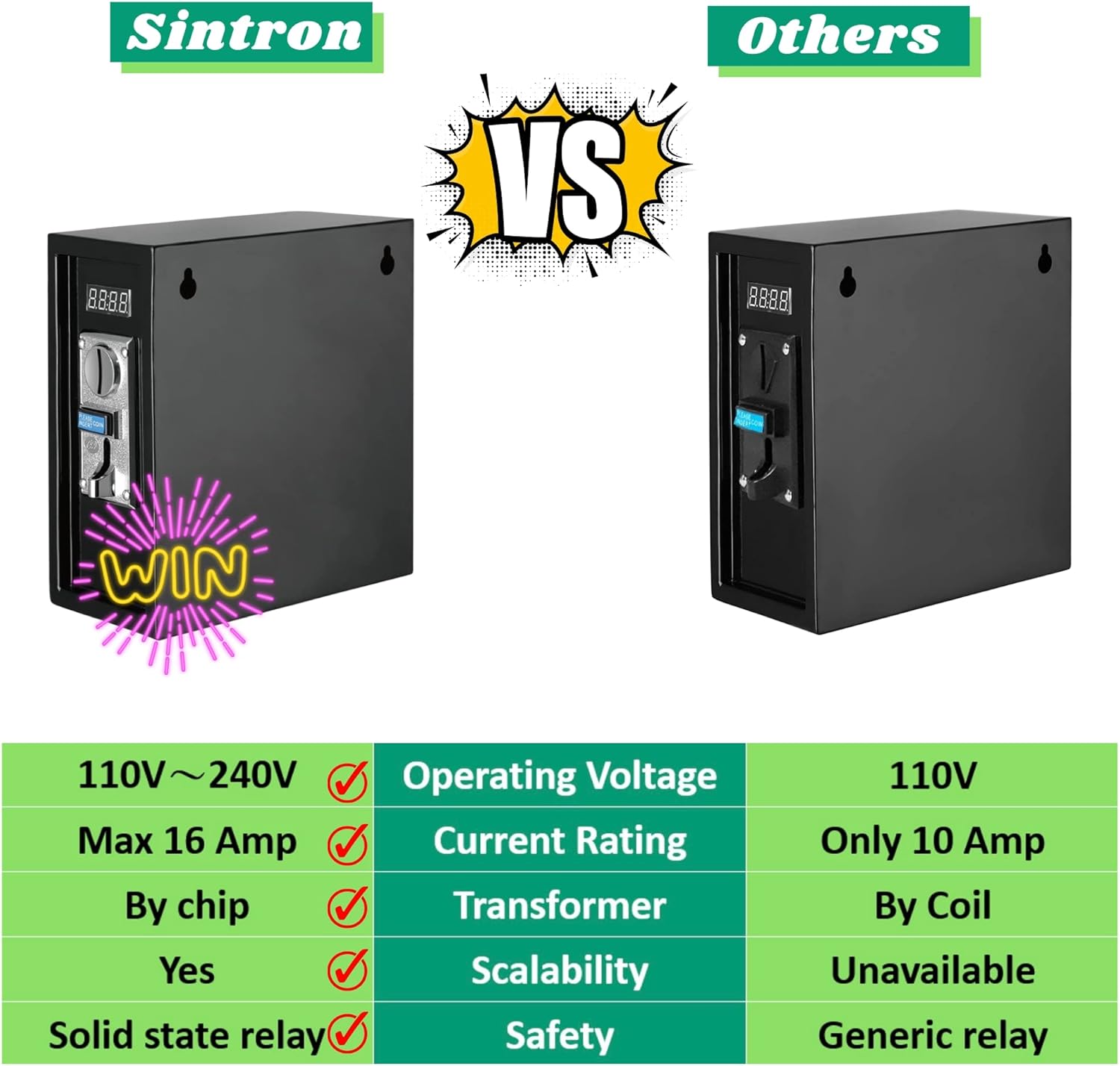
Figure 3.1: Front view of the Sintron ST-002 Coin Operated Timer Control Power Box, showing the coin slot and digital display.
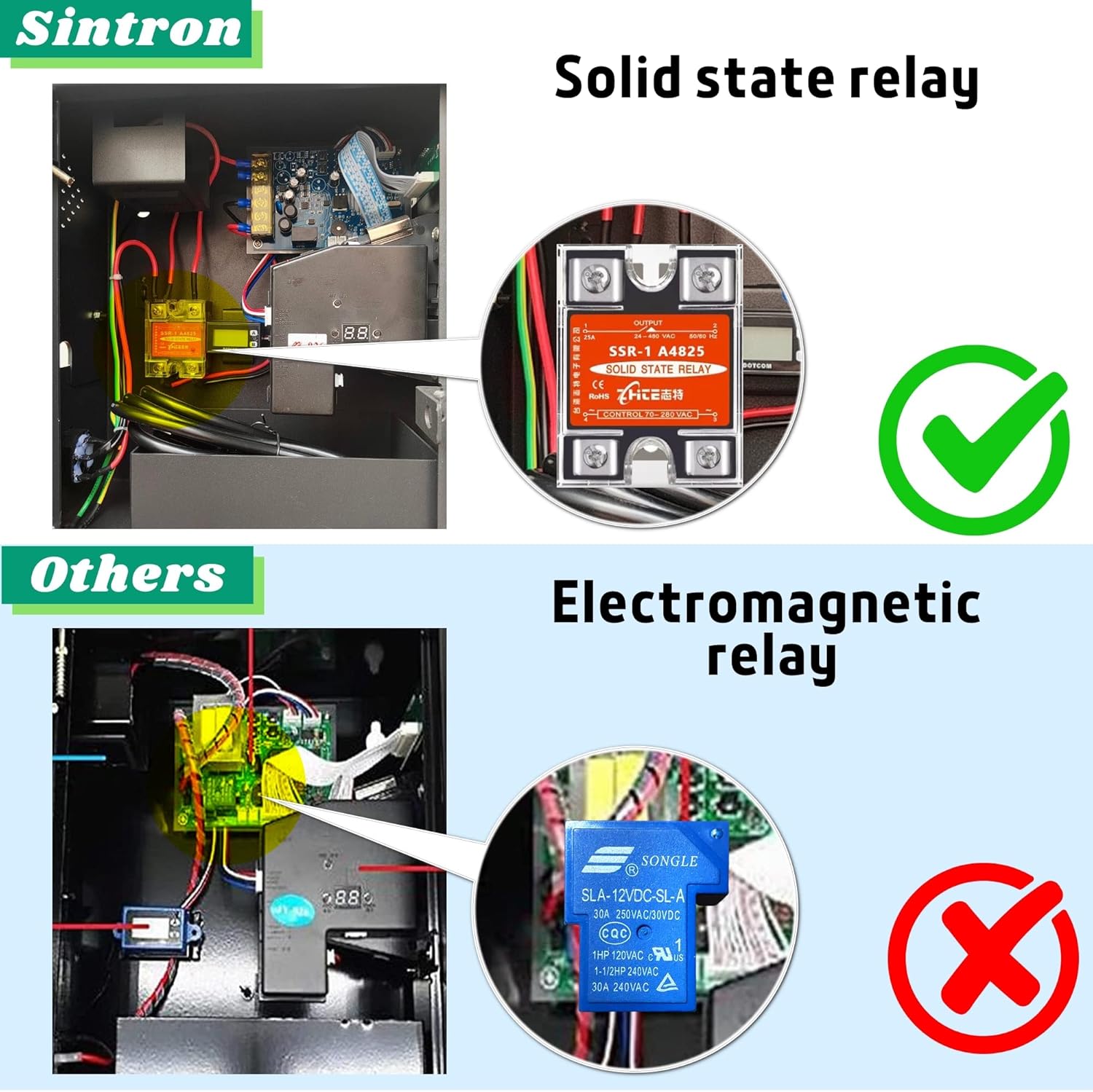
Figure 3.2: Internal view of the Sintron ST-002, revealing the wiring and components, including the coin mechanism and control board.
Key Features:
- Timer Control: Provides precise time-based control over connected electronic devices.
- 110V Voltage: Compatible with standard 110-120V power systems.
- LCD Display: Clear digital display for easy monitoring of time and status.
- Solid State Relay: Utilizes a solid-state relay for enhanced safety and reliability compared to traditional electromagnetic relays.
- Wide Application: Suitable for various commercial and personal timed-service applications.

Figure 3.3: Detailed view comparing the solid-state relay used in the Sintron ST-002 (top) with a typical electromagnetic relay (bottom), highlighting the safety and performance advantages of the solid-state design.

Figure 3.4: The Sintron coin controller board, showcasing its well-constructed design for premium, durable, safe, and protective operation.
4. Setup
Proper setup is crucial for the safe and effective operation of your timer control box. Refer to the detailed wiring diagram and programming instructions provided with your unit for specific steps.
4.1 Mounting the Unit
- Select a secure, dry, and well-ventilated location for mounting.
- Use appropriate fasteners to mount the unit securely to a wall or stable surface. Ensure the mounting points are strong enough to support the unit's weight.

Figure 4.1: Dimensions of the Sintron ST-002 unit, indicating mounting points for secure installation.
4.2 Electrical Connections
- Ensure the main power supply is disconnected before making any electrical connections.
- Connect the 110V AC power input to the designated terminal on the control box.
- Connect the power output to your electronic device. Ensure the device's power requirements do not exceed the 16A maximum current rating of the ST-002.
- Verify all connections are secure and properly insulated.
4.3 Coin Mechanism and Timer Programming
The coin mechanism can be programmed to accept specific coin types and assign corresponding time values. Detailed programming instructions are typically found inside the unit's door or in a separate programming guide. This usually involves:
- Accessing the programming mode via internal buttons.
- Teaching the coin acceptor to recognize desired coin denominations.
- Setting the time duration for each coin or combination of coins.
- Configuring any bonus time or cumulative time settings.
Video 4.1: An overview of the Sintron ST-002 Coin Operated Timer Box, demonstrating its physical features and internal components. This video provides a visual guide to the product's design and functionality, including the coin slot, LCD display, and internal wiring for controlling 16A 110V devices.
5. Operating Instructions
Once the Sintron ST-002 is properly installed and programmed, operating it is straightforward.
- Power On: Ensure the main power supply to the unit is switched on. The LCD display should illuminate.
- Insert Coin: Insert the programmed coin(s) into the coin slot. The unit will register the coin(s).
- Time Activation: Upon successful coin insertion, the LCD display will show the allocated time, and the connected device will receive power.
- Time Countdown: The timer will count down the allocated time.
- Power Cut-off: Once the timer reaches zero, the power supply to the connected device will be cut off.
- Adding Time: If configured, additional coins can be inserted during operation to extend the active time.

Figure 5.1: Examples of devices and applications compatible with the Sintron ST-002 timer control box, including washing machines, massage chairs, hair dryers, arcade games, phone charging stations, kiddie rides, and treadmills.
6. Maintenance
Regular maintenance helps ensure the longevity and reliable operation of your Sintron ST-002.
- Cleaning: Periodically clean the exterior of the unit with a soft, dry cloth. Avoid using abrasive cleaners or solvents.
- Coin Slot: Inspect the coin slot regularly for any obstructions or foreign objects. Clean gently if necessary.
- Connections: Periodically check all electrical connections to ensure they remain tight and secure.
- Ventilation: Ensure ventilation openings are free from dust and debris.
7. Troubleshooting
If you encounter issues with your Sintron ST-002, refer to the following common problems and solutions.
| Problem | Possible Cause | Solution |
|---|---|---|
| Unit does not power on / LCD is blank. | No power supply; loose connection; blown fuse. | Check main power switch and outlet. Verify all electrical connections. Inspect and replace fuse if necessary (refer to fuse specifications). |
| Coins are not accepted. | Incorrect coin type; coin mechanism jammed; programming error. | Ensure correct coins are used. Check coin slot for obstructions. Re-program the coin mechanism according to the detailed instructions. |
| Connected device does not receive power after coin insertion. | Device not properly connected; timer not activated; internal fault. | Verify the device is correctly plugged into the timer box output. Check timer settings. If problem persists, contact support. |
| Timer does not count down correctly or bonus time cannot be programmed. | Incorrect programming settings. | Refer to the detailed programming instructions for the coin mechanism and timer settings. Ensure all steps are followed precisely. If issues persist, contact Sintron support for assistance. |
8. Specifications
| Feature | Detail |
|---|---|
| Brand | Sintron |
| Model Name | ST-002 |
| Input Voltage | 110V AC |
| Max Current Rating | 16 Amps |
| Product Dimensions (L x W x H) | 10.24 x 5.12 x 11.02 inches (260 x 130 x 280 mm) |
| Item Weight | 12.82 pounds (5.82 kg) |
| Color | Black |
| Display Type | LCD |
| Human Interface Input | Buttons (for programming) |
| Special Feature | Timer Control |
9. Warranty and Support
For warranty information, technical support, or service inquiries, please contact Sintron customer service. Keep your purchase receipt as proof of purchase.
For further assistance, visit the official Sintron website or contact their support channels.


