1. Product Overview
The Retekess TR510 is a long-range FM broadcast transmitter designed for various applications such as church parking lots, drive-in movies, and public address systems. It features multiple audio input methods, including dual microphone inputs, RCA, and USB drive support, along with three preset frequency buttons for ease of use.
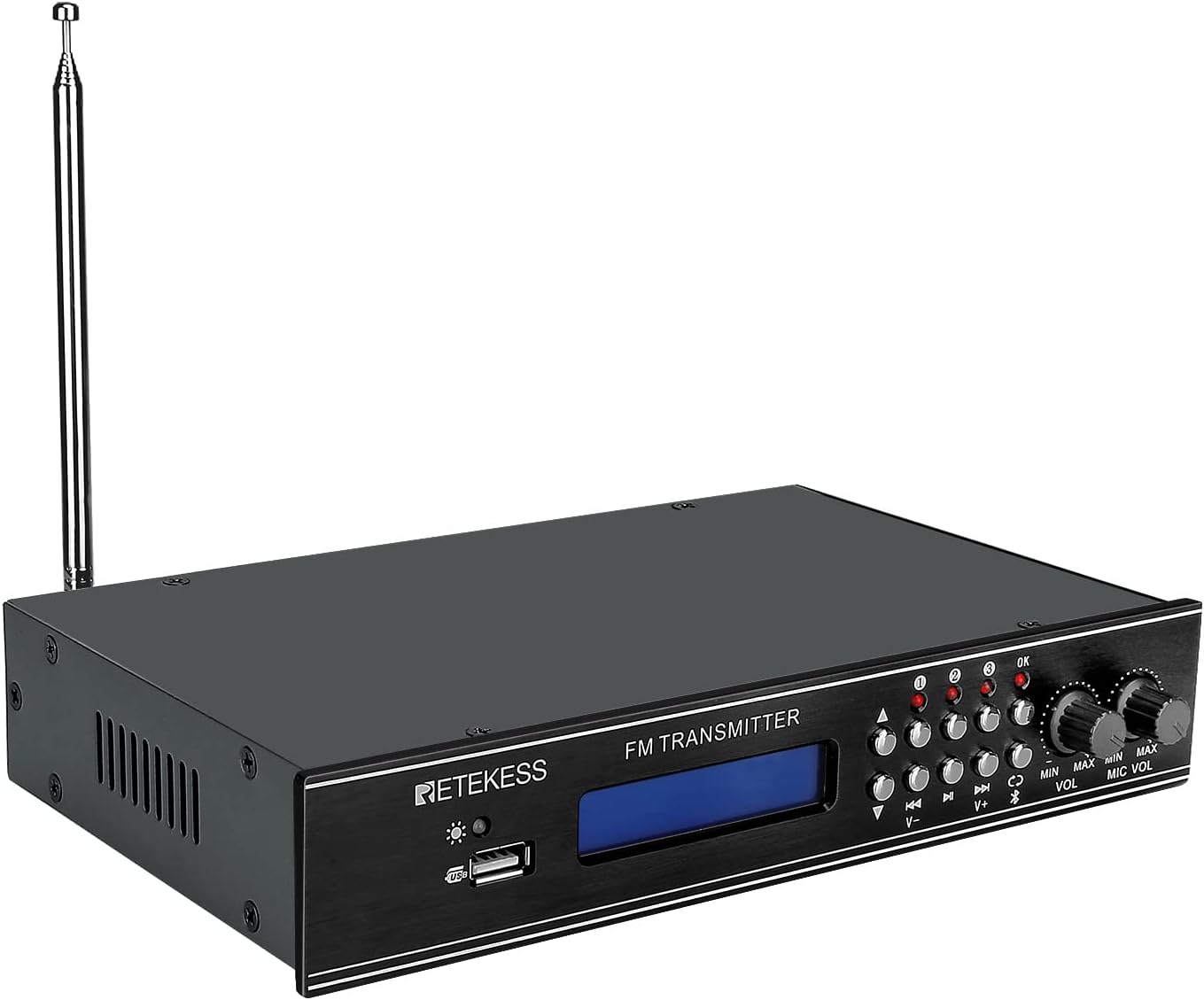
Image 1.1: Front view of the Retekess TR510 FM Transmitter, showing the display, control buttons, and antenna.

Image 1.2: The Retekess TR510 FM Transmitter depicted in various use cases, including church, school, meeting, drive-in movie, and tour guide settings.
2. Package Contents
Please verify that all items are present in the package:
- 1 x TR510 FM Transmitter
- 1 x AUX Cable
- 1 x Power Adapter
- 1 x English User Manual (this document)

Image 2.1: The Retekess TR510 FM Transmitter shown with its power adapter, AUX cable, and user manual.
3. Safety Information
This device is FCC certified (FCC ID: 2A3NOTR510) and operates within the 87.9-91.9 MHz FM frequency range. To ensure safe operation and prevent potential interference, please observe the following:
- Avoid operating the device near other wireless equipment that may use similar frequencies to prevent interference.
- Do not open the device casing. Refer all servicing to qualified personnel.
- Ensure proper ventilation to prevent overheating.
- Use only the provided power adapter.
4. Setup Instructions
Follow these steps to set up your TR510 FM Transmitter:
- Connect the Antenna: Screw the provided FM antenna into the 'ANT' connector on the rear panel of the transmitter. Ensure it is securely fastened.
- Connect Power: Plug the DC input cable from the power adapter into the 'DC INPUT 12V/1A' port on the rear panel. Then, plug the power adapter into a standard electrical outlet.
- Connect Audio Source: Choose one of the following input methods:
- RCA Input: Connect your audio source (e.g., TV, soundboard) to the 'AUX' RCA ports (red for right, white for left) on the rear panel using an RCA cable.
- AUX Input: Connect your audio source (e.g., iPod, MP3 player, computer) to the 'AUX' 3.5mm jack on the rear panel using the provided AUX cable.
- USB Drive Input: Insert a USB drive containing audio files into the USB port on the front panel.
- Microphone Input: Connect up to two microphones to the 'MIC1' and 'MIC2' 6.35mm jacks on the rear panel.
- Power On: Flip the 'ON/OFF' power switch on the rear panel to the 'ON' position. The display on the front panel will illuminate.

Image 4.1: Close-up of the rear panel of the TR510, highlighting the DC input, RCA, AUX, and microphone input ports, along with the antenna connection.

Image 4.2: An individual using a microphone, demonstrating a common input method for the TR510 transmitter.
5. Operating Instructions
Once the transmitter is set up, follow these steps to begin broadcasting:
- Select Frequency: Use the 'V-' and 'V+' buttons on the front panel to adjust the FM broadcasting frequency. The selected frequency will be displayed on the blue backlit screen.
- Preset Frequencies: The TR510 features three preset frequency buttons (1, 2, 3). To save a frequency, tune to the desired frequency, then press and hold one of the preset buttons for three seconds until the indicator light confirms storage. To recall a preset frequency, simply press the corresponding button briefly.
- Adjust Audio Volume: Use the 'VOL' knob on the front panel to adjust the overall audio output volume.
- Adjust Microphone Volume: Use the 'MIC VOL' knob on the front panel to adjust the volume of the connected microphones independently.
- Select Input Source: Use the input selection buttons (e.g., AUX, USB, Bluetooth) to switch between different audio sources.

Image 5.1: Front panel of the TR510, showing the three preset station buttons and independent adjustment knobs for audio and microphone volume.
Video 5.1: An overview demonstrating the features and connectivity options of the Retekess TR510 FM Transmitter, including its various input methods and control interface.
6. Maintenance
To ensure the longevity and optimal performance of your Retekess TR510 FM Transmitter, follow these maintenance guidelines:
- Cleaning: Use a soft, dry cloth to clean the exterior of the transmitter. Avoid using liquid cleaners or solvents, as they may damage the finish or internal components.
- Storage: When not in use for extended periods, store the transmitter in a cool, dry place away from direct sunlight and extreme temperatures.
- Antenna Care: Handle the antenna carefully to prevent bending or breaking. Ensure it is fully extended for optimal signal transmission during operation.
7. Troubleshooting
If you encounter issues with your TR510 FM Transmitter, refer to the following common problems and solutions:
| Problem | Possible Cause | Solution |
|---|---|---|
| No power | Power adapter not connected or faulty; power switch off. | Ensure the power adapter is securely connected and plugged into a working outlet. Verify the power switch on the rear panel is in the 'ON' position. |
| No audio output | Incorrect input selected; audio cable loose or faulty; volume too low. | Check that the correct input source is selected. Ensure audio cables are securely connected. Increase the 'VOL' and 'MIC VOL' knobs. |
| Poor signal quality or limited range | Antenna not fully extended or improperly connected; interference from other devices; environmental obstructions. | Ensure the antenna is fully extended and securely connected. Try adjusting the antenna position. Minimize obstructions between the transmitter and receiver. Select a clear frequency. |
| Microphone not working | Microphone not connected; 'MIC VOL' too low; faulty microphone. | Ensure the microphone is properly plugged into 'MIC1' or 'MIC2'. Increase the 'MIC VOL' knob. Test with another microphone if available. |
| Audio is mono despite stereo input | The TR510 is designed for mono FM transmission. | The device transmits in mono. This is a design characteristic. |
8. Specifications
| Feature | Detail |
|---|---|
| Model Number | FF9255A |
| Product Dimensions | 9.25 x 5.63 x 1.73 inches |
| Item Weight | 1.91 pounds |
| Brand | Retekess |
| Connectivity Technology | Auxiliary, USB |
| Power Source | AC |
| Material | Aluminum |
| Frequency Range | 87.9-91.9 MHz |
| FCC Certification | FCC ID: 2A3NOTR510 |
| Special Features | 3 Preset Stations, Dual MIC/AUX/USB Input |
9. Warranty and Support
For warranty information or technical support, please refer to the official Retekess website or contact their customer service directly. Keep your purchase receipt for warranty claims.


