
DEWENWILS HOSL05D
Contents
DEWENWILS 300W Smart Wi-Fi Low Voltage Transformer
Model: HOSL05D
User Manual
1. Introduction
The DEWENWILS 300W Smart Wi-Fi Low Voltage Transformer is designed to convert standard 120V AC household voltage to a safe 12V/14V AC output, ideal for powering landscape lighting systems. This smart transformer offers advanced control features including Wi-Fi connectivity for remote operation, voice control compatibility with Alexa and Google Home, and various programmable timer modes. Its robust, weatherproof design ensures reliable outdoor performance.

Image 1.1: DEWENWILS 300W Smart Wi-Fi Low Voltage Transformer.
2. Product Features
- Voice Control & Remote Control: Compatible with Amazon Alexa and Google Home Assistant for convenient voice commands. Control your landscape lights from anywhere using the "ECO Plugs" smartphone application.
- Schedule & Timer Function: Offers five distinct timer modes: programmable timer, countdown timer, astronomic timer (on at dusk, off at dawn), holiday random, and security random modes.
- Easy to Set & Install: Connects to your Wi-Fi network (2.4GHz only) for seamless control. Features a built-in hanging hole and a 3.3ft power cable for direct wall mounting.
- Safe & Weatherproof: Equipped with a circuit breaker that automatically activates if current exceeds safe thresholds, protecting connected devices. Constructed from high-performance metal to withstand rain, snow, dust, and abrasion.
- Wide Application: Suitable for all 12V and 14V low voltage LED and halogen landscape lighting, including spotlights, pathway lights, garden lights, and water features. Supports connection of up to twelve Wi-Fi low voltage transformers via the app.

Image 2.1: Remote and Voice Control Capabilities.
3. What's in the Box
Upon opening the package, please verify that all components are present and undamaged:
- 1 x DEWENWILS 300W Smart Wi-Fi Low Voltage Transformer
4. Safety Information
WARNING: To reduce the risk of fire or electric shock, read and follow all instructions carefully.
- Always disconnect power before installing or servicing the transformer.
- This transformer is designed for outdoor use and is weatherproof. However, avoid submerging it in water.
- Ensure all connections are secure and properly insulated to prevent short circuits.
- Do not overload the transformer. The maximum wattage for this model is 300W. Calculate the total wattage of your connected lights to ensure it does not exceed this limit.
- Use only low voltage landscape lighting fixtures with this transformer.
- Keep children and pets away from the transformer and wiring during operation.
- If the circuit breaker trips, disconnect power, check for overloaded circuits or short circuits, and resolve the issue before resetting.
5. Installation and Setup
5.1 Mounting the Transformer
The transformer can be mounted on an outdoor wall or other suitable vertical surface using the built-in hanging hole. Ensure the mounting location is secure and allows for proper ventilation.
- Select a sturdy mounting surface.
- Use appropriate screws or fasteners for your chosen surface.
- Mount the transformer securely, ensuring it is level.

Image 5.1: Weatherproof design and wall mounting.
5.2 Wiring Connections
The transformer features two terminal output ends (12VAC/14VAC) for connecting your low voltage lighting cables. Choose the appropriate voltage for your lighting system.
- Ensure the transformer is unplugged from the power outlet.
- Strip approximately 1/2 inch of insulation from the ends of your low voltage landscape lighting cables.
- Connect the common wire (usually marked COM) to the 'COM' terminal.
- Connect the other wire to either the '12V' or '14V' terminal, depending on your lighting requirements.
- Tighten the terminal screws firmly to ensure a secure connection. Loose connections can cause flickering or damage.
- If your cable has a white loop, thread it through the designated loop on the transformer to reduce gravity and strain on the connections.

Image 5.2: Wiring terminals (12V, COM, 14V) and Resetting Key.
5.3 Wi-Fi and App Setup
To enable smart features, connect the transformer to your Wi-Fi network and set up the "ECO Plugs" app.
- Plug the transformer into a 120V AC outlet. The Wi-Fi signal indicator should begin to flash.
- Download the "ECO Plugs" app from your smartphone's app store (available for iOS and Android).
- Open the app and follow the on-screen instructions to create an account and add a new device.
- Ensure your smartphone is connected to a 2.4GHz Wi-Fi network during the setup process. The transformer does not support 5GHz Wi-Fi.
- Once connected, you can rename the device and configure settings within the app.
6. Operation
6.1 Manual Control
The transformer has a physical Power Button and Reset Button on its front panel.
- Power Button: Press to manually turn the connected lights ON or OFF.
- Reset Button: Used for resetting the Wi-Fi connection or factory resetting the device. Refer to the app's instructions for specific reset procedures.

Image 6.1: Front panel controls and indicators.
6.2 App Control and Scheduling
The "ECO Plugs" app provides comprehensive control over your landscape lighting.
- Remote ON/OFF: Toggle your lights from anywhere with an internet connection.
- Timer Modes: Access and configure the five available timer modes (Programmable, Countdown, Astronomic, Holiday Random, Security Random) to automate your lighting schedule.
- Group Control: If you have multiple DEWENWILS smart transformers, you can group them within the app for simultaneous control.

Image 6.2: App interface for setting rules and schedules.
6.3 Voice Control
Integrate your transformer with Amazon Alexa or Google Home Assistant for hands-free control.
- Follow the instructions within the "ECO Plugs" app to link your account with Alexa or Google Home.
- Once linked, you can use voice commands such as:
- "Alexa, turn on the garden lights."
- "Hey Google, turn off the pathway lights."
7. Maintenance
Regular maintenance helps ensure the longevity and optimal performance of your transformer.
- Cleaning: Periodically wipe the exterior of the transformer with a soft, damp cloth. Do not use harsh chemicals or abrasive cleaners.
- Connection Check: Annually inspect all wiring connections to ensure they remain tight and free from corrosion.
- Ventilation: Ensure the area around the transformer remains clear of debris to allow for proper airflow and heat dissipation.
- Circuit Breaker: If the circuit breaker frequently trips, investigate the cause (e.g., overloaded circuit, short circuit in wiring or fixtures) and rectify it. Do not continuously reset without addressing the underlying issue.
8. Troubleshooting
If you encounter issues with your DEWENWILS Smart Wi-Fi Low Voltage Transformer, refer to the following common problems and solutions:
| Problem | Possible Cause | Solution |
|---|---|---|
| Transformer not powering on. | No power from outlet; tripped circuit breaker; internal fault. | Check the power outlet with another device. Check your home's circuit breaker. Press the transformer's resetting key. If issues persist, contact support. |
| Lights are flickering or dim. | Loose wiring connections; overloaded circuit; faulty light fixtures. | Ensure all wiring connections are tight. Reduce the number of connected lights or use a higher wattage transformer. Test individual light fixtures. |
| Cannot connect to Wi-Fi. | Incorrect Wi-Fi password; 5GHz network used; weak Wi-Fi signal; app issues. | Ensure correct 2.4GHz Wi-Fi network and password. Move transformer closer to router. Restart router and transformer. Reinstall "ECO Plugs" app. |
| Voice control not working. | Not linked to Alexa/Google Home; device offline; incorrect commands. | Verify linking in "ECO Plugs" app and Alexa/Google Home app. Check transformer's Wi-Fi connection. Use correct voice commands. |
| Schedule not activating. | Incorrect schedule settings; time zone issues; device offline. | Review schedule settings in the app. Ensure correct time zone is set in the app. Check transformer's Wi-Fi connection. |
9. Specifications
| Attribute | Value |
|---|---|
| Product Dimensions | 6 x 4 x 8.6 inches (15.24 x 10.16 x 21.84 cm) |
| Item Model Number | HOSL05D |
| Manufacturer | DEWENWILS |
| Power Source | Corded Electric |
| Input Voltage | 120V AC |
| Output Voltage | 12V AC / 14V AC |
| Maximum Wattage | 300W |
| Mounting Type | Wall Mount |
| Maximum Frequency | 60 Hz |
| Wi-Fi Compatibility | 2.4GHz only |
| Power Cord Length | 3.3 ft (1 meter) |
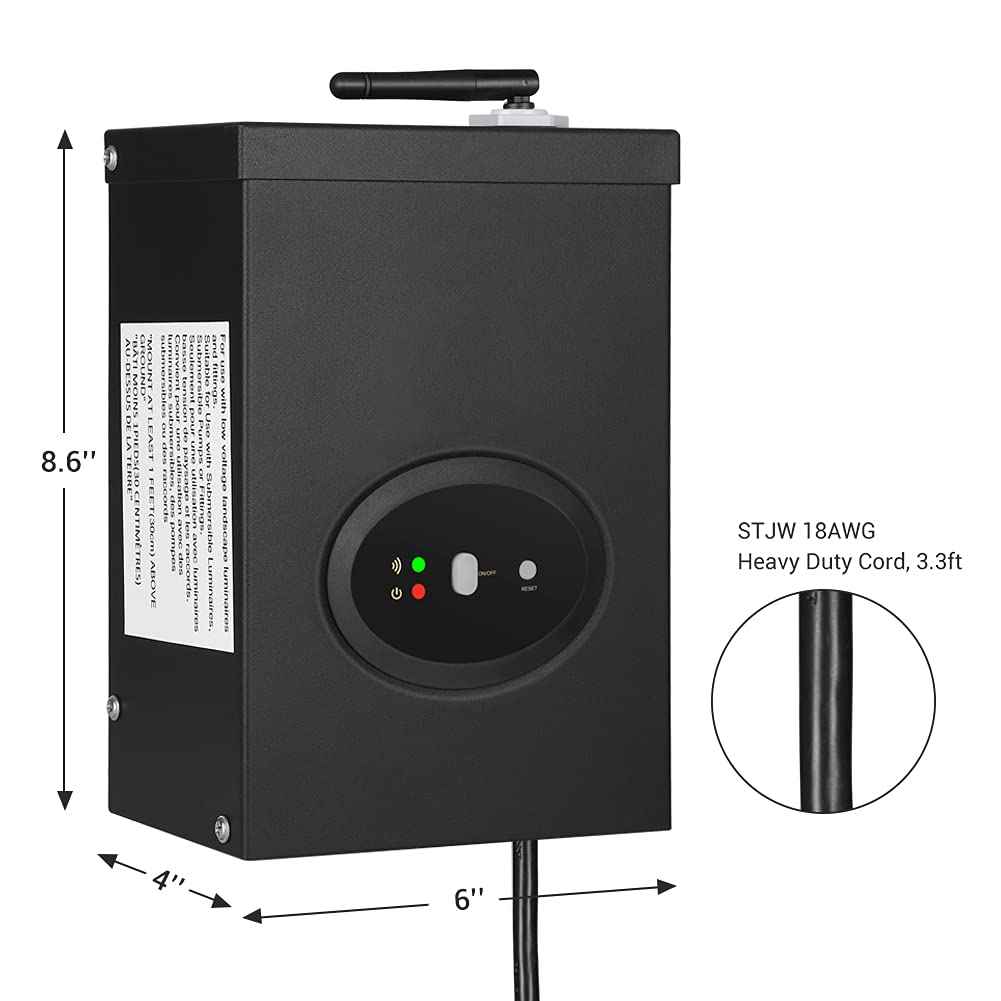
Image 9.1: Product dimensions and cord length.
10. Warranty and Support
For warranty information, technical support, or customer service inquiries, please contact DEWENWILS directly. Refer to the product packaging or the official DEWENWILS website for the most current contact details.
You can also visit the official DEWENWILS store on Amazon for more product information and support resources: DEWENWILS Amazon Store
Ask a question about this manual
Ask about setup, troubleshooting, compatibility, parts, safety, or missing instructions. Manuals+ will review the question and use this page’s manual context to help answer it.