
1. Introduction
The LiitoKala LII-S8 is an advanced 8-bay smart universal battery charger designed for a wide range of rechargeable batteries. It features an intuitive LCD display that provides real-time charging information for each individual bay. With independent charging channels and multiple safety protections, the LII-S8 offers efficient and reliable charging for your batteries.
2. Product Features
- 8 Independent Charging Bays: Each bay operates independently, allowing simultaneous charging of different battery types and sizes.
- Versatile Battery Compatibility: Supports Li-ion (4.20V / 4.35V), IMR, INR, ICR, LiFePO4 (3.60V), NiMH / Cd (1.2V), and 9V batteries.
- LCD Display: Clear LCD screen displays real-time charging status including voltage, current, internal resistance, charging time, and charged capacity (mAh).
- Multiple Charging Currents: Selectable charging currents of 300mA, 500mA, 700mA, 1000mA (1A).
- Fast Charging Capability: Slots #1, #3, #6, and #8 support 2A fast charging when only 4 batteries are being charged.
- 0V Battery Activation: Capable of activating deeply discharged 0V batteries.
- Comprehensive Safety Protections: Includes over-charged, over-current, over-voltage, temperature control, short-circuit protection, and soft start.
- Dedicated 9V Battery Slots: Two dedicated slots for charging 9V batteries with an approximate current of 85mA per battery.
3. Package Contents
Upon opening the package, please verify that all items listed below are present and in good condition:
- 1 x LiitoKala LII-S8 Smart Universal Battery Charger
- 1 x AC Power Adapter (Wall Charger)
- 1 x Car Charger Adapter
- 1 x User Manual

Image: The LiitoKala LII-S8 charger unit shown with its accompanying AC wall adapter and car charger adapter.
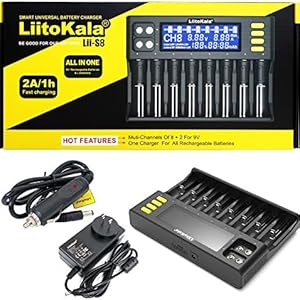
Image: The LiitoKala LII-S8 charger and its accessories, including the user manual, neatly packed within its retail box.
Video: An unboxing demonstration of the LiitoKala LII-S8 battery charger, showcasing the charger unit, power adapters, and user manual as they appear out of the box.
4. Setup
- Connect Power: Plug the provided AC power adapter into the charger's DC input port (12V/4A) and then into a wall outlet. Alternatively, use the car charger adapter for in-vehicle use.
- Initial Power-On: The LCD display will illuminate, indicating the charger is ready for use.

Image: A detailed view of the LiitoKala LII-S8 charger, highlighting the 12V/4A power input port, cooling holes, 9V battery charging contacts, and the main LCD display.
5. Operating Instructions
5.1 Inserting Batteries
- For cylindrical batteries (Li-ion, NiMH/Cd): Insert the battery into any of the 8 main charging slots, ensuring correct polarity (+/-). The charger will automatically detect the battery type and begin charging.
- For 9V batteries: Insert 9V batteries into the two dedicated 9V charging contacts located on the top left of the charger, ensuring correct polarity.

Image: The LiitoKala LII-S8 charger demonstrating its compatibility by showing various battery types, including Li-ion, NiMH, and AAA, inserted into different charging slots simultaneously.

Image: The LiitoKala LII-S8 charger with eight cylindrical batteries inserted, illustrating its capacity to charge multiple batteries concurrently, with each slot providing up to 1000mA charging current.

Image: The LiitoKala LII-S8 charger's display indicating the availability of six charging current options: 300mA, 500mA, 700mA, and 1A for each channel, with 2A output available in slots #1, #3, #6, and #8 when charging four batteries.

Image: The LiitoKala LII-S8 charger with two 9V batteries inserted into their dedicated charging slots, highlighting its capability to charge 9V batteries simultaneously at approximately 85mA per battery.
5.2 Understanding the LCD Display
The LCD display provides detailed information for each charging channel. You can cycle through the information for each channel using the 'PREV' and 'NEXT' buttons. The 'CURRENT' button allows you to adjust the charging current for the selected channel.
- CH1-CH8: Indicates the active charging channel.
- Voltage (V): Displays the current voltage of the battery in the slot.
- Current (mA/A): Shows the charging current being applied.
- Capacity (mAh): Accumulates the charged capacity.
- Time (h): Displays the elapsed charging time.
Video: A demonstration of the LiitoKala LII-S8 charger's LCD display in action, showing how it provides real-time charging data such as voltage, current, and charged capacity for batteries in various slots.
5.3 Selecting Charging Current
The charger automatically selects a default charging current. To manually adjust the current:
- Insert the battery.
- Press the 'CURRENT' button repeatedly to cycle through available current options (300mA, 500mA, 700mA, 1000mA).
- For 2A fast charging, ensure only 4 batteries are inserted into slots #1, #3, #6, and #8. The charger will automatically apply 2A if conditions are met.

Image: A graph illustrating the charging speed comparison between normal and upgraded 2A fast charging on the LiitoKala LII-S8, demonstrating the time-saving benefits of the higher current output.
5.4 Battery Activation Function
The LII-S8 charger can attempt to activate 0V batteries. If a deeply discharged battery is inserted, the charger will try to revive it before initiating the standard charging process. This feature helps to recover batteries that might otherwise be considered unusable.
6. Maintenance
- Cleaning: Disconnect the charger from power before cleaning. Use a soft, dry cloth to wipe the surface. Do not use abrasive cleaners or solvents.
- Storage: Store the charger in a cool, dry place away from direct sunlight and extreme temperatures.
- Safety: Always ensure proper ventilation during charging. Do not cover the charger. Avoid dropping or subjecting the charger to strong impacts.
7. Troubleshooting
- Charger not powering on: Ensure the power adapter is securely connected to both the charger and a working power outlet. Check if the outlet has power.
- Battery not charging/displaying information: Ensure the battery is inserted with correct polarity. Check if the battery is severely damaged or short-circuited. Try inserting the battery into a different slot.
- Display shows 'NULL' or 'ERR': This may indicate a battery fault, incorrect battery type, or poor contact. Re-insert the battery, or try a different battery.
- Overheating: While the charger has temperature control, ensure it is used in a well-ventilated area. If excessive heat is detected, the charger may reduce current or stop charging for safety.
If issues persist, please refer to the full user manual or contact customer support.
8. Specifications
| Product Dimensions | 5.3 x 11.3 x 1.37 inches |
| Item Weight | 1.63 pounds |
| Item Model Number | Lii-S8 |
| Output Voltage | 4.2 Volts (Li-ion), 3.6V (LiFePO4), 1.2V (NiMH/Cd), 9V |
| Supported Battery Types | Li-ion (IMR/ICR), LiFePO4, Ni-MH/Cd (AA, AAA, C), 9V |
| Manufacturer | LiitoKala |
| Country of Origin | China |
| Color | Black |
| Certifications | CE, FCC, RoHS |
9. Warranty and Support
The LiitoKala LII-S8 Smart Universal Battery Charger comes with a 12-month warranty from the date of purchase. This warranty covers manufacturing defects and malfunctions under normal use.
For technical support, warranty claims, or any questions regarding your charger, please contact LiitoKala customer service through their official channels or the retailer from whom you purchased the product. Please retain your proof of purchase for warranty validation.