
Introduction
Thank you for choosing the Heyday Round Portable Bluetooth Speaker with Loop. This manual provides essential information for setting up, operating, and maintaining your speaker. Please read it thoroughly before use and retain it for future reference.
This portable speaker is designed for on-the-go audio, offering Bluetooth connectivity for seamless music streaming from your compatible devices. Its water-resistant construction makes it suitable for various environments, and the integrated loop provides convenient portability.
Safety Information
- Do not expose the speaker to extreme temperatures or direct sunlight for extended periods.
- Avoid dropping or subjecting the speaker to strong impacts.
- Do not disassemble, repair, or modify the speaker yourself. Contact qualified service personnel for any repairs.
- Keep the speaker away from water and liquids, despite its water-resistant design. Do not submerge it.
- Use only the provided USB cable for charging.
- Dispose of the battery and speaker according to local regulations.
Package Contents
- Heyday Round Portable Bluetooth Speaker with Loop
- USB Charging Cable
- User Manual (this document)
Product Overview
Familiarize yourself with the speaker's components:
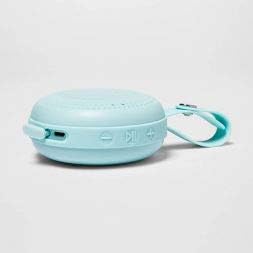
Image: Side view of the Heyday Round Portable Bluetooth Speaker. This image displays the USB charging port, the power button, and the volume/track control buttons on the side of the speaker.
- Power Button: Press and hold to turn the speaker on or off.
- USB Charging Port: Connect the USB cable here to charge the speaker.
- Volume Down / Previous Track Button: Press to decrease volume. Press and hold to go to the previous track.
- Play/Pause / Call Button: Press to play or pause music. Press to answer or end a call. Press and hold to reject a call.
- Volume Up / Next Track Button: Press to increase volume. Press and hold to go to the next track.
- LED Indicator: Shows power, charging, and Bluetooth status.
- Integrated Loop: For convenient carrying or hanging.
Setup
1. Charging the Speaker
Before first use, fully charge the speaker.
- Connect the small end of the included USB charging cable to the USB charging port on the speaker.
- Connect the large end of the USB cable to a USB power adapter (not included) or a computer's USB port.
- The LED indicator will illuminate during charging and turn off when fully charged.
- A full charge typically takes approximately 2-3 hours.
2. Powering On/Off
- To turn on: Press and hold the Power Button for approximately 3 seconds. You will hear an audible prompt, and the LED indicator will flash.
- To turn off: Press and hold the Power Button for approximately 3 seconds. You will hear an audible prompt, and the LED indicator will turn off.
3. Bluetooth Pairing
Pair your speaker with a Bluetooth-enabled device (e.g., smartphone, tablet).
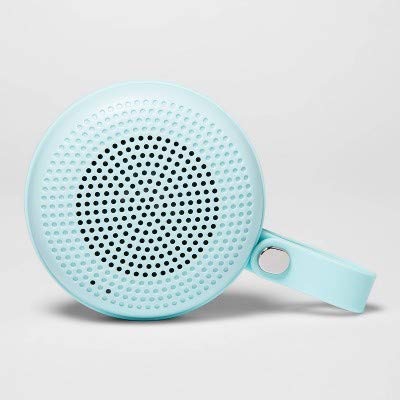
Image: The Heyday Round Portable Bluetooth Speaker in its light teal color, showcasing its compact, round design and integrated loop.
- Ensure the speaker is charged and powered on. The LED indicator will flash rapidly, indicating it's in pairing mode.
- On your device, go to the Bluetooth settings and enable Bluetooth.
- Search for available devices. The speaker will appear as "HEYDAY SPEAKER" or similar.
- Select the speaker from the list to connect.
- Once successfully paired, the LED indicator will stop flashing and remain solid, and you will hear a confirmation tone.
- The speaker will automatically attempt to reconnect to the last paired device when powered on.
Operating the Speaker
Playing Audio
- After pairing, open your music app or audio source on your device and begin playback.
- Press the Play/Pause Button to pause or resume playback.
- Press the Volume Up (+) Button to increase volume. Press and hold to skip to the next track.
- Press the Volume Down (-) Button to decrease volume. Press and hold to go back to the previous track.
Handling Phone Calls
- When a call comes in, the music will pause. Press the Play/Pause Button to answer the call.
- To end a call, press the Play/Pause Button again.
- To reject an incoming call, press and hold the Play/Pause Button for approximately 2 seconds.
Water Resistance
The speaker features a water-resistant design, making it suitable for outdoor use and protection against splashes. However, it is not waterproof. Do not submerge the speaker in water or expose it to heavy rain for extended periods.
Maintenance
- Cleaning: Wipe the speaker with a soft, dry, or slightly damp cloth. Do not use abrasive cleaners, alcohol, or chemical solvents.
- Storage: When not in use for extended periods, store the speaker in a cool, dry place away from direct sunlight.
- Battery Care: To prolong battery life, avoid fully discharging the speaker frequently. Recharge it regularly, even if not in constant use.
Troubleshooting
| Problem | Solution |
|---|---|
| Speaker does not turn on. | Ensure the speaker is charged. Connect it to a power source using the USB cable. |
| Cannot pair with Bluetooth device. |
|
| No sound or low volume. |
|
| Poor audio quality. |
|
Specifications
| Model Name | Round Portable Bluetooth Speaker with Loop |
| Brand | Heyday |
| Connectivity Technology | Bluetooth, USB |
| Power Source | Battery Powered |
| Battery Life | Approximately 5 hours |
| Charging Time | Approximately 2-3 hours |
| Water Resistance | Yes (Water-resistant) |
| ASIN | B091P75C5L |
| UPC/GTIN | 191907191868 |
Warranty Information
Heyday products are designed for quality and reliability. For specific warranty details, please refer to the warranty card included with your purchase or visit the official Heyday website. Typically, a limited warranty covers manufacturing defects for a specified period from the date of purchase.
Customer Support
If you encounter any issues or have questions not covered in this manual, please contact Heyday customer support. Refer to your product packaging or the official Heyday website for contact information, including phone numbers, email addresses, or support portals.
For online resources, you may visit the Heyday official page (Note: Heyday is a Target brand).