Introduction
Thank you for choosing Bass Jaxx Bluetooth Noise-Cancelling Soundproof Headphones. These headphones are designed to provide an immersive audio experience, allowing you to enjoy your favorite music undisturbed with active noise cancellation. Featuring a comfortable design, built-in microphone, and wireless connectivity, they are perfect for everyday use.

Image: Bass Jaxx Bluetooth Noise-Cancelling Soundproof Headphones shown in their retail packaging, highlighting the brand, Bluetooth capability, and active noise cancelling feature.
Setup
1. Charging the Headphones
Before first use, fully charge your headphones. Use the included micro USB cable to connect the headphones to a USB power source (e.g., computer USB port, USB wall adapter).
- Charging Time: Approximately 2 hours for a full charge.
- An indicator light will typically show charging status (e.g., red while charging, off or blue when fully charged).
2. Powering On/Off
- To Power On: Press and hold the Power button until the indicator light illuminates.
- To Power Off: Press and hold the Power button until the indicator light turns off.
3. Bluetooth Pairing
To connect your headphones to a Bluetooth-enabled device:
- Ensure the headphones are powered off.
- Press and hold the Power button for approximately 5-7 seconds until the indicator light flashes rapidly (usually blue and red), indicating pairing mode.
- On your device (smartphone, tablet, computer), enable Bluetooth and search for new devices.
- Select "Bass Jaxx HP-0213" (or similar name) from the list of available devices.
- Once paired, the indicator light on the headphones will typically slow its flashing or turn solid blue.
- Bluetooth Version: 5.1
- Bluetooth Range: Up to 32.8 feet (10 meters) in open areas.
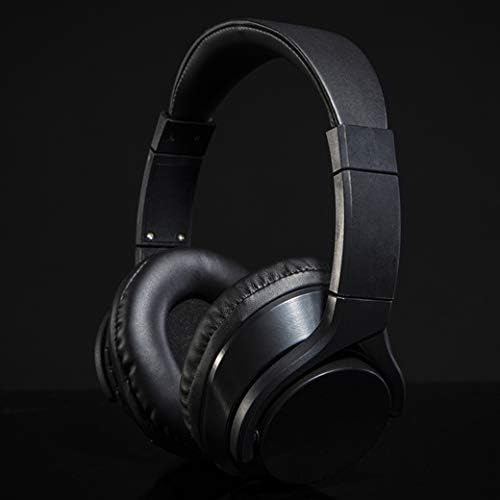
Image: A close-up view of the Bass Jaxx Bluetooth Noise-Cancelling Soundproof Headphones in black, showcasing the earcups and adjustable headband.
Operating Instructions
Basic Controls
The headphones feature intuitive controls for media playback and calls:
- Play/Pause: Press the Multi-function button once.
- Next Track: Press and hold the Volume Up button.
- Previous Track: Press and hold the Volume Down button.
- Volume Up: Short press the Volume Up button.
- Volume Down: Short press the Volume Down button.
Active Noise Cancellation (ANC)
These headphones feature Active Noise Cancellation to reduce ambient noise.
- To Activate/Deactivate ANC: Locate the ANC switch or button (refer to the physical controls on your headphones). Toggle it to turn ANC on or off.
- When ANC is active, you may notice a slight change in audio quality, which is normal.
Using the Built-in Microphone
The headphones include a built-in microphone for hands-free calls.
- Answer/End Call: Press the Multi-function button once during an incoming call.
- Reject Call: Press and hold the Multi-function button for 2 seconds during an incoming call.
Adjusting the Headband
The headband is adjustable to ensure a comfortable and secure fit for various head sizes. Gently slide the earcups up or down along the headband until they rest comfortably over your ears.
Maintenance
Cleaning
- Wipe the headphones with a soft, dry, lint-free cloth.
- Do not use abrasive cleaners, solvents, or strong chemicals, as these may damage the plastic material and finish.
- Avoid getting moisture into any openings.
Storage
- Store the headphones in a cool, dry place away from direct sunlight and extreme temperatures.
- Avoid placing heavy objects on top of the headphones.
Battery Care
- The headphones are equipped with a rechargeable Li-ion battery.
- To prolong battery life, avoid fully discharging the battery frequently.
- If storing for an extended period, charge the headphones to about 50% every few months.
Troubleshooting
| Problem | Possible Cause | Solution |
|---|---|---|
| Headphones do not power on. | Low battery. | Charge the headphones for at least 30 minutes. |
| Cannot pair with device. | Headphones not in pairing mode; Bluetooth off on device; device too far. | Ensure headphones are in pairing mode; enable Bluetooth on your device; move device closer to headphones (within 32.8 ft). |
| No sound or low volume. | Volume too low on headphones or device; headphones not connected. | Increase volume on both headphones and device; re-pair headphones if disconnected. |
| Poor sound quality. | Interference; device too far; low battery. | Move away from sources of interference; ensure device is within range; charge headphones. |
This device complies with part 15 of the FCC rules. Operation is subject to the following two conditions: 1. This device may not cause harmful interference. 2. This device must accept any interference that may cause undesired operation.
Specifications
| Feature | Specification |
|---|---|
| Model Number | HP-0213 |
| Driver Diameter | 40 mm |
| Impedance | 32 ohms |
| Frequency Response | 20Hz-20KHz |
| Sensitivity | 105 dB +/- 3 dB |
| Active Noise Cancellation (ANC) | -18 dB |
| Bluetooth Version | 5.1 |
| Bluetooth Range | 32.8 ft (10 meters) |
| Battery Type | Rechargeable Li-ion 3.7V |
| Charging Time | Approximately 2 hours |
| Playing Time | 3-4 hours |
| Material | Plastic |
| Microphone | Built-in |
| Special Features | Adjustable Headband, Noise Cancellation, Wireless |
Warranty and Support
Information regarding product warranty and customer support was not available in the provided product data. Please refer to the product packaging or the retailer's website for details on warranty coverage and how to contact customer support for your Bass Jaxx Bluetooth Noise-Cancelling Soundproof Headphones.


