
Arlec PEH221
Arlec 2200W White Glass Panel Adjustable Thermostat Convection Heater
User Manual - Model PEH221
Product Overview
The Arlec 2200W White Glass Panel Convection Heater (Model PEH221) is designed to provide efficient and adjustable heating for indoor spaces. Featuring a sleek glass panel design and an adjustable thermostat, this heater offers both aesthetic appeal and practical functionality. It is equipped with a digital display for easy temperature control and can be used as a floor-mounted unit.
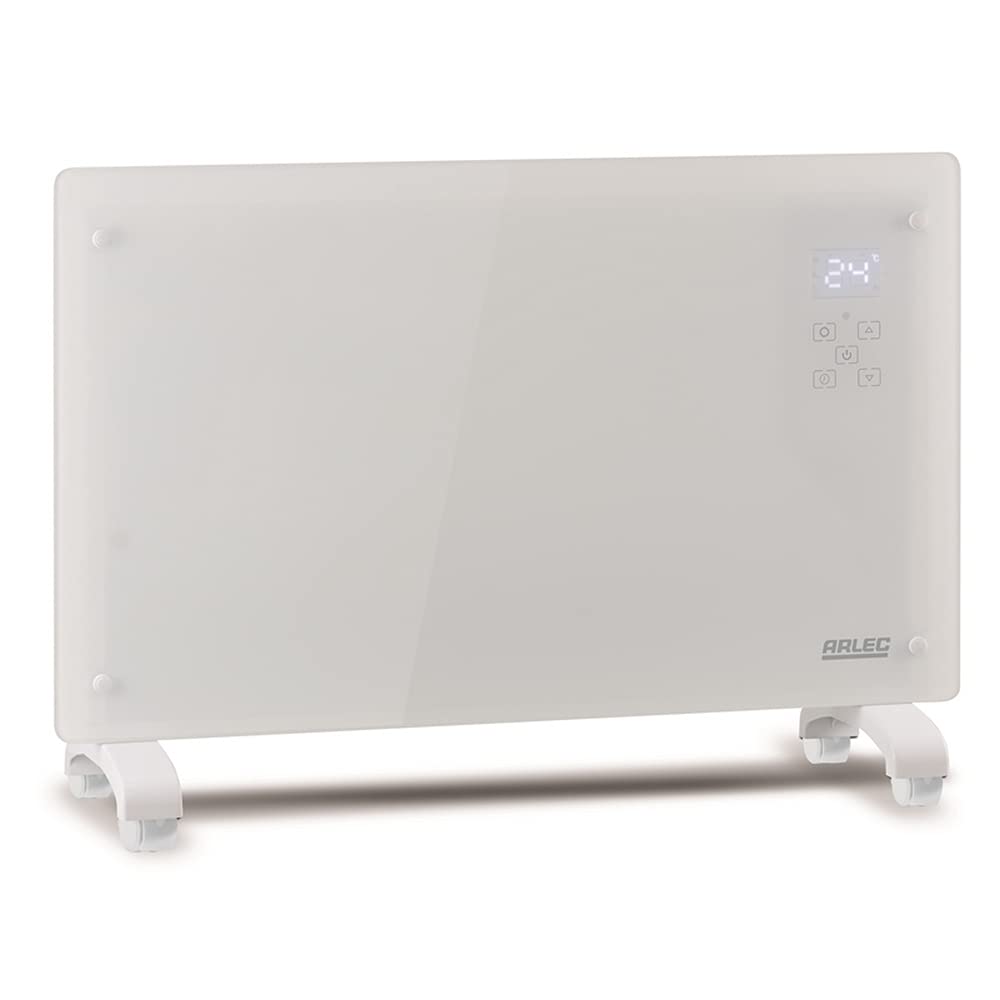
An image showing the Arlec 2200W White Glass Panel Convection Heater. The heater is rectangular, white, with a glass front panel. A digital display showing '24°' and control buttons are visible on the top right. The unit stands on two white feet with small caster wheels, indicating it is a floor-mounted, portable unit.
Important Safety Instructions
- Read all instructions before using this heater.
- Do not use this heater in the immediate surroundings of a bath, a shower or a swimming pool.
- Do not use this heater if it has been dropped.
- Do not use if there are visible signs of damage to the heater.
- Keep combustible materials such as furniture, pillows, bedding, papers, clothes, and curtains at least 1 meter (3.3 feet) from the front of the heater and away from the sides and rear.
- Always unplug the heater when not in use.
- Do not operate any heater with a damaged cord or plug or after the heater malfunctions, has been dropped or damaged in any manner.
- This heater is hot when in use. To avoid burns, do not let bare skin touch hot surfaces.
Setup and Installation
- Unpacking: Carefully remove the heater from its packaging. Retain the packaging for future storage or transport. Check for any signs of damage.
- Attaching Feet/Wheels:
The heater is designed for floor mounting. Attach the provided feet with wheels to the base of the heater using the screws provided. Ensure they are securely fastened to provide stability.
- Align the holes on the feet with the corresponding holes on the heater's base.
- Insert and tighten the screws firmly.
- Placement:
Place the heater on a firm, level surface. Ensure there is at least 1 meter (3.3 feet) of clear space around the heater from walls, furniture, and other objects to allow for proper air circulation and prevent fire hazards.
- Do not place the heater directly below a socket outlet.
- Do not use in areas where gasoline, paint, or flammable liquids are used or stored.
- Power Connection: Ensure the heater is switched off before plugging it into a suitable power outlet. The heater requires a standard electrical supply.
Operating Instructions
- Power On/Off: Press the Power Button (usually indicated by a circle with a vertical line) on the control panel to turn the heater on or off. The digital display will illuminate when the heater is on.
- Setting Temperature: Use the Temperature Up (+) and Temperature Down (-) buttons to adjust the desired room temperature. The digital display will show the set temperature. The heater will cycle on and off to maintain this temperature.
- Mode Selection (if applicable): Some models may have different heating modes (e.g., low, medium, high heat). If available, press the Mode Button (refer to specific icon on your unit) to cycle through the available settings.
- Timer Function (if applicable): If your model includes a timer, press the Timer Button to set the desired operating duration. The display will show the remaining time.
- Child Lock (if applicable): To prevent accidental changes to settings, some models feature a child lock. Refer to your unit's specific icons for activation/deactivation.
Note: When first used, the heater may emit a slight, harmless odor. This is normal and will disappear after a short period of operation.
Maintenance and Care
- Cleaning:
Always unplug the heater from the power outlet and allow it to cool completely before cleaning. Use a soft, damp cloth to wipe the exterior surfaces. Do not use abrasive cleaners or solvents as they may damage the surface.
- Do not immerse the heater in water or any other liquid.
- Ensure no water enters the interior of the heater.
- Storage: When not in use, store the heater in a cool, dry place. It is recommended to store it in its original packaging to protect it from dust and damage.
- Cord Care: Regularly inspect the power cord and plug for any signs of damage. Do not use the heater if the cord or plug is damaged.
Troubleshooting
| Problem | Possible Cause | Solution |
|---|---|---|
| Heater does not turn on. | Not plugged in; Power outlet faulty; Overheat protection activated; Power button not pressed. | Ensure plug is fully inserted; Test outlet with another appliance; Unplug and allow to cool for 30 minutes; Press power button firmly. |
| Heater produces no heat. | Temperature setting too low; Heater in standby mode; Room temperature already reached. | Increase temperature setting; Ensure heater is not in standby; Heater will cycle on when room temperature drops. |
| Unusual odor or smoke. | New unit burning off manufacturing residues (normal for first use); Dust accumulation. | Ensure adequate ventilation for first few uses; Unplug and clean heater thoroughly. If odor persists or is strong, discontinue use and contact support. |
| Heater makes clicking noises. | Normal expansion/contraction of metal parts during heating/cooling. | This is usually normal operation. If noises are loud or unusual, discontinue use and contact support. |
If the problem persists after attempting these solutions, please contact customer support.
Product Specifications
| Brand | Arlec |
| Model | PEH221 |
| Power Output | 2200W |
| Colour | White |
| Heating Method | Convection |
| Form Factor | Pedestal |
| Mounting Type | Floor Mount |
| Item Weight | 9.98 kg |
| Package Dimensions | 55 x 44 x 15.2 cm |
Warranty and Support
This Arlec product comes with a standard manufacturer's warranty. Please refer to the warranty card included with your purchase for specific terms and conditions, including the warranty period and coverage details. Keep your purchase receipt as proof of purchase for warranty claims.
For technical support, troubleshooting assistance, or warranty inquiries, please contact Arlec Customer Service. Contact details can typically be found on the product packaging, the official Arlec website, or the warranty card.
Online Resources: For the latest information, FAQs, and product registration, visit the official Arlec website.
Related documentsPEH221

Ask a question about this manual
Ask about setup, troubleshooting, compatibility, parts, safety, or missing instructions. Manuals+ will review the question and use this page’s manual context to help answer it.