
Honor Honor Band 5
Contents
Honor Band 5 Sports Fitness Tracker Bracelet User Manual
Model: Honor Band 5
Introduction
The Honor Band 5 is a versatile fitness tracking device designed to help you monitor your health and activity levels. This digital display smart band offers a range of features including heart rate monitoring, sleep tracking, and water resistance, making it an ideal companion for your daily fitness journey. It connects seamlessly with your smartphone via Bluetooth to provide comprehensive data and notifications.
Setup
Package Contents
Upon unboxing your Honor Band 5, please ensure all components are present:
- Honor Band 5 Fitness Tracker
- Charging accessory
- User Manual (this document)
Charging the Device
Before first use, fully charge your Honor Band 5. Connect the charging accessory to the charging port on the band and plug the other end into a USB power source. The display will indicate charging status. A full charge typically takes approximately 1.5 hours.
Initial Pairing with Your Smartphone
To unlock the full potential of your Honor Band 5, pair it with a compatible Android smartphone. Ensure Bluetooth is enabled on your phone.
- Download and install the official Honor Health or Huawei Health app from your smartphone's app store.
- Open the app and follow the on-screen instructions to create an account or log in.
- Navigate to the device pairing section within the app and select "Add Device".
- Choose "Honor Band 5" from the list of available devices.
- Confirm the pairing request on both your smartphone and the Honor Band 5 display.

Operating Your Honor Band 5
Display and Navigation
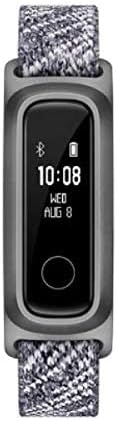
The Honor Band 5 features a vibrant LCD digital display. Navigation is primarily done through the touch-sensitive button located below the screen and by swiping on the display itself. Press the button to wake the screen or return to the home screen. Swipe up or down to scroll through different functions and data screens.
Key Features
The Honor Band 5 is equipped with several features to enhance your health and fitness tracking:
- Heart Rate Monitor: Continuously tracks your heart rate throughout the day and during workouts.
- Sleep Monitor: Analyzes your sleep patterns, including deep sleep, light sleep, and REM sleep, to help you improve sleep quality.
- Water Resistant: Designed to withstand splashes and submersion, suitable for swimming and daily use.
- GPS via Smartphone: Utilizes your connected smartphone's GPS to track outdoor activities like running and cycling, providing accurate route and distance data.
Activity Tracking
The band automatically tracks your daily steps, distance, and calories burned. You can also select specific workout modes from the device or the app to get more detailed metrics for activities such as running, walking, cycling, and swimming.

Maintenance
Cleaning Your Band
To maintain the longevity and hygiene of your Honor Band 5, regularly clean the device and strap. Use a soft, damp cloth to wipe down the screen and body. For the strap, follow the manufacturer's recommendations for cleaning the specific material. Avoid using harsh chemicals or abrasive materials.
Water Resistance
The Honor Band 5 is water resistant. While it is suitable for swimming and showering, it is not recommended for diving or high-pressure water activities. After exposure to water, especially saltwater, rinse the band with fresh water and dry it thoroughly to prevent corrosion and skin irritation.
Troubleshooting
Common Issues and Solutions
- Band not turning on: Ensure the band is fully charged. If it still doesn't turn on, try connecting it to a different charging port or adapter.
- Difficulty pairing with smartphone:
- Ensure Bluetooth is enabled on your smartphone.
- Make sure the Honor Band 5 is within range of your smartphone.
- Restart both the band and your smartphone.
- Clear the Bluetooth cache on your smartphone (if applicable).
- Inaccurate heart rate or activity data: Ensure the band is worn snugly on your wrist, about one finger's width above your wrist bone. Clean the sensor on the back of the band regularly.
- Time display format (24-hour vs. 12-hour): Some users have reported that the Honor Band 5 may default to a 24-hour time format without an apparent option to switch to 12-hour format directly on the device. Check the settings within the connected Honor Health or Huawei Health app for any time format preferences. If no option is available, the device may be designed to follow the time format set on the paired smartphone.
For further assistance, refer to the official Honor support website or contact customer service.
Specifications
| Feature | Detail |
|---|---|
| Operating System | Android compatible |
| Shipping Dimensions | 12.2 x 8.4 x 3.4 cm |
| Item Weight | 102 grams |
| Model Number | Honor Band 5 |
| Wireless Communication Technologies | Bluetooth |
| Connectivity Technologies | Bluetooth |
| GPS | GPS via smartphone |
| Special Features | Sleep monitor, Heart rate monitor, Water resistant, Positioning system |
| Display Technology | LCD |
| Primary Device Interface | Buttons |
| Color | Black |
| Item Shape | Rectangular |
| Style | Modern |
| Date First Available | April 1, 2021 |
Warranty and Support
For detailed information regarding the product warranty, please refer to the warranty card included with your purchase or visit the official Honor website. For technical support, software updates, or service inquiries, please contact Honor customer support through their official channels.
Official Honor Website: www.hihonor.com
Documents and downloads
Ask a question about this manual
Ask about setup, troubleshooting, compatibility, parts, safety, or missing instructions. Manuals+ will review the question and use this page’s manual context to help answer it.