
Divoom Voombox Outdoor
Divoom Voombox Outdoor Stereo Bluetooth Speaker User Manual
Model: Voombox Outdoor
1. Product Overview
The Divoom Voombox Outdoor speaker is designed to deliver exceptional audio performance with wireless Bluetooth connectivity, providing an unparalleled outdoor music listening experience. Its robust and powerful design includes water protection, safeguarding internal components from rain or water splashes. This speaker is built for durability and weather resistance, making it ideal for outdoor use.
Equipped with advanced audio technology, it offers a full-range listening experience. The integrated rechargeable battery ensures up to 12 hours of continuous music playback. It connects wirelessly to various devices, including iPhones, iPads, other smartphones, and tablets.
- Color: Black
- Inputs: Wireless
- Speaker Type: Bluetooth Speakers
- Connectivity: Wireless
- Compatibility: Multi-device (Smartphones, Tablets, Music Players, TVs, Computers)

Image 1: Front view of the Divoom Voombox Outdoor Speaker, showcasing its rugged black design and speaker grille.
2. Setup
- Unboxing: Carefully remove the speaker and all accessories from the packaging. Verify that all components listed in the package contents are present.
- Charging: Before first use, fully charge the speaker. Connect the provided USB charging cable to the speaker's charging port and the other end to a compatible USB power adapter (not included) or a computer USB port. The charging indicator light will show the charging status.
- Power On: Press and hold the power button (usually marked with a power symbol) for a few seconds until you hear an audible prompt or see an indicator light illuminate, indicating the speaker is powered on.
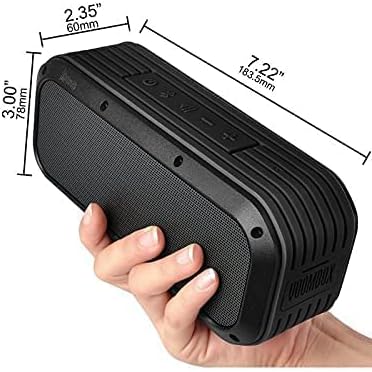
Image 2: The Divoom Voombox Outdoor Speaker held in a hand, illustrating its compact size and dimensions (approximately 7.22 inches long, 3.00 inches high, and 2.35 inches deep).
3. Operating Instructions
- Bluetooth Pairing:
- Ensure the speaker is powered on and in Bluetooth pairing mode (indicated by a flashing LED light, often blue).
- On your device (smartphone, tablet, etc.), go to Bluetooth settings and enable Bluetooth.
- Search for available devices. The speaker should appear as "Voombox Outdoor" or similar.
- Select the speaker from the list to pair. Once paired, the LED indicator will typically turn solid blue, and you may hear a confirmation sound.
- Audio Playback:
- Once paired, open your preferred music or audio application on your device.
- Start playback. Audio will now be routed through the Voombox Outdoor speaker.
- Volume Control: Use the '+' and '-' buttons on the speaker to adjust the volume. You can also control the volume from your connected device.
- Track Control: Some speakers may have buttons for skipping tracks forward/backward or play/pause. Refer to the specific button layout on your speaker.
4. Maintenance
- Cleaning: Use a soft, dry cloth to wipe the speaker's exterior. For stubborn dirt, a slightly damp cloth can be used, but ensure no water enters the ports. Do not use harsh chemicals or abrasive cleaners.
- Storage: When not in use for extended periods, store the speaker in a cool, dry place away from direct sunlight and extreme temperatures.
- Battery Care: To prolong battery life, avoid fully discharging the battery frequently. Charge the speaker regularly, even if not in constant use.

Image 3: An exploded diagram of the Divoom Voombox Outdoor Speaker, highlighting internal components such as passive radiators, shock-absorbing rubber, sturdy metal body, NdFeB full-range speaker, and high-performance tweeter. This illustrates the speaker's durable and high-quality construction.
5. Troubleshooting
| Problem | Possible Cause | Solution |
|---|---|---|
| Speaker does not power on. | Low battery; Power button not pressed correctly. | Charge the speaker fully. Press and hold the power button for 3-5 seconds. |
| No sound from speaker. | Volume too low; Not paired; Device volume low. | Increase speaker and device volume. Ensure speaker is paired correctly. |
| Cannot pair via Bluetooth. | Speaker not in pairing mode; Device Bluetooth off; Too far from device. | Ensure speaker is in pairing mode. Turn device Bluetooth off/on. Move speaker closer to device (within 10 meters). |
| Sound distortion. | Volume too high; Weak Bluetooth signal. | Reduce volume on speaker and device. Move speaker closer to the connected device. |
6. Specifications
| Feature | Detail |
|---|---|
| Model Name | Voombox Outdoor |
| Brand Name | Divoom |
| Manufacturer | Divoom |
| ASIN | B091K2LWQG |
| First Available Date | April 2, 2021 |
| Maximum Speaker Output Power | 7.5 Watts |
| Connectivity Technology | Wireless |
| Audio Output Mode | Stereo |
| Mounting Type | Tabletop |
| Materials | Metal, Plastic |
| Speaker Type | Portable |
| Special Features | Wireless, Bluetooth, Portable |
| Recommended Uses | Smartphones, Tablets, Music Players, Televisions, Computers |
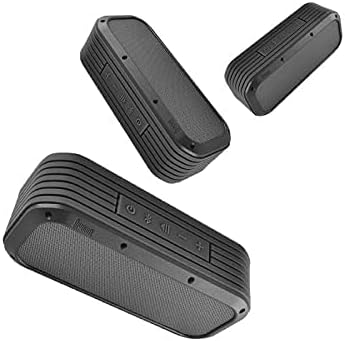
Image 4: Various angles of the Divoom Voombox Outdoor Speaker, demonstrating its compact and versatile design.
7. Warranty and Support
This Divoom product comes with a standard manufacturer's warranty. Please refer to the warranty card included in your product packaging for specific terms and conditions, including warranty period and coverage details.
For technical support, troubleshooting assistance, or warranty claims, please contact Divoom customer service through their official website or the contact information provided in your product documentation. Keep your purchase receipt as proof of purchase for warranty purposes.
Online Resources: For the latest updates, FAQs, and additional support, visit the official Divoom website: www.divoom.com
Related documentsVoombox Outdoor


Ask a question about this manual
Ask about setup, troubleshooting, compatibility, parts, safety, or missing instructions. Manuals+ will review the question and use this page’s manual context to help answer it.