
1. Introduction
Thank you for choosing the ARK-2173 61-Key Standard Keyboard. This electronic keyboard is designed for intermediate players and features a touch-sensitive keyboard, a wide range of voices, and various accompaniment functions to enhance your musical experience. This manual provides essential information for setup, operation, maintenance, and troubleshooting to ensure optimal performance and longevity of your instrument.
2. Safety Instructions
- Power Supply: Use only the specified power adapter. Ensure the voltage matches the requirements of your region.
- Water and Moisture: Do not expose the keyboard to water or excessive moisture. Avoid placing liquids near the instrument.
- Ventilation: Ensure proper ventilation around the keyboard. Do not block ventilation openings.
- Heat Sources: Keep the keyboard away from heat sources such as radiators, heat registers, stoves, or other apparatus (including amplifiers) that produce heat.
- Cleaning: Disconnect the power before cleaning. Use a soft, dry cloth. Do not use liquid cleaners or aerosol cleaners.
- Servicing: Do not attempt to service this product yourself. Refer all servicing to qualified service personnel.
3. Package Contents
Please check that all the following items are included in your package:
- ARK-2173 61-Key Standard Keyboard
- Power Adapter (Corded Electric)
- User Manual
4. Product Overview
The ARK-2173 is a versatile electronic keyboard featuring 61 touch-sensitive keys, designed to provide a dynamic playing experience. It includes a comprehensive sound library and various performance functions.
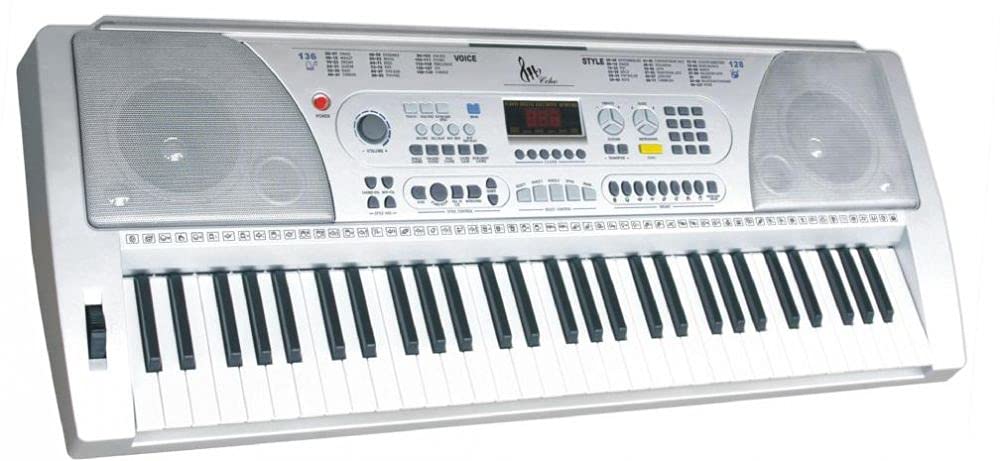
Figure 1: Front view of the ARK-2173 61-Key Standard Keyboard. This image shows the full keyboard layout, including the 61 keys, control panel with various buttons and a display screen, and the speaker grilles on either side.
Key Features:
- 61 Standard Keys with Touch Response
- 128 GM Standard Voices
- 1 Drum Kit
- 100 Auto Accompaniments
- Functions: Split Keyboard, Sustain, Vibrato, Transpose, Metronome
- Real-time Recording and Playback
- Connectivity: USB, 3.5mm Headphone Jack
5. Setup
5.1 Power Connection
- Ensure the keyboard's power switch is in the OFF position.
- Connect the power adapter to the DC IN jack on the back of the keyboard.
- Plug the power adapter into a standard electrical outlet.
5.2 Connecting Headphones
To practice privately, connect a standard 3.5mm stereo headphone jack into the HEADPHONE output port on the keyboard. The internal speakers will automatically mute when headphones are connected.
5.3 USB Connection
The keyboard features a USB port for connecting to a computer. This allows for MIDI data transfer, enabling the keyboard to be used as a MIDI controller with music software. Connect a USB cable (not included) from the keyboard's USB port to an available USB port on your computer.
6. Operating Instructions
6.1 Power On/Off
Press the POWER button to turn the keyboard ON. Press it again to turn the keyboard OFF.
6.2 Playing the Keyboard
The 61 keys are touch-sensitive, meaning the volume and timbre of the sound will change based on how hard or soft you press the keys. Experiment with different playing dynamics to achieve expressive performances.
6.3 Selecting Voices
The ARK-2173 includes 128 General MIDI (GM) standard voices. Use the VOICE selection buttons or the numeric keypad to browse and select different instrument sounds (e.g., Piano, Organ, Strings, Guitar).
6.4 Using Drum Kit
Access the dedicated drum kit to play various percussion sounds. Refer to the voice list in the appendix (if available) for specific drum assignments to keys.
6.5 Auto Accompaniment
The keyboard offers 100 auto accompaniments (rhythms/styles). Select a style using the STYLE selection buttons or numeric keypad. Press START/STOP to begin the accompaniment. Play chords in the lower section of the keyboard to control the harmony of the accompaniment.
6.6 Split Keyboard Function
Activate the SPLIT function to divide the keyboard into two sections, each with a different voice. This allows for playing a bass line with the left hand and a melody with the right hand, for example.
6.7 Sustain, Vibrato, Transpose, Metronome
- Sustain: Press the SUSTAIN button to lengthen the decay of notes.
- Vibrato: Activate VIBRATO to add a slight pitch modulation effect to the sound.
- Transpose: Use the TRANSPOSE buttons to shift the pitch of the entire keyboard up or down in semitone steps.
- Metronome: Press the METRONOME button to activate a click track for practicing with precise timing. Adjust the tempo as needed.
6.8 Recording and Playback
The keyboard supports real-time recording. Press the RECORD button to start recording your performance. Press PLAY to listen to your recorded track. This function is useful for self-evaluation and practice.
7. Maintenance
- Cleaning: Wipe the keyboard surface with a soft, dry, lint-free cloth. For stubborn dirt, slightly dampen the cloth with water and mild soap, then wipe dry immediately. Avoid abrasive cleaners.
- Storage: When not in use, store the keyboard in a clean, dry place away from direct sunlight, extreme temperatures, and humidity.
- Transportation: When transporting the keyboard, use appropriate padding or a carrying case to protect it from physical damage.
8. Troubleshooting
| Problem | Possible Cause | Solution |
|---|---|---|
| No sound |
|
|
| Keys not responding |
|
|
| Accompaniment not playing |
|
|
9. Specifications
| Feature | Specification |
|---|---|
| Brand | ARK |
| Model Name | ARK 2173 |
| Model Number | 2173 |
| Instrument Type | Electronic Keyboard |
| Number of Keys | 61 |
| Skill Level | Intermediate |
| Age Range | Adult |
| Finish Type | Matte |
| Style | Modern |
| Connector Type | USB |
| Connectivity Technology | USB |
| Power Source | Corded Electric |
| Headphone Jack | 3.5mm Jack |
10. Warranty and Support
For warranty information and technical support, please refer to the warranty card included with your product or visit the official ARK website. Keep your purchase receipt as proof of purchase for any warranty claims.
If you encounter any issues not covered in this manual, please contact ARK customer service for assistance.
