
Introduction
Thank you for choosing the Guess U0598G3 Men's Chronograph Watch. This manual provides essential information for the proper setup, operation, and maintenance of your timepiece. Please read it carefully to ensure optimal performance and longevity of your watch.
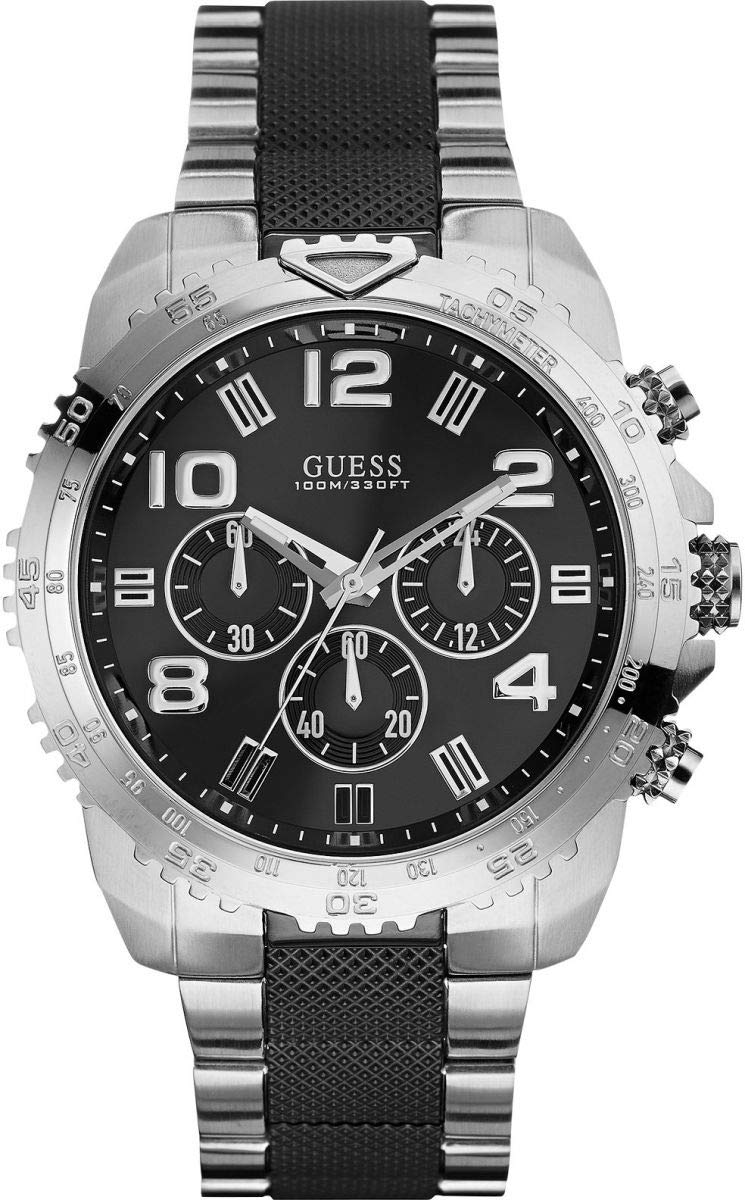
Image: Front view of the Guess U0598G3 Men's Chronograph Watch, showcasing the black dial, three sub-dials, silver-tone hands and markers, and stainless steel case and bracelet.
Setup
Setting the Time
- Pull the crown (B) out to position 2.
- Turn the crown to set the hour and minute hands to the desired time.
- Push the crown back into position 0.
Setting the Date (if applicable)
If your watch features a date display:
- Pull the crown (B) out to position 1.
- Turn the crown clockwise or counter-clockwise (depending on the movement) to set the correct date.
- Push the crown back into position 0.
Note: Avoid setting the date between 9:00 PM and 3:00 AM, as this may interfere with the date change mechanism.
Adjusting the Bracelet
The stainless steel bracelet can be adjusted for a comfortable fit. This typically involves removing or adding links. It is recommended to have this adjustment performed by a qualified jeweler or watch technician to prevent damage to the bracelet or clasp.
Operating the Chronograph
Your Guess U0598G3 watch is equipped with a chronograph function for measuring elapsed time.
Chronograph Buttons
- Button A (Top Pusher): Starts and stops the chronograph.
- Button C (Bottom Pusher): Resets the chronograph.
Using the Chronograph
- To start timing, press Button A. The chronograph second hand will begin to move.
- To stop timing, press Button A again. The chronograph hands will stop, indicating the elapsed time.
- To reset the chronograph, press Button C. All chronograph hands will return to their zero positions.
Note: Do not press the chronograph buttons while the watch is submerged in water, as this can compromise water resistance.
Maintenance
Cleaning Your Watch
- Wipe the watch case and bracelet regularly with a soft, dry cloth to remove dust and dirt.
- For stainless steel parts, a slightly damp cloth can be used, followed by a dry cloth.
- Avoid using harsh chemicals, solvents, or abrasive cleaners, as these can damage the watch's finish.
Water Resistance
Your watch has a water resistance of 100 meters (330 feet). This rating makes it suitable for swimming and snorkeling, but not for high-impact water sports or diving. Ensure the crown is fully pushed in before any contact with water.
Battery Replacement
The watch is powered by a quartz movement and requires a battery. When the battery runs low, the watch may stop or the second hand may skip. It is recommended to have the battery replaced by an authorized Guess service center or a professional watchmaker to ensure proper sealing and maintain water resistance.
Storage
When not wearing your watch, store it in a cool, dry place, away from direct sunlight, extreme temperatures, and strong magnetic fields. The original watch box is ideal for storage.
Troubleshooting
- Watch Not Running: Check if the crown is fully pushed in. If the watch still does not run, the battery may need replacement.
- Time Inaccurate: Ensure the time is set correctly. If the watch consistently gains or loses time, it may require servicing.
- Chronograph Hands Not Resetting to Zero: This can sometimes be corrected by following the chronograph reset procedure. If the issue persists, professional adjustment may be needed.
- Condensation Under Crystal: If you notice condensation, this indicates a loss of water resistance. Have the watch inspected immediately by a professional.
For issues not listed here, or if troubleshooting steps do not resolve the problem, please contact Guess customer support or an authorized service center.
Specifications
| Feature | Detail |
|---|---|
| Brand | Guess |
| Model Number | U0598G3 |
| Movement | Quartz |
| Display Type | Analog |
| Case Material | Stainless Steel |
| Case Diameter | 45 mm |
| Case Thickness | 12.5 mm |
| Dial Window Material | Mineral Crystal |
| Dial Color | Black |
| Band Material | Stainless Steel |
| Band Color | Black/Silver |
| Band Length | 23 mm |
| Clasp Type | Push Button |
| Water Resistance Depth | 100 meters (330 feet) |
| Special Features | Chronograph |
| Item Shape | Round |
| Department | Men |
| Age Range Description | Adult |
Warranty and Support
Your Guess U0598G3 watch is covered by a manufacturer's warranty against defects in materials and workmanship. Please refer to the warranty card included with your purchase for specific terms, conditions, and duration of coverage.
For warranty claims, service, or technical support, please contact Guess customer service or visit an authorized Guess service center. Keep your proof of purchase for warranty validation.
Important: Unauthorized repairs or modifications may void your warranty.
