
BEBIRD Note3 Pro Max
BEBIRD Note3 Pro Max User Manual
Ultimate Version Smart Visual Ear Cleaning Tweezer
1. Introduction
The BEBIRD Note3 Pro Max is an advanced smart ear wax removal tool designed for safe and effective ear cleaning. It features a high-definition camera, dual operating modes (tweezer and ear picker), and seamless integration with a mobile application for real-time visual guidance. This manual provides comprehensive instructions for setting up, operating, maintaining, and troubleshooting your device to ensure optimal performance and user safety.
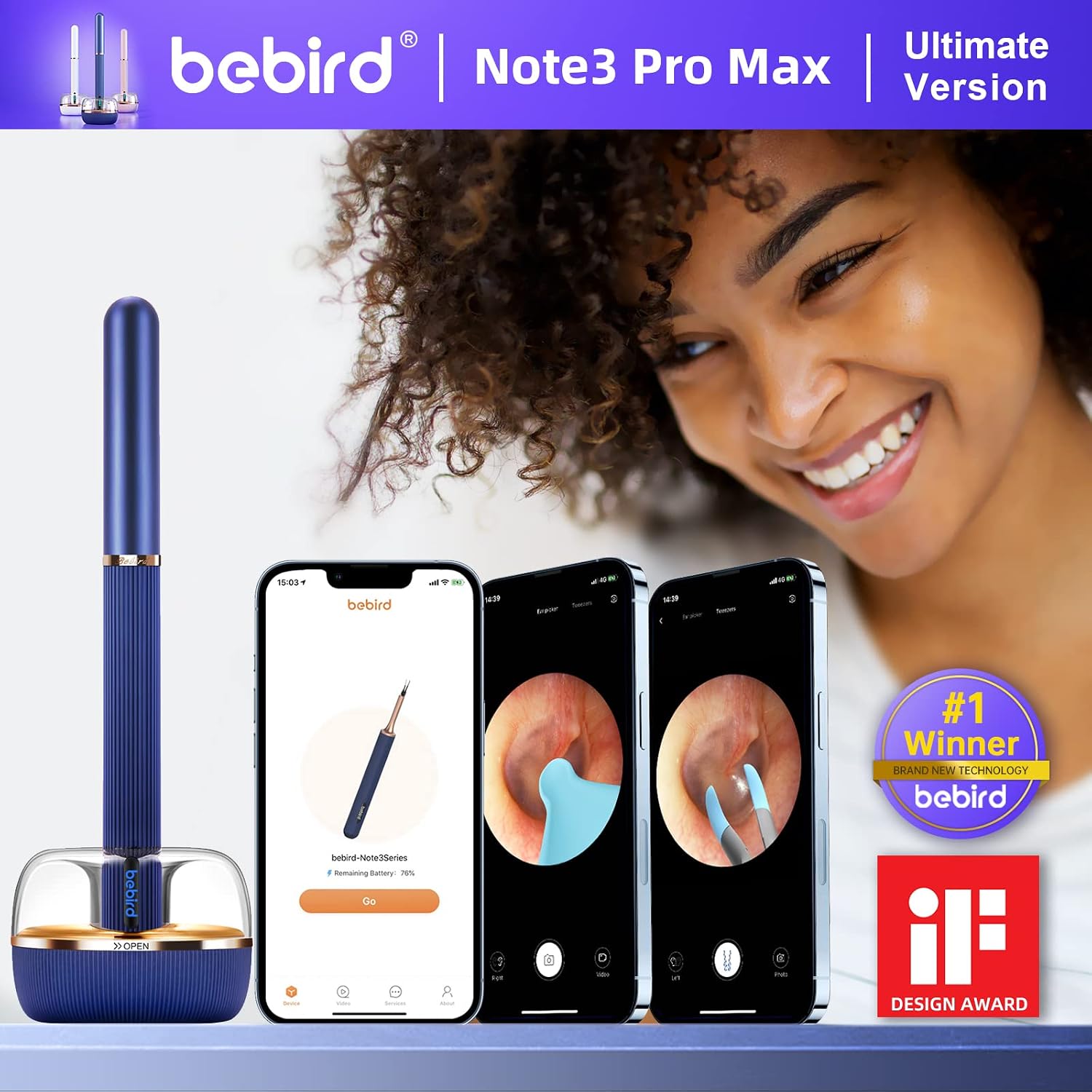
Image: BEBIRD Note3 Pro Max device alongside a smartphone displaying the live ear canal view.
2. Setup Guide
2.1. App Download and Installation
To begin, download the official BEBIRD application on your smartphone or tablet. The app is compatible with both Android and iOS systems.
- Scan the QR code provided in the product packaging or on the device itself.
- Alternatively, visit the official BEBIRD app download page: http://www.bebird.cn/app/en.html
- Follow the on-screen instructions to install the application.

Image: Visual guide for app download and initial connection steps.
2.2. Device Connection
Once the app is installed, connect your BEBIRD Note3 Pro Max to your device:
- Power on the BEBIRD Note3 Pro Max. The device will emit a Wi-Fi signal.
- Go to your phone's Wi-Fi settings and connect to the network named "bebird-XXXX" (where XXXX is a unique identifier for your device).
- Open the BEBIRD app. The device should automatically connect. If not, select the "Note3 Pro Max" model from the device list within the app.
- Tap "Start" to begin the visual ear cleaning process.
Video: Demonstrates the setup and connection process for the BEBIRD Note3 Pro Max.
3. Operating Instructions
3.1. Understanding Dual Modes: Tweezer and Ear Picker
The BEBIRD Note3 Pro Max offers two primary modes for ear wax removal, catering to different needs and types of earwax:
- Tweezer Mode: Utilizes a high-precision micro-mechanical arm with rubber-covered tips. This mode is ideal for grasping and removing complex or larger foreign bodies and stubborn earwax. The open and close degree protection system ensures safe operation.
- Ear Picker Mode: Features a spade-shaped food-grade silicone ear scoop. This mode is suitable for general ear cleaning, effective for both oily and dry earwax.

Image: Simulated use scenarios illustrating the ear pick and tweezer modes within the ear canal.

Image: Detailed view of the micro-robotic arm technology and ear spoon attachment mechanism.
3.2. Visual Cleaning and Safety Features
The device integrates a 10-megapixel HD endoscope with a 360° wide-angle lens and 6-axis gyroscope for precise and safe operation. The latest Wi-Fi chip ensures high-quality, real-time image transmission to your smartphone.
- Real-time View: Observe the ear canal clearly on your phone screen, allowing for accurate and controlled cleaning.
- 6-Axis Gyroscope: Provides stable and accurate measurement, ensuring precise movement and preventing accidental contact with sensitive areas.
- LED Shadowless Light: Illuminates the ear canal effectively, eliminating shadows for a clear view.
- Non-Sensing Temperature: The device maintains a temperature close to the human body, ensuring comfort and safety during use, even for children.
- App Features: The BEBIRD app supports left and right ear modes, allows you to take pictures and record videos of the cleaning process, and can be used for daily checks of ear, nose, and mouth health.

Image: Overview of the state-of-the-art technology integrated into the BEBIRD Note3 Pro Max.
3.3. Accessories and Family Use
The BEBIRD Note3 Pro Max comes with 12 different accessories in 4 distinct colors, making it suitable for the entire family. The food-grade silicone ear spoon heads and robotic arm are round and skin-friendly, ensuring a safe and comfortable experience for all ages.

Image: Contents of the BEBIRD Note3 Pro Max package, highlighting the various ear spoons and cleaning tools.
4. Maintenance
4.1. Cleaning the Device
Regular cleaning ensures hygiene and extends the lifespan of your device:
- After each use, remove the ear spoon or tweezer head.
- Use the provided cleaning brush to remove any visible earwax or debris from the tip and camera lens.
- For thorough cleaning, use the alcohol cotton swabs to gently wipe the camera lens and the accessory tips. Ensure the lens is completely dry before next use.
- Do not submerge the main device body in water.
4.2. Charging
The BEBIRD Note3 Pro Max features a convenient Type-C magnetic charging base.
- Place the device onto the magnetic charging base. Ensure it is properly seated for charging to begin.
- Connect the Type-C cable to the charging base and a suitable power source (e.g., USB wall adapter, computer USB port).
- The device's indicator light will show charging status.

Image: The magnetic charging base and accessory storage for the BEBIRD Note3 Pro Max.
5. Troubleshooting
If you encounter issues with your BEBIRD Note3 Pro Max, refer to the following common problems and solutions:
| Problem | Possible Cause | Solution |
|---|---|---|
| No camera signal / Black screen in app |
|
|
| Video latency or hiccups |
|
|
| Device not charging |
|
|
| Tweezer tips or ear spoons break easily |
|
|
6. Specifications
| Feature | Detail |
|---|---|
| Model | Note3 Pro Max |
| Camera Resolution | 10 Megapixel HD |
| Lens Length | 3.7 mm |
| Gyroscope | 6-Axis Smart Gyroscope |
| Connectivity | High-Speed Wi-Fi Chip |
| Battery Capacity | 300mAh (approx.) |
| Charging Interface | Type-C Magnetic Charging Base |
| Accessories Included | 12 different ear spoons (3 types, 4 colors), cleaning brush, alcohol cotton swabs, liquid cotton swabs. |
| Package Dimensions | 8.19 x 3.54 x 2.6 inches |
| Weight | 12.31 ounces |
| Manufacturer | BEBIRD |
| Date First Available | April 1, 2021 |

Image: Detailed comparison of BEBIRD models, highlighting the Note3 Pro Max's features.
7. Warranty and Support
For warranty information, technical support, or any inquiries regarding your BEBIRD Note3 Pro Max, please refer to the official BEBIRD website or contact their customer service directly. Keep your purchase receipt as proof of purchase for warranty claims.
- Manufacturer: BEBIRD
- Official Website: Please visit the BEBIRD official website for the most up-to-date support information and contact details.
- App Support: For app-related issues, ensure your app is updated to the latest version.
Related documentsNote3 Pro Max


Ask a question about this manual
Ask about setup, troubleshooting, compatibility, parts, safety, or missing instructions. Manuals+ will review the question and use this page’s manual context to help answer it.