
DEWALT DCH416B
DEWALT 60V MAX* 1-1/4 In. Brushless SDS PLUS Rotary Hammer
Model: DCH416B
Introduction
The DEWALT DCH416B 60V MAX* 1-1/4 In. Brushless SDS PLUS Rotary Hammer is engineered for high-performance drilling and chipping in demanding applications. This tool is designed for professionals requiring robust power and advanced safety features for tasks such as structural connections, beam and column anchorage, and various mounting applications in concrete.
Key features include a powerful brushless motor, a durable German-engineered mechanism, and 4.5 Joules of impact energy for efficient material removal. It incorporates DEWALT's PERFORM & PROTECT™ product line technologies, including the Anti-Rotation E-CLUTCH® System and SHOCKS Active Vibration Control® System, enhancing user safety and comfort during operation.

Figure 1: Front view of the DEWALT 60V MAX* 1-1/4 In. Brushless SDS PLUS Rotary Hammer (Tool Only).
Important Safety Information
Always read and understand all safety warnings, instructions, illustrations, and specifications provided with this power tool. Failure to follow all instructions listed below may result in electric shock, fire, and/or serious injury.
- Work Area Safety: Keep work area clean and well lit. Cluttered or dark areas invite accidents.
- Electrical Safety: Do not expose power tools to rain or wet conditions. Water entering a power tool will increase the risk of electric shock.
- Personal Safety: Always wear eye protection. Use hearing protection when operating the tool for extended periods. Wear a dust mask when working in dusty conditions.
- Tool Use and Care: Do not force the power tool. Use the correct power tool for your application. The correct power tool will do the job better and safer at the rate for which it was designed.
- Battery Tool Use and Care: This tool is designed to be used with DEWALT 60V MAX* batteries. Ensure the battery pack is fully charged before use.
- Proposition 65 Warning: This product can expose you to chemicals including lead, which is known to the State of California to cause cancer and birth defects or other reproductive harm. For more information go to www.P65Warnings.ca.gov.
Components and Features
Familiarize yourself with the various parts and advanced features of your rotary hammer for optimal performance and safety.
Included Components:
- DCH416 Rotary Hammer (Tool Only)
- 360° Side Handle
- Depth Rod

Figure 2: The rotary hammer with the 360° side handle and depth rod installed.
Key Features:
- Brushless Motor: Provides efficient performance and extended runtime compared to brushed motors.
- E-CLUTCH® Anti-Rotation System: This safety feature detects bind-up situations and automatically shuts down the tool to reduce the risk of sudden, forceful rotation.
- SHOCKS Active Vibration Control® System: Significantly reduces vibration felt by the user at the handles, improving comfort and reducing fatigue during prolonged use.
- WIRELESS TOOL CONTROL™: Allows the tool to wirelessly link with compatible DEWALT dust extractors (e.g., DCV585 60V MAX* dust extractor) for remote activation, enhancing dust management on the job site.
- Tag-Ready: Features a designated area for DCE041 Tag placement, allowing tracking with the TOOL CONNECT™ System via the DEWALT Site Manager™ app.

Figure 3: Detail of the E-CLUTCH® indicator light, which illuminates when the system is active.

Figure 4: The WIRELESS TOOL CONTROL™ button, used for pairing with compatible dust extractors.
Setup
1. Attaching the Side Handle and Depth Rod:
- Loosen the side handle clamp by rotating the handle counter-clockwise.
- Slide the side handle onto the front of the tool until it is in the desired position.
- Insert the depth rod into the hole on the side handle. Adjust the depth rod to the desired drilling depth.
- Tighten the side handle by rotating it clockwise until secure.
2. Installing the Battery Pack:
This tool is sold as "Tool Only" and requires a DEWALT 60V MAX* battery pack (sold separately).
- Ensure the tool's trigger is in the OFF position.
- Align the battery pack with the battery port on the tool.
- Slide the battery pack into the tool until it clicks securely into place.
- To remove the battery, press the release button on the battery pack and pull it out of the tool.
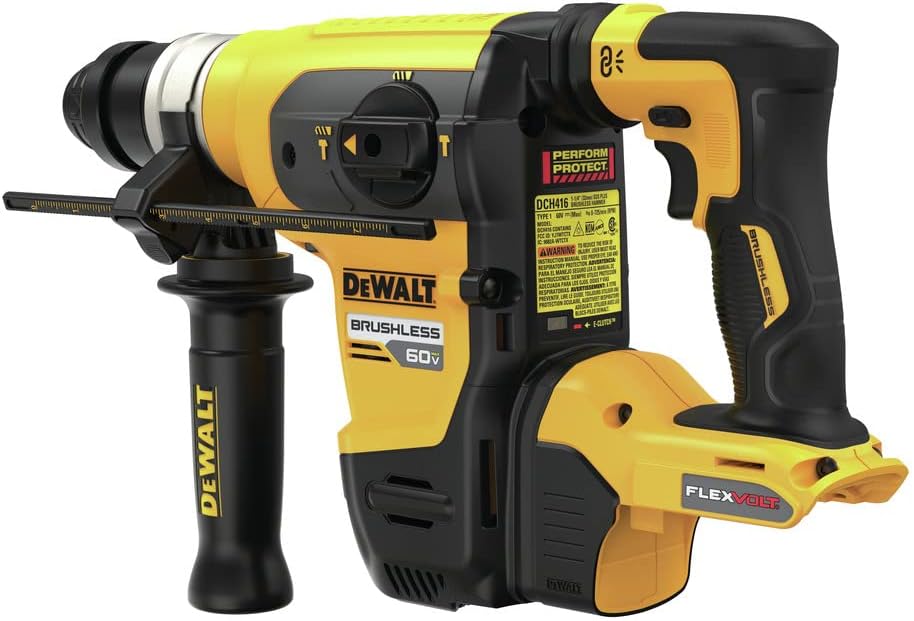
Figure 5: The rotary hammer with a compatible DEWALT 60V MAX* battery pack installed.
3. Installing SDS PLUS Bits:
- Clean the shank of the SDS PLUS bit.
- Pull back the chuck collar on the tool.
- Insert the bit into the chuck until it stops.
- Release the chuck collar. The bit should be held securely but have a slight axial play, which is normal for SDS PLUS systems.
- To remove the bit, pull back the chuck collar and pull the bit out.
Operating Instructions
1. Powering On/Off:
- To turn the tool ON, depress the trigger switch.
- To turn the tool OFF, release the trigger switch.
2. Mode Selection:
The rotary hammer features a mode selector switch to choose between different operating modes:
- Rotary Hammer Mode: For drilling in concrete, masonry, and stone with hammer action.
- Drill Only Mode: For drilling in wood, metal, and plastics without hammer action.
- Chipping/Chisel Mode: For light chipping, chiseling, and demolition work (bit rotation locked).
Rotate the mode selector switch to the desired icon for your application. Always ensure the tool is off before changing modes.
3. WIRELESS TOOL CONTROL™ Operation:
To activate the WIRELESS TOOL CONTROL™ feature and pair with a compatible DEWALT dust extractor:
- Ensure both the rotary hammer and the dust extractor are powered on and within range.
- Press and hold the WIRELESS TOOL CONTROL™ button on the rotary hammer until the indicator light flashes.
- Follow the pairing instructions for your specific DEWALT dust extractor. Once paired, the dust extractor will activate automatically when the rotary hammer's trigger is pulled.
4. E-CLUTCH® and SHOCKS® Systems:
- The E-CLUTCH® System is an automatic safety feature. If the drill bit binds in the material, the system will detect the sudden increase in torque and shut down the motor to prevent uncontrolled rotation of the tool. The E-CLUTCH® indicator light will illuminate. Release the trigger, clear the bind, and restart the tool.
- The SHOCKS Active Vibration Control® System is continuously active during operation, reducing vibration transmitted to the user's hands. This system requires no user input.
Maintenance
Regular maintenance ensures the longevity and optimal performance of your DEWALT rotary hammer.
1. Cleaning:
- After each use, clean the tool with a soft, damp cloth. Do not use harsh chemicals or abrasive cleaners.
- Periodically blow out dust and debris from the motor vents using dry compressed air.
- Keep the chuck clean and free of debris to ensure proper bit insertion and removal.
2. Lubrication:
- Apply a small amount of SDS PLUS grease to the shank of drill bits before insertion into the chuck. This helps reduce wear and improves performance.
3. Storage:
- Store the tool in a dry, secure location out of reach of children.
- Remove the battery pack from the tool before storage.
- Avoid storing the tool in direct sunlight or areas with extreme temperatures.
Troubleshooting
This section addresses common issues you might encounter with your rotary hammer.
| Problem | Possible Cause | Solution |
|---|---|---|
| Tool does not turn on. | Battery not charged or improperly inserted. | Ensure battery is fully charged and properly seated in the tool. |
| Tool stops during operation (E-CLUTCH® activated). | Bit bind-up in material. | Release trigger, remove tool from material, clear obstruction, and restart. |
| Reduced drilling performance. | Worn drill bit; improper mode selection; excessive pressure. | Replace worn bits. Ensure correct mode is selected. Apply appropriate pressure, allowing the tool to do the work. |
| Excessive vibration. | Damaged bit; internal issue. | Inspect bit for damage. If vibration persists, contact DEWALT service. |
For issues not listed here or for further assistance, please contact DEWALT customer support or an authorized service center.
Specifications
| Specification | Value |
|---|---|
| Brand | DEWALT |
| Model Number | DCH416B |
| Power Source | Battery Powered (60V MAX*) |
| Impact Energy | 4.5 Joules |
| Maximum Rotational Speed | 4200 RPM |
| Maximum Chuck Size | 0.5 Inches (for SDS PLUS bits) |
| Item Weight | 10.2 Pounds |
| Product Dimensions | 18"L x 10.87"W x 18"H |
| Included Components | DCH416 Rotary Hammer; 360° Side Handle; Depth Rod |
| Special Features | Brushless Motor, E-CLUTCH® System, SHOCKS Active Vibration Control®, WIRELESS TOOL CONTROL™ |
Warranty and Support
DEWALT provides a limited warranty for its products. For specific warranty terms and conditions, please refer to the official DEWALT website or the warranty card included with your product. Keep your proof of purchase for warranty claims.
For product support, service, or to locate an authorized service center, please visit the official DEWALT website or contact their customer service department.
You can find more information and products at the Official DEWALT Store on Amazon.
Related documentsDCH416B


Ask a question about this manual
Ask about setup, troubleshooting, compatibility, parts, safety, or missing instructions. Manuals+ will review the question and use this page’s manual context to help answer it.