
1. Introduction
The Adoric Digital Caliper is a high-precision measuring instrument designed for accurate internal, external, step, and depth measurements. Constructed from industrial-grade stainless steel, it offers durability and reliable performance for various applications, from household tasks to professional use. This manual provides detailed instructions for its setup, operation, and maintenance to ensure optimal performance and longevity.
2. Product Overview
Familiarize yourself with the components of your Adoric Digital Caliper:
- Big Jaws: For external diameter measurements.
- Small Jaws: For internal diameter measurements.
- LCD Screen: Displays measurement readings.
- On/Off Button: Powers the device on or off.
- MM/Inch/Fraction Button: Toggles between measurement units.
- Zero Button: Resets the display to zero at any point.
- Ruler: The main scale of the caliper.
- Probe: For depth measurements.
- Locking Screw: Secures the jaws in position for stable readings.

3. Setup
Your Adoric Digital Caliper comes with one CR2 battery pre-installed and a spare. A small screwdriver is included for battery replacement.
3.1 Battery Installation/Replacement
- Locate the battery compartment cover on the back of the LCD unit.
- Use the provided screwdriver to gently remove the cover.
- Insert the CR2 battery with the positive (+) side facing up.
- Replace the battery compartment cover and secure it with the screw.
Note: The caliper will automatically turn on when the slider is moved and will shut off after 5 minutes of inactivity to conserve battery life.
4. Operating Instructions
4.1 Power On/Off
- To turn on the caliper, press the ON/OFF button or simply slide the measuring jaws.
- To turn off the caliper, press and hold the ON/OFF button. The device will also automatically power off after 5 minutes of inactivity.
4.2 Zero Setting Function
The zero setting function allows you to set a reference point for your measurements at any position.
- Ensure the caliper is powered on.
- Close the jaws completely and press the ZERO button to set the display to 0.00. This is the absolute zero.
- For relative measurements, position the jaws at your desired starting point and press the ZERO button. The display will reset to 0.00, and subsequent movements will show the relative distance from this point.
4.3 Unit Conversion (Inch/mm/Fraction)
The caliper supports three measurement units: inches, millimeters, and fractions.
- Press the MM/INCH/F button to cycle through the available units. The selected unit will be displayed on the LCD screen.

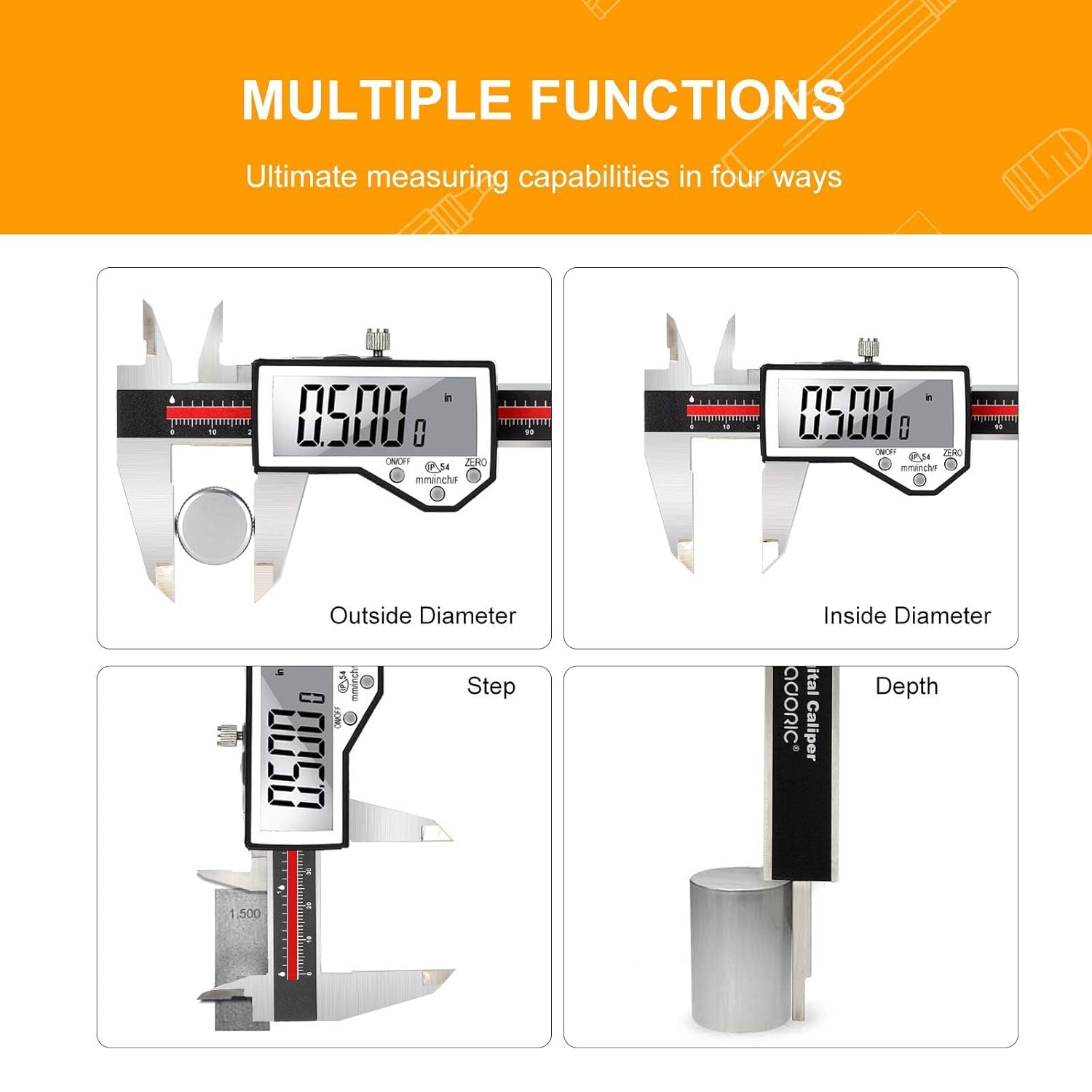
4.4 Measurement Versatility
The Adoric Digital Caliper can perform four types of measurements:
- Outside Diameter Measurement: Use the large jaws to measure the external dimensions of an object.
- Inside Diameter Measurement: Use the small jaws to measure the internal dimensions, such as the diameter of a hole or pipe.
- Depth Measurement: Extend the depth probe into a hole or recess to measure its depth.
- Step Measurement: Use the step measuring face to measure the height or length of a step or shoulder on an object.
5. Maintenance
Proper maintenance ensures the accuracy and longevity of your digital caliper.
- Cleaning: Keep the caliper clean and dry. Wipe it with a soft, dry cloth after each use. Avoid using solvents or harsh chemicals.
- Water Exposure: Do not immerse the caliper in water. While it has an IP54 waterproof rating for splash resistance, immersion can cause damage.
- Storage: Store the caliper in its protective case when not in use to prevent damage and keep it free from dust and debris.
- Battery Conservation: To save energy, remember to turn off the power when the caliper is not in use, or rely on the auto-shutdown feature.

6. Troubleshooting
If you encounter issues with your caliper, refer to the following common solutions:
- Inaccurate Readouts: If the display shows inaccurate readings, slide the measuring jaws completely closed to the "0" point. Then, press the ZERO button to recalibrate.
- Blank or Fading Display: This usually indicates a low battery. Replace the CR2 battery as described in Section 3.1.
- Jaws Not Moving Smoothly: Clean the measuring surfaces and the slider mechanism. Ensure no debris is obstructing movement. A small amount of light machine oil can be applied to the sliding surface if necessary, then wipe off excess.
7. Specifications
| Feature | Specification |
|---|---|
| Brand | Adoric |
| Model | RFS |
| Material | Stainless Steel |
| Measurement Range | 0-6 inches / 0-150 mm |
| Accuracy | +/- 0.001” / 0.03 mm |
| Resolution | 0.0005" / 0.01 mm |
| Units | Inch, Millimeter, Fraction |
| Display | Extra-Large LCD Screen |
| Power Source | 1 x CR2 Battery (included) |
| Auto-Off | After 5 minutes of inactivity |
| Product Dimensions | 9"L x 3"W |
8. Warranty and Support
For warranty information and customer support, please refer to the product packaging or contact Adoric customer service directly. You can also visit the official Adoric store on Amazon for more information: Adoric Store.