
realme Buds Q2
Contents
realme Buds Q2 Truly Wireless Earbuds User Manual
Model: Buds Q2
Introduction
This manual provides detailed instructions for the setup, operation, and maintenance of your realme Buds Q2 Truly Wireless Earbuds. Please read this guide thoroughly to ensure optimal performance and longevity of your device.
Package Contents
- realme Buds Q2 Earbuds (Left and Right)
- Charging Case
- USB Type-C Charging Cable
- Eartips (various sizes)
- User Guide
Product Overview

Image: realme Buds Q2 earbuds inside their charging case, with the lid open, showing the grey color and the iridescent touch panels on the earbuds.

Image: A close-up view of the individual realme Buds Q2 earbuds, highlighting their ergonomic design and the charging contacts.
The realme Buds Q2 feature a compact design with an in-ear fit. Each earbud is equipped with touch controls for various functions. The accompanying charging case provides extended battery life and secure storage.
Setup
1. Charging the Earbuds and Case
Before first use, fully charge the earbuds and charging case. Place the earbuds into the charging case and connect the USB Type-C cable to the charging port on the case. Connect the other end to a compatible USB power adapter (not included).
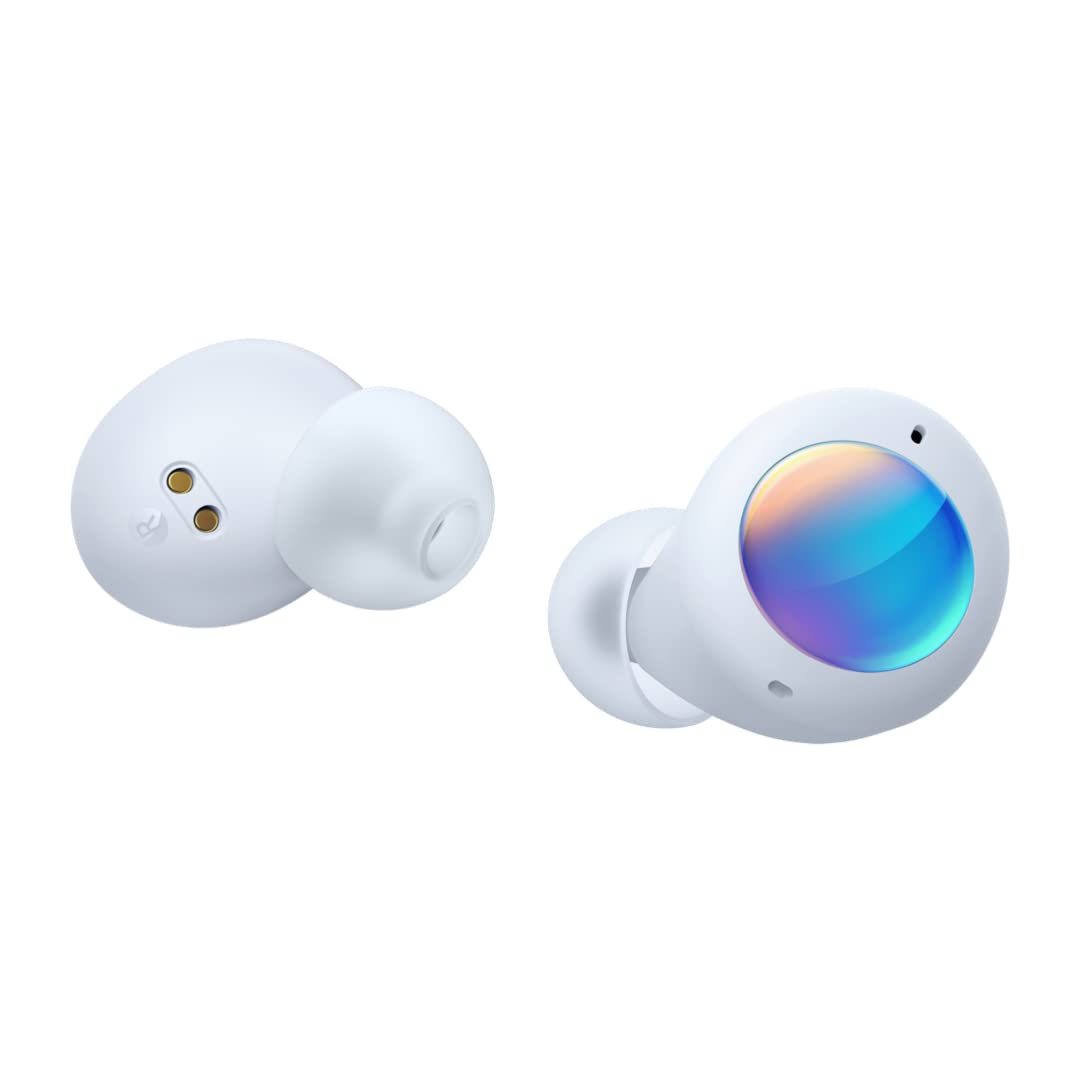
Image: The realme Buds Q2 charging case with a USB Type-C cable connected, indicating the charging port.
- The indicator light on the charging case will illuminate to show charging status.
- A full charge provides up to 28 hours of total playback time with the charging case.
- Fast charging provides up to 3 hours of battery life with just 10 minutes of charging.
2. Bluetooth Pairing
- Ensure the earbuds are charged.
- Open the charging case. The earbuds will automatically enter pairing mode.
- On your smartphone or device, enable Bluetooth and search for available devices.
- Select "realme Buds Q2" from the list of devices to connect.
- A voice prompt will confirm successful pairing.

Image: A smartphone screen displaying a pairing notification for realme Buds Q2, with the earbuds and case nearby.
The earbuds support Google Fast Pair technology for quick and seamless connection with compatible Android devices.
3. realme Link App
Download the realme Link app from your device's app store to unlock additional features and customization options for your Buds Q2.
- Customize touch controls.
- Switch between Noise Cancellation, Normal, and Transparency modes.
- Adjust sound effects (e.g., Bass Boost, Dynamic, Bright).
- Enable Gaming Mode.
- View battery levels for each earbud and the charging case.
- Update firmware.

Image: A smartphone screen showing the realme Link app interface with options for noise control, mode switching, game mode, and sound effects for the realme Buds Q2.
Operating Instructions
1. Wearing the Earbuds
Insert the earbuds into your ears and gently rotate them to find a comfortable and secure fit. Ensure the eartips create a good seal for optimal sound quality and noise cancellation.
2. Touch Controls
The realme Buds Q2 feature intelligent touch controls on each earbud. The functions can be customized via the realme Link app.

Image: A visual guide demonstrating the touch control gestures on the realme Buds Q2, including double-tap, press and hold one side, triple-tap, and press and hold both sides.
- Double-tap: Play/Pause music, Answer/End a call.
- Press and hold one side: Reject a call.
- Triple-tap: Go to the next song.
- Press and hold both sides: Switch between Noise Cancelling mode and Transparency mode.
3. Active Noise Cancellation (ANC) and Transparency Mode
The earbuds offer Active Noise Cancellation (ANC) to reduce external noise by up to 25dB, providing an immersive listening experience. Transparency Mode allows you to hear your surroundings without removing the earbuds.

Image: An illustration showing how Active Noise Cancellation reduces ambient noise (e.g., office chaos) to enhance the music listening experience.

Image: Two individuals interacting while wearing earbuds, illustrating the use of Transparency Mode for clear communication.
Switch between these modes by pressing and holding both earbuds simultaneously, or through the realme Link app.
4. Gaming Mode
Activate Gaming Mode via the realme Link app to experience 88ms super low latency, ensuring perfect synchronization between audio and video during gaming sessions.

Image: realme Buds Q2 earbuds positioned near a smartphone displaying a game, indicating the use of Gaming Mode for low-latency audio.
Maintenance
1. Cleaning
- Regularly clean the earbuds and charging case with a soft, dry, lint-free cloth.
- Remove eartips and clean them with water and mild soap if necessary. Ensure they are completely dry before reattaching.
- Clean the charging contacts on both the earbuds and inside the case to ensure proper charging.
2. Storage
When not in use, store the earbuds in their charging case to protect them from dust, damage, and to keep them charged.
Avoid exposing the earbuds to extreme temperatures, humidity, or direct sunlight.
Troubleshooting
| Issue | Possible Solution |
|---|---|
| Earbuds not pairing | Ensure earbuds are charged. Place them back in the case, close the lid, then open it again to re-enter pairing mode. Check your device's Bluetooth settings. |
| Only one earbud working | Ensure both earbuds are charged. Try resetting the earbuds (refer to realme Link app or product support for specific reset instructions). Re-pair with your device. |
| Poor sound quality | Ensure eartips provide a good seal. Clean earbuds and charging contacts. Check audio source quality. Disable ANC if not needed. |
| Earbuds not charging | Ensure charging cable is securely connected. Clean charging contacts on earbuds and case. Try a different USB power source or cable. |
| Touch controls unresponsive | Ensure your fingers are clean and dry. Try restarting the earbuds by placing them in the case and closing the lid. Check realme Link app for customization settings. |
Specifications
| Feature | Detail |
|---|---|
| Model Name | realme Buds Q2 |
| Connectivity | Bluetooth v5.2 |
| Noise Control | Active Noise Cancellation (up to 25dB) |
| Audio Driver | 10mm Bass Boost Driver |
| Battery Life | Up to 28 hours (with charging case) |
| Fast Charging | 10 minutes charge for 3 hours playback |
| Charging Port | USB Type-C |
| Water Resistance | IPX5 (Water Resistant) |
| Low Latency | 88ms Super Low Latency Gaming Mode |
| Control Method | Touch, App (realme Link) |
| Weight | 60 g (total) |
| Dimensions | 6.03 x 2.09 x 2.38 cm |
Warranty and Support
For warranty information and technical support, please refer to the warranty card included in your package or visit the official realme website. Keep your proof of purchase for warranty claims.
Ask a question about this manual
Ask about setup, troubleshooting, compatibility, parts, safety, or missing instructions. Manuals+ will review the question and use this page’s manual context to help answer it.