
Introduction
Thank you for choosing the INNOTALK Wireless Headset, Model W780EHSav96. This professional-grade wireless headset is designed to enhance your communication experience with Avaya 16xx and 96xx series desk phones. Featuring DECT 6.0 technology, a noise-canceling microphone, and an Electronic Hook Switch (EHS) cable for remote call answering, this headset provides freedom of movement and crystal-clear audio quality for business calls.
Package Contents
Please verify that all items listed below are included in your package:
- Wireless Headset
- Magnetic Headset Charging Stand
- Visual Glass Call Indicator
- Busy Light Indicator Jack
- Remote Hook Switch Cable (EHS) Compatible with Avaya 1608, 1616, 9608, 9611, 9620, 9621, 9630, 9640, 9641G, 9650, 9670
- Power Adapter
- Telephone Cord
- User Manual (this document)
- Quick Setup Guide
- Black and Wine color headset covers

Image: Overview of the INNOTALK Wireless Headset and its included accessories, such as the charging dock, headset, and optional busy light.
Setup Guide
1. Connecting to Your Avaya Desk Phone
The INNOTALK Wireless Headset is designed for seamless integration with specific Avaya desk phone models using the included Electronic Hook Switch (EHS) cable. This cable allows for remote call answering and ending directly from your headset.
- Connect one end of the provided telephone cord to the "TEL" port on the back of the headset charging stand.
- Connect the other end of the telephone cord to the "HEADSET" port on your Avaya desk phone.
- Connect the EHS cable to the designated EHS port on the headset charging stand. Refer to the EHS cable's specific instructions for connecting it to your Avaya phone's auxiliary or headset port, as connections may vary slightly by phone model.
- Connect the power adapter to the "POWER" port on the charging stand and plug it into a wall outlet.
- Place the wireless headset onto the charging stand. Ensure it is seated correctly and the charging indicator light illuminates.

Image: Visual guide for connecting the headset base to an Avaya desk phone, highlighting the EHS cable and RJ9 adapter.
2. Compatibility
This headset system is compatible with the following Avaya desk phone models:
- Avaya 1608, 1616
- Avaya J179
- Avaya 9608, 9611, 9620, 9621, 9630, 9640, 9641, 9650, 9670
Note: This headset is designed for desk phone calls only and is not intended for computer calls.

Image: Compatibility chart for Avaya phone models, emphasizing the included EHS device.
Operating Instructions
Call Control
- Answering/Ending Calls: With the EHS cable properly connected, you can answer or end calls by pressing the dedicated call control button on the headset.
- Volume Control: Use the volume up (+) and volume down (-) buttons on the headset to adjust the listening volume.
- Mute: Press the mute button on the headset to temporarily disable your microphone. Press it again to unmute.
- Incoming Call Notification: The headset and charging stand will provide an audible and visual indication of incoming calls.
Wireless Range and Technology
The INNOTALK Wireless Headset utilizes advanced DECT 6.0 technology, providing a robust and secure wireless connection. This technology allows you to roam up to 300 feet (approximately 90 meters) from your desk phone while maintaining clear communication. The actual range may vary depending on environmental factors such as obstacles and interference.
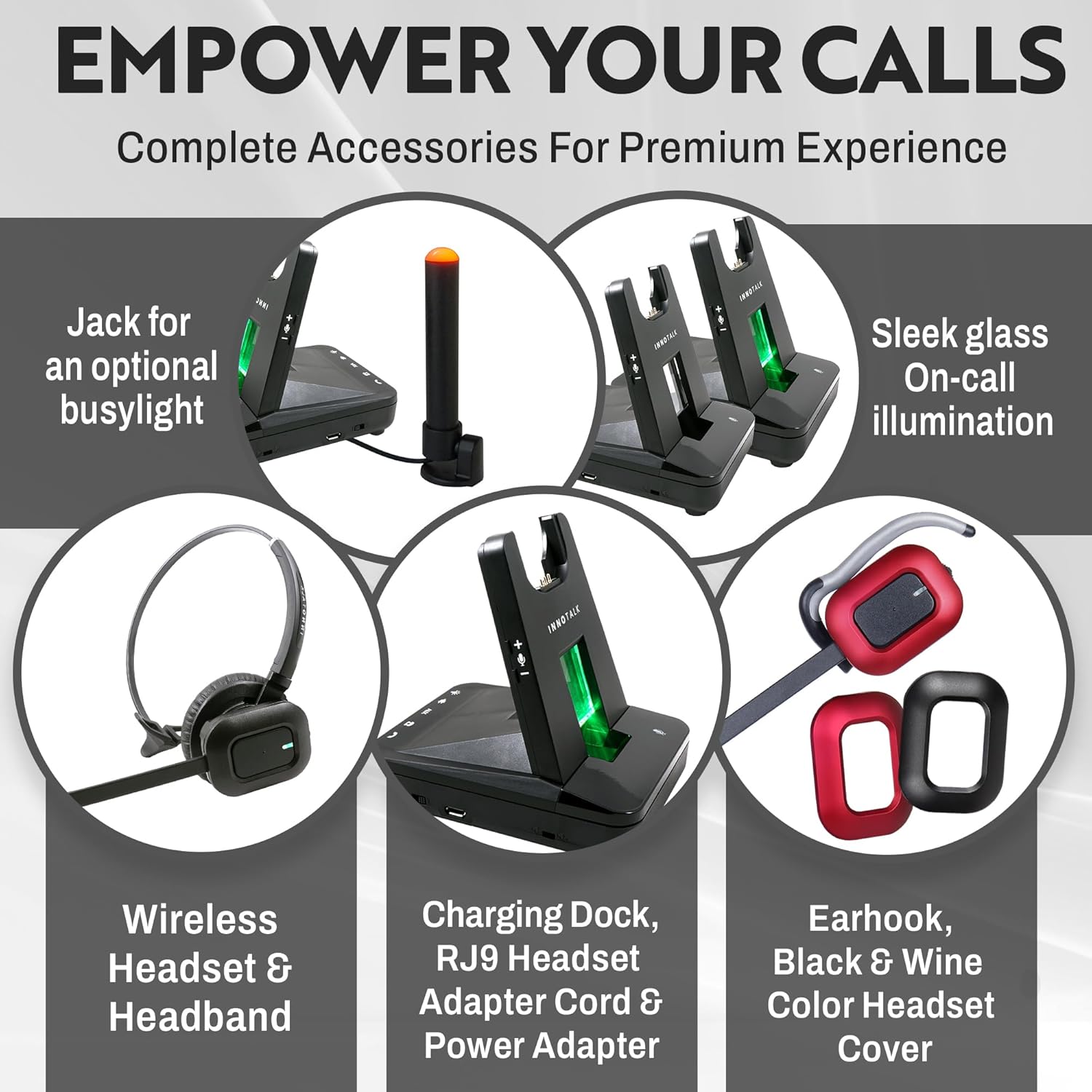
Image: Depiction of the headset's wireless range using DECT 6.0 technology, showing freedom of movement from the desk phone.
Noise-Canceling Microphone
The headset features a digital noise-canceling microphone that filters out background noise, ensuring that your voice is heard clearly by the person on the other end of the call. Digital Signal Processing (DSP) further enhances sound quality and helps eliminate Wi-Fi interference.

Image: Illustration of the noise-canceling microphone's function, showing how it improves clarity for the listener.
Features Overview
- Extended Talk Time: Enjoy up to 12 hours of talk time on a single charge, with approximately 50 hours of standby time. Actual talk time may vary based on usage and volume levels.
- Acoustic Protection: Built-in Acoustic Protection Technology safeguards your ears from sudden loud noises.
- Magnetic Charging Stand: The elegant magnetic charging stand provides a secure and convenient place to store and charge your headset.
- Visual Call Indicator: The charging stand features a glass window with on-call illumination, providing a visual indication of call status.
- Busy Light Indicator Jack: A dedicated jack is available for connecting an optional busy light indicator, useful for call center environments.
- Comfortable Design: The headset features a slim design with a 180-degree rotatable speaker and soft, breathable memory-protein ear pads (2.4-inch diameter) for extended comfort during long calls.
- Customizable Appearance: The headset comes with changeable black and wine-colored covers, allowing you to personalize its look.
Image: Detailed view of the headset's ergonomic features, including the rotatable speaker and comfortable ear pad.
Maintenance
Proper care and maintenance will extend the life of your INNOTALK Wireless Headset.
- Cleaning: Use a soft, dry cloth to clean the headset and charging stand. Avoid using harsh chemicals or abrasive materials.
- Storage: When not in use, always place the headset on its charging stand. Store the device in a cool, dry place away from direct sunlight and extreme temperatures.
- Battery Care: To maintain optimal battery life, avoid fully discharging the headset battery frequently. Charge the headset regularly, even if not in daily use.
- Earpad Replacement: The ear pads are designed for comfort and can be replaced if they show signs of wear.
Troubleshooting
If you encounter issues with your INNOTALK Wireless Headset, please refer to the following common problems and solutions:
| Problem | Possible Cause / Solution |
|---|---|
| No dial tone or audio in headset. |
|
| Cannot answer/end calls remotely. |
|
| Poor audio quality or static. |
|
| Headset not charging. |
|
Specifications
| Feature | Detail |
|---|---|
| Model Name | Headset for Avaya (W780EHSav96) |
| Connectivity Technology | Wireless (DECT 6.0), Remote Answering Electronic Hook Switch (EHS) |
| Wireless Range | Up to 300 feet (approx. 90 meters) |
| Noise Control | Active Noise Cancellation (Microphone) |
| Frequency Response | 1.9 GHz |
| Sensitivity | 100 dB |
| Headphones Jack | RJ9 Modular Remote Answering Cables for listed Avaya Phone Models |
| Talk Time | Max 12 Hours |
| Standby Time | 50 Hours |
| Charging Time | 2 Hours |
| Material | Plastic |
| Item Weight | 17.3 Ounces (Headset) / 1.08 pounds (Total package) |
| Product Dimensions | 4.25 x 3.25 x 4.3 inches |
| Ear Placement | Over Ear |
| Form Factor | On Ear |
| Impedance | 8 Ohm |
| Battery Type | Lithium Polymer (included) |
| UPC | 734092422357 |
Warranty and Support
The INNOTALK Wireless Headset comes with a Two-Year Warranty for Avaya Phone compatibility. This warranty covers defects in materials and workmanship under normal use.
For technical support, warranty claims, or further assistance, please contact INNOTALK customer service through the retailer where you purchased the product or visit the official INNOTALK website for contact information.
Please retain your proof of purchase for warranty purposes.
