
1. Introduction
The HUAWEI Band 6 is a versatile fitness activity tracker designed to monitor various health and fitness metrics. It features an all-day SpO2 oxygen level monitor, a long-lasting battery, fast charging capabilities, continuous heart rate monitoring, and advanced sleep tracking. With its 1.47-inch FullView Display and 96 workout modes, it provides comprehensive data to support your active lifestyle.

Figure 1: HUAWEI Band 6 displaying time and activity data.
2. What's in the Box
Upon unboxing your HUAWEI Band 6, you should find the following items:
- HUAWEI Band 6 device with strap
- Charging cable (magnetic)
- Quick Start Guide / Safety Information
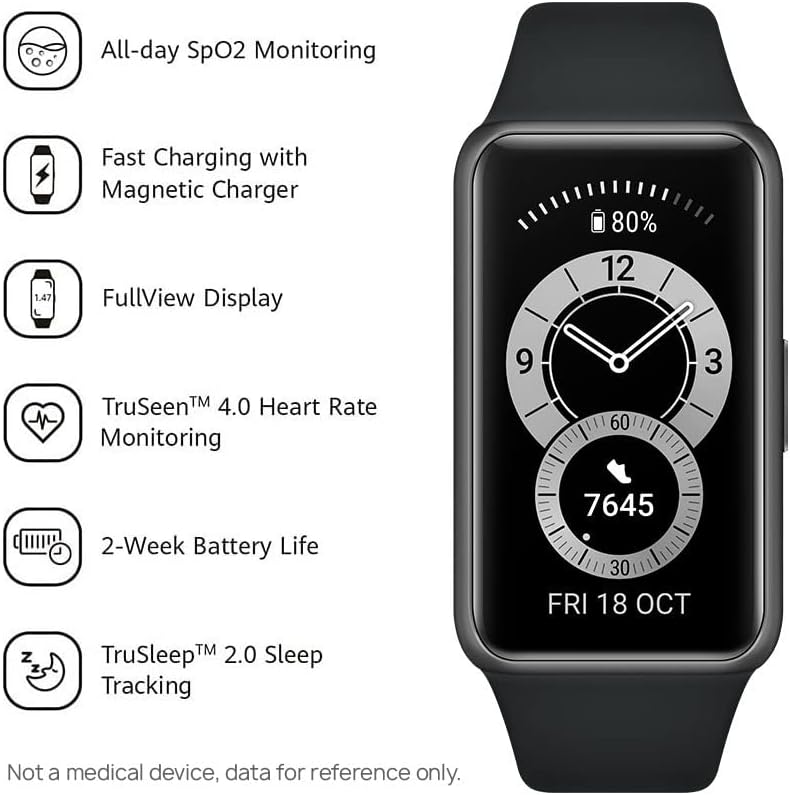
Figure 2: HUAWEI Band 6 highlighting key features.
3. Setup
To set up your HUAWEI Band 6, follow these steps:
- Download the HUAWEI Health App: Scan the QR code provided in the Quick Start Guide or search for "HUAWEI Health" in your phone's app store (compatible with iOS/Android). You can also download it from consumer.huawei.com.
- Pair Your Device: Open the HUAWEI Health app, go to 'Devices' > 'Add' > 'Smart watches or Smart bands', then select your device name (HUAWEI Band 6). Follow the on-screen instructions to complete the pairing process.
- Update Firmware: After successful pairing, open the HUAWEI Health app and go to 'Me' > 'Check for updates' to ensure your band has the latest firmware for optimal performance and features.

Figure 3: Visual guide for HUAWEI Band 6 setup.
Setup Video Guide
Video 1: Unboxing and initial setup of a HUAWEI Band (Band 10 shown, but the pairing process is similar for Band 6). This video demonstrates how to connect the device to the HUAWEI Health app.
4. Operating Your HUAWEI Band 6
4.1. Navigation and Display
The HUAWEI Band 6 features a vibrant 1.47-inch AMOLED FullView Display. Navigate through menus and features using touch gestures (swipe, tap) on the screen. The side button typically serves as a home button or to access the app list.

Figure 4: The 1.47-inch AMOLED FullView Display.
4.2. Health Monitoring
The band offers comprehensive health tracking features:
- All-Day SpO2 Monitoring: Automatically measures blood oxygen saturation and provides alerts if levels are too low.
- 24/7 Heart Rate Monitor: Utilizes TruSeen 4.0 technology for continuous heart rate tracking and alerts for abnormally low or high rates.
- TruSleep 2.0 Sleep Tracking: Monitors various sleep states (deep sleep, light sleep, REM) and offers over 200 suggestions for improving sleep quality.
- TruRelax Stress Monitoring: Tracks stress levels throughout the day.

Figure 5: SpO2 monitoring interface on the band.
4.3. Workout Modes
Choose from 96 different workout modes, including 11 professional sports modes (indoor/outdoor running, cycling, elliptical, rowing) and 85 custom modes covering fitness, dance, leisure, and extreme sports. The band tracks your activity and provides data to help you achieve your fitness goals.

Figure 6: Representation of the 96 workout modes.
4.4. Smart Features
Beyond health and fitness, the HUAWEI Band 6 offers convenient smart features:
- View incoming calls and messages.
- Get weather updates.
- Control music playback on your phone.
- Take photos remotely using your phone's camera.
- Customize watch faces from a wide variety of designs.
5. Battery Life and Charging
The HUAWEI Band 6 boasts an impressive battery life:
- Up to 14 days of battery life for typical use.
- HUAWEI Fast Charging technology allows for 2 days of typical use from a 5-minute charge.

Figure 7: HUAWEI Band 6 with extended battery life.
6. Specifications
| Feature | Detail |
|---|---|
| Brand | HUAWEI |
| Model Name | Band 6 |
| Model Number | 55026633 |
| Display | 1.47 Inches AMOLED FullView Display (194 x 368 px) |
| Operating System | Android, iOS compatible |
| Special Features | Activity Tracker, Heart Rate Monitor, Sleep Monitor, SpO2 Monitor |
| Battery Life | Up to 14 days (typical use) |
| Charging Time | 5 minutes for 2 days use |
| Connectivity | Bluetooth |
| Water Resistance | 5 ATM (suitable for swimming) |
| Dimensions | 4.3 x 2.54 x 1.15 cm |
| Weight | 18 g |
7. Maintenance
To ensure the longevity and optimal performance of your HUAWEI Band 6, follow these maintenance guidelines:
- Cleaning: Regularly clean the band and the device with a soft, damp cloth. Avoid harsh chemicals or abrasive materials.
- Water Resistance: The band is 5 ATM water-resistant, meaning it can be used for shallow-water activities like swimming. However, avoid using it in hot showers, saunas, or for diving, as steam and high temperatures can affect its seals.
- Charging: Use only the provided magnetic charging cable. Ensure the charging contacts on the band and cable are clean and dry before charging.
- Storage: Store the band in a cool, dry place away from direct sunlight and extreme temperatures when not in use.
8. Troubleshooting
If you encounter issues with your HUAWEI Band 6, try the following common troubleshooting steps:
- Connectivity Issues: Ensure Bluetooth is enabled on your phone and the band is within range. Restart both your phone and the band. Re-pair the device if necessary through the HUAWEI Health app.
- Inaccurate Readings: Ensure the band is worn snugly but comfortably on your wrist. Clean the sensors on the back of the device. Ensure the latest firmware is installed.
- Battery Draining Quickly: Reduce the frequency of continuous monitoring (e.g., heart rate, SpO2) in the HUAWEI Health app settings. Disable unnecessary notifications. Ensure the Always-On Display (if available and enabled) is not excessively used.
- Screen Unresponsive: Try restarting the band by pressing and holding the side button. If unresponsive, allow the battery to fully drain and then recharge it.
9. Warranty and Support
Your HUAWEI Band 6 is covered by a manufacturer's warranty. For specific warranty terms, conditions, and duration, please refer to the warranty card included in your product packaging or visit the official HUAWEI support website for your region. For technical support, product inquiries, or service requests, please contact HUAWEI customer service through their official channels.


