
1. Introduction
Thank you for choosing the Commax Intercom Panel with 6-Apartment Camera, Model DRC-6AC2. This manual provides essential information for the safe and efficient installation, operation, and maintenance of your new intercom system. Please read this manual thoroughly before using the product and retain it for future reference.
This intercom panel is designed to provide secure and convenient communication for multi-apartment buildings, featuring a 1/3 color gate camera and a durable aluminum casing.
2. Safety Information
- Installation: Installation should only be performed by qualified personnel to prevent electric shock or product damage.
- Power Source: Ensure the power source matches the specifications of the device (DC). Incorrect voltage can cause damage.
- Environment: Do not expose the unit to extreme temperatures, humidity, or direct sunlight. Avoid installing in areas with excessive dust or corrosive gases.
- Cleaning: Disconnect power before cleaning. Use a soft, dry cloth. Do not use liquid or aerosol cleaners.
- Modifications: Do not attempt to modify or disassemble the unit. This will void the warranty and may cause harm.
3. Package Contents
Please check that all the following items are included in your package:
- Commax Intercom Panel with Camera (DRC-6AC2)
- Mounting Screws and Anchors
- User Manual (this document)
- Wiring Diagram (may be included separately or within the manual)
If any items are missing or damaged, please contact your supplier immediately.
4. Product Overview
The Commax DRC-6AC2 is an outdoor intercom panel featuring a built-in color camera and call buttons for up to 6 apartments. Its robust aluminum casing ensures durability and resistance to outdoor elements.
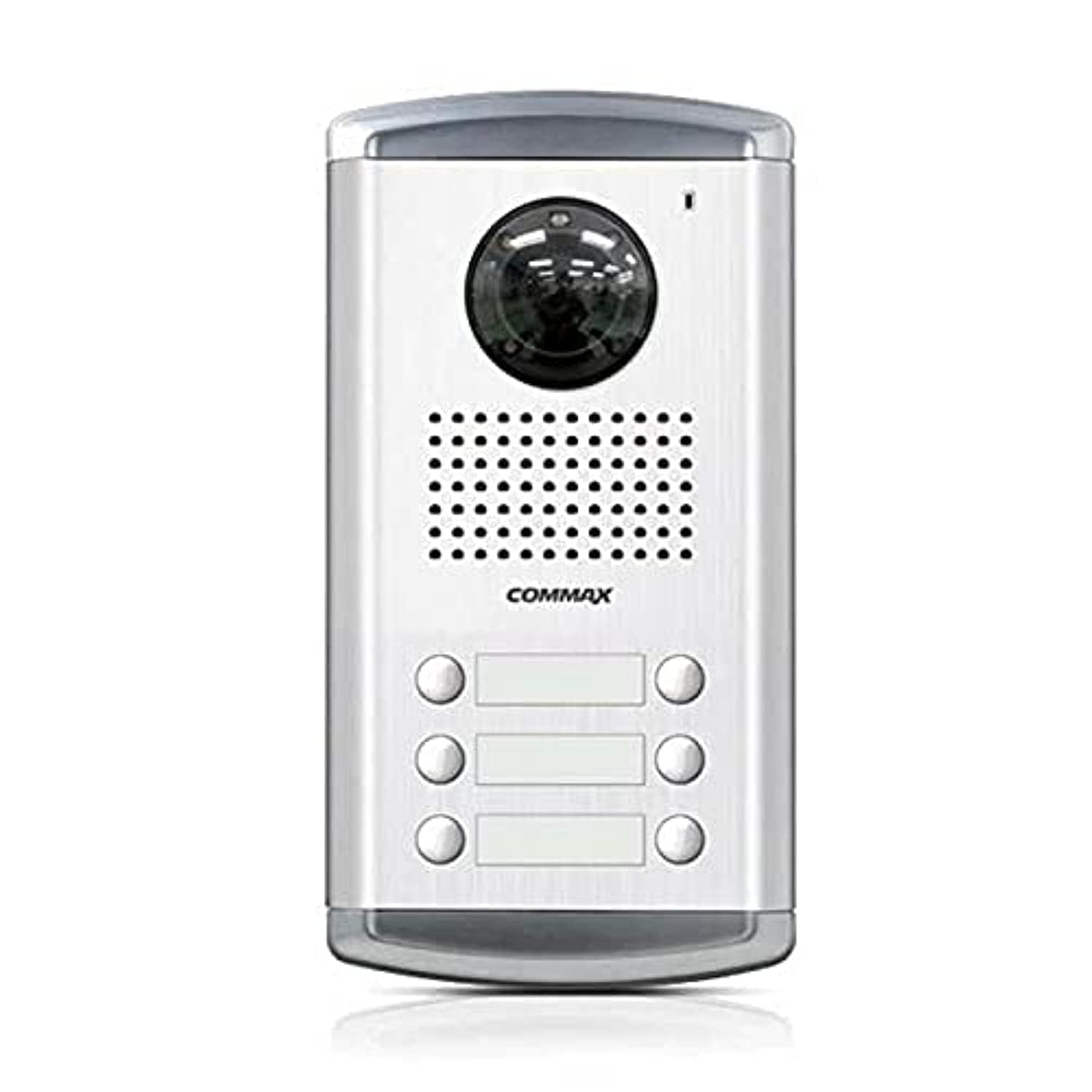
Figure 1: Front view of the Commax DRC-6AC2 Intercom Panel. This image shows the main unit with its camera lens, speaker, microphone, and multiple call buttons, all housed within a silver-colored aluminum frame.
Key Components:
- Color Camera: Provides clear video feed of visitors.
- Call Buttons: Individual buttons for each of the 6 apartments.
- Speaker: For two-way audio communication.
- Microphone: For capturing audio from visitors.
- Infrared LEDs: For night vision capability (Light Source Type: Infrared).
- Aluminum Casing: Durable and weather-resistant housing.
5. Setup and Installation
This section provides general guidelines for setting up your intercom panel. For detailed wiring diagrams and specific installation instructions, please refer to the separate wiring diagram provided with your product or consult a professional installer.
5.1 Site Selection
- Choose a location at the entrance that provides a clear view of visitors for the camera.
- Ensure the panel is mounted at an appropriate height for all users.
- Avoid direct exposure to heavy rain or snow if possible, even with the aluminum casing.
5.2 Wiring
The DRC-6AC2 requires a wired connection to indoor monitors (not included) and a DC power source. Proper wiring is crucial for functionality and safety.
- Connect the power supply (DC) to the designated terminals.
- Connect the video and audio lines from the outdoor panel to the respective indoor monitors for each apartment.
- Ensure all connections are secure and insulated to prevent short circuits.
5.3 Mounting
- Use the provided mounting screws and anchors to securely attach the panel to a wall or suitable surface.
- Ensure the panel is level and firmly fixed to prevent movement or damage.
6. Operating Instructions
6.1 Calling an Apartment
- A visitor presses the corresponding call button for the desired apartment.
- The indoor monitor in the selected apartment will ring and display the video feed from the outdoor camera.
6.2 Two-Way Communication
- Once a call is answered from the indoor monitor, two-way audio communication is established between the visitor and the resident.
6.3 Door Release (if connected)
- If connected to an electronic door lock system, the resident can press the door release button on their indoor monitor to grant access.
7. Maintenance
- Cleaning: Regularly wipe the camera lens and the panel surface with a soft, dry cloth to remove dust and dirt. Do not use abrasive cleaners or solvents.
- Inspection: Periodically check the wiring connections for any signs of wear or damage.
- Environmental Protection: While the aluminum casing is durable, prolonged exposure to harsh weather conditions may affect performance over time. Consider additional protective measures if necessary.
8. Troubleshooting
If you encounter issues with your Commax intercom panel, please refer to the following common problems and solutions:
| Problem | Possible Cause | Solution |
|---|---|---|
| No video feed on indoor monitor | Loose video cable connection, power issue, camera malfunction. | Check video cable connections. Ensure power supply is active. If problem persists, contact support. |
| No audio during communication | Loose audio cable connection, microphone/speaker malfunction. | Check audio cable connections. Ensure microphone and speaker are not obstructed. |
| Call button not working | Faulty button, wiring issue to specific apartment. | Inspect the button for physical damage. Check wiring to the affected apartment. |
| Poor image quality at night | Infrared LEDs obstructed or malfunctioning. | Ensure the camera lens and IR LEDs are clean and unobstructed. |
If these solutions do not resolve the issue, please contact customer support for further assistance.
9. Specifications
| Feature | Specification |
|---|---|
| Brand | Commax |
| Model Name | Commax Intercom System |
| Part Number | 2724608031164.0 |
| Connectivity Technology | Wired |
| Power Source | DC |
| Color | White |
| Number of Channels | 6 |
| Wireless Communication Technology | Wi-Fi (Note: Product description indicates wired, Wi-Fi might refer to internal module or general capability, confirm with product documentation) |
| Form Factor | Dome (Note: This might refer to the camera type, not the panel itself which is rectangular) |
| Mounting Type | Freestanding (Note: Typically intercom panels are wall-mounted, this might refer to a specific installation option) |
| Material | Aluminum |
| Light Source Type | Infrared |
| Batteries Required? | No |
| Item Weight | 11 Grams |
| Date First Available | March 30, 2021 |
10. Warranty and Support
Specific warranty information for the Commax DRC-6AC2 is not available in the provided product data. Please refer to the warranty card included with your product or contact your local Commax distributor or retailer for details regarding warranty coverage and terms.
Customer Support:
For technical assistance, troubleshooting, or service inquiries, please contact your authorized Commax service center or the retailer from whom you purchased the product. When contacting support, please have your product model (DRC-6AC2) and purchase information ready.


