
BAOFENG UV-5R Plus
Contents
BAOFENG UV-5R+ Plus Two Way Radio User Manual
Model: UV-5R Plus
Introduction
This manual provides detailed instructions for the safe and efficient operation of your BAOFENG UV-5R+ Plus Two Way Radio. Please read this manual thoroughly before using the device to ensure proper functionality and to prevent damage. Keep this manual for future reference.

The BAOFENG UV-5R+ Plus Two Way Radio in Imperial Yellow, featuring its metallic rugged shell and clear display.
What's in the Box
Verify that all items are present in your package:
- 1 x Baofeng UV-5R+ Plus Two Way Radio
- 1 x 7.4V 1800mAh Li-ion Battery Pack
- 1 x Antenna
- 1 x Earpiece Mic/Headset
- 1 x Belt Clip
- 1 x Hand Strap
- 1 x User Manual
- 1 x Adapter
- 1 x Desktop Charger
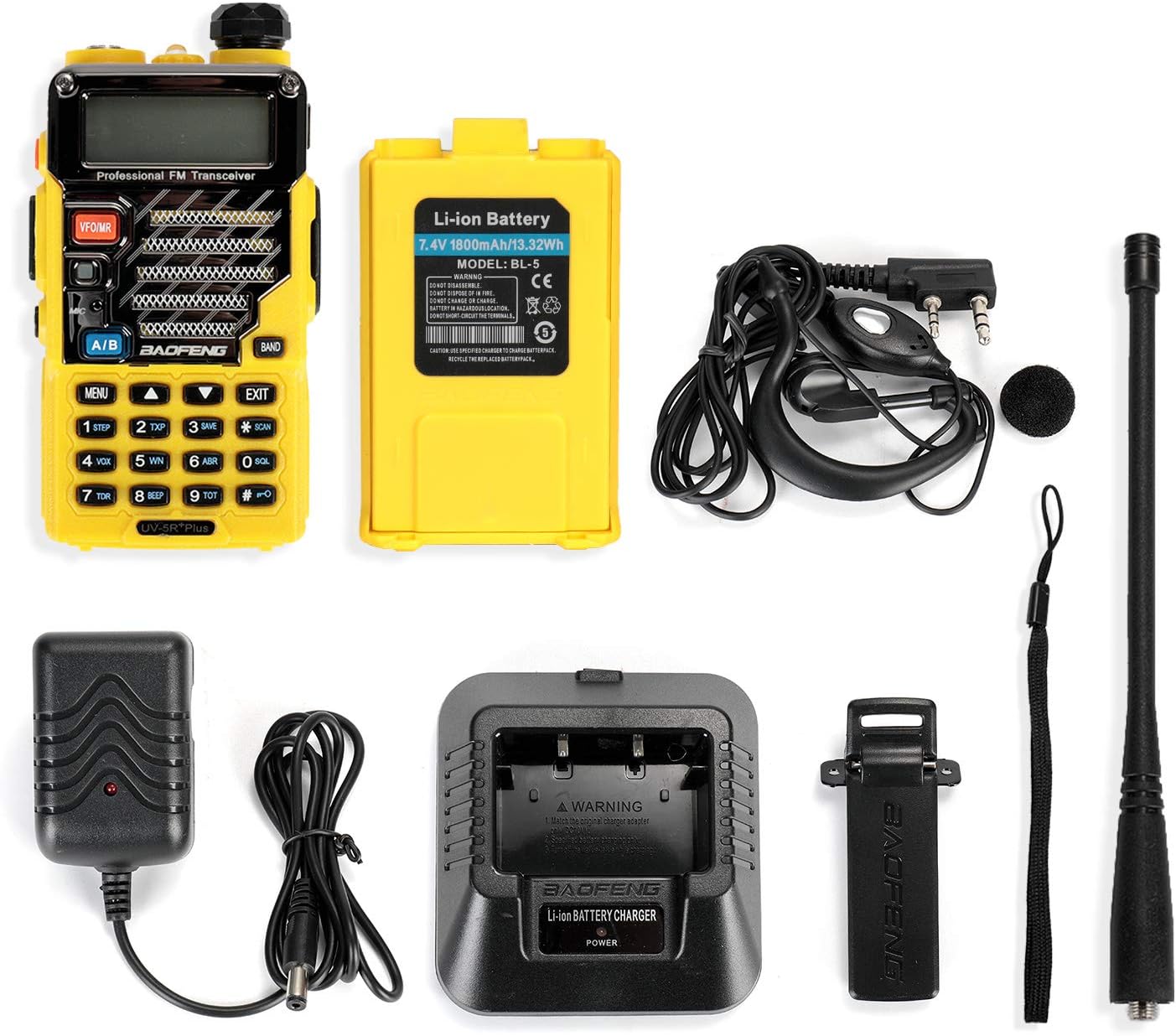
All components included in the BAOFENG UV-5R+ Plus Two Way Radio package.
Product Overview
Familiarize yourself with the various parts of your UV-5R+ Plus radio:

Labeled diagram of the BAOFENG UV-5R+ Plus radio, highlighting key components.
- SMA-F Antenna
- Flashlight
- Knob (ON/OFF, Volume)
- LCD Display
- SK-side key1 / CALL (radio, alarm)
- SK-side key2 / MONI (flashlight, monitor)
- PTT key (Push-to-Talk)
- VFO/MR (frequency mode / channel mode)
- LED indicator
- Strap buckle
- Accessory jack
- A/B key (frequency display switches)
- BAND key (band switches)
- Keypad
- SP. & MIC.
- Battery pack
- Battery contacts
- Battery remove button
Setup
1. Battery Installation
To install the battery:
- Align the battery pack with the grooves on the back of the radio.
- Slide the battery upwards until it clicks into place.
To remove the battery, press the battery release button (18) and slide the battery downwards.

The 1800mAh Li-ion battery pack for the UV-5R+ Plus, featuring over-charge, over-discharge, over-heat, over-current, and short-circuit protection.
2. Antenna Attachment
Screw the SMA-F antenna (1) clockwise onto the connector at the top of the radio until it is finger-tight. Do not overtighten.
3. Charging the Battery
Before first use, fully charge the battery. Place the radio with the battery installed into the desktop charger. Ensure the charger is connected to the power adapter and a power outlet. The LED indicator on the charger will show charging status (typically red for charging, green for fully charged).
Operating Instructions
1. Power On/Off and Volume
Rotate the knob (3) clockwise to power on the radio. Continue rotating to increase the volume. Rotate counter-clockwise to decrease volume and power off the radio.
2. Selecting Frequency/Channel Mode (VFO/MR)
Press the VFO/MR button (8) to switch between Frequency Mode (VFO) and Channel Mode (MR). In VFO mode, you can manually input frequencies. In MR mode, you can select pre-programmed channels.
3. Transmitting (PTT)
To transmit, press and hold the PTT (Push-to-Talk) button (7) on the side of the radio. Speak clearly into the microphone. Release the PTT button to receive.
4. Programming
The UV-5R+ Plus can be programmed directly via the keypad or by connecting to a PC using a programming cable (sold separately). Software like CHIRP or CPS is recommended for PC programming. Refer to specific programming guides for detailed steps.
5. Special Features
- Flashlight: Press the MONI key (6) briefly to activate the built-in flashlight.
- VOX (Voice Operated Transmit): This feature allows hands-free transmission. Refer to the full user manual for activation and sensitivity settings.
- Scan: Press the SCAN key (key #0) to initiate channel or frequency scanning.
- Alarm: Press the CALL key (5) to activate the alarm function.
Maintenance
1. Cleaning
Clean the radio's exterior with a soft, damp cloth. Do not use harsh chemicals or abrasive cleaners. Ensure the radio is powered off and the battery is removed before cleaning.
2. Battery Care
To prolong battery life:
- Avoid fully discharging the battery frequently.
- Store the radio and battery in a cool, dry place when not in use.
- Do not expose the battery to extreme temperatures.
Troubleshooting
- Radio does not power on: Ensure the battery is correctly installed and fully charged. Check the power knob.
- Cannot transmit or receive: Verify the antenna is securely attached. Check frequency/channel settings. Ensure you are within range of another radio or repeater. Confirm the battery has sufficient charge.
- Poor audio quality: Adjust the volume knob. Check the earpiece/headset connection if in use. Ensure the microphone is not obstructed.
- Programming issues: Ensure you are using the correct programming cable and software (e.g., CHIRP). Check cable connections and driver installation on your PC.
Specifications
| Feature | Specification |
|---|---|
| Model Number | UV-5R Plus |
| Item Weight | 1.12 pounds |
| Product Dimensions | 7.28 x 5.71 x 3.94 inches |
| Battery Type | 1 Lithium Ion battery required (1800mAh) |
| Number of Channels | 128 |
| Frequency Range | 144-148 MHz / 420-450 MHz |
| Power Output | 4 / 1 watts |
| Talking Range Maximum | 10 Miles (under optimal conditions) |
| Voltage | 4 Volts |
| Water Resistance Level | Not Water Resistant |
| Special Feature | Lightweight, Metallic Rugged Shell |
Warranty and Support
For warranty information and technical support, please refer to the documentation provided with your purchase or visit the official BAOFENG website. Keep your proof of purchase for warranty claims.
Documents and downloads
Ask a question about this manual
Ask about setup, troubleshooting, compatibility, parts, safety, or missing instructions. Manuals+ will review the question and use this page’s manual context to help answer it.