
K&F Concept KF34.024
K&F Concept SL-60W LED Video Light User Manual
Model: KF34.024
Introduction
This manual provides comprehensive instructions for the safe and effective operation of your K&F Concept SL-60W LED Video Light. Please read this manual thoroughly before use and retain it for future reference.
The K&F Concept SL-60W is a continuous output LED video light designed for photography and videography. It features a 60W COB LED, 5600K color temperature, high CRI/TLCI, wireless remote control, and a Bowens mount for versatile accessory attachment.

Image: The K&F Concept SL-60W LED Video Light, showing the main unit, remote control, and standard reflector.
Product Components
The K&F Concept SL-60W LED Video Light package includes the following items:
- SL-60W LED Video Light Unit
- Standard Reflector (Bowens Mount)
- Wireless Remote Control
- Power Cable
- Protection Cover for LED beads
- User Manual

Image: A visual representation of the items included in the product package.
Setup
Attaching the Reflector:
Align the three mounting points on the standard reflector with the Bowens mount on the front of the LED light. Insert the reflector and twist clockwise until it locks securely into place.
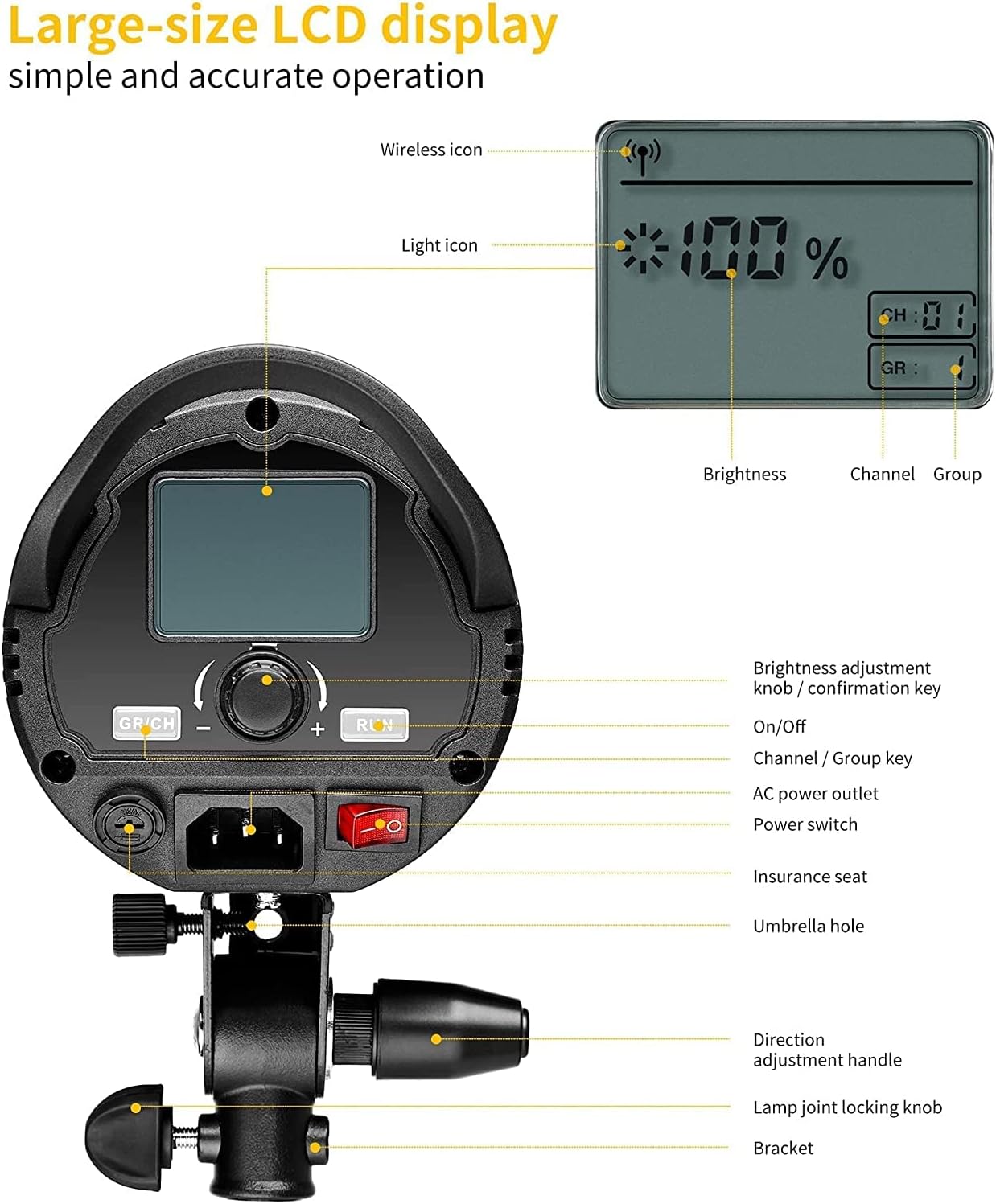
Image: Illustration of the Bowens mount system for attaching light modifiers.
Mounting the Light:
Attach the light unit to a compatible light stand using the integrated mounting bracket. Secure it by tightening the lamp joint locking knob. The bracket allows for 180-degree tilt adjustment. Ensure the light is stable before proceeding.

Image: The light unit demonstrating its 180-degree tilt capability on a stand.
Power Connection:
Connect the power cable to the AC power outlet on the back of the light unit. Plug the other end into a suitable power source. Ensure the power switch is in the OFF position before connecting.
Operating Instructions
Light Unit Controls

Image: Rear panel of the light, highlighting the LCD display and control functions.
Power Switch: Located on the rear panel, use this to turn the light ON or OFF.
Brightness Adjustment Knob / Confirmation Key: Rotate to adjust brightness from 10% to 100%. Press to confirm selections or enter settings menus.

Image: Demonstrates the infinite brightness adjustment feature of the light.
Channel / Group Key (GP/CH): Press to switch between channel and group settings. Rotate the adjustment knob to select the desired channel (CH1-16) or group (A-F).
LCD Panel: Displays current brightness percentage, selected channel, and group. Settings are automatically saved.
Wireless Remote Control
The included wireless remote control allows for convenient adjustment of light settings from a distance (up to 66 feet / 20 meters).

Image: The wireless remote control used to operate the light.
Power Button: Turns the light ON or OFF.
Brightness Buttons (+/-): Adjusts the brightness level.
CH/GR Button: Switches between channel and group selection modes.
SET Button: Confirms selections.
Channel and Group Selection: Use the CH/GR button and arrow keys to select the desired channel (CH1-16) and group (A-F). To control all lights simultaneously, set the channel to CH88.
Maintenance
Cleaning: Use a soft, dry cloth to clean the exterior of the light. Do not use abrasive cleaners or solvents. For the LED surface, use a lens cleaning cloth if necessary, avoiding direct contact with fingers.
Heat Dissipation: The light features a built-in fan and heatsink for efficient heat dissipation. Ensure the ventilation openings are not obstructed during operation to prevent overheating and prolong the life of the LED beads.

Image: Visual representation of the internal fan and heatsink cooling system.
Storage: When not in use, store the light in a cool, dry place, away from direct sunlight and excessive humidity. Always attach the protection cover to the LED beads before storage.
Troubleshooting
| Problem | Possible Cause | Solution |
|---|---|---|
| Light does not turn on. | No power, loose connection, power switch off. | Check power cable connection. Ensure power switch is ON. Try a different power outlet. |
| Remote control not working. | Batteries low/dead, incorrect channel/group, remote too far. | Replace remote batteries. Ensure remote and light are on the same channel/group. Move closer to the light. |
| Light overheats. | Obstructed ventilation, prolonged high power use in hot environment. | Ensure ventilation openings are clear. Reduce brightness or allow light to cool down. Operate in a well-ventilated area. |
| Inconsistent brightness. | Power fluctuation, internal issue. | Ensure stable power supply. If problem persists, contact customer support. |
Specifications
| Feature | Detail |
|---|---|
| Model Number | KF34.024 |
| Power Output | 60W |
| Color Temperature | 5600K (Daylight) |
| CRI (Color Rendering Index) | ≥95 |
| TLCI (Television Lighting Consistency Index) | ≥95 |
| Brightness Adjustment | 10% - 100% |
| Mount Type | Bowens Mount |
| Wireless Control Frequency | 433MHz |
| Wireless Channels/Groups | 16 Channels / 6 Groups (CH1-16, A-F), CH88 for all |
| Remote Control Range | ≥20m (66ft) |
| Cooling System | Built-in Fan & Heatsink |
| Product Dimensions | 0.39 x 0.39 x 0.39 inches (approximate, as per data) |
| Item Weight | 3.52 pounds |
Warranty and Support
K&F Concept provides a One-Year Warranty for refund or replacement for this product. Lifetime after-sale service is also available.
For technical support, warranty claims, or any inquiries regarding your K&F Concept SL-60W LED Video Light, please contact K&F Concept customer service directly. Refer to the contact information provided in your product packaging or visit the official K&F Concept website.
You can also visit the K&F Concept Store on Amazon for more information and product updates.
Ask a question about this manual
Ask about setup, troubleshooting, compatibility, parts, safety, or missing instructions. Manuals+ will review the question and use this page’s manual context to help answer it.