
Easytry123 RM-C15G, RM-C15G-1H, HD-52Z575, HD-61Z585, HD-61Z575, RM-C18G, AV-35850, HD527BP7, HD52FA97, AV-32F702, AV-32F802
User Manual for Easytry123 Replacement Remote Control
Models: RM-C15G, RM-C15G-1H, HD-52Z575, HD-61Z585, HD-61Z575, RM-C18G, AV-35850, HD527BP7, HD52FA97, AV-32F702, AV-32F802
Introduction
This user manual provides comprehensive instructions for the Easytry123 Replacement Remote Control, designed for various JVC LCD HDTV and TV models. Please ensure your original remote matches the appearance of this replacement remote for full compatibility. This manual covers setup, operation, maintenance, and troubleshooting to help you maximize your remote's functionality.
Product Overview
The Easytry123 Replacement Remote Control is an infrared (IR) device designed to operate compatible JVC televisions. It features a standard layout with dedicated buttons for power, channel, volume, input selection, and various playback controls.

This image displays the Easytry123 replacement remote control from an angled perspective, highlighting its ergonomic design and the arrangement of all primary function buttons, including numerical keys, navigation, volume, and channel controls.
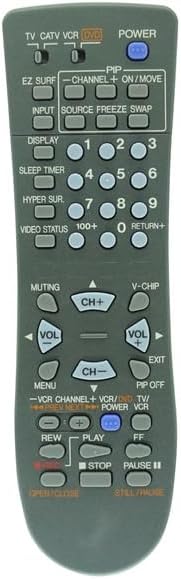
This image provides a direct front view of the Easytry123 replacement remote control, offering a clear look at each button and its label, essential for identifying specific functions like power, input, channel, and volume.
Setup
Battery Installation
The remote control requires two (2) AA batteries for operation. Follow these steps to install the batteries:
- Locate the battery compartment on the back of the remote control.
- Press down on the latch and slide the battery cover downwards to open it.
- Insert two AA batteries, ensuring the positive (+) and negative (-) terminals align correctly with the markings inside the compartment.
- Slide the battery cover back into place until it clicks securely.
Note: Always replace both batteries at the same time. Do not mix old and new batteries, or different types of batteries. Remove batteries if the remote will not be used for an extended period.
Operating Instructions
Point the remote control directly at the infrared sensor on your JVC television. Ensure there are no obstructions between the remote and the TV.
Basic Functions
- POWER: Press to turn the TV on or off.
- INPUT: Cycles through available input sources (e.g., TV, AV, HDMI).
- CH+ / CH-: Changes the channel up or down.
- VOL+ / VOL-: Increases or decreases the volume.
- MUTING: Mutes or unmutes the TV audio.
- Numerical Buttons (0-9): Directly enter channel numbers.
- RETURN+: Returns to the previous channel.
Advanced Functions
- MENU: Accesses the TV's on-screen menu. Use navigation buttons (if present) to move through options.
- DISPLAY: Shows current channel information or other on-screen display data.
- SLEEP TIMER: Sets a timer for the TV to automatically turn off.
- EZ SURF: (Functionality may vary by TV model)
- PIP / ON/MOVE / SOURCE / FREEZE / SWAP: These buttons are typically for Picture-in-Picture functions. Their exact operation depends on your TV's capabilities. Refer to your TV's original manual for detailed use of these features.
- V-CHIP: Accesses V-Chip parental control settings.
- VCR/DVD/TV Controls: Buttons like PLAY, STOP, PAUSE, REW, FF, OPEN/CLOSE are for controlling connected VCRs or DVD players if your TV supports integrated control or if the remote is programmed for such devices.
Care and Maintenance
- Cleaning: Wipe the remote with a soft, dry cloth. Do not use liquid cleaners or abrasive materials.
- Storage: Store the remote in a cool, dry place away from direct sunlight and extreme temperatures.
- Battery Life: Replace batteries when the remote's response becomes sluggish or inconsistent.
- Avoid Drops: Protect the remote from physical shocks and drops, which can damage internal components.
Troubleshooting
| Problem | Possible Cause / Solution |
|---|---|
| Remote is not working. |
|
| Some buttons do not work. |
|
| TV responds intermittently. |
|
Specifications
- Brand: Easytry123
- Compatible Devices: JVC LCD HDTV TV models (RM-C15G, RM-C15G-1H, HD-52Z575, HD-61Z585, HD-61Z575, RM-C18G, AV-35850, HD527BP7, HD52FA97, AV-32F702, AV-32F802)
- Connectivity Technology: Infrared (IR)
- Power Source: 2 x AA Batteries (not included)
- Special Feature: Ergonomic, Replacement remote
- Max Number of Supported Devices: 1 (Television)
Support Information
For further assistance or inquiries regarding your Easytry123 Replacement Remote Control, please contact the manufacturer or seller directly through your purchase platform. Ensure you have your product details and model numbers ready when seeking support.
Manufacturer: Easytry123
Date First Available: December 10, 2019
Ask a question about this manual
Ask about setup, troubleshooting, compatibility, parts, safety, or missing instructions. Manuals+ will review the question and use this page’s manual context to help answer it.