
Introduction
Thank you for purchasing the JOC H1822UR Rechargeable FM Radio. This device offers FM radio reception, USB and Micro SD card playback, and a digital display for ease of use. Please read this manual carefully to understand the product's features, setup, and operation, ensuring optimal performance and longevity.
What's in the Box
- 1 x JOC H1822UR Radio
- 1 x Rechargeable Battery (1200mAh)
- 1 x User Manual (this document)
- 1 x USB Power Cable
Safety Information
To ensure safe operation and prevent damage, please observe the following precautions:
- Do not expose the device to rain, moisture, or extreme temperatures.
- Avoid dropping or subjecting the device to strong impacts.
- Do not disassemble or attempt to repair the unit yourself. Refer all servicing to qualified personnel.
- Keep the device away from direct sunlight and heat sources.
- Use only the specified power supply (DC 5V) and charging cable.
- Dispose of batteries according to local regulations.
Product Overview
Familiarize yourself with the components and controls of your JOC H1822UR radio.
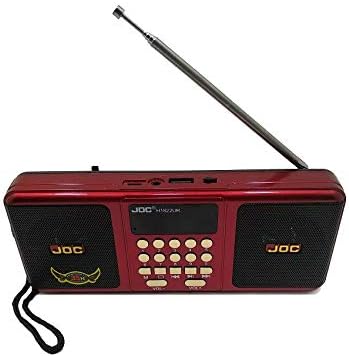
Figure 1: Front View - Shows the dual speakers, central digital display, and various control buttons for playback and tuning.

Figure 2: Side View - Illustrates the retractable antenna, USB port for external storage, and Micro SD card slot.

Figure 3: Rear View - Displays the battery compartment, the included rechargeable battery, and the USB charging cable.
Controls and Ports:
- Power Button: Turns the radio on or off.
- Mode Button: Switches between FM radio, USB, and Micro SD card modes.
- Play/Pause Button: Controls playback for USB/Micro SD.
- Previous/Next Buttons: Navigates tracks or tunes radio frequencies.
- Volume Control: Adjusts the audio output level.
- Digital Display: Shows current mode, frequency, or track information.
- USB Port: For connecting USB flash drives.
- Micro SD Card Slot: For inserting Micro SD memory cards.
- DC 5V Charging Port: For connecting the USB power cable to charge the battery.
- Telescopic Antenna: Extends for improved FM radio reception.
Setup
1. Battery Installation
- Locate the battery compartment on the rear of the radio (refer to Figure 3).
- Open the battery compartment cover.
- Insert the provided 1200mAh rechargeable battery, ensuring the polarity (+/-) matches the indicators inside the compartment.
- Close the battery compartment cover securely.
2. Charging the Battery
- Connect the small end of the USB power cable to the DC 5V charging port on the radio.
- Connect the larger end of the USB power cable to a standard USB power adapter (not included) or a computer's USB port.
- The charging indicator (if present) will illuminate, indicating that the battery is charging.
- Allow the battery to charge fully before first use. Charging time may vary.
Operating Instructions
1. Power On/Off
- Press the Power button to turn the radio on. The digital display will light up.
- Press the Power button again to turn the radio off.
2. FM Radio Operation
- Extend the telescopic antenna for optimal reception.
- Press the Mode button until "FM" appears on the digital display.
- Auto Scan: Press and hold the Play/Pause button to initiate an automatic scan for FM stations. The radio will scan and save available stations.
- Manual Tuning: Use the Previous/Next buttons to manually tune to desired frequencies.
- Adjust the volume using the Volume controls.
3. USB/Micro SD Card Playback
- Insert a USB flash drive into the USB port or a Micro SD card into the Micro SD card slot. Ensure the media contains MP3 audio files.
- Press the Mode button to switch to USB or Micro SD mode. The radio will automatically detect and begin playing audio files.
- Use the Play/Pause button to pause or resume playback.
- Use the Previous/Next buttons to skip to the previous or next track.
- Adjust the volume using the Volume controls.
Maintenance
- Cleaning: Use a soft, dry cloth to clean the exterior of the radio. Do not use liquid cleaners or abrasive materials.
- Storage: When not in use for extended periods, store the radio in a cool, dry place.
- Battery Care: To prolong battery life, avoid fully discharging the battery frequently. Charge the battery regularly, even if the radio is not in use.
Troubleshooting
| Problem | Possible Cause | Solution |
|---|---|---|
| Radio does not power on. | Battery is discharged or not installed correctly. | Charge the battery. Ensure the battery is inserted with correct polarity. |
| Poor FM reception. | Antenna not extended or weak signal. | Fully extend the telescopic antenna. Try repositioning the radio. |
| USB/Micro SD playback not working. | Incorrect mode selected, unsupported file format, or media not inserted correctly. | Ensure the radio is in USB/Micro SD mode. Verify files are MP3 format. Reinsert the USB drive/Micro SD card. |
| No sound. | Volume is too low or muted. | Increase the volume. |
Specifications
- Brand: JOC
- Model Number: H1822UR
- FM Radio Frequency: 87.5-108 MHz
- Power Supply: DC 5V
- Battery: Rechargeable 1200mAh (Included)
- Audio Playback: USB / Micro SD MP3 Player
- Speakers: Dual Speaker
- Display: Digital Display
- Antenna: High Sensitivity Telescopic Antenna
- Connectivity: USB
- Special Features: Rechargeable, Auto Save FM Channel, High Performance IC
Warranty and Support
Specific warranty details are typically provided at the point of purchase or on the product packaging. For technical support or warranty claims, please contact your retailer or the manufacturer directly using the contact information provided with your purchase documentation.