
Introduction
This manual provides detailed instructions for the safe and effective use of your ULANZI VL49 RGB Video Light and VIJIM R70 RGB Video Light. Please read this manual thoroughly before operating the devices and retain it for future reference.
These video lights are designed to provide versatile and high-quality illumination for various photography and videography applications, including portraits, product shots, vlogging, and creative lighting setups.
Package Contents
Verify that all items listed below are included in your package. If any items are missing or damaged, please contact customer support.
- 1 x ULANZI VL49 RGB Video Light
- 1 x VIJIM R70 RGB Video Light
- 1 x USB Type-C Charging Cable
- 1 x Mini Tripod (for R70)
- 1 x Cold Shoe Adapter

Image: The complete package contents, including both video lights, charging cable, mini tripod, and cold shoe adapter.
Product Overview
ULANZI VL49 RGB Video Light
The ULANZI VL49 is a compact and versatile RGB LED video light featuring 60 high color rendering LED beads. It offers a wide illumination angle and precise control over color and brightness.
- LED Beads: 60 high color rendering LEDs
- Illumination Angle: Up to 120°
- Brightness: Up to 800 LUX at 0.5m
- CRI: >95 for accurate color reproduction
- Color Temperature: 2500K (warm) to 9000K (cold), steplessly dimmable
- Hue Adjustment: 0° - 359°
- Color Saturation: 0% - 100% adjustable
- Brightness Adjustment: 0% - 100% dimmable
- Display: Built-in LCD for accurate readings
- Battery: 2000mAh built-in lithium battery, rechargeable via Type-C port
- Mounting: Magnetic back design, cold shoe mount, 1/4" screw thread
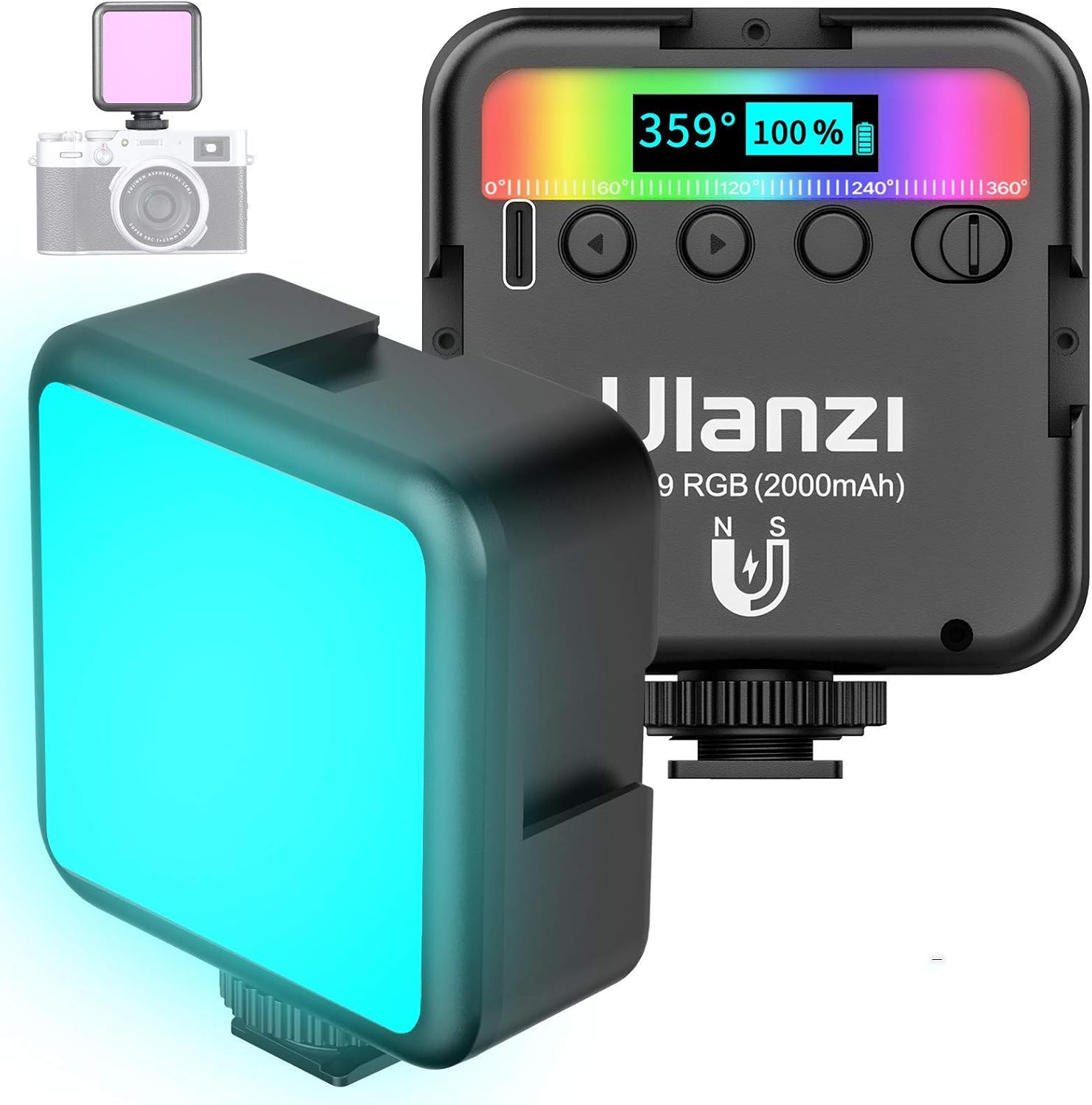
Image: Front view of the ULANZI VL49 showing the LED panel and the LCD display with current settings.
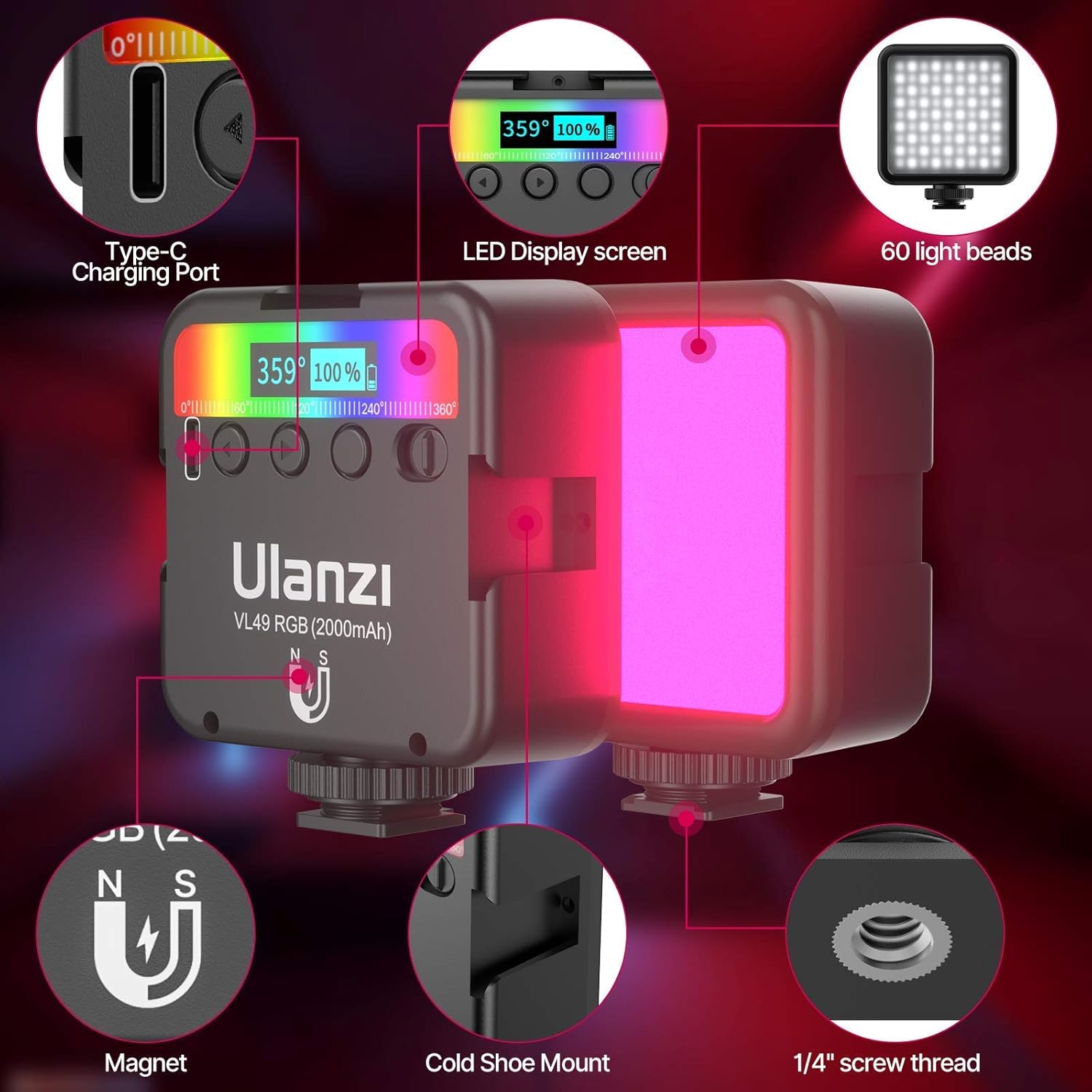
Image: Diagram highlighting key features of the ULANZI VL49, including the Type-C charging port, LED display, magnet, cold shoe mount, and 1/4" screw thread.

Image: Demonstration of the ULANZI VL49 operating in RGB mode with various colors and CCT mode showing different color temperatures (warm, natural, cold).
VIJIM R70 RGB Video Light
The VIJIM R70 is a powerful RGB video light designed for professional use, featuring a high number of lamp beads and flexible adjustment options.
- LED Beads: 158 high-efficiency lamp beads (88 warm white, 70 RGB)
- Color Temperature (CCT): 2700K - 8500K
- Brightness Adjustment: 0% - 100%
- RGB Hue Adjustment: 0° - 360°
- Adjustment: 360° spindle adjustment for flexible positioning
- Mounting: Universal 1/4" screw hole

Image: Close-up view of the VIJIM R70 LED panel, illustrating the CCT range from 2700K to 8500K and RGB hue adjustment from 0° to 360°.

Image: The VIJIM R70 mounted on a mini tripod, demonstrating its 360° spindle adjustment capability for versatile lighting angles.
Setup
Charging the Battery
- Locate the Type-C charging port on the side of the ULANZI VL49.
- Connect the provided USB Type-C cable to the light and a compatible USB power source (e.g., wall adapter, power bank, computer USB port).
- The battery indicator on the LCD display will show charging status. A full charge typically takes approximately 2 hours.
- The ULANZI VL49 can be used while charging.
Mounting the Lights
Both lights offer various mounting options for flexibility.
ULANZI VL49 Mounting:
- Cold Shoe Mount: Attach the VL49 directly to a camera's hot/cold shoe or a compatible bracket.
- 1/4" Screw Thread: Use the 1/4" screw thread at the bottom to mount on tripods, light stands, or magic arms.
- Magnetic Back: The powerful magnetic back allows attachment to any metallic surface.
VIJIM R70 Mounting:
- 1/4" Screw Hole: The R70 features a universal 1/4" screw hole for mounting on the included mini tripod, other tripods, light stands, or magic arms.
- Cold Shoe Adapter: Use a cold shoe adapter (not included with R70, but one is included in the bundle for general use) to attach to a camera's hot/cold shoe.

Image: The VIJIM R70 shown mounted on a camera via a cold shoe and on a mini tripod, demonstrating various setup configurations.
Operating Instructions
ULANZI VL49 RGB Video Light Operation
- Power On/Off: Press and hold the power button (usually on the side) for a few seconds to turn the light on or off.
- Mode Selection: Short press the mode button to cycle between CCT (Color Temperature) mode and HSI (Hue, Saturation, Intensity) RGB mode.
- Adjusting Brightness: In any mode, use the adjustment dial or buttons to increase or decrease the brightness from 0% to 100%. The LCD display will show the current brightness level.
- Adjusting Color Temperature (CCT Mode): In CCT mode, use the adjustment dial or buttons to change the color temperature from 2500K (warm) to 9000K (cold).
- Adjusting Hue (RGB Mode): In RGB mode, use the adjustment dial or buttons to select the desired hue from 0° to 359°.
- Adjusting Saturation (RGB Mode): In RGB mode, use the adjustment dial or buttons to set the color saturation from 0% to 100%.
VIJIM R70 RGB Video Light Operation
- Power On/Off: Press and hold the power button to turn the light on or off.
- Mode Selection: Short press the mode button to switch between CCT mode and RGB mode.
- Adjusting Brightness: In any mode, use the dedicated brightness control to adjust the intensity from 0% to 100%.
- Adjusting Color Temperature (CCT Mode): In CCT mode, use the color temperature control to set the desired temperature between 2700K and 8500K.
- Adjusting Hue (RGB Mode): In RGB mode, use the hue control to select a color from 0° to 360°.
- Spindle Adjustment: The R70 features a 360° spindle adjustment. Loosen the locking knob, adjust the light panel to the desired angle, and then tighten the knob to secure it.
Maintenance
- Cleaning: Use a soft, dry cloth to clean the surface of the lights. Do not use abrasive cleaners or solvents.
- Storage: Store the lights in a cool, dry place away from direct sunlight and extreme temperatures.
- Battery Care: For optimal battery life, avoid completely draining the battery frequently. Charge the ULANZI VL49 regularly, even if not in use for extended periods.
- Handling: Handle the lights with care to prevent damage from drops or impacts.
Troubleshooting
| Problem | Possible Cause | Solution |
|---|---|---|
| Light does not turn on. | Battery is depleted. | Charge the ULANZI VL49 using the Type-C cable. Ensure the VIJIM R70 has sufficient power if using an external source. |
| Light is not bright enough. | Brightness setting is too low; Battery is low. | Increase the brightness setting. Charge the ULANZI VL49. |
| Incorrect color output. | Incorrect mode or settings. | Verify you are in the correct mode (CCT or RGB). Adjust hue, saturation, or color temperature settings as needed. |
| Light flickers or turns off unexpectedly. | Low battery; Loose connection. | Charge the ULANZI VL49. Ensure all connections are secure. |
Specifications
ULANZI VL49 RGB Video Light
- LED Quantity: 60 beads
- Illumination: 800 LUX (0.5m)
- CRI: >95
- Color Temperature Range: 2500K - 9000K
- Hue Range: 0° - 359°
- Saturation Range: 0% - 100%
- Brightness Range: 0% - 100%
- Battery Capacity: 2000mAh
- Charging Port: USB Type-C
VIJIM R70 RGB Video Light
- LED Quantity: 158 beads (88 warm white, 70 RGB)
- Color Temperature Range: 2700K - 8500K
- Brightness Range: 0% - 100%
- RGB Hue Range: 0° - 360°
- Mounting: 1/4" screw hole
General
- ASIN: B091BWW1C2
- Date First Available: March 30, 2021
Warranty and Support
For warranty information and customer support, please refer to the documentation provided with your purchase or visit the official VIJIM website. Keep your proof of purchase for any warranty claims.


