1. Introduction
This manual provides detailed instructions for the operation and maintenance of your BLACKBOX PocketPlus Compact 2-Way Radio. Please read this manual thoroughly before using the device to ensure proper function and safety. The PocketPlus is a compact, high-performance UHF radio designed for reliable communication.
2. Key Features
- 16 Channels for versatile communication.
- 1.5 Watts Output for effective range.
- UHF Frequency 400-470 Mhz.
- Ultra-thin design, only 0.5 inches thick.
- Includes Compander for enhanced audio clarity.
- PC Programmable for customized settings.
- Voice Prompt for easy navigation.
- VOX Function for hands-free operation.
- Scan Function to monitor active channels.
- Scramble Function for private conversations.
- Time-out Timer (TOT) to prevent accidental continuous transmission.
- Battery Saver mode to extend battery life.
- Low Battery Warning indicator.
- TX End Tone confirmation.
- Busy Channel Lock Out to prevent interference.
- Squelch Level Adjust for noise reduction.
- CTCSS/DCS Decode and Encode for privacy codes.
- Wide/Narrow Band 25KHz/12.5KHz selection.
- Compatible with K1 (KENWOOD style) connectors for earpieces.
3. Product Overview

This image displays the front of the BLACKBOX PocketPlus radio, highlighting its compact size and the Push-To-Talk (PTT) button.
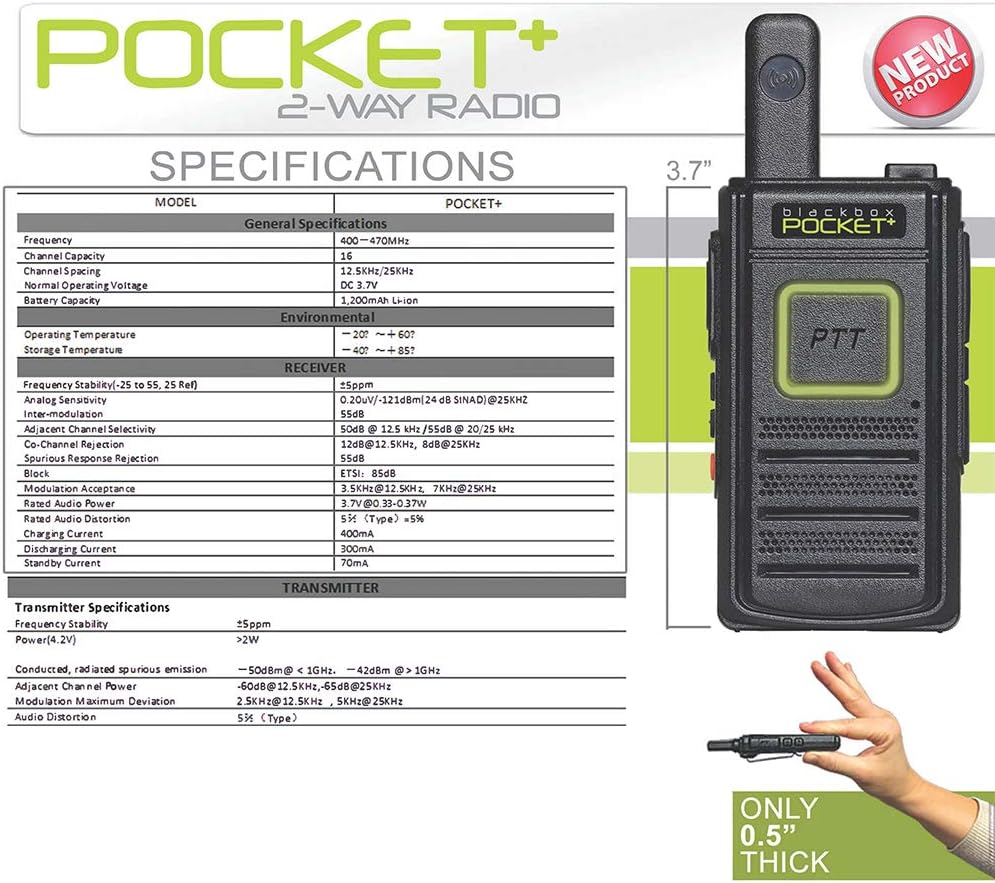
This image shows a side profile of the radio, emphasizing its thin design (0.5 inches) and overall height (3.7 inches). It also includes a specifications table.
Controls and Ports:
- PTT Button: Push-To-Talk button for transmitting your voice.
- Volume Up/Down: Adjusts the speaker volume.
- Channel Up/Down: Changes the operating channel.
- Power On/Off: Turns the radio on or off.
- Microphone: For voice input.
- Speakers: For audio output.
- USB Port: For charging and PC programming.
- Headset Port: For connecting compatible earpieces (K1/KENWOOD style).
- Steel Belt Clip: For convenient carrying.
4. Setup
4.1 Battery Installation and Charging
- Ensure the radio is powered off.
- Locate the battery compartment on the back of the radio.
- Insert the provided Nonstandard Battery, ensuring correct polarity.
- Close the battery compartment securely.
- Connect the radio to a power source using the USB port and the provided charging cable. The charging indicator will show the charging status.
- Charge the battery fully before first use (approximately 3-4 hours).
4.2 Attaching the Belt Clip
Align the steel belt clip with the designated slots on the back of the radio and secure it firmly. This allows for easy attachment to a belt or pocket.
5. Operating Instructions
5.1 Power On/Off
Press and hold the Power On/Off button (typically red) on the side of the radio until you hear a voice prompt or a power-on tone.
5.2 Adjusting Volume
Use the Volume Up/Down buttons on the side of the radio to increase or decrease the listening volume.
5.3 Selecting a Channel
Use the Channel Up/Down buttons on the side of the radio to cycle through the available 16 channels. A voice prompt will announce the selected channel number.
5.4 Transmitting and Receiving
- To transmit, press and hold the PTT (Push-To-Talk) button. Speak clearly into the microphone. The indicator light will typically turn red during transmission.
- Release the PTT button to stop transmitting and return to receive mode. The indicator light will typically turn green when receiving a signal.
- Ensure you are on the same channel as the person you wish to communicate with.
5.5 VOX Function (Voice Operated Transmission)
The VOX function allows for hands-free transmission. When activated, the radio will automatically transmit when it detects your voice. Refer to the PC programming software for activation and sensitivity adjustment.
5.6 Scan Function
The Scan function allows the radio to automatically scan through programmed channels to detect active conversations. Activate this feature via PC programming or a dedicated button if available (check your specific model's configuration).
5.7 Scramble Function
The Scramble function encrypts your voice transmission for increased privacy. This feature is typically activated and configured via PC programming.
5.8 PC Programming
The BLACKBOX PocketPlus radio is PC programmable. This allows for advanced customization of features such as channel frequencies, CTCSS/DCS codes, VOX sensitivity, scan lists, and more. You will need the appropriate programming software and a USB programming cable (sold separately) to access these settings. Refer to the software's user guide for detailed instructions.
6. Maintenance
6.1 Battery Care
- Charge the battery regularly, even if the radio is not in frequent use, to maintain battery health.
- Avoid overcharging or completely draining the battery.
- Store the radio and battery in a cool, dry place when not in use.
6.2 Cleaning
- Wipe the radio's exterior with a soft, damp cloth.
- Do not use harsh chemicals or abrasive cleaners.
- Ensure the USB and headset ports are free from dust and debris.
6.3 Environmental Considerations
The radio is not water-resistant. Avoid exposing it to rain, splashes, or high humidity. Operate and store within specified temperature ranges.
7. Troubleshooting
| Problem | Possible Cause | Solution |
|---|---|---|
| Radio does not power on. | Low or dead battery. | Charge the battery fully. |
| Cannot transmit or receive. | Incorrect channel selected. | Verify both radios are on the same channel. |
| Battery too low. | Recharge the battery. | |
| Busy Channel Lock Out active. | Wait for the channel to clear or switch channels. | |
| Poor audio quality. | Low signal strength. | Move closer to the other radio or to an open area. |
| Squelch level too high. | Adjust squelch level via PC programming. | |
| Radio turns off randomly. | Battery issue or loose connection. | Ensure battery is securely seated and fully charged. If problem persists, contact support. |
8. Specifications
- Brand: BLACKBOX
- Model Number: Blackbox-PocketPlus
- Number of Channels: 16
- Frequency Range: 400 - 470 MHz (UHF)
- Output Power: 1.5 Watts
- Item Weight: 7 ounces
- Package Dimensions: 5.94 x 4.09 x 2.05 inches
- Battery Type: 1 Nonstandard Battery (required)
- Talking Range Maximum: 1 Mile (actual range may vary based on terrain and conditions)
- Water Resistance Level: Not Water Resistant
- Compatible Devices: KENWOOD style earpieces
9. Included Components
The BLACKBOX PocketPlus Compact 2-Way Radio typically includes:
- BLACKBOX PocketPlus 2-Way Radio Unit
- Nonstandard Battery
- Steel Belt Clip
- USB Charging Cable
- User Manual (this document)
Note: Additional accessories such as PC programming cables or multi-unit chargers may be sold separately.

An example of an optional multi-unit charger for the PocketPlus radios, allowing simultaneous charging of multiple units.
10. Warranty and Support
For warranty information and technical support, please refer to the contact details provided with your purchase or visit the official BLACKBOX website. Keep your proof of purchase for warranty claims.
Manufacturer: BLACKBOX
Website: www.KleinElectronics.com
Phone: 800.959.2899


