
1. Introduction
Thank you for choosing the Alpicool CX40 Portable Refrigerator/Freezer. This appliance is designed to provide efficient cooling and freezing for various applications, including automotive, home, dormitory, and outdoor use. Please read this manual thoroughly before operating the unit to ensure safe and proper use.

Figure 1: Alpicool CX40 Portable Refrigerator/Freezer with mobile app interface.
2. Product Features
- Rapid Cooling Technology: Achieves 0°C from 25°C in approximately 15 minutes, ensuring quick preservation of contents.
- Generous 40L Capacity: Spacious interior capable of holding up to 57 x 330ml cans or 28 x 550ml bottles, suitable for various food and beverage storage needs.
- Vehicle Battery Protection: Features a three-stage battery protection system to prevent vehicle battery discharge, ensuring your vehicle can always start.
- Dual Power Supply: Compatible with both DC (12V/24V) and AC (100-240V) power sources, offering versatile use in cars, homes, and outdoor settings.
- Enhanced Portability: Equipped with durable wheels and a telescopic handle for easy transportation, even on uneven terrain.
- Shockproof Design: Engineered to operate normally on bumpy roads and inclines up to 40 degrees, providing reliable performance during travel.

Figure 2: Key features of the Alpicool CX40.
3. Package Contents
Please check the package for the following items:
- Alpicool CX40 Portable Refrigerator/Freezer Unit
- DC Power Cable (12V/24V for car cigarette lighter)
- AC Power Adapter (100-240V for home use)
- User Manual (this document)
4. Setup
4.1 Unpacking and Placement
- Carefully remove the refrigerator from its packaging.
- Place the unit on a flat, stable surface. Ensure there is adequate ventilation around the unit (at least 10 cm clearance on all sides) to allow for proper heat dissipation.
- Before first use, it is recommended to let the unit stand upright for at least 6 hours if it has been transported horizontally.
4.2 Power Connection
The Alpicool CX40 can be powered by two methods:
- DC Power (12V/24V): Connect the DC power cable to the unit's DC input port and plug the other end into your vehicle's cigarette lighter socket.
- AC Power (100-240V): Connect the AC power adapter to the unit's AC input port and plug it into a standard wall outlet.
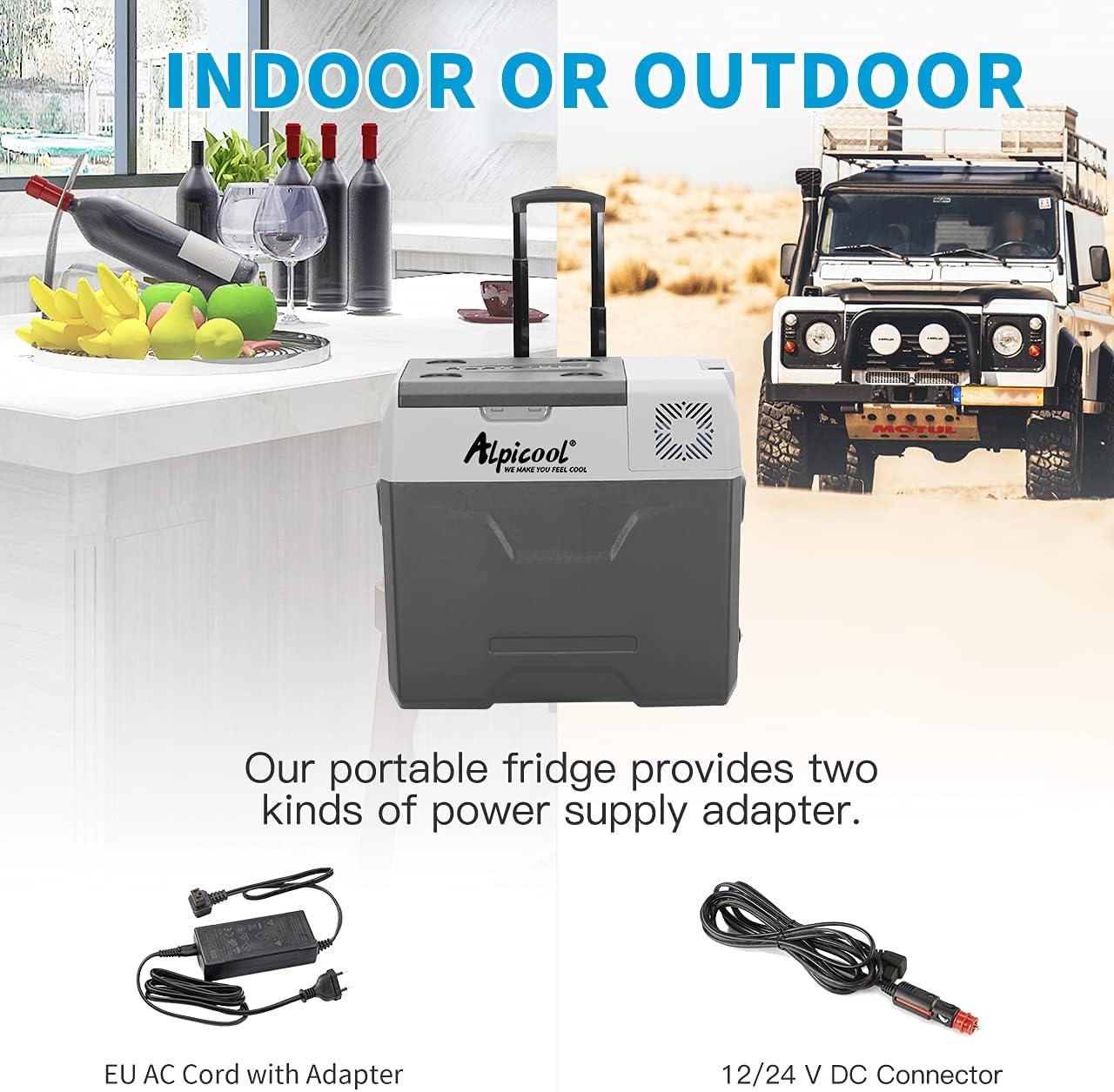
Figure 3: Power supply options for the Alpicool CX40.
5. Operating Instructions
5.1 Control Panel Overview
The control panel is located on the top of the unit and features a digital display and control buttons.

Figure 4: Control panel of the Alpicool CX40.
5.2 Powering On/Off
Press the Power button to turn the unit on or off. The digital display will illuminate when the unit is on.
5.3 Setting Temperature
Use the + and - buttons to adjust the desired temperature. The display will show the set temperature, then revert to the current internal temperature.
5.4 Battery Protection Mode
The unit features three levels of battery protection (High, Medium, Low) to prevent your vehicle battery from draining. Press the Settings button to cycle through these modes. Select the appropriate mode based on your vehicle's battery condition and usage.
5.5 USB Charging Port
The Alpicool CX40 includes a USB charging port for convenience. You can use this port to charge small electronic devices like smartphones.

Figure 5: USB charging port for external devices.
6. Maintenance
6.1 Cleaning
- Always unplug the unit before cleaning.
- Clean the interior and exterior surfaces with a damp cloth and mild detergent. Do not use abrasive cleaners or solvents.
- Ensure the drainage hole (if present) is clear to prevent water accumulation.
- Regularly clean the ventilation grilles to ensure proper airflow and prevent overheating.
6.2 Defrosting
If a thick layer of ice forms inside the unit, defrost it manually:
- Turn off the unit and unplug it.
- Remove all contents.
- Leave the lid open to allow the ice to melt naturally.
- Wipe away melted water with a clean cloth. Do not use sharp objects to remove ice.
6.3 Storage
When storing the unit for an extended period, ensure it is clean, dry, and the lid is slightly ajar to prevent odors and mold growth.
7. Troubleshooting
| Problem | Possible Cause | Solution |
|---|---|---|
| Unit does not turn on | No power supply; Faulty cable; Blown fuse. | Check power connection; Test cable; Replace fuse. |
| Unit not cooling sufficiently | Temperature set too high; Poor ventilation; Too much content; Door not sealed. | Lower temperature; Ensure proper clearance; Reduce contents; Check lid seal. |
| Display shows error code | Specific internal issue (e.g., sensor error, compressor fault). | Refer to specific error code in a more detailed service manual or contact support. |
| Excessive noise | Unit not level; Fan obstruction. | Ensure unit is on a flat surface; Check for obstructions around fan. |
8. Specifications
- Model: CX40
- Capacity: 40 Liters
- Weight: 12.7 Kilograms
- Dimensions (L x W x H): 63.1 x 37.8 x 48 cm
- Voltage: 12 Volts (DC), 100-240 Volts (AC)
- Rated Power: 60 Watts
- Noise Level: Approximately 45 dB
- Special Features: Portable, Large Capacity, Shockproof Design

Figure 6: Alpicool CX40 dimensions and capacity examples.
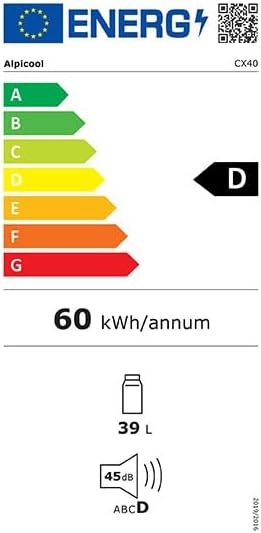
Figure 7: Alpicool CX40 Energy Label.
9. Warranty and Support
For warranty information and technical support, please refer to the warranty card included with your product or contact Alpicool customer service directly. Keep your purchase receipt as proof of purchase.


