
1. Product Overview
This manual provides essential information for the safe and effective use of your CS WMTM-169 rechargeable lithium-ion battery. This battery is specifically designed as a compatible replacement for the Kingston MLW221 device, offering a capacity of 1500mAh and a nominal voltage of 3.7V.
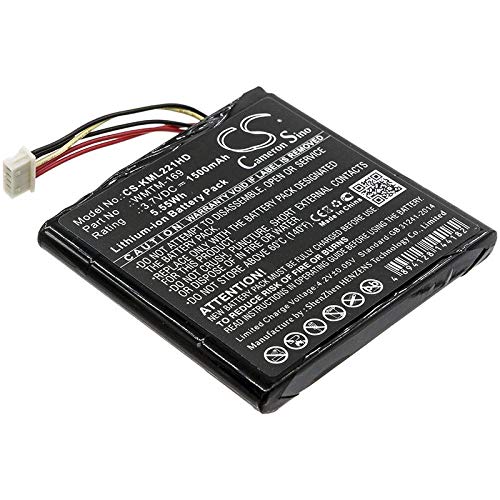
An image showing the CS WMTM-169 rechargeable lithium-ion battery, designed for use with the Kingston MLW221 device.
Please read this manual thoroughly before installation and operation to ensure optimal performance and safety.
2. Safety Information
Improper handling of lithium-ion batteries can lead to fire, explosion, or other hazards. Adhere to the following safety guidelines:
- Do not disassemble, crush, puncture, or short-circuit the battery. This can cause internal damage and lead to overheating or fire.
- Avoid exposure to extreme temperatures. Do not store or use the battery in direct sunlight, near heat sources, or in temperatures above 60°C (140°F) or below 0°C (32°F).
- Keep the battery away from water and other liquids. Moisture can damage the battery and create a short circuit.
- Use only compatible chargers. Ensure the charger is designed for lithium-ion batteries with the correct voltage and current specifications.
- Dispose of batteries properly. Do not dispose of batteries in household waste. Follow local regulations for recycling or disposal of lithium-ion batteries.
- Keep out of reach of children.
- If the battery shows signs of swelling, leakage, or damage, discontinue use immediately and dispose of it safely.
3. Setup and Installation
This battery is designed for the Kingston MLW221 device. Follow the device manufacturer's instructions for battery installation.
- Power Off Device: Ensure your Kingston MLW221 device is completely powered off before attempting to replace the battery.
- Locate Battery Compartment: Identify the battery compartment on your Kingston MLW221 device. This is typically on the back or underside.
- Remove Old Battery: Carefully open the compartment and remove the existing battery. Note its orientation.
- Insert New Battery: Insert the CS WMTM-169 battery into the compartment, ensuring it is correctly oriented according to the device's markings. Do not force the battery into place.
- Secure Compartment: Close and secure the battery compartment cover.
- Initial Charge: It is recommended to fully charge the new battery before its first use.
4. Operating Instructions
The CS WMTM-169 is a rechargeable lithium-ion battery. Proper charging and usage practices will ensure its longevity and performance.
4.1 Charging the Battery
- Connect your Kingston MLW221 device (with the WMTM-169 battery installed) to its original or a compatible charger.
- Allow the battery to charge until the device's charging indicator shows it is full.
- Avoid overcharging the battery by disconnecting the charger once it is fully charged.
- Do not leave the battery charging unattended for extended periods.
4.2 General Usage
- The battery is designed for normal use within the Kingston MLW221 device.
- Avoid completely draining the battery frequently, as this can reduce its overall lifespan.
- If the device will not be used for an extended period, store the battery with approximately 50% charge.
5. Maintenance
Proper maintenance helps extend the life of your battery:
- Cleaning: Keep the battery contacts clean and free from dust or debris. Use a dry, soft cloth if cleaning is necessary.
- Storage: If storing the battery for an extended period, ensure it is charged to about 50% and stored in a cool, dry place away from direct sunlight and extreme temperatures.
- Avoid Physical Damage: Protect the battery from drops, impacts, and crushing.
6. Troubleshooting
If you encounter issues with your CS WMTM-169 battery, consider the following:
- Battery Not Charging:
- Ensure the charger and charging cable are properly connected to both the device and a working power outlet.
- Verify that the charger is compatible with your Kingston MLW221 device and the WMTM-169 battery.
- Check for any visible damage to the battery or charging port.
- Device Not Powering On:
- Confirm the battery is correctly installed in the device.
- Ensure the battery has sufficient charge. Try charging it for a period.
- If possible, test the device with another known-good battery to rule out device issues.
- Short Battery Life:
- Ensure the battery is being fully charged.
- Review device settings for power-saving options.
- Extreme temperatures can affect battery performance; ensure the device is used within recommended temperature ranges.
If problems persist, contact customer support for further assistance.
7. Specifications
| Feature | Detail |
|---|---|
| Model Number | WMTM-169 |
| Compatible Part Numbers | WMTM-169 |
| Compatible Devices | Kingston MLW221 |
| Battery Type | Lithium Ion |
| Capacity | 1500mAh |
| Voltage | 3.7V |
| Energy | 5.55Wh |
| Dimensions (L x W x H) | 51.00 x 49.60 x 5.50mm |
| Reusability | Rechargeable |
| Manufacturer | CS |
8. Warranty and Support
For warranty information or technical support regarding your CS WMTM-169 battery, please refer to the documentation provided with your purchase or contact the seller directly. Keep your proof of purchase for any warranty claims.
For general inquiries or further assistance, please reach out to the manufacturer or authorized reseller.


