
Ohniyou GLX004
Ohniyou 42" Retractable Ceiling Fan with Light and Remote User Manual
Model: GLX004
1. Introduction
This manual provides comprehensive instructions for the safe operation, installation, and maintenance of your Ohniyou 42" Retractable Ceiling Fan with Light and Remote. This crystal chandelier ceiling fan is designed to enhance the comfort and aesthetics of your bedroom, living room, or other indoor spaces. Please read this manual thoroughly before installation and use, and retain it for future reference.

Figure 1: Ohniyou 42" Retractable Ceiling Fan with Light and Remote (Chrome Silver)
2. Safety Instructions
To reduce the risk of electric shock, fire, or injury to persons, read and follow all instructions carefully.
- Ensure the power supply is disconnected before installation or maintenance.
- Installation must be performed by a qualified electrician in accordance with all local and national electrical codes.
- Mount the fan to a ceiling outlet box marked "Acceptable for Fan Support of 35 lbs (15.9 kg) or less" and use the mounting screws provided with the outlet box.
- Do not bend the fan blades when cleaning or performing maintenance.
- Keep hands, hair, and clothing away from moving fan blades.
- Do not operate the fan if there is any visible damage to the power cord or fan components.
- This appliance is not intended for use by persons (including children) with reduced physical, sensory or mental capabilities, or lack of experience and knowledge, unless they have been given supervision or instruction concerning use of the appliance by a person responsible for their safety.
3. Package Contents
Verify that all components listed below are included in your package:
- 42" Ceiling Fan with Light (Main Unit)
- Remote Control
- Instruction Manual
- 2 Downrods (4" & 8")

Figure 2: Exploded View of Fan Components
4. Product Features
- Retractable Blades: Four invisible ABS acrylic fan blades automatically extend when the fan is on and retract when off, maintaining a sleek chandelier appearance.
- Crystal Chandelier Design: Features a clear crystal and glass lampshade for an elegant aesthetic.
- Silent DC Motor: Equipped with a pure copper motor for quiet operation (noise level below 30dB) and efficient air movement.
- Reversible Function: The DC motor allows for reversible airflow, providing a cooling downdraft in summer and circulating warm air in winter.
- Remote Control & APP Control: Full control over fan speeds, light colors, brightness, and timer settings. Fan and light can be controlled independently.
- Adjustable Light Settings:
- 3 LED Light Colors: Yellow (3000K), Warm (4500K), White (6000K).
- Smooth Dimming: Adjust brightness from 10% to 98%.
- Night Light Mode: Provides a soft, low-light setting.
- Multiple Fan Speeds: 6-speed settings for customized airflow, from gentle breeze to strong circulation.
- Timer Function: Set the fan to turn off automatically after 2 hours.
- Flexible Installation: Includes 4" and 8" downrods to accommodate various ceiling heights. Adaptable for sloped ceilings up to 15 degrees.

Figure 3: Silent DC Motor Operation

Figure 4: Reversible DC Motor Function

Figure 5: Fan Speed Recommendations
5. Specifications
| Attribute | Detail |
|---|---|
| Brand | Ohniyou |
| Model Name | GLX004 |
| Color | Silver (Chrome Silver) |
| Material | Metal shell, Acrylic fan blade, Crystal lampshade |
| Product Dimensions | 42"L x 42"W x 22.64"H (when extended) |
| Power Source | DC |
| Voltage | 119.99 Volts |
| Wattage | 35 watts |
| Light Source Type | LED |
| Light Colors | Warm White (3000K), Neutral White (4500K), Cool White (6000K) |
| Control Method | Remote Control, APP Control |
| Installation Type | Semi Flush Mount (Downrod Mount) |
| Item Weight | 18.39 pounds |
| UPC | 756588289213 |
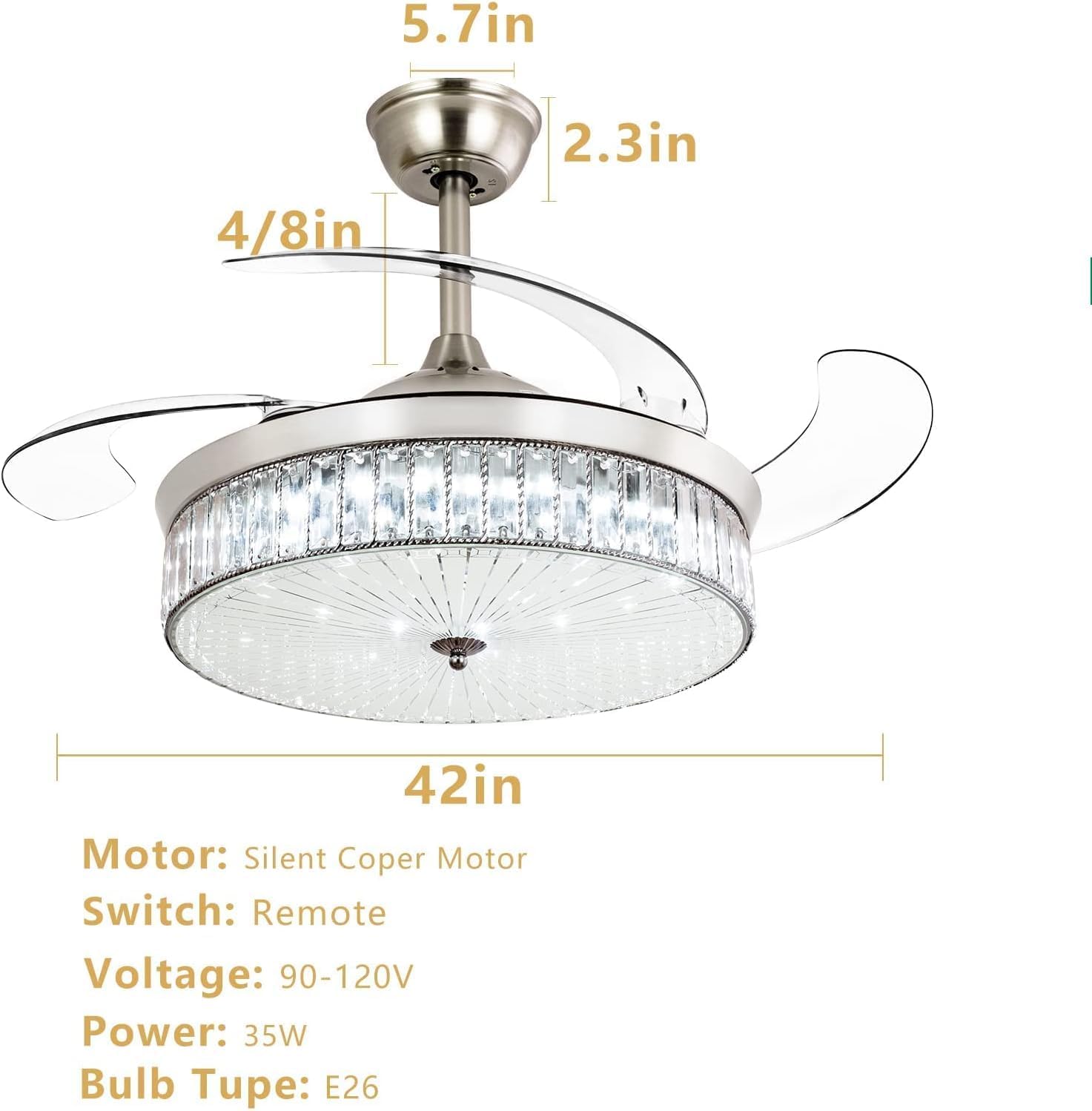
Figure 6: Product Dimensions
6. Setup and Installation
Installation of this ceiling fan requires electrical wiring knowledge. It is highly recommended to consult the detailed Installation Manual (PDF) provided by the manufacturer for step-by-step instructions. Below are general guidelines:
- Preparation: Turn off power at the circuit breaker. Ensure the mounting location is suitable for fan support.
- Mounting Bracket Installation: Secure the mounting bracket to the ceiling outlet box.
- Downrod Assembly: Choose the appropriate downrod (4" or 8") for your ceiling height and assemble it with the fan motor.
- Wiring: Connect the fan's electrical wires to the household wiring according to the wiring diagram in the detailed manual. Ensure all connections are secure.
- Canopy Installation: Secure the canopy to the mounting bracket, covering the wiring.
- Lampshade and Crystal Installation: Attach the glass lampshade and crystal components carefully.
For detailed visual instructions, please refer to the official Installation Manual PDF.

Figure 7: Fan Installed in a Bedroom Setting
7. Operating Instructions
7.1 Remote Control Operation
The included remote control allows for convenient operation of your ceiling fan and light.
- Fan ON/OFF: Press the fan button to turn the fan on or off.
- Fan Speed: Use the speed buttons (1-6) to adjust the fan speed.
- Light ON/OFF: Press the light button to turn the light on or off.
- Light Color Temperature: Cycle through Yellow (3000K), Warm (4500K), and White (6000K) light colors.
- Brightness Adjustment: Use the dimming buttons to increase or decrease light brightness.
- Timer: Press the timer button (e.g., 2H) to set the fan to turn off after a specified duration.
- Reversible Mode: Press the reverse button to switch between downdraft (summer) and updraft (winter) modes.
7.2 APP Control Operation
Control your fan and light via a smartphone application for enhanced functionality.
- Download APP: Scan the QR code provided in the product images or search for "Fan Lamp Pro" (or similar, based on the image link) in your app store.

Figure 8: APP Control Interface and QR Code
For more information on the app, visit: http://www.jasonghost.com/fanlamppro/index-en.html
- Pairing:
- Ensure Bluetooth is enabled on your phone.
- Turn the ceiling fan light ON and OFF 5 times to enter pairing mode.
- Follow the in-app instructions to connect to your fan.
- Functions: The app allows control of light color temperature, brightness, wind speed, wind direction (reversible), night light mode, and timing.

Figure 9: LED Light Color and Dimming Options
8. Maintenance
Regular maintenance ensures the longevity and optimal performance of your ceiling fan.
- Cleaning:
- Before cleaning, ensure the power is turned off at the circuit breaker.
- Use a soft, damp cloth to clean the fan's exterior surfaces. Do not use abrasive cleaners or solvents.
- Gently wipe the crystal components with a lint-free cloth to maintain their sparkle.
- Blade Care: The retractable blades are made of durable ABS acrylic. Avoid applying excessive force to them.
- Motor: The fan features a sealed motor that does not require lubrication.
- Light Source: The LED light source is integrated and not user-replaceable. If the light fails, contact customer support.
9. Troubleshooting
Before contacting customer support, please refer to the following common issues and their solutions:
| Problem | Possible Cause | Solution |
|---|---|---|
| Fan does not start. | No power to the fan; Loose wire connections; Remote control battery low or not paired. | Check circuit breaker and wall switch. Ensure all wiring connections are secure. Replace remote battery or re-pair the remote/APP. |
| Light does not turn on. | Loose wire connections; LED light source failure; Remote control issue. | Check wiring. If light still fails, contact customer support as the LED is integrated. Replace remote battery or re-pair. |
| Fan makes noise. | Loose screws; Canopy rubbing against ceiling; Blades unbalanced. | Tighten all screws. Ensure canopy is properly seated. Check for any obstructions. |
| Remote control not working. | Low battery; Not paired with fan; Obstruction between remote and receiver. | Replace remote battery. Re-pair the remote with the fan (refer to operating instructions). Ensure clear line of sight. |
| Blades do not retract/extend properly. | Obstruction; Motor issue. | Check for any physical obstructions. If the issue persists, contact customer support. |
10. Warranty and Support
Ohniyou products are manufactured with high-quality materials and craftsmanship. For warranty information and customer support, please refer to your purchase documentation or contact Ohniyou customer service directly.
You can also visit the official Ohniyou brand store for more information and product offerings: Ohniyou Brand Store.

Ohniyou is committed to providing high-quality products and customer satisfaction.
Related documentsGLX004


Ask a question about this manual
Ask about setup, troubleshooting, compatibility, parts, safety, or missing instructions. Manuals+ will review the question and use this page’s manual context to help answer it.