
Braun BC12G
Contents
Braun Classic Analog Alarm Clock BC12G - User Manual
Model: BC12G | Brand: Braun
Introduction
Thank you for purchasing the Braun Classic Analog Alarm Clock, model BC12G. This manual provides detailed instructions for setting up, operating, maintaining, and troubleshooting your new alarm clock. Please read this manual thoroughly before use to ensure optimal performance and longevity of your device.
Product Overview

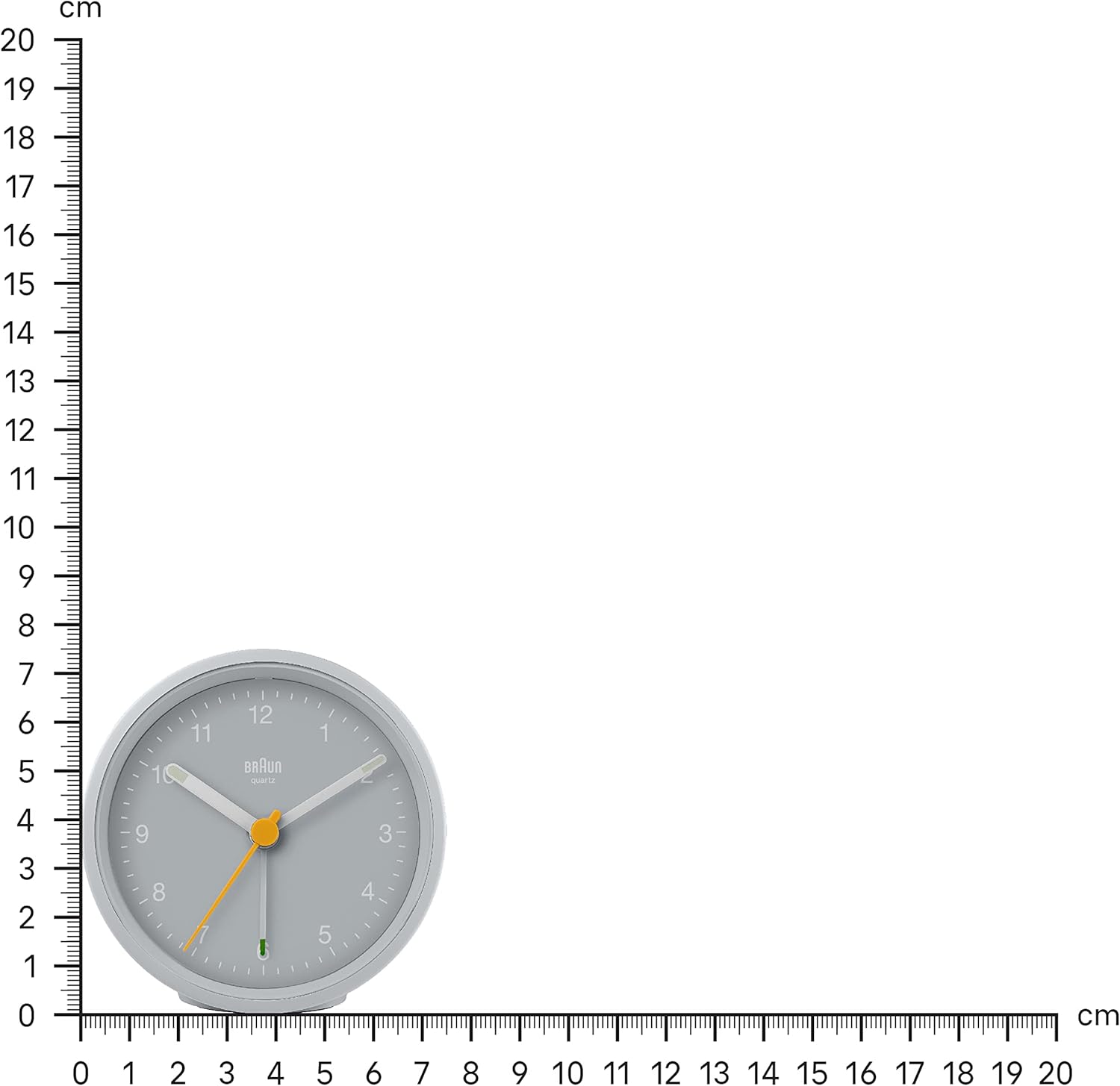
Front view of the Braun BC12G Classic Analog Alarm Clock, showcasing its grey matte dial and casing, with white hour and minute hands, a yellow second hand, and a green alarm hand.

Rear view of the Braun BC12G Alarm Clock, showing the battery compartment and setting knobs.
The Braun BC12G Alarm Clock held in a hand, illustrating its compact size of 75mm in height.
Setup
1. Battery Installation
- Locate the battery compartment cover on the back of the alarm clock.
- Remove the cover by sliding it downwards or lifting it, depending on the design.
- Insert one AAA (LR3) battery, ensuring the correct polarity (+/-) as indicated inside the compartment. (Battery not included)
- Replace the battery compartment cover securely.
2. Setting the Time
- Turn the Time Setting Knob (usually located on the back) clockwise or counter-clockwise until the hour and minute hands indicate the correct time.
- For accurate time setting, it is recommended to set the time slightly ahead and then turn it back to the exact time.
3. Setting the Alarm
- Turn the Alarm Setting Knob (usually located on the back) until the alarm hand points to your desired alarm time.
- Ensure the alarm ON/OFF switch (often a small slider on the side or back) is in the ON position.
Operating Instructions
Reading the Time
The clock features a clear analog display with distinct hour, minute, and second hands. The hour and minute hands are luminous, allowing for readability in low-light conditions.

Close-up view of the Braun BC12G clock face in the dark, highlighting the glow-in-the-dark hour and minute hands for improved legibility at night.
Snooze and Integrated Light Function
To activate the snooze function or illuminate the dial, press down on the top button/bar of the alarm clock. The light will illuminate for approximately 5 seconds. If the alarm is sounding, pressing this button will temporarily silence the alarm for a 5-minute snooze interval.

The Braun BC12G Alarm Clock with its integrated snooze and light function activated, showing the dial illuminated and indicating a 5-minute snooze interval.
Crescendo Beep Alarm
The BC12G features a crescendo alarm. When the alarm activates, the beep sound will start softly and gradually increase in volume and frequency over time to ensure you wake up gently but effectively.

An illustration of the Braun BC12G Alarm Clock highlighting its crescendo beep alarm feature, which gradually increases in intensity.
Silent Quartz Movement
This alarm clock is equipped with a silent precision quartz movement, ensuring that the clock operates without any ticking noise, providing a peaceful environment.

The Braun BC12G Alarm Clock with an icon indicating its quiet precision quartz movement, ensuring silent operation.
Maintenance
Cleaning
- Wipe the clock's surface with a soft, dry cloth.
- Do not use abrasive cleaners, solvents, or chemical sprays, as these may damage the finish.
Battery Replacement
- Replace the battery when the clock starts losing time or the alarm sound becomes weak.
- Follow the battery installation steps outlined in the "Setup" section.
- Dispose of used batteries responsibly according to local regulations.
Troubleshooting
| Problem | Possible Cause | Solution |
|---|---|---|
| Clock not working / Hands not moving. | Battery is dead or incorrectly inserted. | Check battery polarity or replace with a new AAA battery. |
| Alarm not sounding. | Alarm switch is OFF; Alarm time not set correctly; Battery low. | Ensure alarm switch is ON. Re-set alarm time. Replace battery. |
| Light not working. | Battery low or dead. | Replace battery. |
| Alarm sound is too quiet. | Battery is low. | Replace battery. The crescendo alarm will increase in volume over time. |
Specifications
- Model: BC12G
- Brand: Braun
- Color: Grey
- Dimensions (L x W x H): 3.5 x 3.81 x 7.5 cm (1.38 x 1.5 x 2.95 inches)
- Weight: 75 grams (2.65 ounces)
- Material: Plastic
- Movement: Silent Precision Quartz Movement
- Power Source: 1 x AAA (LR3) Battery (not included)
- Features: Crescendo Beep Alarm, Integrated Snooze (5 min), Integrated Backlight (5 sec), Luminous Tipped Hands, Matte Dial and Casing.
Warranty and Support
Warranty Information
This Braun alarm clock comes with a manufacturer's warranty of up to 5 years. Please retain your proof of purchase for any warranty claims. For specific warranty terms and conditions, refer to the documentation included with your product or visit the official Braun website.
Customer Support
If you encounter any issues not covered in this manual or require further assistance, please contact Braun customer support. You can usually find contact information on the official Braun website or on the product packaging.
For more information, visit the official Braun website: www.braun-clocks.com
Important Safety Information
- Do not expose the clock to extreme temperatures, direct sunlight, or high humidity.
- Keep out of reach of small children due to small parts (battery).
- Do not attempt to disassemble or repair the clock yourself. Refer to qualified service personnel.
- Remove batteries if the clock will not be used for an extended period to prevent leakage.
Documents and downloads
Ask a question about this manual
Ask about setup, troubleshooting, compatibility, parts, safety, or missing instructions. Manuals+ will review the question and use this page’s manual context to help answer it.