
LEXiBOOK JC598PAi2
Contents
Instruction Manual
LEXiBOOK Paw Patrol Educational and Bilingual Laptop
Model: JC598PAi2
Introduction
Thank you for choosing the LEXiBOOK Paw Patrol Educational and Bilingual Laptop. This interactive learning toy is designed to engage children with a variety of educational activities in both Spanish and English, covering subjects like mathematics, language, logic, and music. Its ergonomic design, inspired by real laptops, provides a comfortable and intuitive learning experience for young users.
Safety Information
This product is recommended for children aged 3 years and up. Always supervise young children during play. Ensure that the battery compartment is securely closed to prevent access to batteries. Do not mix old and new batteries. Do not mix alkaline, standard (carbon-zinc), or rechargeable (nickel-cadmium) batteries. Remove batteries during long periods of non-use to prevent leakage.
Setup
- Battery Installation: Locate the battery compartment on the underside of the laptop. Open it using a small screwdriver. Insert 2 AA batteries, ensuring correct polarity (+/-). Close the compartment securely.
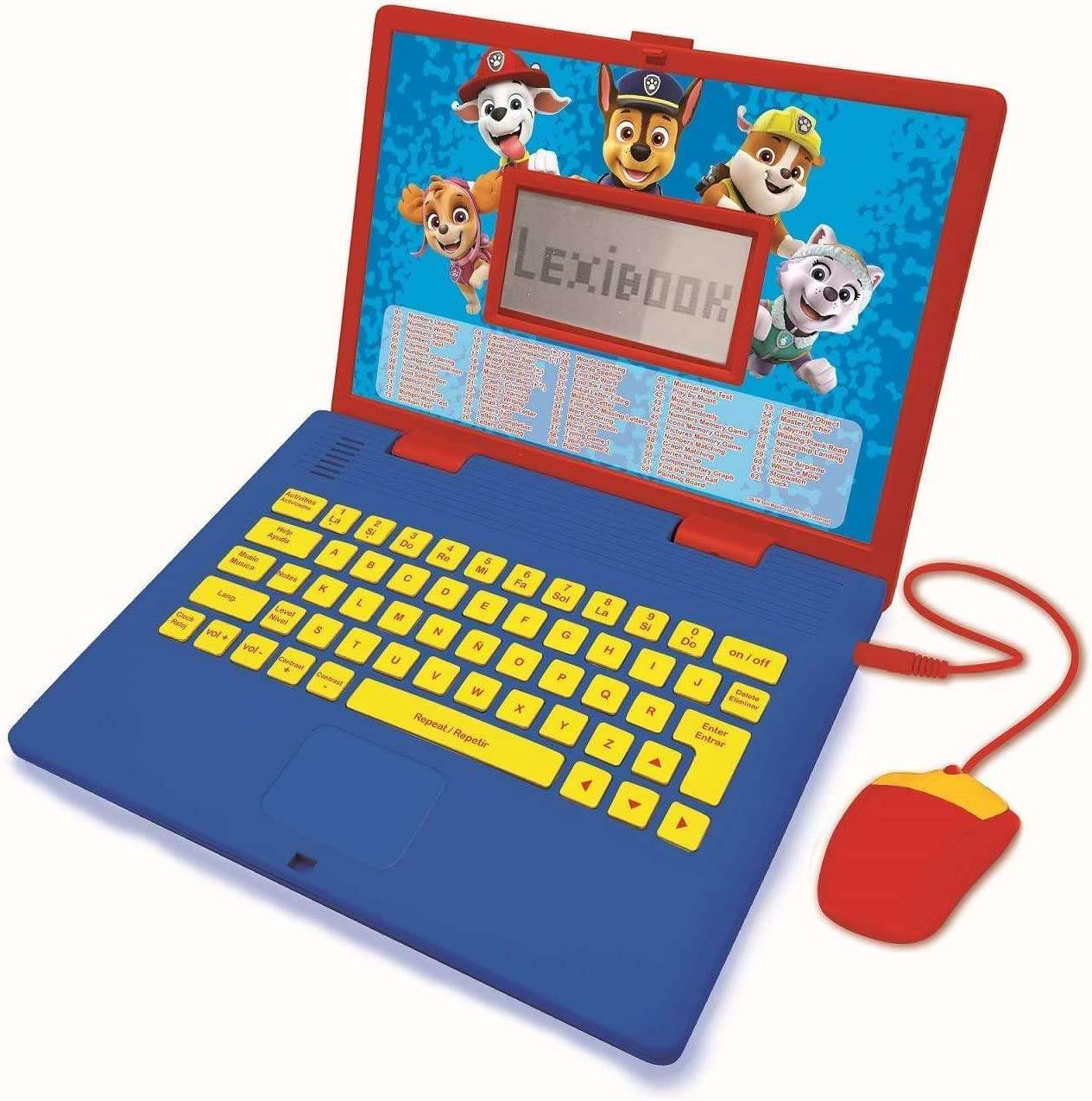
Figure 1: The LEXiBOOK Paw Patrol laptop, showcasing its open design with a full keyboard and a screen featuring Paw Patrol characters. This image provides a clear view of the device's layout for setup and operation. - Power On: Press the "On/Off" button located on the keyboard to power on the laptop.
- Language Selection: Upon first use, you may be prompted to select your preferred language (Spanish or English). Follow the on-screen instructions to make your selection.
Operating Instructions
The laptop features 124 activities across various categories. Use the keyboard and the integrated touchpad to navigate through menus and interact with games.
- Activity Selection: Browse through the list of activities displayed on the screen. Use the arrow keys to highlight an activity and press "Enter" to select it.
- Educational Activities:
- Language: Learn letters, words, typing, and spelling in both Spanish and English.
- Mathematics: Practice numbers, basic calculations (addition, subtraction, multiplication, division), and problem-solving.
- General Knowledge: Explore various topics to expand general knowledge.
- Logic: Engage in activities designed to develop logical thinking skills.
- Music: Discover musical notes, compose simple melodies, and play pre-programmed tunes.
- Clock Reading: Learn to tell time.

Figure 2: A detailed view of the laptop's screen, illustrating the diverse range of educational activities available, from language learning to mathematical challenges. - Games: Test your logic, memory, and speed with fun, interactive games.
- Volume Control: Use the dedicated volume buttons on the keyboard to adjust the sound level.
- Repeat Function: The "Repeat / Repetir" button allows you to hear instructions or sounds again.
Maintenance
- Cleaning: Wipe the surface of the laptop with a soft, dry cloth. Do not use abrasive cleaners or immerse the device in water.
- Storage: Store the laptop in a cool, dry place away from direct sunlight and extreme temperatures.
- Battery Care: Remove batteries if the device will not be used for an extended period. Dispose of used batteries responsibly according to local regulations.
Troubleshooting
| Problem | Possible Cause | Solution |
|---|---|---|
| Laptop does not turn on. | Batteries are low or incorrectly installed. | Replace batteries with new ones, ensuring correct polarity. |
| Screen is dim or unreadable. | Low battery power; contrast setting. | Replace batteries. Check if there is a contrast adjustment button on the keyboard (refer to specific model features). |
| Sound is not working. | Volume is too low or muted. | Increase volume using the volume buttons. |
| Keyboard/touchpad unresponsive. | Temporary software glitch; low battery. | Turn the laptop off and on again. Replace batteries. |
Specifications
- Model Number: JC598PAi2
- Product Dimensions: 24 x 18 x 3.6 inches
- Item Weight: 1.45 pounds
- Power Source: 2 AA batteries (not included)
- Recommended Age: 3 years and up
- Languages: Spanish, English
- Activities: 124 educational activities and games

Warranty and Support
For warranty information and customer support, please refer to the contact details provided on the product packaging or visit the official LEXiBOOK website. Keep your purchase receipt as proof of purchase for any warranty claims.
You can also visit the LEXiBOOK Store on Amazon for more products and information.
Documents and downloads
Ask a question about this manual
Ask about setup, troubleshooting, compatibility, parts, safety, or missing instructions. Manuals+ will review the question and use this page’s manual context to help answer it.