
Arcchio Ronka Dimmable Ceiling Light Instruction Manual
Model: Ronka (9624448)
Introduction
This manual provides instructions for the Arcchio Ronka dimmable ceiling light. The Ronka ceiling spotlight features individually adjustable GU10 lamp holders, compatible with ES111 LED bulbs. It includes screwless connection terminals for simplified installation. Made from aluminum, this white ceiling light is designed for indoor use in various rooms such as living rooms, dining rooms, offices, and hallways.
Safety Information
WARNING: Electrical shock hazard. Always disconnect power at the fuse or circuit breaker before installation or servicing. Installation must be performed by a qualified electrician in accordance with local electrical codes.
- Do not install near heat sources or in damp locations.
- Ensure the mounting surface can support the weight of the fixture.
- Use only GU10 ES111 LED bulbs as specified.
- Do not exceed the maximum wattage specified for the lamp holders.
- Keep packaging materials away from children.
Package Contents
Verify that all components are present before beginning installation.
- Arcchio Ronka Ceiling Light Fixture
- Mounting Bracket
- Mounting Hardware (screws, wall anchors)
- Instruction Manual
- Note: Light bulbs are not included.
Specifications
| Feature | Detail |
|---|---|
| Brand | Arcchio |
| Model Name | Ronka |
| Model Number | 9624448 |
| Color | White / Opal |
| Material | Aluminum |
| Dimensions (LxWxH) | 34 cm x 18.5 cm x 9 cm |
| Weight | 1.46 kg |
| Bulb Base | GU10 |
| Number of Lights | 2 |
| Max Wattage per Bulb | 20 W (for ES111 LED) |
| Voltage | 230 Volt (AC) |
| Luminous Flux | Up to 2000 Lumen (total) |
| Dimmable | Yes (with compatible bulbs and dimmer switch) |
| Control Method | Button (external dimmer switch required) |
| Protection Type | IP20 |
| Protection Class | I |
| Indoor/Outdoor Use | Indoor |
| Assembly Required | Yes |
Setup and Installation
Before starting, ensure the power supply is disconnected at the main circuit breaker.
- Prepare Mounting Surface: Identify the desired location on the ceiling. Ensure the surface is clean, dry, and structurally sound to support the fixture.
- Attach Mounting Bracket: Secure the mounting bracket to the ceiling using the provided screws and wall anchors. Ensure it is firmly attached.
- Electrical Connection: Connect the household electrical wires to the screwless connection terminals of the fixture. Ensure correct polarity (Live, Neutral, Earth) according to local electrical codes. The fixture is designed for 230V AC.
- Mount the Fixture: Carefully align the ceiling light fixture with the mounting bracket and secure it in place.
- Install Bulbs: Insert two GU10 ES111 LED bulbs (not included) into the lamp holders.
- Restore Power: Once installation is complete and all connections are secure, restore power at the main circuit breaker.

Image: The internal view of the Arcchio Ronka ceiling light showing the mounting bracket detached, ready for installation. Wiring terminals are visible.
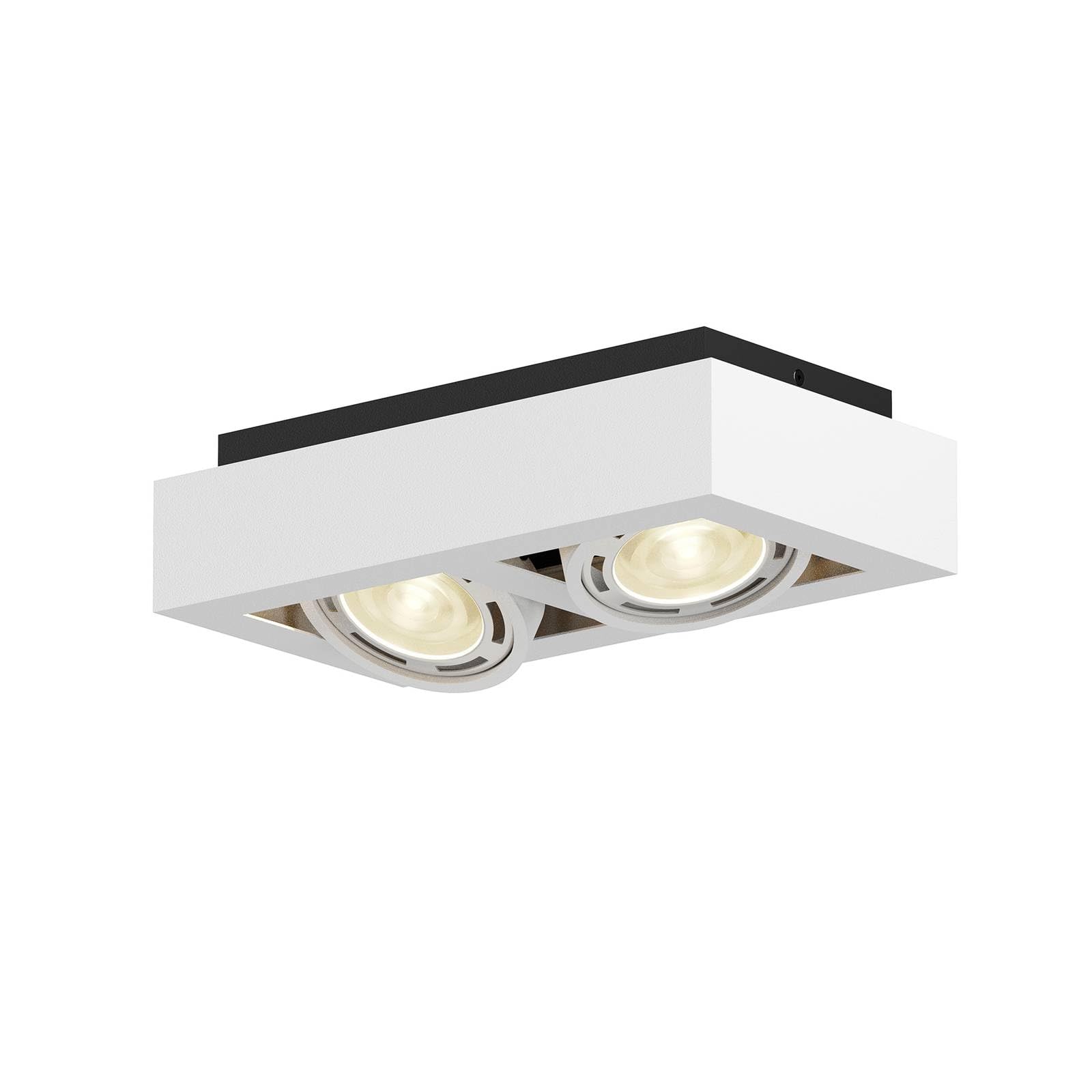
Image: The Arcchio Ronka ceiling light, white aluminum, with two illuminated GU10 spotlights, mounted flush against a white ceiling.

Image: A detailed view of one of the GU10 ES111 LED bulbs installed and illuminated within the white aluminum housing of the Ronka ceiling light.
Operating Instructions
The Arcchio Ronka ceiling light is designed for straightforward operation.
- Power On/Off: Use your standard wall switch to turn the light fixture on or off.
- Dimming Function: If you have installed dimmable GU10 ES111 LED bulbs and connected the fixture to a compatible external dimmer switch, you can adjust the light intensity using the dimmer control.
- Adjusting Spotlights: The individual spotlights can be manually adjusted to direct light to specific areas of the room. Gently pivot each spotlight to achieve the desired illumination angle.

Image: The Arcchio Ronka ceiling light with its two spotlights tilted downwards, demonstrating the adjustable nature of the light sources.
Maintenance
Regular maintenance ensures optimal performance and longevity of your Arcchio Ronka ceiling light.
- Cleaning: Disconnect power before cleaning. Wipe the fixture with a soft, dry, or slightly damp cloth. Do not use abrasive cleaners, solvents, or polishes as they may damage the finish.
- Bulb Replacement:
- Disconnect power at the circuit breaker.
- Allow bulbs to cool completely before handling.
- Gently twist and pull out the old GU10 ES111 LED bulb.
- Insert a new, compatible GU10 ES111 LED bulb by aligning the pins and twisting to secure.
- Restore power and test the light.
- Inspection: Periodically inspect the wiring and connections for any signs of wear or damage. If any issues are found, consult a qualified electrician.
Troubleshooting
Refer to the following table for common issues and their solutions.
| Problem | Possible Cause | Solution |
|---|---|---|
| Light does not turn on. | No power supply. Bulb is faulty or not installed correctly. Loose wiring connection. |
Check circuit breaker and wall switch. Replace bulb or ensure it is fully seated. (Disconnect power first) Check wiring connections. |
| Light flickers or dims unexpectedly. | Incompatible dimmer switch or bulbs. Loose connection. Faulty bulb. |
Ensure dimmable bulbs and compatible dimmer are used. (Disconnect power first) Check wiring connections. Replace bulb. |
| Light fixture gets excessively hot. | Incorrect bulb type or wattage used. | Ensure only GU10 ES111 LED bulbs with a maximum of 20W are used. |
Warranty and Support
This Arcchio product comes with a limited warranty. For specific warranty details, please refer to the documentation provided at the time of purchase or contact your retailer.
For technical support or inquiries, please contact Arcchio customer service or visit the official Arcchio website. When contacting support, please have your model number (Ronka, 9624448) and purchase information ready.
You can find more information about Arcchio products at Arcchio Store on Amazon.