
1. Introduction
Thank you for choosing the Arcchio Lissano LED Solar Outdoor Wall Light. This product is designed to provide efficient and convenient outdoor illumination using solar energy. It features an integrated motion sensor and a dusk sensor for automatic operation, emitting a warm white light suitable for various outdoor environments.
Key features include:
- Solar-powered operation for energy efficiency.
- Integrated LED light source (8W total) providing 3,000 K warm white light.
- Dusk sensor for automatic activation at night.
- Motion sensor with 110° detection angle and up to 12 meters detection distance.
- Adjustable illumination duration from 10 to 60 seconds.
- IP44 protection rating, suitable for outdoor use.
2. Safety Instructions
Please read these safety instructions carefully before installation and use. Keep this manual for future reference.
- Installation: Ensure the light is installed on a stable surface. All installation work should be performed by a qualified person if electrical connections beyond the solar panel are required.
- Solar Panel Placement: Position the solar panel in an area that receives direct sunlight for at least 6-8 hours daily to ensure optimal charging. Avoid shaded areas.
- Water Resistance: The product has an IP44 rating, meaning it is protected against splashing water. Do not submerge the unit in water or expose it to high-pressure water jets.
- Cleaning: Use a soft, damp cloth for cleaning. Do not use abrasive cleaners or solvents.
- Battery: This unit contains an integrated rechargeable battery. Do not attempt to replace the battery unless specifically instructed by the manufacturer. Dispose of batteries according to local regulations.
- Temperature: Do not expose the product to extreme temperatures or open flames.
3. Package Contents
Verify that all components are present and undamaged:
- Arcchio Lissano LED Solar Outdoor Wall Light unit
- Separate Solar Panel with connecting cable
- Mounting hardware (screws, wall plugs)
- Instruction Manual
4. Product Overview
Familiarize yourself with the components of your Arcchio Lissano LED Solar Outdoor Wall Light.
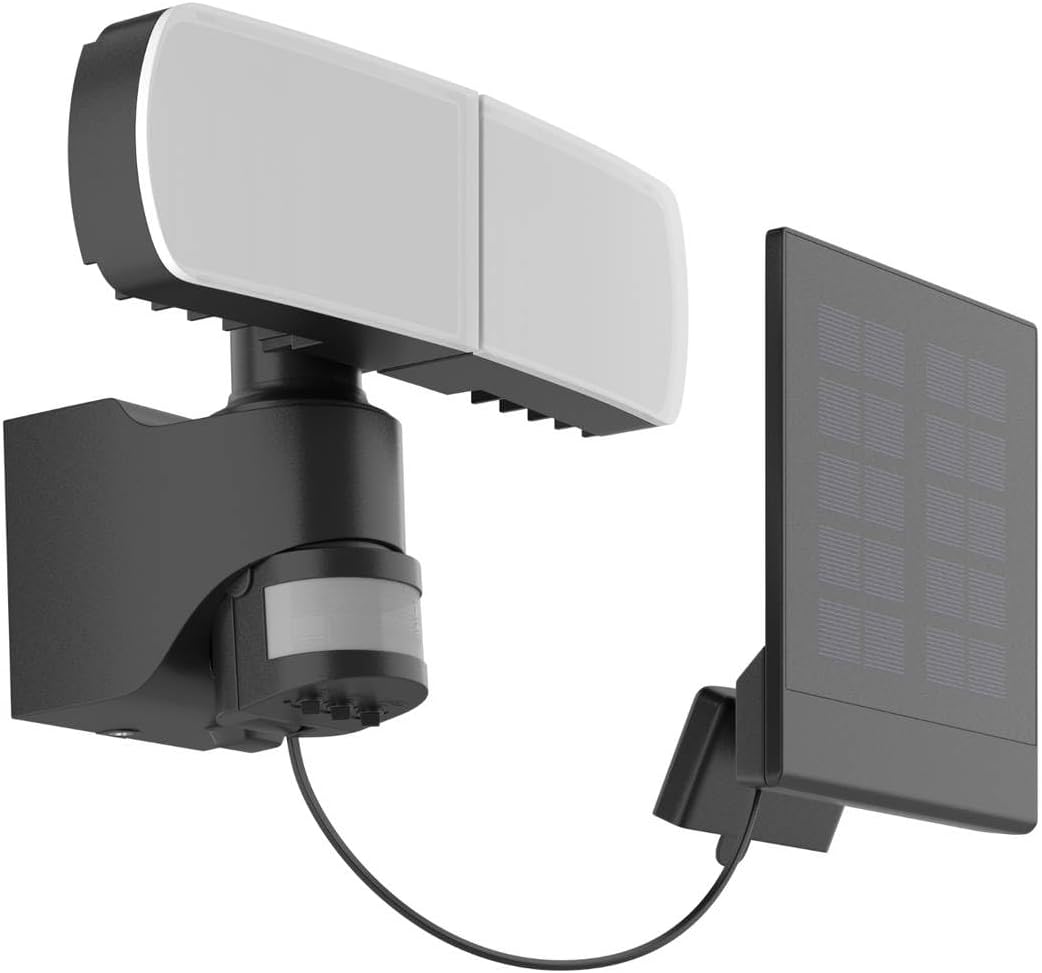
Figure 1: The Arcchio Lissano LED Solar Outdoor Wall Light, showing the main light unit connected to its separate solar panel.

Figure 2: Detailed dimensions of the light unit and solar panel, indicating a width of 250mm for the light, 170mm height, and 150mm depth. The solar panel is 155mm wide and 65mm deep.

Figure 3: Close-up view of the underside of the light unit, showing the motion sensor and three adjustable dials labeled 'SENS', 'TIME', and 'LUX' for sensitivity, duration, and light level settings.

Figure 4: Internal view of the light unit, revealing the battery compartment designed for rechargeable AAA batteries, along with the connection point for the solar panel.
5. Setup and Installation
Follow these steps to install your solar wall light:
- Choose Location: Select a mounting location for the light unit that provides the desired illumination coverage. For the solar panel, choose a location that receives maximum direct sunlight throughout the day, ideally 6-8 hours. The solar panel can be mounted separately from the light unit to optimize sun exposure.
- Mount Solar Panel: Use the provided mounting hardware to securely attach the solar panel to your chosen surface. Ensure it is angled to capture sunlight effectively.
- Mount Light Unit: Securely attach the light unit to your desired wall or surface using the provided screws and wall plugs.
- Connect Solar Panel: Connect the cable from the solar panel to the input port on the light unit. Ensure the connection is firm.
- Initial Charge: Allow the solar panel to charge the internal battery for at least 24-48 hours in direct sunlight before first use. This ensures the battery is fully charged for optimal performance.

Figure 5: The Arcchio Lissano light unit and solar panel installed on an exterior wall, demonstrating its operational state at dusk.

Figure 6: The light unit with its two adjustable LED heads, allowing users to direct illumination as needed.
6. Operating Instructions
The Arcchio Lissano light operates automatically based on its integrated sensors.
Sensor Settings:
The light unit features three adjustable dials (refer to Figure 3) to customize its operation:
- SENS (Sensitivity): Adjusts the detection range of the motion sensor. Turn clockwise for higher sensitivity (longer detection distance) and counter-clockwise for lower sensitivity.
- TIME (Illumination Duration): Sets how long the light remains on after motion is detected. Adjustable from 10 to 60 seconds. Turn clockwise to increase duration, counter-clockwise to decrease.
- LUX (Light Level): Determines the ambient light level at which the motion sensor becomes active. Turn clockwise for the sensor to activate in brighter conditions (e.g., early dusk), and counter-clockwise for it to activate only in darker conditions (e.g., deep night).
Automatic Operation:
Once installed and charged, the light will operate as follows:
- During the day, the solar panel charges the internal battery. The light will remain off.
- As ambient light levels drop below the set LUX threshold (dusk sensor), the motion sensor becomes active.
- When motion is detected within the SENS range, the LED light will turn on for the duration set by the TIME dial.
- After the set time, if no further motion is detected, the light will turn off.
7. Maintenance
Regular maintenance ensures optimal performance and longevity of your solar light.
- Clean Solar Panel: Periodically wipe the solar panel with a soft, damp cloth to remove dust, dirt, or debris. A clean panel ensures efficient charging.
- Clean Light Unit: Clean the light unit and sensor lens with a soft, damp cloth. Avoid harsh chemicals.
- Check Connections: Occasionally check the connection between the solar panel and the light unit to ensure it remains secure.
- Battery Life: The integrated rechargeable battery has a limited lifespan. If the light's performance significantly degrades over time, the battery may need replacement. Contact customer support for guidance on battery replacement.
8. Troubleshooting
If you encounter issues with your Arcchio Lissano light, refer to the following common problems and solutions:
| Problem | Possible Cause | Solution |
|---|---|---|
| Light does not turn on at night. | Insufficient solar charge. Solar panel is dirty or shaded. LUX setting is too high. | Ensure solar panel receives 6-8 hours of direct sunlight daily. Clean the solar panel. Adjust the LUX dial to a lower setting. Allow 24-48 hours for initial charge. |
| Light stays on constantly or flashes. | Motion sensor is continuously triggered. Faulty sensor. | Check for constant movement near the sensor (e.g., tree branches). Adjust SENS dial to lower sensitivity. If problem persists, contact support. |
| Light turns on during the day. | LUX setting is too low. | Adjust the LUX dial to a higher setting so the sensor only activates in darker conditions. |
| Light duration is too short/long. | TIME setting is incorrect. | Adjust the TIME dial to your desired illumination duration (10-60 seconds). |
| Motion sensor not detecting. | SENS setting is too low. Obstruction in front of sensor. | Adjust SENS dial to higher sensitivity. Ensure no objects are blocking the sensor's field of view. |
9. Specifications
| Feature | Specification |
|---|---|
| Brand | Arcchio |
| Model Number | 9936010 |
| Product Dimensions (Light Unit) | 16 x 25 x 17.2 cm (Depth x Width x Height) |
| Weight | 1.05 kg |
| Material | Plastic |
| Color | Black (housing), White (lampshade) |
| Light Source | Integrated LED |
| Wattage | 8 W |
| Luminous Flux | 800 lumens |
| Color Temperature | 3,000 K (Warm White) |
| Power Source | Solar-energy |
| IP Protection Rating | IP44 |
| Protection Class | III |
| Motion Sensor Detection Angle | 110° |
| Motion Sensor Detection Distance | Max. 12 meters |
| Illumination Duration (Adjustable) | 10 to 60 seconds |
| Special Features | Waterproof (IP44), Motion Sensor, Dusk Sensor |
10. Warranty and Support
This product is covered by a return policy of 31 days from the date of purchase. For any questions regarding the product, technical assistance, or warranty claims, please contact the seller directly via their Amazon store. Please have your purchase details and model number (9936010) ready when contacting support.