
Introduction
This manual provides detailed instructions for the installation, operation, and maintenance of your Arcchio Logan LED Floor Lamp. This modern LED floor lamp is designed to provide efficient and adaptable lighting for office environments and workspaces. It features advanced functionalities such as a touch dimmer, CCT (Correlated Color Temperature) control, motion sensor, and daylight sensor to optimize your lighting experience.

Figure 1: Arcchio Logan LED Floor Lamp, a sleek silver floor lamp with a rectangular head and U-shaped base.
Important Safety Instructions
Please read these instructions carefully before installation and use. Keep this manual for future reference.
- Ensure the power supply is disconnected before installation, cleaning, or maintenance.
- This product is for indoor use only (IP20 rating). Do not expose to water or high humidity.
- Installation should be performed by a qualified electrician if you are unsure.
- Do not attempt to modify or repair the lamp yourself. Contact qualified service personnel.
- Keep packaging materials away from children.
- Ensure the lamp is placed on a stable, level surface to prevent tipping.
Package Contents
Verify that all components are present and undamaged before proceeding with installation.
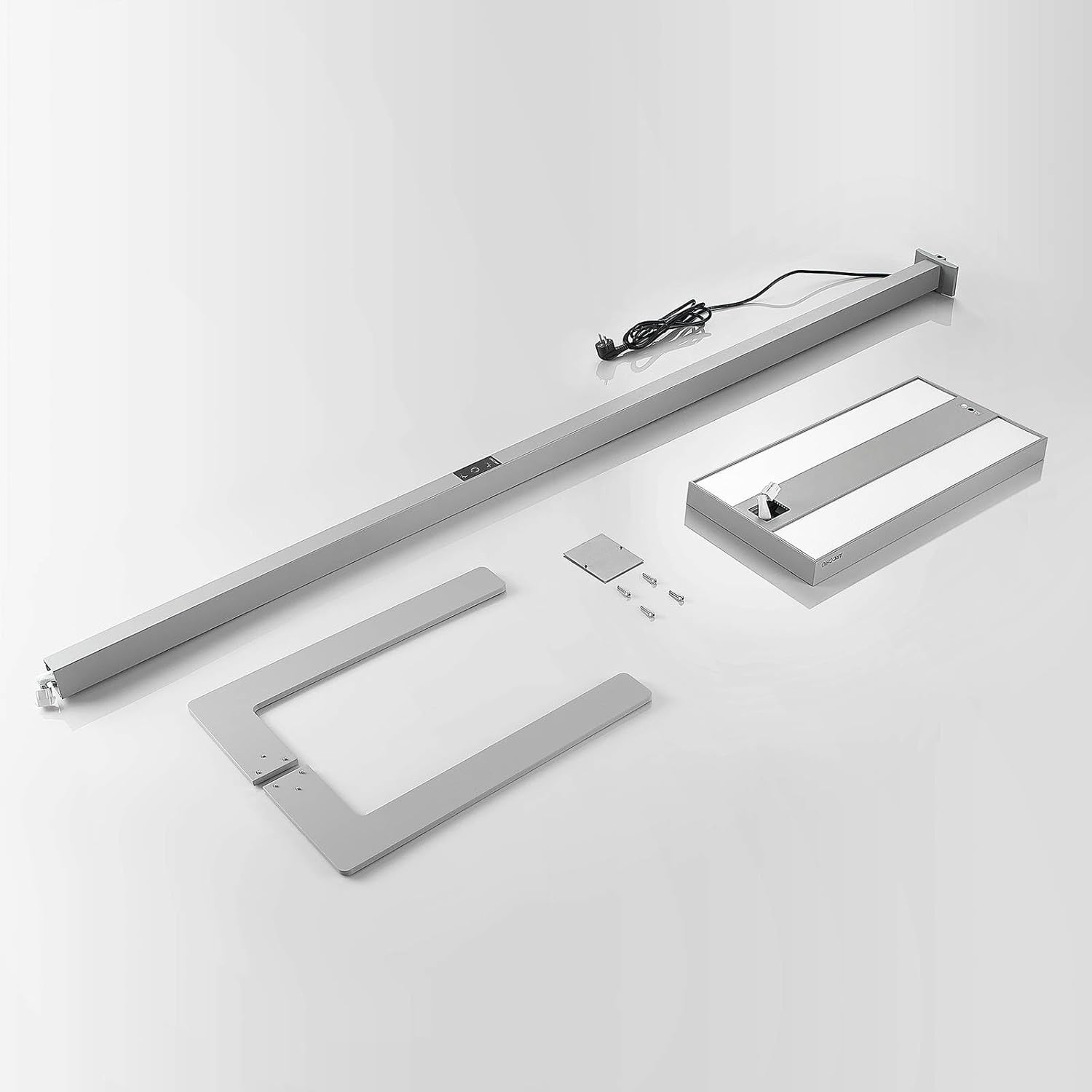
Figure 2: All components of the Arcchio Logan LED Floor Lamp laid out, including the base, main pole, lamp head, and power cable.
- LED Lamp Head
- Main Pole
- U-shaped Base
- Power Cable
- Mounting Hardware (screws, tools if applicable)
- Integrated LED Light Source
Setup and Installation
Follow these steps to assemble and set up your Arcchio Logan LED Floor Lamp:
- Assemble the Base: Attach the main pole securely to the U-shaped base using the provided screws. Ensure all connections are tight.
- Attach the Lamp Head: Connect the LED lamp head to the top of the main pole. Ensure the electrical connection is properly seated and the head is firmly attached.
- Position the Lamp: Place the lamp in your desired workspace. The U-shaped base is designed to fit around desk legs, allowing for optimal positioning next to your workstation.
- Connect to Power: Plug the power cable into a standard 230V electrical outlet.
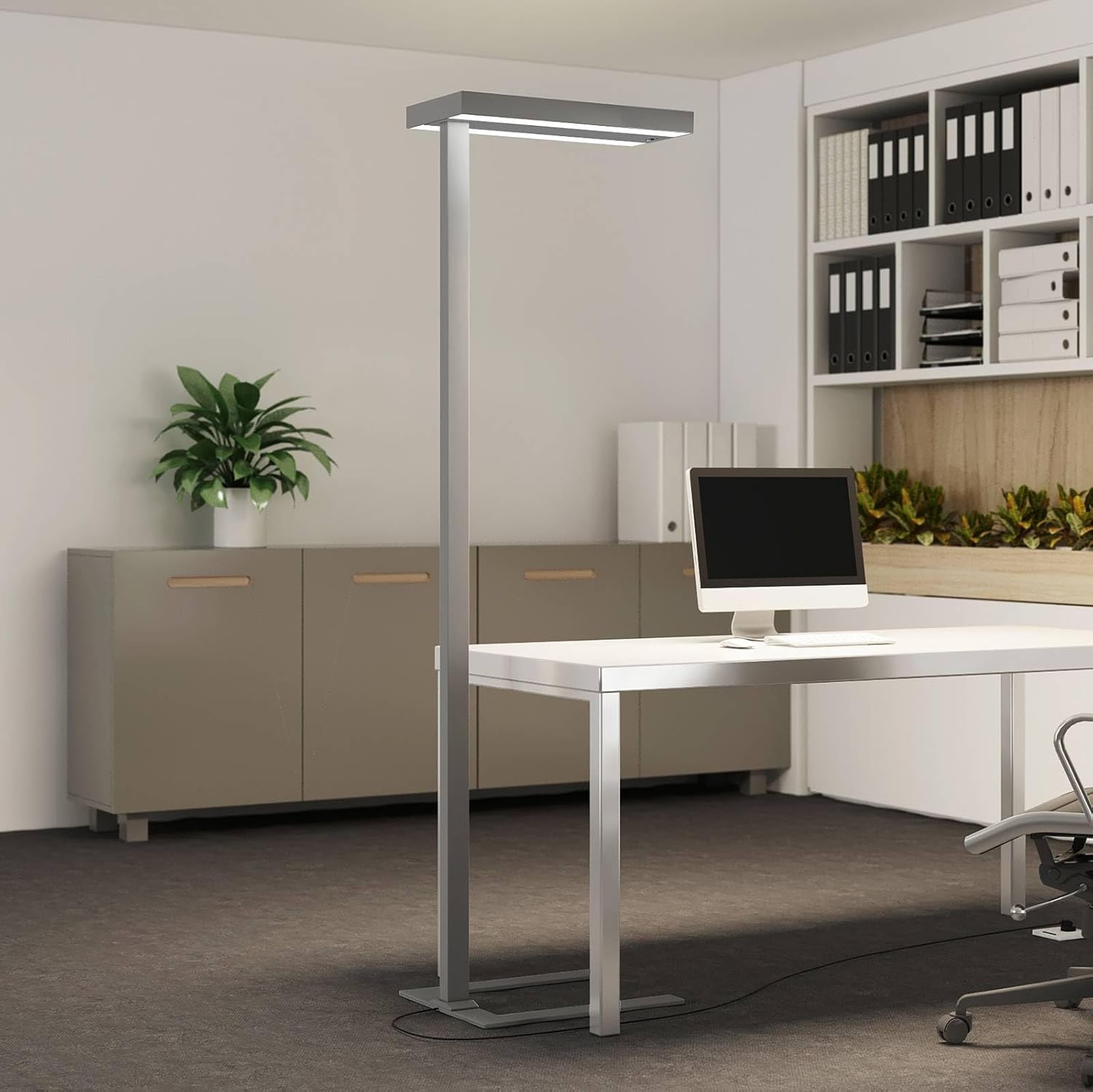
Figure 3: The Arcchio Logan LED Floor Lamp positioned in an office setting, demonstrating its U-shaped base fitting around a desk.
Operating Instructions
The Arcchio Logan LED Floor Lamp features an intuitive touch control panel for various functions.

Figure 4: Close-up of the touch control panel on the lamp's main pole, showing icons for power, dimming, and color temperature adjustment.
- Power On/Off: Press the power icon on the touch panel to turn the lamp on or off.
- Dimming Function:
- Touch the dimming icon (sun/brightness symbol) to adjust the light intensity.
- The lamp provides both direct light (downwards onto the workspace) and indirect light (upwards for ambient illumination). Both can be dimmed separately via the touch panel.
- CCT (Correlated Color Temperature) Control:
- Touch the CCT icon (color temperature symbol) to change the white light color. This allows you to switch between different shades of white light to suit your preference or task.
- Motion Sensor:
- The integrated motion sensor automatically turns the light on when activity is detected.
- If no activity is detected for 30 minutes, the lamp will automatically turn off to save energy.
- Daylight Sensor:
- The daylight sensor automatically adjusts the lamp's brightness based on the ambient light levels in the room. This ensures consistent illumination and energy efficiency.

Figure 5: Underside view of the lamp head, highlighting the integrated motion and daylight sensors.
Maintenance
- Cleaning: Disconnect the power before cleaning. Use a soft, dry cloth to wipe the lamp. Do not use abrasive cleaners or solvents.
- LED Light Source: The LED light source is integrated and not user-replaceable. If the LEDs fail, contact customer support.
Troubleshooting
| Problem | Possible Cause | Solution |
|---|---|---|
| Lamp does not turn on. | No power supply. Lamp is switched off. | Check if the power cable is securely plugged in. Press the power button on the touch panel. |
| Dimming or CCT function not working. | Incorrect touch input. Temporary software glitch. | Ensure you are touching the correct icon. Disconnect power for 10 seconds and reconnect. |
| Motion sensor not detecting movement. | Sensor obstructed. Incorrect sensitivity setting (if adjustable). | Ensure the sensor area (underside of lamp head) is clear. (No explicit sensitivity setting mentioned, assume fixed). |
| Light turns off too quickly. | Motion sensor timeout. | The lamp is designed to turn off after 30 minutes of inactivity. Ensure continuous movement in the sensor's range if prolonged illumination is desired. |
Specifications
| Feature | Detail |
|---|---|
| Brand | Arcchio |
| Model Number | 9968060 |
| Product Dimensions (L x W x H) | 61 cm x 28 cm x 198.6 cm |
| Weight | 12.2 kg |
| Material | Aluminum, Plastic |
| Color | Silver (RAL 9006) |
| Voltage | 230 Volt |
| IP Code | IP20 (Indoor use) |
| Protection Class | I |
| Wattage | 100 Watt |
| Luminous Flux | 13800 Lumen |
| Color Temperature | Adjustable CCT (e.g., 3000 Kelvin mentioned as a base, but CCT implies range) |
| Special Features | Touch Dimmer, Motion Sensor, Daylight Sensor, CCT Function, Flicker-free, SDCM <3, UGR <17, Direct and Indirect Light |
| Energy Efficiency Rating | D (New EU energy label) |

Figure 6: EU Energy Label for the Arcchio Logan LED Floor Lamp, indicating an energy efficiency class of D.
For more detailed product information, refer to the EPREL database: https://eprel.ec.europa.eu/qr/743905
Warranty Information
For warranty details, please refer to the terms and conditions provided by your retailer at the time of purchase. Keep your proof of purchase for any warranty claims.
Customer Support
If you encounter any issues or have questions not covered in this manual, please contact Arcchio customer support or your authorized retailer for assistance.