1. Introduction
This manual provides detailed instructions for the installation, operation, and maintenance of your FCCUM Digital Thermostat Control Board. This replacement control board is designed to restore and enhance the temperature management capabilities of compatible Pit Boss Wood Pellet Grills. Please read this manual thoroughly before installation and use to ensure proper function and safety.

Figure 1: FCCUM Digital Thermostat Control Board
2. Compatibility
The FCCUM Digital Thermostat Control Board is a direct replacement for the OEM controller board in the following Pit Boss Wood Pellet Grill models:
- Tailgater 340 (PB340TGW1)
- Classic 700 (PB700FBW2)
- Austin XL 1000 (PB1000XLW1)
- Lexington 540
Important Note:
This control board is not compatible with Vertical Pellet Smokers or Refrigerator Grills.

Figure 2: Control Board installed on a compatible Pit Boss grill
3. Product Features
The FCCUM Digital Thermostat Control Board offers several features for precise grilling control:
- LCD Display: Provides clear and accurate real-time cooking temperature readings.
- Adjustable Temperature Settings: Offers eight cooking temperature settings, ranging from 200 ℉ to 475 ℉.
- Cook and Smoke Modes: Allows selection between standard cooking temperatures and a dedicated smoke mode for enhanced flavor. The 'P' set function enables adjustment of smoke intensity.
- Dual Probe Connection Ports: Equipped with two ports for connecting meat probes, allowing monitoring of internal meat temperatures without opening the grill lid.

Figure 3: Control Board features with labeled components
4. Setup and Installation
Installation of the FCCUM Digital Thermostat Control Board is designed to be straightforward. Follow these steps for proper setup:
- Safety First: Ensure your grill is completely powered off and unplugged from the electrical outlet before beginning any installation.
- Access Old Controller: Carefully remove the existing control board from your Pit Boss grill. Note the position and connection of all wires.
- Connect Wiring: Connect the new FCCUM control board by matching the wire colors to their corresponding components. Refer to the wiring diagram below for guidance.
- Yellow Wire: Connects to the fan.
- Red Wire: Connects to the auger motor.
- Purple Wire: Connects to the hot rod igniter.
- Black Wire: Connects to the main power cord.
- Secure New Controller: Once all wires are securely connected, mount the new control board into the grill's housing. Ensure it is firmly in place.
- Initial Power-Up: Plug the grill back into the electrical outlet. The LCD display should illuminate.

Figure 4: Wiring Diagram for Control Board Connections
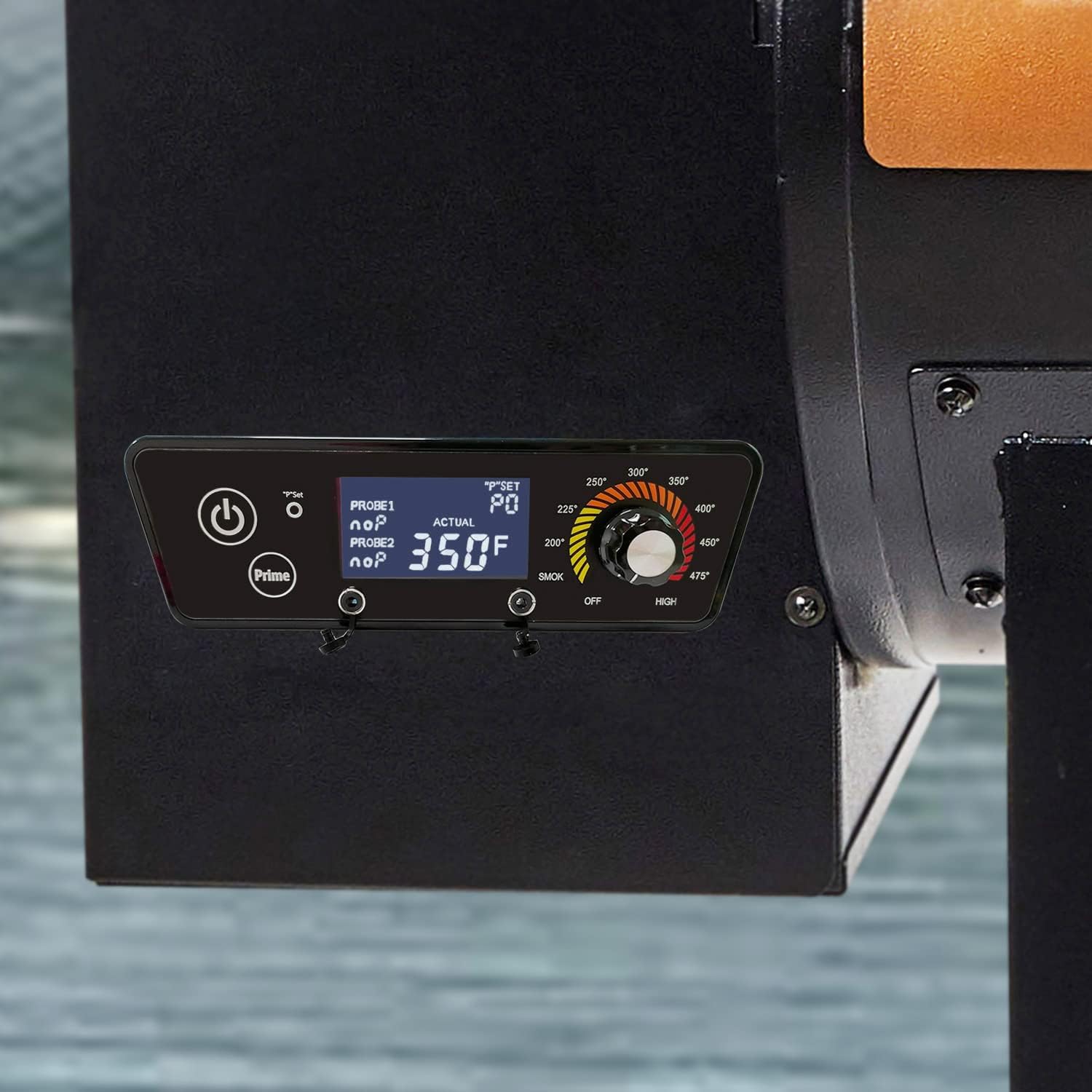
Figure 5: Control Board with attached wiring harnesses
5. Operation
Operating your FCCUM Digital Thermostat Control Board is intuitive:
- Power On: Press the power button (⏻) to turn on the grill. The LCD display will show the current internal grill temperature.
- Set Temperature: Rotate the main control knob to select your desired cooking temperature. Available settings range from 200 ℉ to 475 ℉. The display will show the set temperature and the actual temperature.
- Smoke Mode ('P' Set): To activate smoke mode or adjust smoke intensity, press the 'P' Set button. This allows for fine-tuning the pellet feed rate to produce more or less smoke. Refer to your grill's specific instructions for optimal 'P' settings.
- Prime Function: Press the 'Prime' button to quickly feed pellets into the fire pot, useful during initial startup or after running out of pellets.
- Meat Probes: Insert meat probes into the designated ports on the control board. The display will show the internal temperature of your food, labeled as PROBE1 and PROBE2.
- Power Off: To turn off the grill, rotate the control knob to the 'OFF' position and then press the power button.

Figure 6: Control Board in operation, displaying temperature
6. Troubleshooting
If you encounter issues with your FCCUM Digital Thermostat Control Board, consider the following common troubleshooting steps:
- No Power/Display: Ensure the grill is securely plugged into a working electrical outlet. Check for any tripped circuit breakers. Verify all wiring connections to the control board are secure as per the installation instructions.
- Inaccurate Temperature Readings: Ensure the grill's internal temperature probe is clean and properly positioned. If using meat probes, ensure they are fully inserted into the food and the control board ports.
- Grill Not Heating: Check the pellet hopper for sufficient pellets. Verify the hot rod igniter connection and function. Ensure the auger motor is feeding pellets correctly.
- Excessive Smoke/No Smoke: Adjust the 'P' set value in smoke mode. A higher 'P' value typically results in more smoke and lower temperatures, while a lower 'P' value results in less smoke and higher temperatures.
- Error Codes: If the display shows an error code, consult your original Pit Boss grill manual for specific error code meanings, as this control board mimics the OEM functionality.
If problems persist after attempting these steps, please contact customer support.
7. Specifications
| Brand | FCCUM |
| Model Number | 7882856161393 |
| UPC | 788285616139 |
| Manufacturer | Entsong |
| Product Dimensions (L x H) | 8.85 inches x 2.8 inches |
| Item Weight | 11.7 ounces (0.33 Kilograms) |
| Color | Black |
| Material | Plastic |
| Display Type | LCD |
| Operating Temperature Range | 200 ℉ to 475 ℉ |

Figure 7: Control Board dimensions
8. Warranty and Support
Your FCCUM Digital Thermostat Control Board is designed for durability and reliable performance. While specific warranty details are not provided in this manual, we are committed to customer satisfaction.
If you have any questions, require assistance with installation, or experience any issues with your product, please do not hesitate to contact us through Amazon Messenger. Our friendly service team is available to provide support and resolve any concerns you may have.