
FILA 38-325-001
FILA 38-325-001 Digital Watch User Manual
Model: 38-325-001
Introduction
This manual provides detailed instructions for the setup, operation, and maintenance of your FILA 38-325-001 Digital Watch. Please read this manual thoroughly to ensure proper use and longevity of your timepiece.
Watch Components
Familiarize yourself with the main components and buttons of your FILA digital watch.
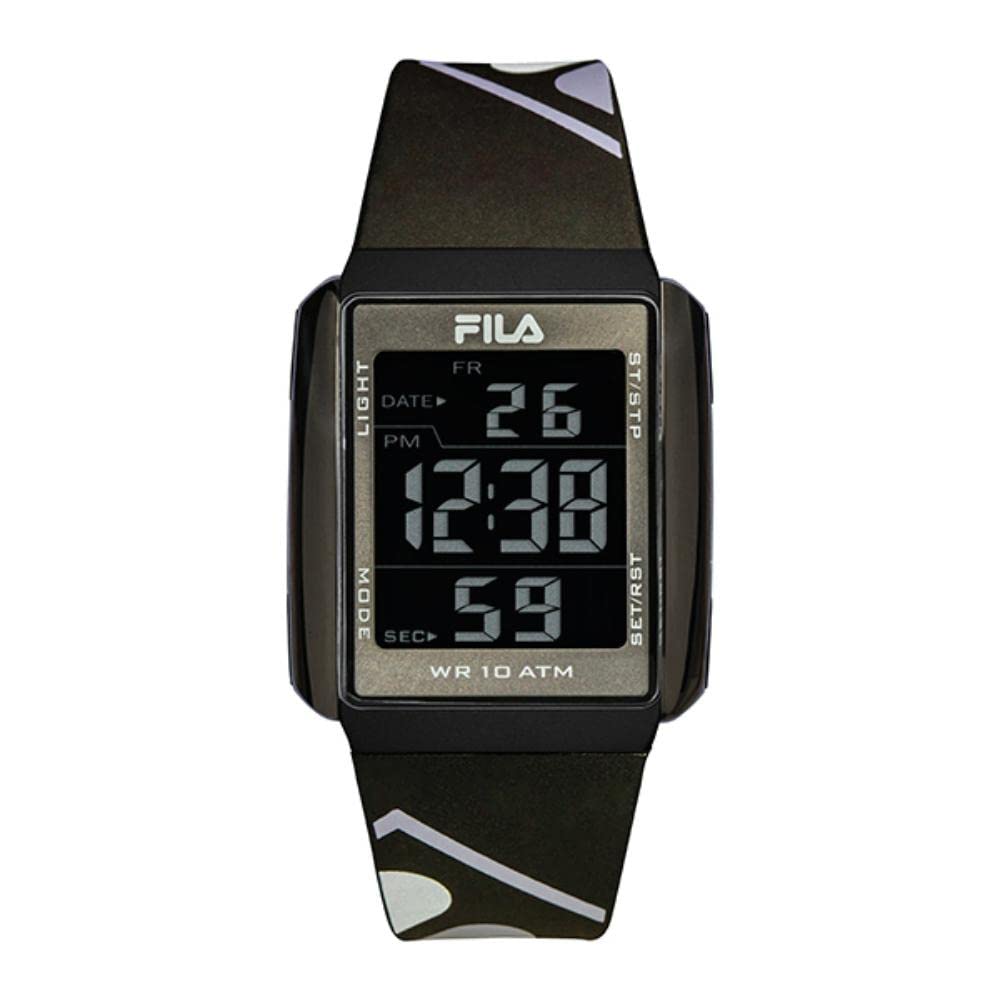
Image 1: Front view of the FILA 38-325-001 Digital Watch, highlighting the display and button labels. The display shows 'FR 26 PM 12:38 59 SEC'. Buttons are labeled 'LIGHT' (top left), 'MODE' (bottom left), 'ST/STP' (top right), and 'SET/RST' (bottom right).
- LIGHT Button (Top Left): Activates the EL backlight for illumination.
- MODE Button (Bottom Left): Cycles through different modes (Time, Stopwatch, Alarm, Date).
- ST/STP Button (Top Right): Starts and stops the stopwatch function.
- SET/RST Button (Bottom Right): Used for setting values and resetting functions.
Setup
Setting Time and Date
- From the normal time display, press the MODE button repeatedly until the time setting mode is reached. Digits to be set will flash.
- Press the SET/RST button to select the hour, minute, month, date, or day of the week.
- Use the ST/STP button to adjust the flashing value.
- Once all settings are complete, press the MODE button to return to the normal time display.
Setting the Alarm
- From the normal time display, press the MODE button until the alarm setting mode is displayed.
- Press the SET/RST button to select the hour or minute.
- Use the ST/STP button to adjust the flashing value.
- Press the MODE button to exit the alarm setting mode.
- To activate/deactivate the alarm, press the ST/STP button while in the alarm display mode. An alarm icon will appear/disappear.
Operating Instructions
Using the Stopwatch (Chronograph)
- Press the MODE button until the stopwatch mode is displayed (usually indicated by '00:00:00').
- Press the ST/STP button to start the stopwatch.
- Press the ST/STP button again to stop the stopwatch.
- To reset the stopwatch to zero, press the SET/RST button while the stopwatch is stopped.
Activating the Backlight
Press the LIGHT button (top left) to illuminate the display for a few seconds, making it visible in low-light conditions.
Maintenance
Cleaning Your Watch
To maintain the appearance and hygiene of your watch, especially the silicone strap, clean it regularly.
- Use a soft, damp cloth with mild soap to gently wipe the watch case and strap.
- Rinse with clean water and dry thoroughly with a soft cloth.
- Avoid using harsh chemicals or abrasive materials, as these can damage the watch's finish.
Water Resistance
Your FILA 38-325-001 watch features 10 ATM (100 meters) water resistance. This means it is suitable for swimming, showering, and snorkeling. However, it is not recommended for diving. Avoid operating buttons while the watch is submerged in water to prevent water ingress.

Image 2: Side view of the FILA 38-325-001 Digital Watch, showcasing its black resin case and silicone strap, worn on a wrist. This image illustrates the watch's design and fit.
Troubleshooting
- Display is blank or dim: The battery may be low. Replace the CR2 battery.
- Buttons are unresponsive: Ensure the watch is not in a locked mode (if applicable, though not specified for this model). If the issue persists, a battery replacement or reset may be required.
- Time is incorrect: Re-set the time following the "Setting Time and Date" instructions. If the time consistently loses accuracy, the battery may be weak.
- Water inside the watch: Despite water resistance, extreme temperature changes or impacts can compromise seals. Do not attempt to open the watch. Seek professional service immediately.
Specifications
| Feature | Detail |
|---|---|
| Model Number | 38-325-001 |
| Display Type | Digital (VE Display) |
| Case Material | ABS Case, Black Resin |
| Case Diameter | 40 mm |
| Case Thickness | 10 mm |
| Strap Material | Silicone |
| Strap Width | 20 cm |
| Strap Length | 24 cm |
| Crystal Material | Mineral Crystal Glass |
| Water Resistance | 10 ATM (100 meters) |
| Functions | Stopwatch/Chronograph, Alarm, Calendar, EL Backlight |
| Battery Type | 1 CR2 battery (included) |
Warranty Information
FILA watches typically come with a manufacturer's warranty covering defects in materials and workmanship. The specific terms and duration of the warranty may vary by region and retailer. Please retain your proof of purchase for warranty claims. For detailed warranty information, refer to the documentation provided at the time of purchase or contact your retailer.
Customer Support
If you encounter any issues not covered in this manual or require further assistance, please contact the retailer where you purchased your FILA watch or visit the official FILA website for customer support contact information.
Ask a question about this manual
Ask about setup, troubleshooting, compatibility, parts, safety, or missing instructions. Manuals+ will review the question and use this page’s manual context to help answer it.