1. Product Overview
The ScentAir Whisper Home Diffuser Machine is designed to provide a consistent and pleasant fragrance experience in your home or small business. It utilizes patented dry-air fragrance technology to scent areas up to 800 sq. ft. The device is lightweight, compact, and offers versatile placement options.

Image: The ScentAir Whisper Home Diffuser Machine, a white rectangular device with the ScentAir logo, designed for home fragrance.
Key Features:
- Lightweight & Compact: Weighs only 3.7 lbs with cartridge, operating quietly even at maximum setting.
- Versatile Design: Can be positioned upright or laid flat to suit your space. Features LED lighting.
- Smart Connectivity: Compatible with Wi-Fi, Bluetooth, Google Assistant, and Amazon Alexa for advanced control.
- Smartphone Scheduling: Adjust settings and schedule fragrance release remotely using the ScentAir app.
- Effective Coverage: Scents up to 800 sq. ft. for up to 300 hours per month.
2. Setup Instructions
- Unbox the ScentAir Whisper Home diffuser and plug it into a power source.
- If using a fragrance cartridge (sold separately), insert it into the diffuser.
- Adjust the machine's position to stand up straight or lay flat.
- Manually adjust the settings or use advanced Wi-Fi & Bluetooth controls, Google Assistant, or Amazon Alexa.
- Download the ScentAir app to schedule fragrance release and adjust settings remotely.
- Ensure the diffuser is in a well-ventilated area and not near water sources or sensitive electronics.
- When not in use, turn off the diffuser or remove the fragrance cartridge to conserve power.
Inserting a Fragrance Cartridge:
Fragrance cartridges are sold separately. To insert a cartridge, remove the top cover of the diffuser, place the cartridge into the designated slot, and replace the cover.

Image: A user demonstrates how to insert a fragrance cartridge into the ScentAir Whisper Home Diffuser.
Video: This video demonstrates the process of replacing a ScentAir fragrance cartridge in the Whisper Home Machine.
3. Operating Instructions
Manual Control:
The diffuser can be operated manually using the controls on the device itself. Refer to the device's physical buttons for basic power and intensity adjustments.
Smart Control (Wi-Fi & Bluetooth):
For advanced control, download the ScentAir app on your smartphone. The app allows you to:
- Adjust fragrance intensity levels (low, medium, high).
- Create custom schedules for fragrance release.
- Monitor cartridge life and receive replacement notifications.
- Integrate with Google Assistant and Amazon Alexa for voice control.
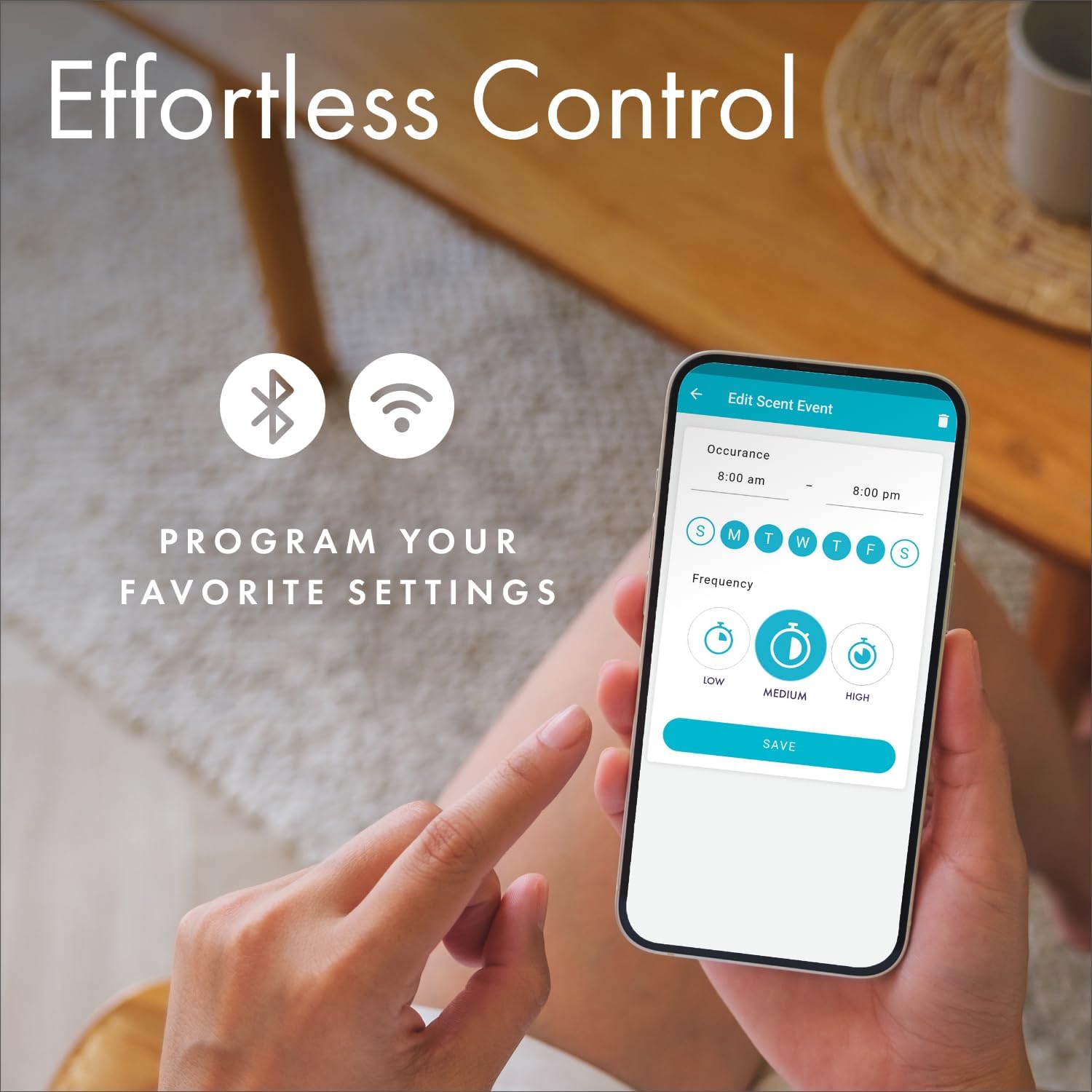
Image: The ScentAir mobile application interface, demonstrating scheduling and intensity control features for the diffuser.
Video: An overview of the ScentAir Whisper Home diffuser, highlighting its features and smart control capabilities.
4. Maintenance
To ensure optimal performance and longevity of your ScentAir Whisper Home Diffuser, regular maintenance is recommended:
- Cartridge Replacement: Fragrance cartridges typically last up to 300 hours per month, depending on usage and intensity settings. Replace cartridges when the scent diminishes or as indicated by the ScentAir app.
- Cleaning: Periodically wipe the exterior of the diffuser with a soft, dry cloth. Ensure the device is unplugged before cleaning. Avoid using harsh chemicals or abrasive materials.
- Ventilation: Keep the diffuser's air vents clear of dust and debris to maintain proper airflow.
5. Troubleshooting
If you encounter issues with your ScentAir Whisper Home Diffuser, consider the following:
- No Scent Emission:
- Ensure a fragrance cartridge is properly inserted.
- Check if the cartridge is empty or expired.
- Verify the device is powered on and the intensity setting is not too low.
- Confirm the app schedule is active and not set to 'off' during desired operating times.
- Device Not Powering On:
- Check if the power adapter is securely plugged into both the diffuser and a working electrical outlet.
- Test the outlet with another device to ensure it has power.
- App Connectivity Issues:
- Ensure your smartphone's Bluetooth and Wi-Fi are enabled.
- Make sure the diffuser is within range of your Wi-Fi router.
- Restart the ScentAir app and/or the diffuser.
- Check for app updates in your device's app store.
If problems persist, please contact ScentAir customer support for further assistance.
6. Specifications
| Feature | Detail |
|---|---|
| Brand | ScentAir |
| Model Name | SWD3000W |
| Color | White |
| Product Dimensions | 6"L x 6"W x 10"H |
| Item Weight | 3.74 pounds |
| Power Source | DC Power Supply |
| Wattage | 15 watts |
| Coverage Area | Up to 800 Square Feet |
| Special Feature | Liquidless, LED Lighting |
| Connectivity | WiFi & Bluetooth Enabled, Compatible with Alexa & Google |
| UPC | 850011778012 |
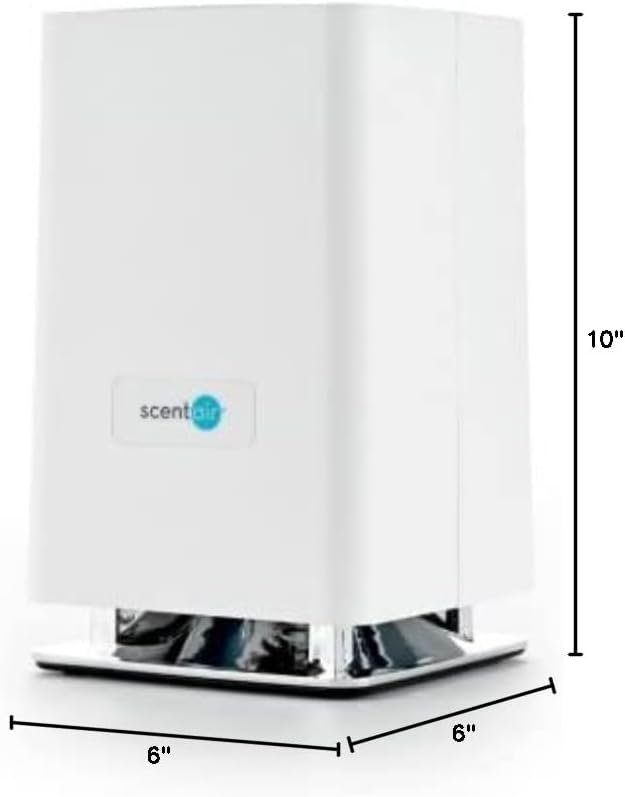
Image: A diagram illustrating the physical dimensions of the ScentAir Whisper Home Diffuser.
7. Safety Information
- Avoid direct skin contact with undiluted essential oils.
- Keep out of reach of children and pets.
- Ensure proper ventilation during use.
- Do not place near water sources or sensitive electronics.
8. Warranty and Support
For warranty information or technical support, please refer to the official ScentAir website or contact ScentAir customer service directly. Keep your purchase receipt for any warranty claims.
