
Introduction
The SINGER Heavy Duty 6800C combines robust construction with advanced computerized features, offering versatility for a wide range of sewing projects. This machine is designed for durability and ease of use, suitable for various fabric types from light to heavy-duty materials. This manual provides essential information for setting up, operating, and maintaining your sewing machine.

Front view of the SINGER Heavy Duty 6800C Computerized Sewing Machine, highlighting its sleek grey design and control panel.
Getting Started
1. Unpacking and Placement
Carefully remove the machine from its packaging. Place the machine on a stable, flat surface. Ensure adequate lighting and space for comfortable operation.
2. Power Connection
Connect the power cord to the machine and then to a suitable electrical outlet.
3. Bobbin Winding
Follow the numbered guides on the machine to wind the bobbin correctly. The machine features a bobbin stopper to prevent overfilling.
4. Threading the Upper Thread
Guide the upper thread through the designated path, following the numbered instructions on the machine. Utilize the built-in needle threader for convenience.
5. Inserting the Bobbin
Place the wound bobbin into the bobbin case, ensuring the thread feeds in the correct direction as indicated by the machine's markings. The top drop-in bobbin with a transparent cover allows for easy monitoring.
6. Needle Threader
The built-in needle threader simplifies threading the needle's eye, saving time and reducing eye strain.
This video demonstrates the complete threading process for a SINGER Heavy Duty Sewing Machine (model HD6700, similar to HD6800C), including bobbin winding and upper thread path.
Operating Your Machine
1. Stitch Selection and Adjustment
Use the intuitive LCD screen and touch buttons to select your desired stitch from the 586 available applications. The screen will display the selected stitch and recommended settings. Adjust the stitch length (up to 6mm) and width (up to 5mm) using the dedicated controls to suit your fabric and project requirements.

Close-up view of the SINGER Heavy Duty 6800C's LCD screen displaying stitch settings, alongside a visual guide to its 586 stitch applications.
2. Speed Control
Utilize the speed control lever to adjust the sewing speed, allowing for precise control on intricate details or faster sewing on long seams.
3. Reverse Sewing and Tie-Off
Press the reverse sewing lever to sew backward, useful for securing seams. The tie-off button automatically secures the end of a seam.
4. Built-in Thread Cutter
After completing a seam, press the thread cutter button to automatically trim both the upper and bobbin threads.

Detailed view of the control buttons on the SINGER Heavy Duty 6800C, including programmable needle up/down, thread tie-off, thread cutter, and speed control lever.
5. Free Arm Conversion
Remove the accessory tray to convert the machine to free arm mode, ideal for sewing cuffs, sleeves, and other small, circular items.
6. Drop Feed for Specialty Sewing
Engage the drop feed mechanism for free-motion sewing, quilting, or darning.
7. One-Step Buttonholes
The machine offers 9 one-step buttonhole styles for professional and consistent results. Simply attach the buttonhole foot and follow the on-screen instructions.
Accessories
The SINGER Heavy Duty 6800C comes with a comprehensive accessory kit to enhance your sewing experience:
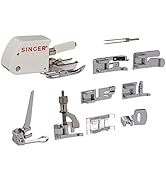
- 10 Presser Feet: All-Purpose, Zipper, Buttonhole, Blind Hem, Button Sewing, Sew Easy, Satin Stitch, Even Feed / Walking, Open Toe, and Cording Foot.
- 4 Bobbins: SINGER Class 15 transparent bobbins.
- Spool Holders: Large and Small Spool Holders.
- Other Tools: Spool Pin Felt, Auxiliary Spool Pin, L-Screwdriver, Brush / Seam Ripper, Soft Cover, and a Pack of Needles.

Image showing the SINGER Heavy Duty 6800C sewing machine along with its complete accessory kit, including various presser feet and tools.
Maintenance
1. Cleaning the Machine
Regularly clean lint and dust from the bobbin area and feed dogs using the provided brush. Ensure the machine is unplugged before cleaning to prevent accidental operation.
2. Needle Care and Replacement
Replace needles frequently, especially when sewing different fabric types or if the needle becomes dull or bent. Using a fresh, sharp needle prevents skipped stitches and fabric damage. Always use SINGER Class 15 needles appropriate for your fabric type.
Troubleshooting
For common issues such as skipped stitches, thread breakage, or tension problems, refer to the detailed troubleshooting section in the full user manual. Ensure proper threading and needle selection for optimal performance. Many solutions can be found in the Creativate App or the official SINGER website.
Product Specifications
- Product Dimensions: 17.5 x 7.5 x 10.9 inches
- Item Weight: 16.62 pounds
- Model Number: HD6800C
- Stitch Applications: 586
- Stitch Speed: Up to 1,100 stitches per minute
- Motor: Heavy-duty, 60% stronger than standard motors
- Frame: Full metal frame
- Color: Grey
- UPC: 037431887146
Warranty and Support
For warranty information and product support, please visit the official SINGER website or download the FREE Creativate App.
Creativate App
The Creativate App is your dedicated sewing support hub. Input your machine model number (HD6800C) to access your manual, quick start guides, tutorials, troubleshooting tips, and information on accessories.
Screenshot of the SINGER Creativate App interface, showing options for user manual, quick start, tutorials, and troubleshooting.
Download the app:


