
1. Introduction
Thank you for choosing the Luminous Cruze 2.5 kVA Sine Wave Inverter and Red Charge RC 18000 Battery Combo. This system is designed to provide reliable power backup for your home, office, or shop. This manual provides essential information for the safe installation, operation, and maintenance of your inverter and battery system. Please read it thoroughly before use and retain it for future reference.
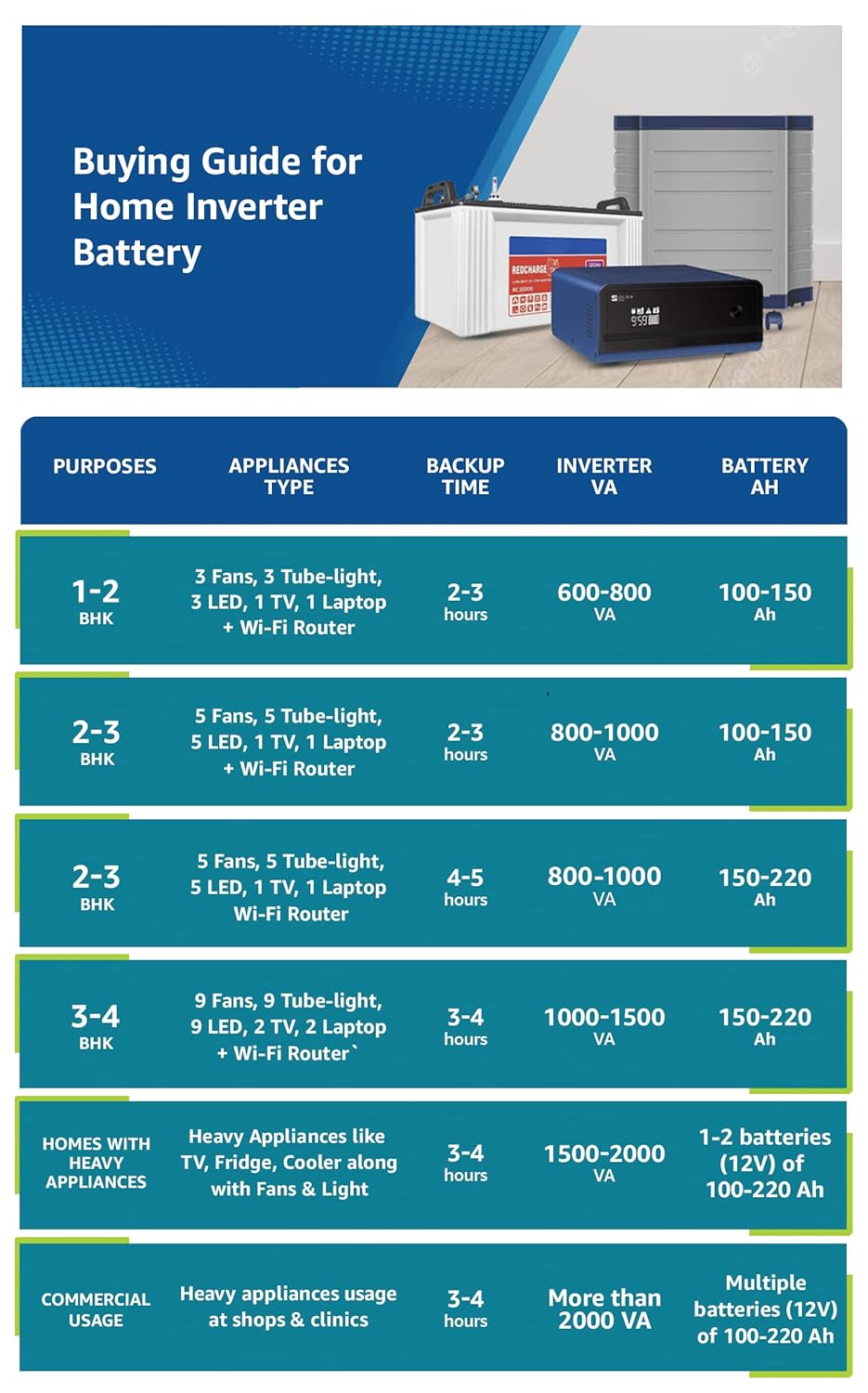
Image 1: Luminous Cruze 2.5 kVA Sine Wave Inverter and Red Charge RC 18000 Tall Tubular 150Ah Battery Combo. This image displays the inverter unit, a tall tubular battery, and a battery trolley, illustrating the complete power backup solution.
2. Safety Information
Always observe the following safety precautions to prevent injury or damage to the equipment:
- Electrical Hazard: Do not open the inverter casing. There are no user-serviceable parts inside. Refer all servicing to qualified personnel.
- Battery Safety: Batteries contain corrosive acid. Avoid contact with skin, eyes, or clothing. Wear appropriate personal protective equipment (PPE) such as gloves and eye protection when handling batteries.
- Ventilation: Ensure adequate ventilation around the inverter and batteries to prevent overheating and accumulation of flammable gases from batteries.
- Flammable Materials: Keep the system away from flammable liquids, gases, or other combustible materials.
- Water and Moisture: Do not expose the inverter or batteries to rain, water splashes, or excessive humidity.
- Children and Pets: Keep the system out of reach of children and pets.
- Proper Grounding: Ensure the inverter is properly grounded according to local electrical codes.
3. Package Contents
Verify that all items are present in the package:
- 1 x Luminous Cruze 2.5KVA Sine Wave Inverter
- 3 x Luminous Red Charge RC 18000 150Ah Tall Tubular Batteries
- 1 x Instruction Manual
- 1 x Warranty Card
4. Setup Instructions
Follow these steps for proper installation. It is recommended that installation be performed by a qualified technician.
4.1 Placement
- Choose a cool, dry, and well-ventilated area.
- Avoid direct sunlight, heat sources, and areas with high dust or humidity.
- Ensure sufficient clearance around the inverter for airflow.
- Place the batteries on a sturdy, level surface, preferably in a battery trolley.
4.2 Battery Connection
The Luminous Cruze 2.5 kVA Inverter operates on a 36V DC input, requiring three 12V batteries connected in series.
- Ensure the inverter is switched OFF and disconnected from the mains supply.
- Connect the positive terminal of the first battery to the negative terminal of the second battery.
- Connect the positive terminal of the second battery to the negative terminal of the third battery.
- Connect the remaining negative terminal of the first battery to the inverter's negative battery terminal.
- Connect the remaining positive terminal of the third battery to the inverter's positive battery terminal.
- Ensure all connections are tight and secure. Apply petroleum jelly to terminals to prevent corrosion.
4.3 Mains and Load Connection
- Connect the inverter's input power cord to a properly grounded wall outlet.
- Connect your appliances (lights, fans, TV, etc.) to the output sockets of the inverter. Do not overload the inverter.
5. Operating Instructions
5.1 Powering On/Off
- To Power On: After all connections are secure, switch on the main power supply to the inverter. Then, switch on the inverter's power button. The inverter will perform a self-test and then start operating.
- To Power Off: First, switch off all connected appliances. Then, switch off the inverter's power button. Finally, disconnect the inverter from the mains supply.
5.2 Indicators and Display
The inverter features a display panel that provides real-time information about its status. Common indicators include:
- Mains ON: Indicates that the inverter is receiving power from the grid.
- Battery Charging: Indicates that the batteries are being charged.
- Inverter ON: Indicates that the inverter is supplying power to the connected load from the batteries.
- Overload: Warns that the connected load exceeds the inverter's capacity. Reduce the load immediately.
- Low Battery: Indicates that the battery charge is low and requires recharging.
5.3 Load Management and Backup Time
The backup time of your inverter system depends on the total load connected and the battery capacity. Refer to the guide below for typical appliance usage and estimated backup times.
| Purposes | Appliances Type | Backup Time | Inverter VA | Battery Ah |
|---|---|---|---|---|
| 1-2 BHK | 3 Fans, 3 Tube-light, 3 LED, 1 TV, 1 Laptop + Wi-Fi Router | 2-3 hours | 600-800 VA | 100-150 Ah |
| 2-3 BHK | 5 Fans, 5 Tube-light, 5 LED, 1 TV, 1 Laptop + Wi-Fi Router | 2-3 hours | 800-1000 VA | 100-150 Ah |
| 2-3 BHK | 5 Fans, 5 Tube-light, 5 LED, 1 TV, 1 Laptop Wi-Fi Router | 4-5 hours | 800-1000 VA | 150-220 Ah |
| 3-4 BHK | 9 Fans, 9 Tube-light, 9 LED, 2 TV, 2 Laptop + Wi-Fi Router | 3-4 hours | 1000-1500 VA | 150-220 Ah |
| Homes with Heavy Appliances | Heavy Appliances like TV, Fridge, Cooler along with Fans & Light | 3-4 hours | 1500-2000 VA | 1-2 batteries (12V) of 100-220 Ah |
| Commercial Usage | Heavy appliances usage at shops & clinics | 3-4 hours | More than 2000 VA | Multiple batteries (12V) of 100-220 Ah |
6. Maintenance
Regular maintenance ensures optimal performance and longevity of your inverter and battery system.
6.1 Battery Maintenance
- Water Level Check: For tall tubular batteries, regularly check the electrolyte level (every 2-3 months). Ensure the level is between the minimum and maximum marks.
- Refilling: If the water level is low, refill with distilled water only. Do not use tap water or acid.
- Terminal Cleaning: Keep battery terminals clean and free from corrosion. If corrosion is present, clean with a wire brush and apply petroleum jelly.
6.2 Inverter Maintenance
- Cleaning: Keep the inverter's exterior clean and free from dust. Use a dry cloth. Do not use liquid cleaners.
- Ventilation: Ensure that the ventilation openings on the inverter are not blocked.
7. Troubleshooting
This section addresses common issues you might encounter. For problems not listed here, contact customer support.
| Problem | Possible Cause | Solution |
|---|---|---|
| Inverter not turning ON | No mains supply, loose battery connections, discharged batteries, inverter switch OFF. | Check mains supply, ensure battery terminals are tight, allow batteries to charge, switch ON inverter. |
| Short backup time | Overload, batteries not fully charged, old/weak batteries, low battery water level. | Reduce load, ensure proper charging, check battery health, refill battery water if low. |
| Overload alarm | Too many appliances connected. | Immediately disconnect some appliances to reduce the load. |
| Inverter making unusual noise | Internal fault, fan obstruction. | Switch off the inverter and contact customer support. Ensure ventilation is clear. |
8. Specifications
| Feature | Specification |
|---|---|
| Inverter Type | Sine Wave Inverter |
| Inverter Capacity | 2500VA / 36V |
| Max. Peak Load | 4368 Watts |
| Battery Type | Tall Tubular Battery |
| Battery Capacity | 150 Ah / 12V (per battery) |
| Number of Batteries Supported | Three 12V batteries |
| Output Waveform | Pure Sine Wave |
| Frequency | 50 Hz |
| Inverter Dimensions (LxWxH) | 28 x 36.5 x 38 CM |
| Battery Dimensions (LxWxH) | 50.2 x 19.1 x 44.0 CM |
| Safety Features | MCB for input main protection, Auto over-load handling, Bypass switch |
9. Warranty and Support
9.1 Warranty Information
- Inverter Warranty: 2 years
- Battery Warranty: 36 months (18 Months flat + 18 Months Pro-rata)
Please retain your purchase receipt and warranty card for any warranty claims.
9.2 Customer Support
For technical assistance, service, or warranty inquiries, please contact Luminous Power Technologies Private Limited:
Address: Plot 150 Honda City Road, Sector 44, Gurugram, Haryana, 122003
Refer to the warranty card or Luminous official website for the most current contact details.


