
Introduction
Thank you for purchasing the AMINY U-Air6 Sport Bluetooth Earbuds. This manual provides essential information for setting up, operating, and maintaining your earbuds to ensure optimal performance and longevity. Please read this manual thoroughly before using the product.
What's in the Box
Upon unboxing your AMINY U-Air6 earbuds, you will find the following items:
- AMINY U-Air6 Wireless Earbuds (Left and Right)
- Charging Case
- USB Charging Cable
- Multiple sizes of Eartips (S, M, L)
- Multiple sizes of Ear-fins (S, M)
- User Manual

Image: Contents of the AMINY U-Air6 package, showing the earbuds, charging case, USB cable, and different sizes of eartips and ear-fins.
Product Overview
The AMINY U-Air6 earbuds are designed for active lifestyles, offering a blend of comfort, durability, and audio quality.
Key Features:
- Bluetooth 5.0 Connectivity: Ensures stable and efficient wireless connection.
- IPX8 Waterproof Rating: Provides protection against water immersion and sweat, suitable for sports and outdoor activities.
- Touch Control: Intuitive touch sensors for managing music, calls, and voice assistants.
- Ergonomic Ear-Fins: Designed for a secure and comfortable fit, dispersing pressure during extended wear.
- Long Battery Life: Up to 5 hours of single playtime, with the charging case providing up to 100 hours of total playtime.
- Premium Sound: Features a flexible composite membrane for clear stereo sound with punchy bass.

Image: A close-up of an AMINY U-Air6 earbud, illustrating its premium sound capabilities with enhanced bass.

Image: AMINY U-Air6 earbuds shown with water splashing, emphasizing their IPX8 water and sweat resistant design.

Image: A diagram illustrating the ergonomic ear-fins of the AMINY U-Air6 earbuds, designed for a painless and secure fit.
Setup Instructions
1. Initial Pairing
- Open the charging case. Both earbuds will power on automatically and enter pairing mode. The LED light on the earbuds will flash red and white alternately.
- On your mobile device, go to Bluetooth settings.
- Search for Bluetooth devices and select "Aminy U-Air6" to connect.
- Once connected, the LED lights on the earbuds will turn off, and a voice prompt will confirm the connection.
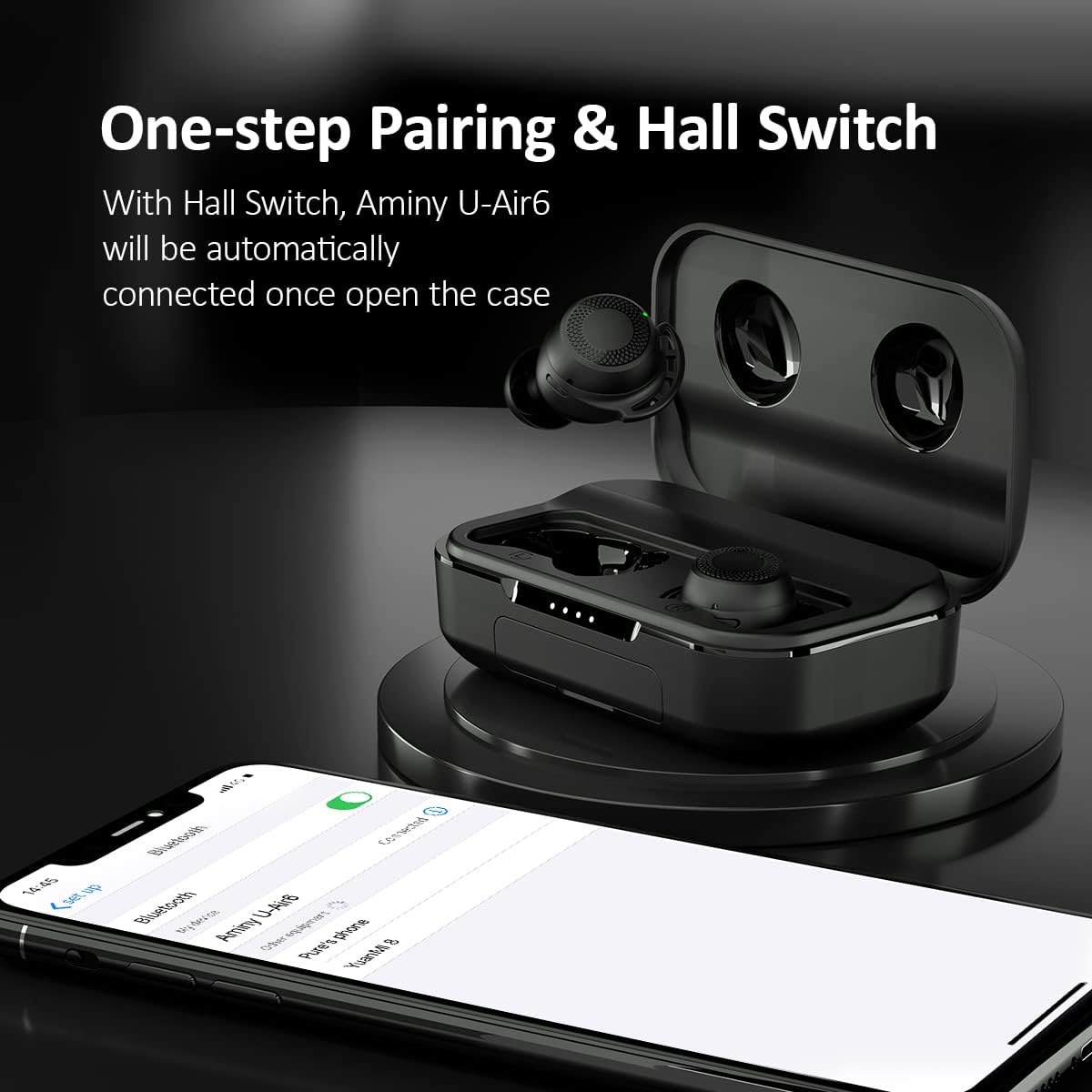
Image: A visual guide demonstrating the one-step pairing of the AMINY U-Air6 earbuds by opening the case and connecting via a smartphone's Bluetooth settings.
2. Resetting the Earbuds
If you experience connection issues or wish to pair with a new device, you may need to reset the earbuds:
- First, delete any "Aminy U-Air6" records from your device's Bluetooth list.
- Place both earbuds into the charging case.
- Press and hold the touch control area on both earbuds for 5 seconds until the LED lights flash red and white.
- The earbuds are now reset and ready for a new pairing process.
Video: This video demonstrates the unboxing and initial setup process for the AMINY U-Air6 earbuds, including how to pair them with a device.
Operating Instructions
The AMINY U-Air6 earbuds feature intuitive touch controls for easy management of your audio and calls.
Touch Controls:
| Action | Left Earbud | Right Earbud |
|---|---|---|
| Play/Pause | Tap once | Tap once |
| Next Track | N/A | Double tap |
| Previous Track | Double tap | N/A |
| Volume Up | N/A | Long press |
| Volume Down | Long press | N/A |
| Answer/End Call | Tap once | Tap once |
| Reject Call | Long press for 1 second | Long press for 1 second |
| Activate Voice Assistant (Siri/Google Assistant) | Triple tap | Triple tap |

Image: A visual representation of the touch control functions for both the left and right AMINY U-Air6 earbuds, detailing actions for volume, music tracks, phone calls, and voice assistant activation.
Video: This video provides a detailed demonstration of the touch controls and various features of the AMINY U-Air6 sport Bluetooth earphones.
Charging
The AMINY U-Air6 earbuds come with a portable charging case that extends their usage time significantly.
Charging the Earbuds:
- Place the earbuds into their respective slots in the charging case.
- The earbuds will automatically begin charging. The LED indicators on the earbuds will show their charging status.
- A full charge for the earbuds takes approximately 1.5 hours, providing up to 5 hours of playtime.
Charging the Case:
- Connect the provided USB charging cable to the charging port on the case.
- Connect the other end of the USB cable to a power source (e.g., USB wall adapter, computer USB port).
- The LED indicator lights on the front of the case will illuminate to show the charging progress. Each light represents approximately 25% of the battery capacity.
- The charging case has a 2000mAh battery capacity, providing up to 100 hours of additional playtime for the earbuds.
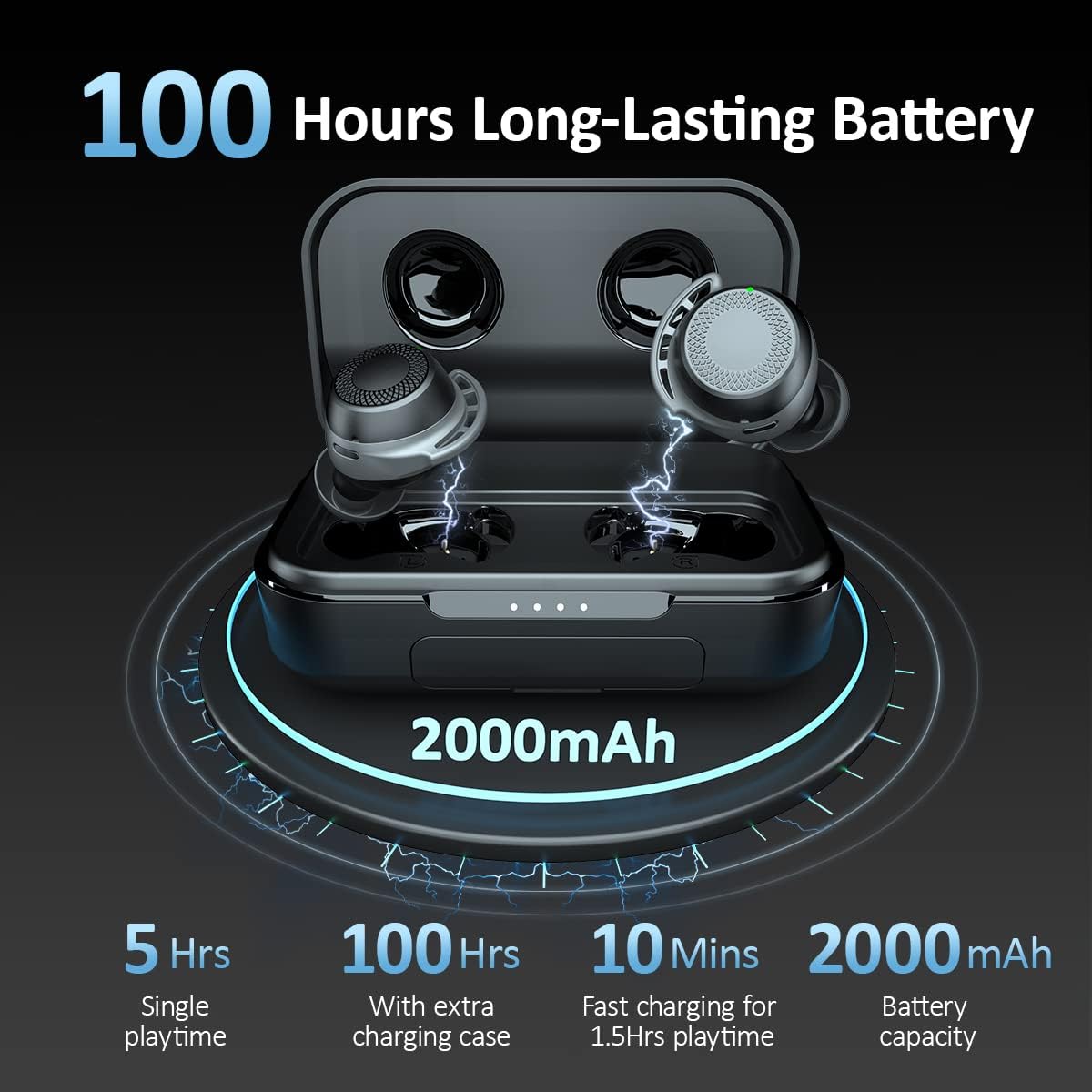
Image: The AMINY U-Air6 charging case illustrating its 2000mAh battery capacity, providing 5 hours of single playtime and 100 hours with the case, along with fast charging details.

Image: A close-up view of the LED indicator lights on the AMINY U-Air6 charging case, showing the battery level from 0% to 100%.
Maintenance
Proper maintenance ensures the longevity and performance of your AMINY U-Air6 earbuds.
- Cleaning: Regularly clean the earbuds and charging case with a soft, dry cloth. Avoid using harsh chemicals or abrasive materials.
- Eartips: Remove and clean the eartips periodically to prevent wax buildup, which can affect sound quality.
- Storage: When not in use, store the earbuds in their charging case to protect them from dust and damage.
- Water Resistance: While IPX8 waterproof, avoid prolonged submersion in water and ensure the charging port is dry before charging.
Troubleshooting
If you encounter any issues with your AMINY U-Air6 earbuds, refer to the following common solutions:
- No Sound: Ensure the earbuds are properly paired and connected to your device. Check the volume levels on both the earbuds and your device.
- Pairing Issues: If earbuds fail to pair, try resetting them as described in the Setup section. Ensure Bluetooth is enabled on your device and the earbuds are within range.
- Charging Problems: Verify that the charging cable is securely connected to both the case and the power source. Check the LED indicators on the case for charging status.
- Uncomfortable Fit: Experiment with different sizes of eartips and ear-fins provided to find the most comfortable and secure fit for your ears.
Specifications
| Feature | Specification |
|---|---|
| Model Name | U-Air6 |
| Connectivity Technology | Bluetooth 5.0, Wireless |
| Wireless Communication Technology | Bluetooth |
| Included Components | Earphone |
| Material | Plastic, Silicone |
| Specific Uses For Product | Communication, Sports and Exercise |
| Charging Time (Earbuds) | 1.5 Hours |
| Compatible Devices | Bluetooth-enabled devices |
| Control Type | Touch Control |
| Water Resistance Level | Waterproof (IPX8) |
| Unit Count | 1 Count |
| Control Method | Touch |
| Number of Items | 1 |
| Controller Type | Touch |
| Battery Life (Earbuds) | 5 Hours (single playtime) |
| Battery Life (with Charging Case) | 100 Hours |
| Audio Driver Type | Dynamic Driver |
| Bluetooth Version | 5.0 |
| Earpiece Shape | Rounded Tips |
| Input Device Interface | Bluetooth |
| Special Feature | Microphone Included, USB connectivity, sports-and-exercise, water-resistant, wireless |
| Manufacturer | AMINY |
| Product Dimensions | 3.23 x 2.01 x 1.24 inches |
| Item Weight | 7 ounces |
| Date First Available | March 24, 2021 |
| Color | Black |
| Ear Placement | In Ear |
| Form Factor | In Ear |
| Headphones Jack | No Jack |
Warranty and Support
For warranty information, technical support, or customer service inquiries, please refer to the contact information provided on the product packaging or the official AMINY website. Keep your purchase receipt for warranty claims.


