
Introduction
This manual provides detailed instructions for the installation, operation, and maintenance of your WEILAILIFE Wireless Security Camera System. Please read this manual thoroughly before using the product to ensure proper setup and optimal performance. Keep this manual for future reference.
Packing List
Please check all items upon unpacking. If any items are missing or damaged, contact customer support.
- 500 Megapixel PTZ Camera x 4
- Camera Antenna 3DB x 8
- Network Video Recorder Power Supply 12V2A x 1
- Wireless Camera Power Supply 12V1A x 4
- Camera Mounting Screw Pack x 4
- Instruction Manual
- Warning Label x 1
- USB Mouse x 1
- HDMI Connection Cable 1.5 meters x 1
Video Description: This video demonstrates the unboxing of the OHWOAI 5 Megapixel 4-camera mini NVR security system, showing all included components such as the NVR, cameras, power adapters, cables, and accessories. This is a similar product and provides a general idea of the unboxing experience.

Video Description: This video shows the unboxing of a black MINI NVR Wireless Security Camera Set, detailing the contents and providing a visual guide to what is included in the package. This is a similar product and provides a general idea of the unboxing experience.
Product Overview
The WEILAILIFE Wireless Security Camera System offers advanced surveillance features for both indoor and outdoor environments. Key features include:
- Two-Way Talk: Communicate with visitors or deter intruders using the built-in microphone and speaker.
- Dual Antenna for Enhanced WiFi: Improved wireless signal strength and range for stable video transmission.
- 130° Ultra-Wide Angle Lens: Provides a broad field of view, reducing blind spots.
- PIR & Dual Detection: Advanced human detection and infrared sensors for accurate alerts, minimizing false alarms from leaves or insects.
- Free APP & No Monthly Fees: Access and manage your system via the free "Honestview" or "Eseecloud" app on smartphones and tablets.
- 3K 5 Megapixel Ultra High Definition: Records clear 2592 x 1944 resolution video for 24/7 security.
- Night Vision: IR-LED system automatically activates infrared mode in dark conditions, providing clear vision up to 24 meters.
- IP66 Waterproof: Designed for outdoor use, ensuring reliable performance in various weather conditions.

Image Description: An image illustrating the two-way talk feature. A person uses a smartphone app to communicate with a delivery person at the door, demonstrating remote interaction.

Image Description: This image compares the 130-degree ultra-wide angle view of the WEILAILIFE camera with a standard 75-degree view, highlighting the significantly larger area covered by the wide-angle lens in a snowy outdoor scene.
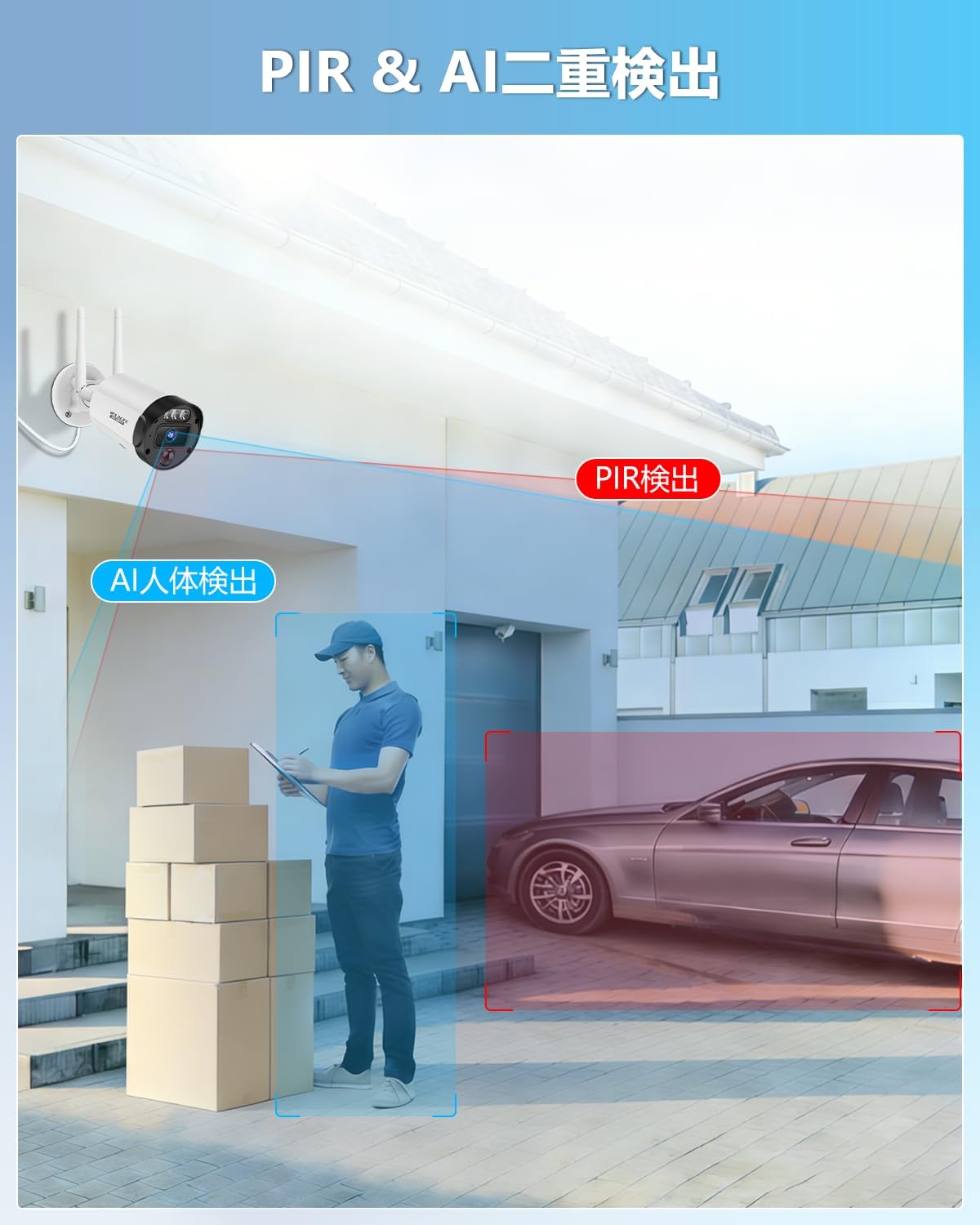
Image Description: An illustration of the PIR and AI dual detection feature. A person is detected by AI (blue zone) and a car by PIR (red zone), demonstrating accurate and differentiated motion detection.

Image Description: This image displays the two transmission modes: wireless connection from the camera to a router, and a wired connection via a LAN cable, offering flexible installation options.

Image Description: An image highlighting the IP66 waterproof and dustproof design of the camera, with a detailed three-step illustration of the waterproof connector for secure outdoor installation.

Image Description: This image demonstrates the remote control feature, showing a user operating a remote to view multiple camera feeds on a television screen, indicating convenient access to surveillance.

Image Description: An image illustrating the plug-and-play setup, where the camera connects to power and the NVR, and live feeds are accessible on a monitor, laptop, tablet, and smartphone via the Honestview app.

Image Description: This image highlights remote access capabilities, showing a user viewing camera feeds on a smartphone, with icons for App Store and Google Play, indicating mobile app availability.
Setup Guide
1. App Installation and Account Registration
- Download the "Honestview" or "Eseecloud" app from your smartphone's App Store (iOS) or Play Store (Android).
- Open the app and tap "Register" to create a new account using your email address.
- Retrieve the verification code from your email inbox and enter it into the app.
- Set a password to complete the new registration.
- Log in with your newly registered username and password.
2. Adding Devices to the App
- Tap "Add Smart Device" and scan the QR code displayed on your NVR's monitor.
- Alternatively, scan the QR code for the UID number found in the app download section on the NVR's monitor to add the device.
- Name your camera, and the device addition is complete.

Video Description: This video demonstrates the process of adding a device using the ESEECLOUD app, including account registration, scanning QR codes, and completing the setup. This video is directly relevant to the setup process.

Video Description: This video illustrates the setup process for a 5 Megapixel dome camera, which is similar in principle to the bullet cameras in this system, providing a visual guide for connecting and configuring the camera.
Operating Instructions
Two-Way Audio Communication
The system supports two-way audio, allowing you to communicate through the camera using the mobile application. This feature is useful for interacting with visitors or deterring unwanted guests.

Image Description: An image demonstrating the two-way audio feature, with icons for microphone and speaker, indicating that users can speak and listen through the camera via the app.
Motion Detection and Alerts
The system utilizes PIR and AI dual detection to accurately identify human movement. When motion is detected, you will receive real-time notifications via the app. This advanced detection minimizes false alarms.

Image Description: This image illustrates the motion detection and alert system, showing a smartphone receiving a notification when movement is detected. It highlights how the camera identifies a person and a car within its surveillance area.

Video Description: This video showcases the features of a 4-camera security set, including motion detection and other functionalities. It provides a general overview of the system's capabilities.
Night Vision Modes
The camera offers multiple night vision modes to ensure clear surveillance in low-light conditions:
- Infrared Night Vision: Provides clear black and white images in complete darkness.
- Color Night Vision: Activates built-in spotlights to capture full-color video at night.
- Smart Night Vision: Automatically switches from infrared to color night vision when motion is detected, providing detailed evidence.

Image Description: This image demonstrates the automatic day/night switching feature of the camera, showing a clear color view during the day and a sharp infrared view at night.
Flexible Storage Options
The system includes a built-in 3TB HDD, allowing for continuous recording for over 30 days. It also supports H.265+ compression technology, which reduces required storage capacity by 50% while maintaining clear image quality. Cloud storage options may also be available.

Image Description: An image showing the NVR with a built-in hard drive, highlighting the H.265+ compression technology that allows for more efficient video storage compared to H.264.

Image Description: This image illustrates the three recording modes: continuous recording, scheduled recording (e.g., 20:30-23:59), and motion detection recording, providing flexibility in how video is captured.
Remote Monitoring
Monitor your property anytime, anywhere using the dedicated mobile app on your smartphone or tablet, or through a desktop application on your PC or TV. The system supports up to 10 channels, allowing for expansion.

Image Description: An image depicting remote monitoring across various devices, including a TV, smartphone, tablet, and laptop, all displaying live camera feeds from the security system.
Video Description: This video demonstrates the real-time viewing and remote monitoring capabilities of the security camera system, showing how feeds can be accessed and controlled from different devices like a monitor, PC, and smartphone.
Enhanced Connectivity
The system features dual antennas for improved wireless signal strength, extending the transmission range by approximately 50%. It supports both wired (IEEE802.11a/n/f) and wireless (Wi-Fi 2.4G/5.8G) connections for stable and high-speed video transmission.

Image Description: An image illustrating the dual antenna design of the camera system, emphasizing the increased transmission range and improved signal strength for wireless connectivity.

Image Description: This image demonstrates the dual transmission modes, showing both wireless and wired connections for the camera system, ensuring high-speed and stable video transmission.
WDR Function
The AI WDR (Wide Dynamic Range) function adjusts the balance between bright and dark areas in surveillance footage, enhancing image clarity and sharpness.

Image Description: An image comparing video quality with AI WDR (Wide Dynamic Range) turned ON versus OFF, demonstrating how WDR improves clarity by balancing bright and dark areas in the footage.
Area Detection Settings
You can customize specific detection zones to focus on critical areas and avoid unnecessary alerts. The system can differentiate between humans and other objects like animals or foliage.

Image Description: This image illustrates the customizable area detection settings, showing how users can define specific zones for monitoring and exclude areas where detection is not desired, such as ignoring a pet.
Maintenance
- Regularly clean the camera lenses with a soft, dry cloth to ensure clear image quality.
- Ensure all cables are securely connected and free from damage.
- Check for firmware updates periodically through the mobile app or NVR interface to ensure optimal performance and security.
- Avoid placing the NVR in direct sunlight or near heat sources to prevent overheating.
Troubleshooting
No Video Feed
- Ensure all power adapters are correctly plugged into the cameras and NVR, and that power outlets are functional.
- Verify that the cameras are within the WiFi range of the NVR. Consider using the extended antenna if signal is weak.
- Check HDMI/VGA connections to the monitor.
- Restart the NVR and cameras.
Poor Image Quality
- Clean the camera lens.
- Ensure the camera is properly focused (if adjustable).
- Check for obstructions in the camera's field of view.
- Adjust camera position to optimize lighting conditions.
False Motion Alerts
- Adjust the sensitivity settings for motion detection in the app or NVR interface.
- Define specific detection zones to exclude areas with frequent non-human movement (e.g., trees swaying, pets).
Specifications
| Feature | Detail |
|---|---|
| Brand | WEILAILIFE |
| Connectivity Technology | Wired IEEE802.11a/n/f, Wireless Wi-Fi 2.4G/5.8G |
| Video Capture Resolution | 1920p, 2.7K 1920P |
| Special Features | 130° Ultra-Wide Angle, PIR & Dual Detection, Dual Antenna for Enhanced WiFi, Two-Way Audio, Free APP & No Monthly Fees |
| Number of Channels | 10 |
| Communication/Connection Interface | Wired IEEE802.11a/n/f, Wireless Wi-Fi 2.4G/5.8G |
| Video Pixels | 1920p, 2.7K 1920P |
| Max Memory Capacity (GB) | 3 TB |
| Power Type | Power Cord Type |
| OS | Linux |
| Compatible Devices | Camera, Smartphone, Tablet, TV, Desktop PC |
| Signal Format | Digital |
| Camera Description | 130° Ultra-Wide Angle & Two-Way Talk, PIR Dual Detection & Dual Antenna Signal Enhancement 55% |
| Night Vision | 845 Nano 3 Infrared Dot Matrix Lamp Super Night Vision |
| Night Vision Range | 20 meters |
| Antenna Type | Fixed |
| Frame Rate | 15 fps |
| Recording Mode | Scheduled, Manual |
| Optical Sensor Technology | CMOS |
| USB Port Count | 2 |
| Hardware Interface | HDMI, USB, VGA |
| Lens Type | Wide Angle |
| Video Input | Network Camera, Wireless Digital Video Camera |
| Field of View | 130 degrees |
| Recommended Uses | Outdoor, Indoor |
| Model Number | 日CSWL-07SW5MP03-4ch+3.5"3TB-BW |
| Manufacturer Name | WEILILIFE |
| UPC | 749965340331 |
| Product Type | PTZ Security Camera |
| Country of Origin | China |
| Unit Count | 1 Set |
| Product Dimensions | 29 x 55 x 41 cm |
| ASIN | B08ZYFRWZ9 |
Warranty & Support
WEILAILIFE offers a 12-month quality guarantee for this product. Our company maintains strict quality control, production management, and inspection processes. We have a service center in Japan located at Chiba Prefecture, Chiba City, Inage Ward, Tendai 5-8-9 Rose Avenue Inage Tendai 1F.
If you have any questions or encounter issues during consideration or use, please feel free to contact us. We offer Japanese language support via email, with responses typically within 24 hours.
- Email Support: info-jp@weilailifetech.com
- Official Website: jp.weilailifetech.com
- LINE Service: Add us on LINE

Image Description: A graphic displaying the 12-month warranty, along with the official website and email address for support.

Image Description: A QR code for the WEILAILIFE LINE service, providing an additional channel for customer support.