
Blonbar AJ310
Blonbar Desk Lamp with Alarm Clock Qi Wireless Charger (Model AJ310) User Manual
1. Introduction
This manual provides comprehensive instructions for the Blonbar Desk Lamp with Alarm Clock and Qi Wireless Charger, Model AJ310. This multi-functional device integrates an LED lamp, digital alarm clock, and wireless charging capabilities, designed for convenience in various settings such as bedrooms, offices, or living rooms. Please read this manual thoroughly before use to ensure proper operation and to maximize the product's lifespan.

Figure 1: Blonbar Desk Lamp with Alarm Clock and Qi Wireless Charger
2. Product Overview
2.1 Key Features
- Four-in-One Functionality: Integrates an LED lamp, digital alarm clock, Qi wireless charger, and wake-up light.
- Qi Wireless Charging: Compatible with most Qi-Certified smartphones, providing 10W maximum wireless charging.
- Wake-Up Alarm Clock: Features a wake-up light that gradually brightens 10 minutes before the set alarm time. Includes a snooze function for additional sleep.
- Three-Stage Brightness: The LED lamp offers three adjustable brightness levels via sensitive touch control.
- Eye-Caring LED Light: Designed to provide comfortable illumination for reading or as a nightlight.
2.2 What's in the Box
- Blonbar Desk Lamp (Model AJ310)
- Power Adapter
3. Setup
3.1 Initial Connection
- Unpack all components from the box.
- Connect the provided power adapter to the lamp's power input port.
- Plug the power adapter into a standard electrical outlet. The digital clock display will illuminate.
3.2 Setting the Time
To set the current time on your Blonbar Desk Lamp:
- Press and hold the 'Time' button (usually indicated by a clock icon) until the hour digits begin to flash.
- Use the 'Up' (▲) and 'Down' (▼) buttons to adjust the hour. Pay attention to AM/PM indicators.
- Press the 'Time' button again to switch to minute adjustment. Use the 'Up' (▲) and 'Down' (▼) buttons to set the minutes.
- Press the 'Time' button one more time to confirm and exit time setting mode.
Video 1: Demonstrates the time setting operation for the Blonbar Desk Lamp.
4. Operating Instructions
4.1 Light Function
The lamp features touch-sensitive controls for easy operation:
- Turning On/Off: Lightly tap anywhere on the lamp bar to turn the light on or off.
- Adjusting Brightness: The lamp offers three brightness levels. Continue tapping the lamp bar to cycle through low, medium, high, and off settings.
- Wake-Up Light: If enabled with an alarm, the light will gradually increase in brightness 10 minutes before the alarm sounds, simulating a natural sunrise.

Figure 2: High-sensitivity touch control for adjusting light brightness.

Figure 3: The wake-up light feature gradually illuminates the room.
Video 2: Demonstrates the wake-up light function of the Blonbar Desk Lamp.
4.2 Alarm Clock
The integrated alarm clock provides reliable wake-up functionality:
- Setting Alarms: Press the 'Alarm 1' or 'Alarm 2' button to activate and set individual alarms. Use the 'Up' (▲) and 'Down' (▼) buttons to adjust the time. Press the alarm button again to confirm.
- Snooze Function: When an alarm sounds, press the 'Snooze' button to temporarily silence it for 10 minutes. This can be repeated up to three times.
- Alarm Deactivation: To turn off an alarm completely, press the corresponding 'Alarm' button until the alarm icon disappears from the display.
- LED Screen Brightness: The clock display brightness can be adjusted. Refer to the controls on the device for specific adjustment methods, often involving the 'Snooze' button or a dedicated dimmer control.

Figure 4: Alarm clock and snooze button for convenient wake-up.

Figure 5: Adjusting the brightness of the LED clock display.
4.3 Qi Wireless Charger
The lamp includes a 10W Qi wireless charging pad for compatible devices:
- Placement: Place your Qi-compatible smartphone or other device directly onto the charging pad, ensuring it is centered over the charging symbol.
- Compatibility: Ensure your device supports Qi wireless charging. Some phone cases may interfere with charging; remove thick or metallic cases if charging issues occur.
- Charging Indicator: The device will typically display a charging indicator on its screen when properly placed and charging.

Figure 6: The 10W Qi wireless charging pad for compatible devices.
Video 3: Demonstrates the Qi wireless charging functionality.
Video 4: Overview of the bedside lamp with wireless charger.
5. Maintenance
- Cleaning: To clean the lamp, unplug it from the power outlet. Use a soft, dry cloth to wipe down the surfaces. Avoid using abrasive cleaners or solvents that could damage the finish.
- Storage: If storing the lamp for an extended period, ensure it is clean, dry, and stored in a cool, dry place away from direct sunlight.
6. Troubleshooting
| Problem | Possible Cause | Solution |
|---|---|---|
| Lamp does not turn on. | Not plugged in; power outage; faulty adapter. | Ensure power adapter is securely plugged into both the lamp and the outlet. Check the power source. Try a different outlet. |
| Wireless charging is not working. | Device not Qi-compatible; improper placement; thick phone case; foreign objects on pad. | Verify device supports Qi charging. Reposition device on the center of the charging pad. Remove phone case. Ensure no metal objects are on the charging pad. |
| Alarm does not sound. | Alarm not set or deactivated; volume too low. | Ensure the alarm is correctly set and activated (alarm icon visible). Adjust the alarm volume. |
| Clock display is too bright/dim. | Display brightness setting needs adjustment. | Use the dedicated brightness control (often the 'Snooze' button or a separate button) to adjust the display intensity. |
7. Specifications
| Feature | Detail |
|---|---|
| Model Number | AJ310 |
| Brand | Blonbar |
| Product Dimensions | 4.01"D x 5.62"W x 8.67"H |
| Item Weight | 1.32 pounds (0.6 Kilograms) |
| Light Source Type | LED |
| Brightness | 150 Lumens |
| Color Temperature | 4000 Kelvin |
| Wattage | 12 watts |
| Voltage | 12 Volts (DC) |
| Control Method | Touch |
| Special Feature | Wireless Charging |
| Material | Acrylonitrile Butadiene Styrene, Plastic |
| UPC | 778365239822 |
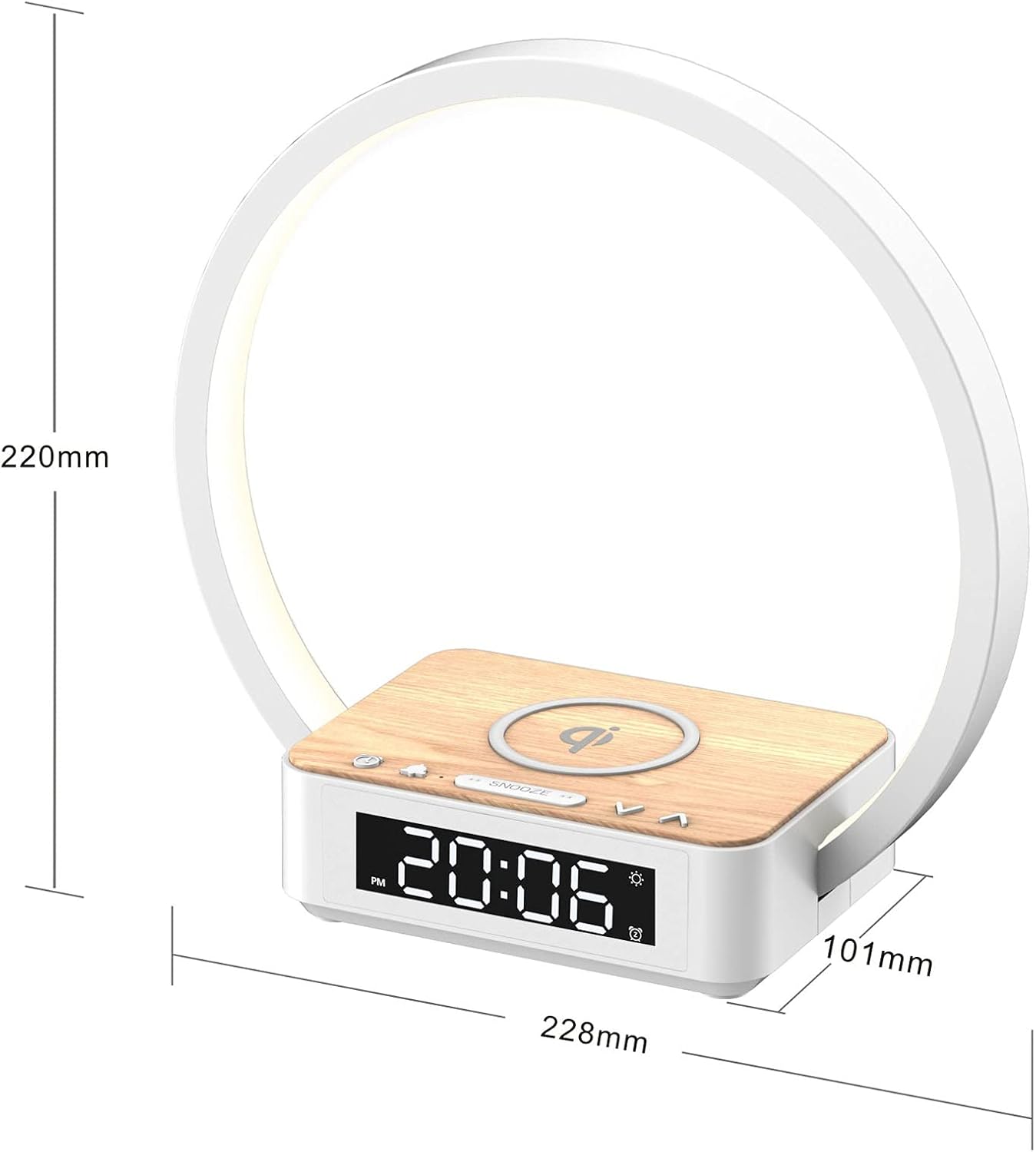
Figure 7: Product dimensions of the Blonbar Desk Lamp.

Figure 8: Energy label for the Blonbar Desk Lamp. For more details, visit eprel.ec.europa.eu/qr/1619425
8. Warranty and Support
For any product-related inquiries, technical support, or warranty claims, please contact Blonbar customer service through the retailer's platform or the official Blonbar website. Keep your purchase receipt as proof of purchase for warranty purposes.
Related documentsAJ310


Ask a question about this manual
Ask about setup, troubleshooting, compatibility, parts, safety, or missing instructions. Manuals+ will review the question and use this page’s manual context to help answer it.