
1. Introduction
This manual provides essential information for setting up, operating, and maintaining your TJD MT-750QU 7.5-inch Android Tablet. Please read this guide thoroughly to ensure proper usage and to maximize your device's performance and longevity.
2. What's in the Box
Upon unboxing your TJD MT-750QU tablet, verify that all the following items are included:
- Tablet x 1
- Adapter x 1
- USB type x 1 (Micro-USB cable)
- User Manual x 1
- Earphones x 1
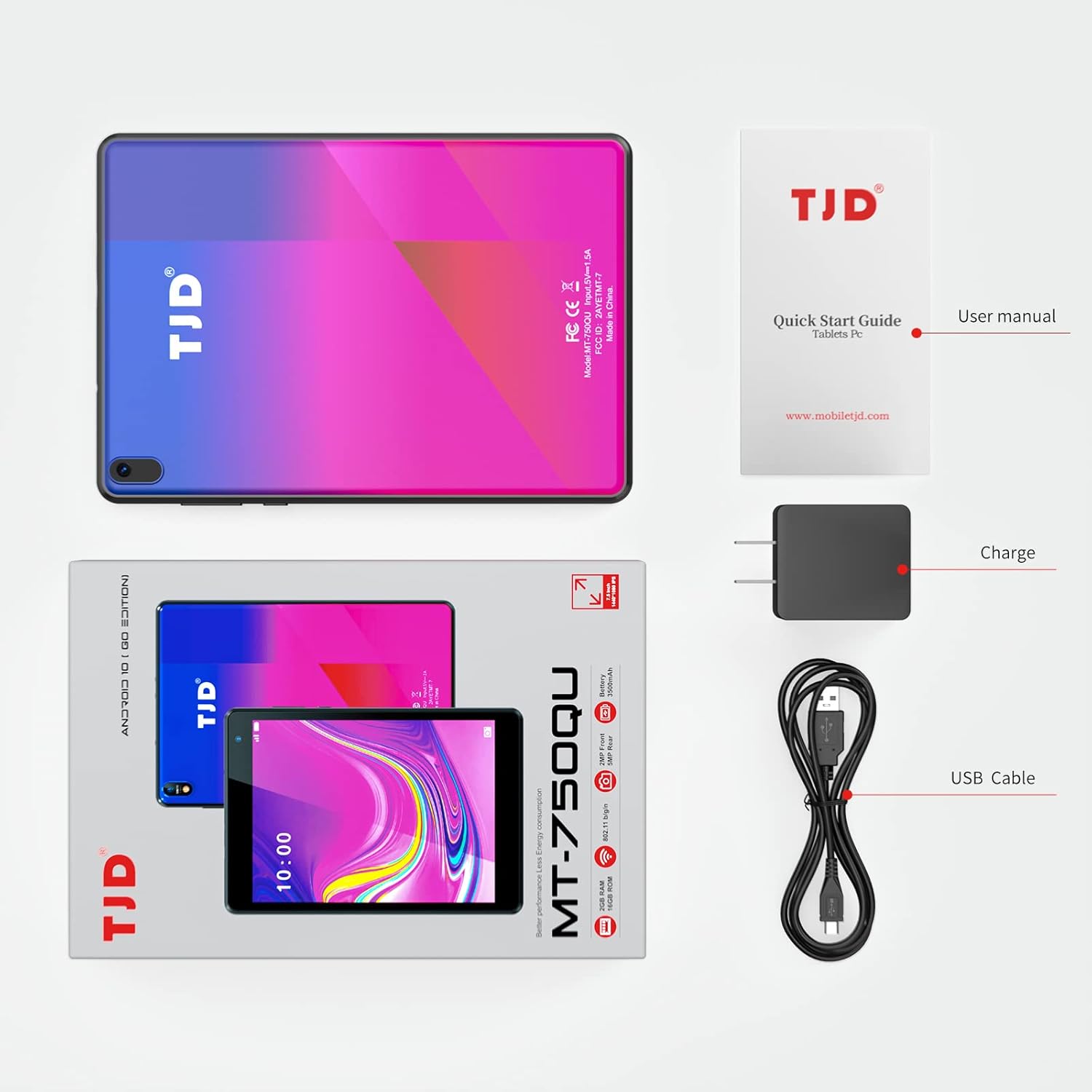
The image displays the TJD MT-750QU tablet packaging, showing the tablet itself, a quick start guide, charger, USB cable, and earphones.
3. Device Layout
Familiarize yourself with the physical components and ports of your tablet:
- Top Edge: Power button and volume control buttons.
- Left Side: Headphone jack, microSD card slot, and micro-USB charging port.
- Rear: Main camera located on the top left side.
- Bottom Edge: Dual speaker grilles.
- Front: Front camera located on the top right corner of the display.

This image provides a detailed view of the tablet's left side, indicating the locations of the headphone jack, microSD card slot, and micro-USB charging port. The power and volume buttons are located on the top edge.
4. Setup
- Initial Charge: Before first use, fully charge the tablet using the provided adapter and USB cable.
- Power On: Press and hold the power button located on the top edge until the TJD logo appears.
- Language and Region: Follow the on-screen prompts to select your preferred language and region.
- Wi-Fi Connection: Connect to a Wi-Fi network to enable internet access and download necessary updates or applications.
- Google Account: Sign in with your Google account to access the Google Play Store and synchronize your data.
5. Operating System
The TJD MT-750QU tablet runs on Android 10 Go Edition, an optimized version of Android designed for entry-level devices. This ensures efficient performance and access to a wide range of applications through the Google Play Store, thanks to its Google Mobile Services (GMS) certification.

The tablet's screen is shown with the Android 10 Go operating system interface, highlighting Google Mobile Services (GMS) certification for access to the Google Play Store.
6. Display Features
The tablet features a 7.5-inch IPS HD display with a resolution of 1440 x 1080 pixels. This display is designed to provide clear and stable images, helping to reduce eye fatigue during extended use.

A close-up of the tablet's 7.5-inch IPS display showcasing a high-definition image, illustrating the 1440x1080 resolution and clear visual quality.
7. Camera Usage
The TJD MT-750QU is equipped with dual cameras:
- Rear Camera: 5.0MP with autofocus, suitable for general photography.
- Front Camera: 2.0MP, ideal for video chats and selfies.
While functional for basic use, the cameras may exhibit limitations in low light or when attempting to focus on distant objects. The front camera's frame rate may also be slow during video calls.

The tablet is depicted in use, with its screen showing a live camera feed. It features a 2MP front camera and a 5MP rear camera for photos and video calls.
8. Audio
The tablet features box stereo dual speakers, designed to provide a more pleasant listening experience for media consumption. For optimal audio quality, especially in noisy environments, using the included earphones is recommended.

This image highlights the tablet's dual speaker system, designed to provide an enhanced audio experience for media consumption.
9. Performance
The TJD MT-750QU is powered by a Cortex-A53 Quad-Core 1.6GHz processor, paired with 2GB RAM and 32GB ROM. This configuration is optimized for general use and light tasks. While it can handle some casual games and basic web browsing, users may experience slower loading times and occasional frame rate drops with more demanding applications or during heavy multitasking.
10. Battery Life
The tablet is equipped with a 3500mAh battery, providing up to approximately 4 hours of usage for activities such as reading, watching videos, or browsing the internet. Actual battery life may vary based on usage patterns, screen brightness, and running applications.
11. Connectivity
The TJD MT-750QU supports the following connectivity options:
- Wi-Fi: 802.11 b/g/n for wireless internet access.
- Bluetooth: For connecting to wireless accessories like headphones or speakers.
- G-Sensor: For automatic screen rotation.
12. Specifications
| Feature | Specification |
|---|---|
| Brand | TJD |
| Model Name | 750QU |
| Item Model Number | 2F-MXUZ-CPIM |
| Operating System | Android 10 Go |
| Screen Size | 7.5 Inches |
| Screen Resolution | 1440 x 1080 Pixels (IPS) |
| Processor | Cortex-A53 Quad-Core 1.6 GHz (Allwinner) |
| RAM | 2 GB DDR SDRAM |
| Internal Storage (ROM) | 32 GB (expandable) |
| Rear Webcam Resolution | 5 MP |
| Front Webcam Resolution | 2 MP |
| Battery Capacity | 3500mAh |
| Average Battery Life | 4 Hours |
| Wireless Type | 5 GHz Radio Frequency (Wi-Fi 802.11 b/g/n) |
| Product Dimensions | 7.28 x 7.5 x 0.39 inches |
| Item Weight | 1.38 pounds |
13. Troubleshooting
- Screen Brightness: The display may not be bright enough for comfortable outdoor use in direct sunlight. Adjust brightness settings in a shaded area or indoors.
- Camera Focus: The camera may struggle with autofocus, especially in certain lighting conditions or when trying to focus on specific objects. Tap on the screen to manually adjust focus if available in the camera app.
- Streaming Quality: Due to Widevine Security Level 3 (L3), streaming services like Netflix may not play content in HD or Full HD. YouTube may be the only platform supporting 720p resolution.
- General Performance: Expect slower loading times for applications and occasional frame rate drops, particularly with resource-intensive games or during multitasking, given the tablet's specifications.
- Battery Drain: If battery drains faster than expected, check background app usage and consider enabling battery saver mode.
14. Maintenance
- Cleaning: Use a soft, lint-free cloth to clean the screen and body of the tablet. Avoid abrasive materials or harsh chemicals.
- Software Updates: Regularly check for and install system updates to ensure optimal performance and security.
- Storage Management: Periodically clear unnecessary files and uninstall unused applications to free up storage space and improve performance.
- Battery Care: Avoid extreme temperatures and do not let the battery completely drain frequently to prolong its lifespan.
15. Official Product Video
Watch this official video for more details about the TJD MT-750QU tablet:
An official product video showcasing various features of the TJD MT-750QU tablet, including its display, dual speakers, and applications.
16. Warranty and Support
For warranty information or technical support, please refer to the documentation included in your product packaging or visit the official TJD website. Keep your purchase receipt as proof of purchase for any warranty claims.