
ARCADE1UP 195570000861
Arcade1Up Outrun Stand Up Edition Instruction Manual
Model: 195570000861
Introduction
This manual provides essential information for the safe and proper assembly, operation, maintenance, and troubleshooting of your Arcade1Up Outrun Stand Up Edition arcade game. Please read this manual thoroughly before assembly and retain it for future reference.
The Arcade1Up Outrun cabinet includes four classic racing games: Outrun, Turbo Outrun, Outrunners, and Power Drift. It features a steering wheel, gas pedal, and brake pedal for an authentic arcade experience.
Safety Information
Always follow basic safety precautions when assembling and operating this product to reduce the risk of fire, electric shock, or injury.
- Keep away from water and moisture.
- Do not attempt to disassemble or modify the unit.
- Ensure the unit is placed on a stable, level surface.
- Unplug the unit from the power outlet before cleaning or maintenance.
- This product is intended for indoor use only.
Package Contents
Verify that all components are present before beginning assembly. If any parts are missing or damaged, contact Arcade1Up customer support.
- Arcade Cabinet Panels
- Control Panel Assembly (Steering Wheel, Buttons)
- Gas and Brake Pedal Assembly
- Light-Up Marquee
- Monitor
- Power Adapter
- Hardware Pack (Screws, Bolts, etc.)
- Instruction Manual
Setup and Assembly
Assembly typically requires two adults. Follow the numbered steps carefully. Tools required (not included): Phillips head screwdriver.
- Unpack Components: Carefully remove all parts from the packaging and lay them out on a clean, soft surface to prevent scratches.
- Assemble Side Panels: Attach the base and back panels to the main side panels using the provided hardware. Ensure all connections are secure.
- Install Monitor: Mount the monitor into the designated slot within the cabinet structure. Connect the necessary video and power cables.
- Attach Control Panel: Secure the control panel, including the steering wheel and buttons, to the front of the cabinet. Connect the control panel wiring to the main board.
- Install Pedal Assembly: Place the gas and brake pedal assembly at the base of the cabinet and connect its cable to the main board.
- Mount Light-Up Marquee: Attach the light-up marquee to the top of the cabinet and connect its power cable.
- Final Checks: Before powering on, double-check all connections and ensure all screws are tightened.

Figure 1: Fully assembled Arcade1Up Outrun cabinet.

Figure 2: Close-up of the control panel and screen displaying game options.
Operating Instructions
Once assembled and plugged in, the unit is ready for operation.
- Power On: Locate the power switch, typically on the back or side of the cabinet, and switch it to the 'ON' position. The marquee will light up and the screen will display the game selection menu.
- Select Game: Use the steering wheel or directional buttons (if present) and the 'SELECT' or 'ENTER' button to navigate through the available games: Outrun, Turbo Outrun, Outrunners, and Power Drift.
- Start Game: Press the 'START' button to begin playing the selected game.
- Gameplay Controls:
- Steering Wheel: Turn left or right to control your vehicle's direction.
- Gas Pedal: Press down to accelerate.
- Brake Pedal: Press down to decelerate or stop.
- Shift Lever (if applicable): Use to change gears (High/Low).
- Exiting a Game: To return to the main game selection menu, press and hold the 'PLAYER 1 START' button for approximately 5 seconds.
- Power Off: When finished playing, switch the power button to the 'OFF' position.
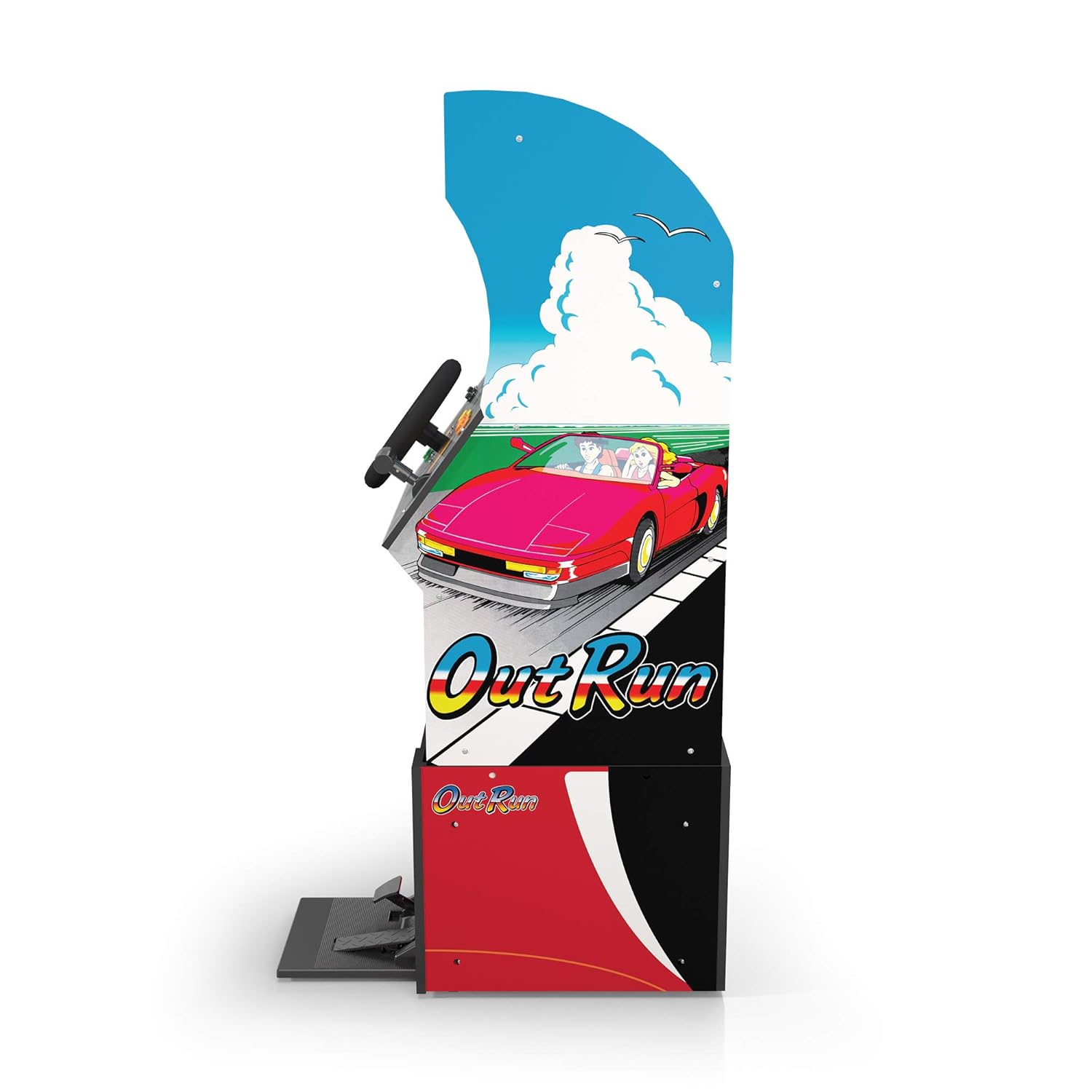
Figure 3: Side profile of the arcade cabinet, illustrating the driving controls.
Maintenance
Regular maintenance ensures the longevity and optimal performance of your arcade cabinet.
- Cleaning: Use a soft, dry cloth to wipe down the cabinet surfaces. For stubborn marks, a slightly damp cloth with mild soap can be used, followed by drying. Avoid abrasive cleaners or excessive moisture.
- Screen Care: Clean the monitor screen with a microfiber cloth specifically designed for electronics. Do not spray liquid directly onto the screen.
- Pedal Maintenance: Periodically check the gas and brake pedals for any debris or obstructions that might hinder their movement. Keep the area around the pedals clean.
- Cable Management: Ensure all cables are neatly tucked away and not pinched or exposed, which could lead to damage.
Troubleshooting
Refer to this section for common issues and their solutions. If the problem persists, contact customer support.
| Problem | Possible Cause | Solution |
|---|---|---|
| Unit does not power on. | Power cable not connected; Power outlet issue; Power switch off. | Ensure power cable is securely plugged into the unit and a working outlet. Check power switch is 'ON'. |
| No image on screen. | Monitor cable loose; Monitor not powered. | Check monitor's power and video cables are securely connected. |
| Controls (steering wheel/pedals) unresponsive. | Control panel/pedal cables loose; Software glitch. | Verify all control panel and pedal cables are firmly connected to the main board. Try restarting the unit. |
| Game freezes or crashes. | Temporary software issue. | Power off the unit, wait 10 seconds, then power back on. |
Specifications
- Model Number: 195570000861
- Dimensions (Assembled): 47.75 x 23.75 x 10.5 inches (Height x Width x Depth)
- Weight: 89.5 pounds
- Included Games: Outrun, Turbo Outrun, Outrunners, Power Drift
- Controls: Steering Wheel, Gas Pedal, Brake Pedal, Game Selection Buttons
- Power: AC Adapter (Input: 100-240V ~ 50/60Hz, Output: Specific to adapter, refer to label)
- Manufacturer: Arcade 1Up
- Release Date: April 7, 2021
Warranty and Support
Arcade1Up products typically come with a limited manufacturer's warranty. For specific warranty terms and conditions, please refer to the warranty card included with your product or visit the official Arcade1Up website.
For technical support, missing parts, or warranty claims, please contact Arcade1Up Customer Support:
- Website: arcade1up.com/pages/contact-us
- Phone: Refer to the official website for regional contact numbers.
When contacting support, please have your model number (195570000861) and proof of purchase readily available.
Ask a question about this manual
Ask about setup, troubleshooting, compatibility, parts, safety, or missing instructions. Manuals+ will review the question and use this page’s manual context to help answer it.