
1. Introduction
The RING TYREINFLATE Cordless Inflator, Model RTC2000, is a versatile and portable device designed for maintaining optimal tire pressure in various items. This rechargeable unit features a digital gauge for accurate readings, an auto-stop function for precise inflation, and can also serve as a power bank. It is suitable for vehicles, bicycles, sports equipment, and other inflatables, offering convenience and efficiency for on-the-go use or regular maintenance.

Image 1: The RING TYREINFLATE Cordless Inflator (RTC2000) with its retail packaging.
2. What's in the Box
Upon opening your RING TYREINFLATE Cordless Inflator package, you should find the following components:
- RING TYREINFLATE Cordless Inflator (RTC2000)
- 2-piece adaptor kit for bikes, air beds, and other inflatables
- Bike mount
- Storage bag
- USB charging cable

Image 2: All components included with the RTC2000: the inflator, air hose, adaptors, USB charging cable, storage bag, and bike bracket.
3. Key Features
- Rechargeable & Cordless: Internal power bank for portable use without external power sources.
- Digital Gauge: Accurately check and set tire pressure.
- Auto-Stop Function: Automatically stops inflation once the desired pressure is reached, preventing over-inflation.
- Versatile Use: Suitable for vehicles, bicycles, sports equipment, and other inflatables.
- Power Bank Function: 5200mAH power bank with a 2.4A USB charging port for mobile devices.
- LED Torch: Integrated LED torch for use in low-light conditions.
- Compact Design: Easy to store and transport, fits neatly in a glovebox or backpack.
- Built-in Storage: Internal storage for the air hose and adaptors.

Image 3: The clear digital display and user-friendly controls for setting pressure and selecting units (PSI, BAR, kPa).

Image 4: The base of the inflator showing the USB-C recharging port and the USB-A charging port for external devices.
4. Setup
4.1 Initial Charging
Before first use, fully charge the RTC2000. Connect the supplied USB charging cable to the USB-C port on the inflator and to a suitable USB power source (e.g., car charger, wall adapter, computer USB port). The battery indicator on the digital display will show charging progress.
4.2 Preparing for Inflation
- Remove the dust cap from the tire valve. Ensure the valve is clear of any debris.
- Remove the air hose from its storage compartment on the side of the main unit.
- Screw the air hose securely onto the inflator's output port.
- If inflating items other than standard car/bike tires, select the appropriate valve adapter from the storage compartment under the end cap and attach it to the air hose.
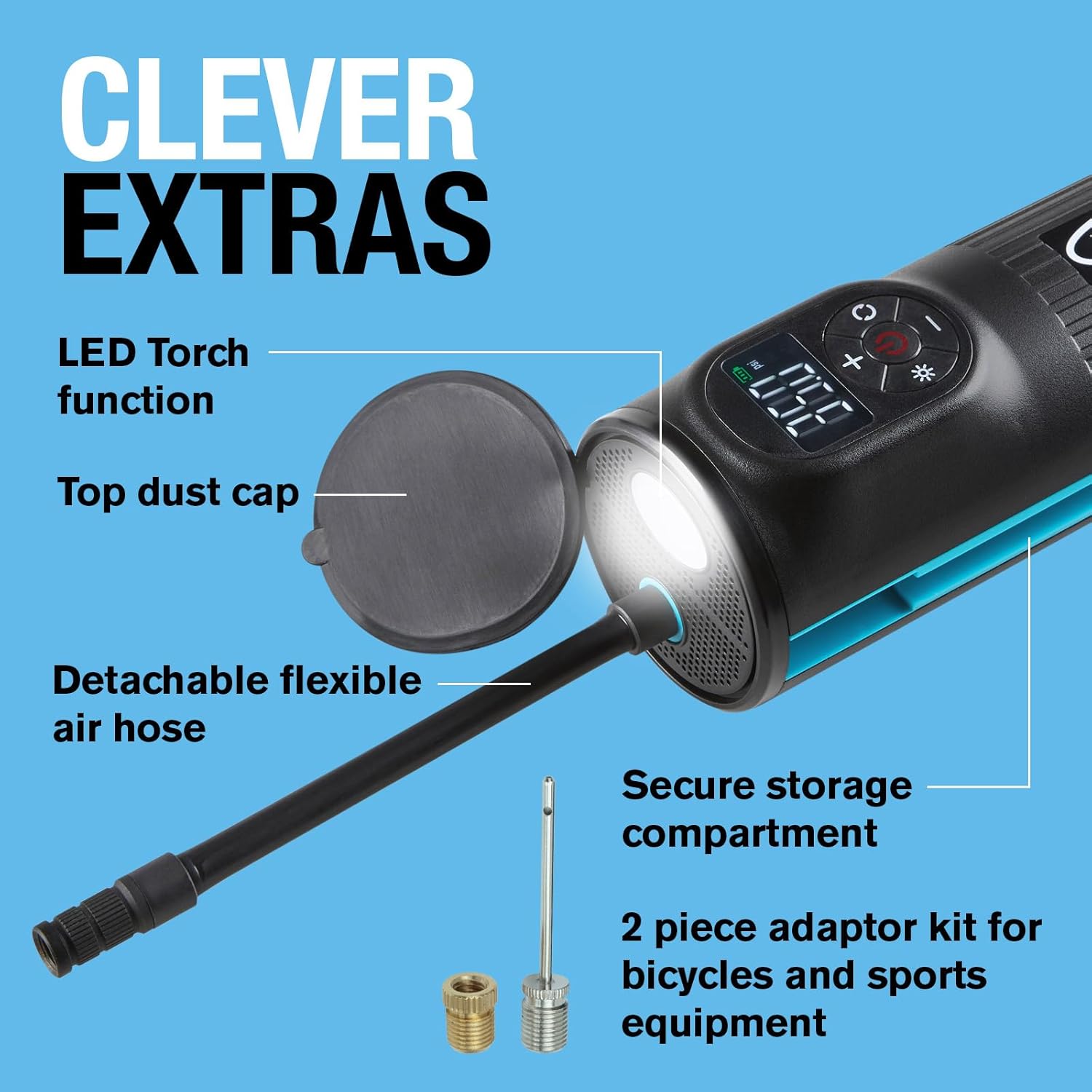
Image 5: The RTC2000 with its top cap removed, revealing the integrated LED torch and the storage for the air hose and various valve adaptors.
5. Operating Instructions
5.1 Tire Inflation
- Attach the air hose securely to the tire valve. The digital display will show the current tire pressure.
- Press the power button to turn on the inflator.
- Use the '+' and '-' buttons to set the desired pressure. You can cycle through pressure units (PSI, kPa, BAR) using the unit selection button.
- Press the start button (usually indicated by a power symbol) to begin inflation. The inflator will automatically stop when the preset pressure is reached.
- Once inflation is complete, remove the air hose from the valve and replace the dust cap. Store the hose and adaptors back in their designated compartments.


Image 6 & 7: The RTC2000 in use, demonstrating its versatility for inflating various items including car tires, bicycle tires, and sports balls.
5.2 Using the Power Bank Function
The RTC2000 can be used to charge mobile devices. Simply open the base dust cap, connect your device's charging cable to the USB-A output port (2.4A), and ensure the inflator is powered on. This feature is useful for emergencies or when an external power source is unavailable.
5.3 Using the LED Torch
To activate the LED torch, press the dedicated torch button on the control panel. This provides illumination in dark environments, useful during nighttime tire checks or emergencies.
Video 1: This video demonstrates the inflation process for various items (motorcycle, car, bicycle) and highlights the power bank functionality of the RTC2000. It shows how to connect the inflator, set the desired pressure, and initiate inflation, as well as charging a mobile phone.
Video 2: This video illustrates the convenience of the RTC2000's cordless design, showing a user easily moving around a car to inflate tires without being restricted by cables, contrasting it with a traditional corded inflator.
6. Maintenance
- Cleaning: Wipe the inflator with a soft, damp cloth. Do not use harsh chemicals or abrasive cleaners.
- Storage: Store the unit in its provided storage bag in a cool, dry place, away from direct sunlight and extreme temperatures. Ensure the air hose and adaptors are properly stored in their compartments to prevent loss or damage.
- Battery Care: For optimal battery life, charge the unit regularly, even if not in frequent use. Avoid fully discharging the battery for extended periods.
7. Troubleshooting
7.1 Inflator Not Turning On
- Check if the battery is charged. Connect the inflator to a power source using the USB charging cable.
- Ensure the power button is pressed firmly.
7.2 Slow Inflation or No Air Output
- Verify that the air hose is securely attached to both the inflator and the tire valve.
- Check for any blockages in the air hose or valve adaptors.
- Ensure the tire valve is not damaged or obstructed.
7.3 Inaccurate Pressure Reading
- Ensure the air hose is properly connected to the tire valve without any leaks.
- Calibrate the digital gauge if possible (refer to specific instructions if available, not detailed in general product info).
7.4 Overheating
- If the unit becomes excessively hot during prolonged use, allow it to cool down before continuing operation. This is a normal protective measure.
8. Specifications
| Attribute | Detail |
|---|---|
| Brand | RING |
| Model Number | RTC2000 |
| Style | Cordless Inflator |
| Color | Black |
| Material | Plastic |
| Power Source | Battery Powered |
| Battery Type | 2 Lithium Ion batteries (included) |
| Power Bank Capacity | 5200mAH |
| Product Dimensions | 7 x 7 x 17 cm |
| Item Weight | 0.66 Kilograms |
| Special Features | 5200mAH powerbank, Bike mounting bracket, Built-in storage of air hose and adapters, Digital autostop, LED torch |
9. Warranty & Support
For warranty information and customer support, please refer to the documentation included with your product or visit the official RING Automotive website. Keep your proof of purchase for any warranty claims.


