
1. Product Overview
The SINOTIMER TM616 is a weekly programmable digital timer designed for controlling electrical equipment at preset times. It features a high-capacity 30 Amp relay, suitable for various applications including household and industrial use with DB Boards. The timer supports 24-hour and 7-day programming, offering flexibility for automated control.
Key Characteristics:
- High capacity: 6500 Watt / 30 Amps.
- Programmable for 24 hours / 7 days a week.
- Built-in battery for memory backup, preserving settings during power failure.
- Automatic time error correction: +/- 30 seconds weekly.
- Supports 17 ON/OFF settings for repeat programs.
- Manual ON/OFF control option.

Figure 1: Front view of the TM616 Weekly Programmable Timer, displaying the digital screen and various control buttons such as 'Clock', 'TIMER', 'C/R', 'Manual', 'Week', 'Hour', and 'Minute'. The SINOTIMER logo is visible at the bottom.
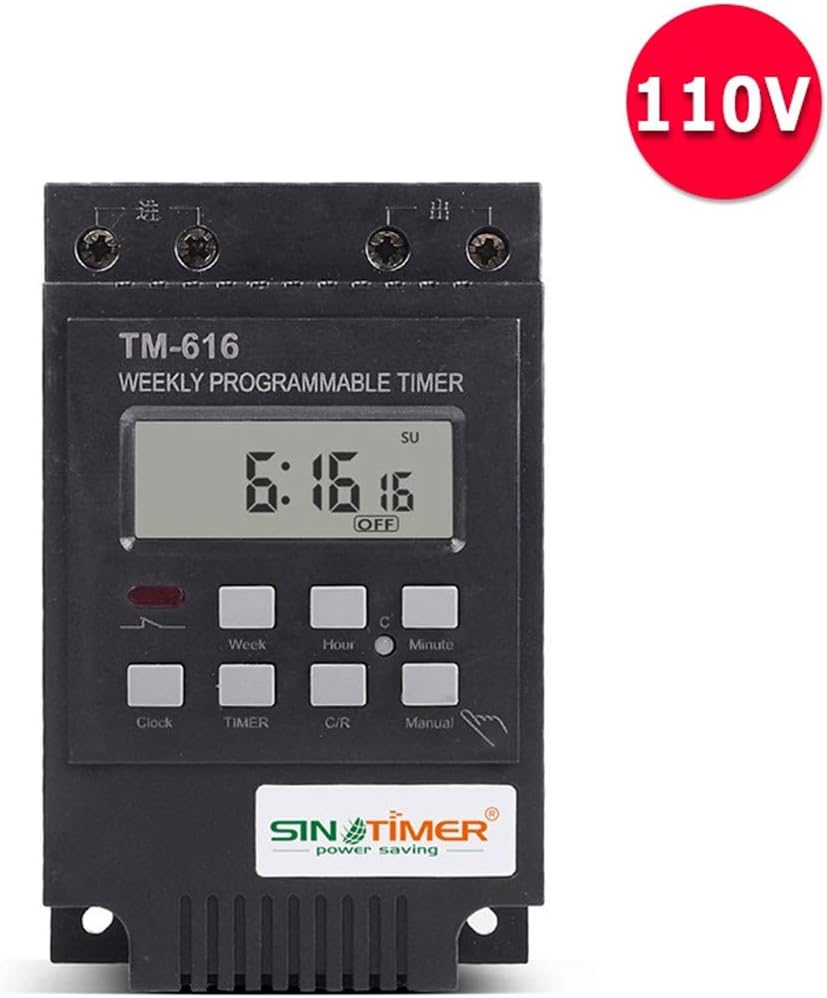
Figure 2: Front view of the TM616 Weekly Programmable Timer, similar to Figure 1, but with an additional red circular label indicating '110V' in the upper right corner, signifying the voltage variant.

Figure 3: Angled side view of the TM616 timer, highlighting the product label which details specifications such as 'Working volt: 220VEC', 'Output control: 30A', and 'Standard: IEC 60730-2-7'. This view also shows the terminal screws at the top.
2. Safety Information
Please read and understand all safety instructions before installing or operating the TM616 timer. Failure to follow these instructions may result in electric shock, fire, or serious injury.
- Electrical Hazard: Installation and wiring should only be performed by a qualified electrician or competent person. Ensure power is disconnected at the circuit breaker before any installation or maintenance.
- Voltage Compatibility: Verify that the timer's voltage rating (110V/220V/12V AC) matches your electrical system.
- Load Capacity: Do not exceed the maximum load capacity of 30 Amps / 6500 Watts. Overloading can cause overheating and fire.
- Proper Grounding: Ensure the device is properly grounded according to local electrical codes.
- Indoor Use Only: This timer is designed for indoor use in dry environments. Do not expose to water or excessive humidity.
3. Setup and Installation
3.1 Package Contents
- TM616 Weekly Programmable Timer Unit
- User Manual (this document)
3.2 Mounting
The TM616 timer is designed for Din Rail mounting, which allows for easy installation in electrical distribution boards or enclosures. It can also be screw-mounted using the integrated mounting holes.

Figure 4: Bottom view of the TM616 timer, illustrating the yellow Din Rail mounting clip in the center and the four screw mounting holes located at each corner of the base, providing flexible installation options.
3.3 Wiring Diagram
Accurate wiring is critical for the safe and correct operation of the timer. Refer to the wiring diagram printed on the side of the device or included in the original packaging. The terminals are typically labeled for input (supply) and output (load). Ensure all connections are secure and comply with local electrical codes.
Important: If the wiring labels or diagram are unclear, consult a qualified electrician or refer to the detailed wiring diagram provided on the device or in the original packaging before attempting any connections.
4. Operating Instructions
4.1 Initial Setup
- Upon first power-up or after a prolonged power outage, the display may be blank. The built-in battery will charge when connected to power. Allow a few minutes for the display to activate.
- Press the 'C/R' button to clear any previous settings and reset the timer to its default state.
4.2 Setting Current Time
- Press and hold the 'Clock' button.
- While holding 'Clock', press 'Week' to set the current day of the week (MON, TUE, WED, THU, FRI, SAT, SUN).
- While holding 'Clock', press 'Hour' to set the current hour (0-23).
- While holding 'Clock', press 'Minute' to set the current minute (0-59).
- Release the 'Clock' button to save the current time.
4.3 Programming ON/OFF Cycles
The TM616 allows for up to 17 ON/OFF program settings. Each program can be set for a specific day or group of days.
- Press the 'TIMER' button once. The display will show '1 ON'.
- Press 'Week' to select the desired day(s) for this 'ON' setting. Options include individual days, weekdays, weekends, or all days.
- Press 'Hour' and 'Minute' to set the desired ON time.
- Press 'TIMER' again. The display will show '1 OFF'.
- Press 'Week' to select the desired day(s) for this 'OFF' setting (usually matching the 'ON' setting).
- Press 'Hour' and 'Minute' to set the desired OFF time.
- Repeat steps 1-6 for additional ON/OFF programs (up to 17).
- After setting all desired programs, press the 'Clock' button to return to the current time display. The programs are now saved.
4.4 Manual Control
The 'Manual' button allows you to override the programmed settings temporarily or permanently.
- Press 'Manual' repeatedly to cycle through modes: ON (always on), AUTO ON (currently on, will follow program), OFF (always off), AUTO OFF (currently off, will follow program).
- Select 'AUTO ON' or 'AUTO OFF' to ensure the timer follows the programmed schedule.
5. Maintenance
The TM616 timer requires minimal maintenance.
- Cleaning: Wipe the exterior of the timer with a soft, dry cloth. Do not use abrasive cleaners or solvents.
- Battery: The built-in rechargeable battery (1.2V 40Ma) is designed to maintain program settings during power outages. It is not user-replaceable. If the timer consistently loses settings after power interruptions, the battery may need professional servicing.
6. Troubleshooting
- Display is blank: Ensure the timer is properly connected to power. The internal battery may be fully discharged; allow it to charge for a few minutes.
- Timer not switching ON/OFF as programmed:
- Check if the current time is set correctly.
- Verify that the ON/OFF programs are set accurately for the desired times and days.
- Ensure the timer is in 'AUTO ON' or 'AUTO OFF' mode using the 'Manual' button.
- Check the wiring connections to ensure they are secure and correct (input/output).
- Programs are lost after power outage: The internal battery may be weak or faulty. While it is designed for backup, prolonged power outages or an aging battery can lead to loss of settings.
- Timer makes clicking sound but load doesn't turn ON/OFF: This indicates the internal relay is switching, but there might be an issue with the load wiring or the load itself. Check the load device and its connections.
7. Specifications
| Feature | Specification |
|---|---|
| Programs | 17 ON/OFF settings (daily or weekly) |
| Minimum Interval | 1 minute |
| Capacity | 30(16)A 250V AC |
| Timer Range | 1 minute to 168 hours |
| Rechargeable Battery | 1.2V 40Ma (for memory backup) |
| Average Error | ±1 second / 24 hours (at 25°C) |
| Temperature Range | -20°C to +50°C |
| Black-out Memory | Up to 60 days |
| Color | Black |
| Item Weight | 22 pounds (approx. 10 kg) |
| Screen Size | 2 Inches |
| Package Dimensions | 5.12 x 3.35 x 2.8 inches |
| Model Number | TM616 |
| UPC | 191869715713 |
8. Warranty and Support
For warranty information and technical support, please refer to the documentation provided with your purchase or contact the seller/manufacturer directly. Keep your proof of purchase for any warranty claims.